
Craftbeerpi4 Plugin for PT100/PT1000 Sensor
PT100 / PT1000 probes using an adafruit based max31865 chip. for wiring go to this page.
You will need to set the reference resistors on the craftbeerpi hardware page! My max31865 chip uses a 4,3 kohm resistor for the PT1000. It might be 430 ohm for a PT100 board
Using a max31865 board like: https://learn.adafruit.com/adafruit-max31865-rtd-pt100-amplifier/
Software installation:
This version requires Craftbeerpi V4 version 4.6.0 and above.
Please have a look at the Craftbeerpi4 Documentation
- Package name: cbpi4-pt100x
- Package link: https://github.com/PiBrewing/cbpi4-pt100x/archive/main.zip
Hardware Installation:
- on your pi use the following GPIO pins:
- csPin = 8 this one can be any GPIO you want, if using multiple probes you change this on each one, but keep the other 3 pins the same
- misoPin = 9
- mosiPin = 10
- clkPin = 11
SPI must be enabled on the Pi via raspi-config.
The code is installing the adafruit circuitpython max31865 library. It requires the RPi.GPIO package for older Pis (<=4) nd the rpi-lgpio pacakge for the Pi 5.
The installation routine (setup.py in cbpi has been modified to match these requirements). Existing installations on Pi4 and older boards must be redone, but your config can be still used (pipx uninstall cbpi4 and then install cbpi4 as described in the documentation. This will be updated later. Then install your plugins)
Sensor Configuration
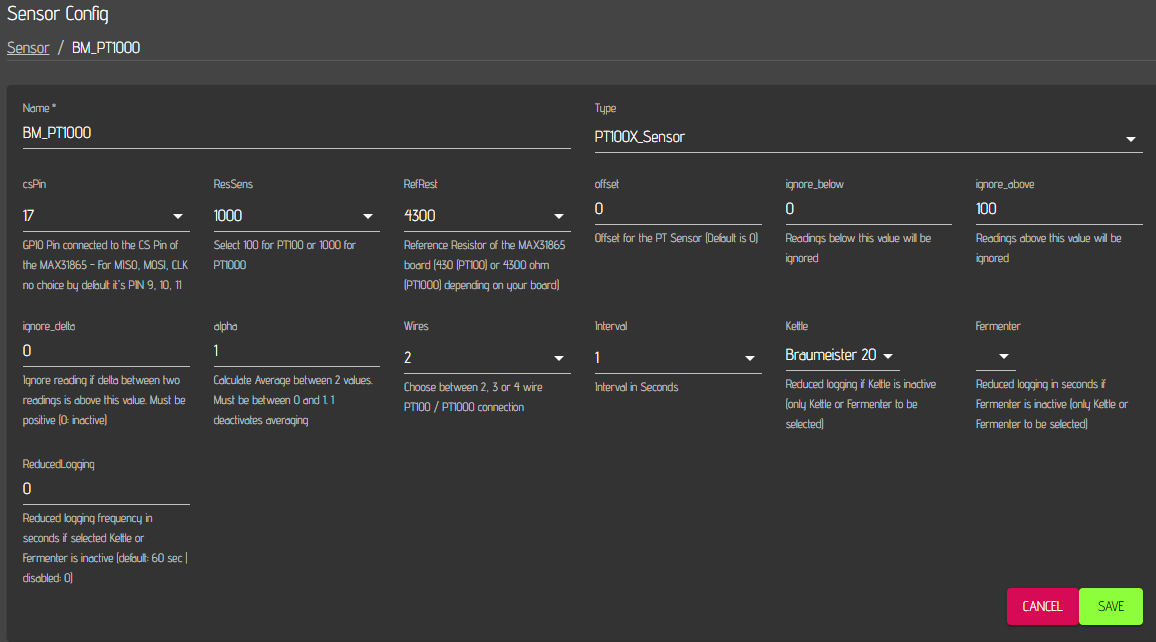
The sensor must be configured on the hardware page. The following parameters must be set and will affect your readings:
- csPin: The BCM number of the GPIO you max board cs pin is connected to.
- ResSens: Reistance in ohm of your sensor. Select 1000 for PT1000 or 100 for PT100.
- RefRest: Resistance in ohm of your reference resistor on your max board. 4300 for a PT100 board and 430 for a PT100 board. The value is typically listed on the resistor of your board (Please have a look here for smd resistance codings.)
- offset: Defines a temperature offset for your temp probe.
- ignore_above: Ignores Temp readings above this value (0: deactivated)
- ignore_below: Ignores Temp readings below this value (0: deactivated)
- ignore_delta: If you experience issues with 'jumping' temp readings, you can define a threshold (only positive values are allowed) for the difference between two readings. If the difference between two subsequent readings is higher than the threshold, the value will be ignored. If the next reading is also higher (lower), this value is used / logged. (0: deactivated)
- alpha: calculates the average between 2 subsequent values. Must be between 0 and 1. (1: deactivated). 0.5 yields for instance in the average of two subsequent readings.
- Wires: You need to set this parameter to the configuration of your RTD (2,3 or 4 wire).
- Interval: defines the frequency of sensor readings in seconds.
- Kettle/Fermenter: You can select a Kettle OR Fermenter if you want to activate reduced sensor logging during inactivity of the Kettle / Fermenter
- Reducedlogging: Defines the logging interval for reduced logging in seconds (e.g. 300 would result in logging every 5 Minutes when the Kettle / Fermenter logic is not active) (0: no sensor logging during inactivity)
Please note that the max board delivers readings above 900C if no sensor is connected to the board.
Changelog:
- 13.10.25: (0.2.1) Add pyproject.toml file to support pip 25.3+
- 20.03.25: (0.2.0) Retire the old mx31865 library and move to the adafruit-circuitpython-max31865 library. This should prevent the false readings and the jumps between data points (requires Server 4.6.0 for Pi4 and older boards)
- 25.06.23: (0.1.10) Better logging description on high delta value
- 09.06.23: (0.1.9) Updated descriptions for Sensor parameters on Hardware page. Updated README.
- 28.03.23: (0.1.8) No logging options in case of Kettle or Fermenter inactivity (set reducedlogging to 0)
- 25.03.23: (0.1.4) Reduced logging options in case of Kettle or Fermenter inactivity
- 10.05.22: (0.1.3) updated readme (removed cbpi add)
- 10.05.22: (0.1.2) Removed cbpi dependency
- 08.12.21: (0.1.1) Removed resampling as it caused issues with respect to long term stability (sensor unresponsivness)
- 01.12.21: (0.1.0) Improved handling of resampling in case of issues (test)
- 01.11.21: (0.0.11) Experimental update under development branch: Read another sample if delta between two values is too high
- 10.06.21: (0.0.10) Calculating average of 2 subsequent values.
- 29.05.21: (0.0.9) Added filter function to filter out outliers
- 14.04.21: (0.0.8) Adaption for properties (updated dataclass.py in cbpi)
- 09.04.21: (0.0.7) Fix in offset handling in case value is not None but empty
- 15.03.21: (0.0.6) Change to supprt cbpi >= 4.0.0.31
- 20.02.21: (0.0.4) Change to support cbpi >= 4.0.0.24. Added sensor log fucntionality
- 14.02.21: (0.0.3) Updated function to retrieve temperature unit. Units will be changed automatically for sensor when settigs saved properly. No need to update the sensor
- 09.02.21: (0.0.2) Added offset parameter and changed the GPIO.setmode. Currnetly, warnings are displayed during startup of CBPi. However, they cause typically no issues
- 05.02.21: (0.0.1) Adpated code to run under cbpi4
1 maintainer

Download files
Download the file for your platform. If you're not sure which to choose, learn more about installing packages.
Source Distribution
File details
Details for the file cbpi4_pt100x-0.2.1.tar.gz.
File metadata
- Download URL: cbpi4_pt100x-0.2.1.tar.gz
- Upload date:
- Size: 20.1 kB
- Tags: Source
- Uploaded using Trusted Publishing? No
- Uploaded via: twine/6.2.0 CPython/3.13.9
File hashes
| Algorithm | Hash digest | |
|---|---|---|
| SHA256 |
63ab274371041da5f656096c1a74da389f5eb5541e914bccc6450af154eed705
|
|
| MD5 |
334a17f1900f276890f23fdf806c3167
|
|
| BLAKE2b-256 |
f0775507dfb94a8500dc12f9cf9f0ee6d11abfb6e056a04bef4da3fce8d32495
|







