
CraftBeerPi4 SCD30 based CO2 Sensor Plugin
Sensors
Plugin will add system a sensor to monitor for instance CO2 monitoring in your fermentation room
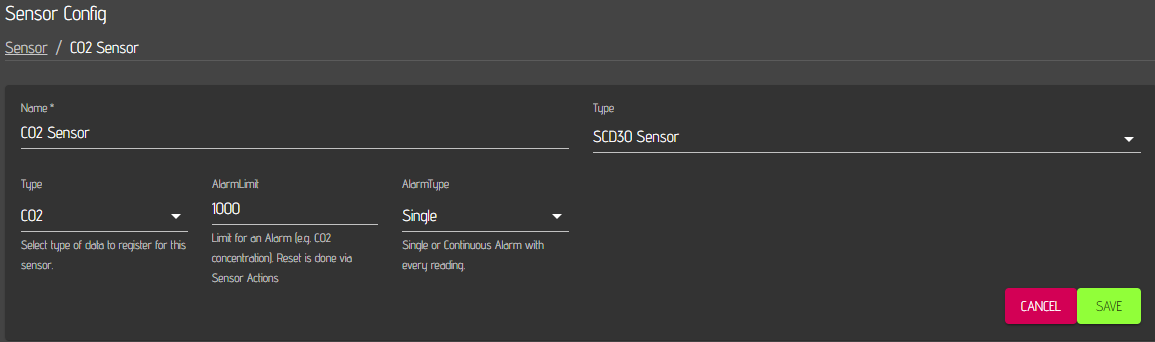
Type
- CO2: CO2 value in ppm
- Relative Humidity: Relative humidity in %
- Temperatur: Temperature
Alarmlimit
- If a value is entered, an Alarm will be raised, if the sensor value is above the limit.
- Delete the limit (or don't enter a limit) to disable the alarm.
Alarmtype
-
Single:
- Alarm is raised once, if Sensor value is above Alarmlimit.
- Message is shown and can be removed from screen if you click 'ok'.
- No additional alarm is raised until you reset the alarm or until the sensor value falls below the alarm limit and is rising again above the limit.
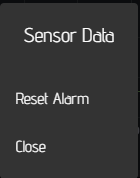
- You can reset the alarm and then a new alarm is raised in single mode. Therefore you need to use the actions menu of your sensor.
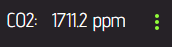
- You need to activate Actions for your Sensor in the dashboard (Please see CraftbeerPi Documentation) to activate the Action menu (3 dots)
- With The action menu, you can reset the sensor alarm:
-
Continuous:
- Notification is send / Alarm is played on every sensor reading if sensor value is above limit
- Notification is shown on the bottom right and does not persist on the screen.
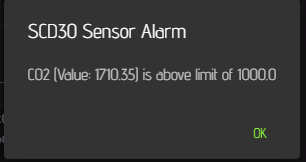

Each parameter has to be added as individual sensor.

Installation:
Please have a look at the Craftbeerpi4 Documentation
- Package name: cbpi4-scd30_CO2_Sensor
- PAckage link: https://github.com/pibrewing/cbpi4-scd30-co2-sensor/archive/main.zip
Usage:
- Configure the update interval of the sensor data in the cbpi global settings. Although shorter cycles ar possible, 30 or 60 seconds should be more than sufficient.

- Add Hardware under Sensor and choose SCD30 Sensor as Type and select the parameter you want to monitor.
Hardware requirements:
A datasheet of the sensor can be found here: https://www.sensirion.com/fileadmin/user_upload/customers/sensirion/Dokumente/9.5_CO2/Sensirion_CO2_Sensors_SCD30_Datasheet.pdf
Information on how read from then sensor is documented here: https://cdn.sparkfun.com/assets/d/c/0/7/2/SCD30_Interface_Description.pdf
The sensor is connected via I2C and has the address 0x61. The user just needs to activate I2C in the raspi config and connect the sensor to the I2C bus. The supply voltage (VDD) can be 5V, but the I2C bus has to be at 3.3V
Changelog:
- 13.10.25: (0.1.1) Add pyproject.toml file to support pip 25.3+
- 21.03.25: (0.1.0) Usage of adafruit circuit python driver for SCD30
- 02.01.24: (0.0.8) Add Sensoralarm (single and continuous)
- 28.07.23: (0.0.7.a2) add exception handling to read loop
- 30.06.23: (0.0.7.a1) test closing loop to avoid errors
- 10.06.23: (0.0.6) bump version to release
- 02.06.23: (0.0.6.rc1) added cbpi4 requirement
- 16.04.23: (0.0.6.a6) fixed bug in parameter generation
- 04.04.23: (0.0.6.a5) test for plugin settings selection branch
- 10.05.22: (0.0.4) Removed cbpi requirement
- 16.01.22: (0.0.3) adaption for cbpi 4.0.1.2
- 12.01.22: (0.0.2) Reduction of mqtt traffic
- 23.07.21: (0.0.1) Initial commit
1 maintainer

Metadata
1 maintainer
Release files for cbpi4-scd30-CO2-Sensor 0.1.1
For a detailed explanation of source distributions (sdists) and built distributions (wheels), please see the package formats documentation.
Source distribution (sdist)
| File | Size | Uploaded | |
|---|---|---|---|
| cbpi4_scd30_co2_sensor-0.1.1.tar.gz | 18.1 kB | Details |
Release files / cbpi4_scd30_co2_sensor-0.1.1.tar.gz
| Download URL | cbpi4_scd30_co2_sensor-0.1.1.tar.gz |
|---|---|
| Size | 18.1 kB |
| Tags | Source |
|
SHA-256 checksum How to use checksums |
e14dffa87097c1c02479efe8ef594750fc4e3396670cb457d8e8acb2fd5b3cd8
|
|
BLAKE2b-256 checksum How to use checksums |
32d9f3b3c6cf1e61e16b5af1e64e98da9eefc4666fba094ef00b13f4164b60b4
|
| Upload date | |
|
Uploaded using Trusted Publishing? What is trusted publishing? |
No |
| Uploaded via |
twine/6.2.0 CPython/3.13.9
|














