
 cdsswarm




Concurrent CDS API downloader with an interactive Textual TUI and script mode.
Submit multiple CDS API requests and download them in parallel with a configurable number of workers. Monitor progress through an interactive terminal UI with an htop-style worker table, or run headless in script mode for CI/cron jobs.
Feedback welcome! This project is under active development. If you have suggestions, feature requests, or run into any issues, please open an issue on GitHub or send an email to b.giebl@protonmail.com.
Performance
How much faster is parallel downloading? Benchmark with 4 monthly ERA5 files (2m temperature, Germany bounding box):
| Workers | Wall time | Speedup |
|---|---|---|
| 1 | 24m02s | 1.0x |
| 2 | 8m58s | 2.7x |
| 4 | 7m39s | 3.1x |
| 8 | 7m54s | 3.0x |
Each CDS request spends most of its time waiting in the server queue and being processed — parallel workers overlap that wait. For large files, download parallelism helps too. Results vary with server load and time of day; larger batches benefit more from higher worker counts.
Installation
pip install cdsswarm
Or via conda-forge:
conda install -c conda-forge cdsswarm
For YAML request file support:
pip install "cdsswarm[yaml]"
For development (tests, pre-commit):
git clone https://github.com/bgiebl/cdsswarm.git
cd cdsswarm
pip install -e ".[dev]"
Prerequisites
A valid CDS API configuration file at ~/.cdsapirc:
url: https://cds.climate.copernicus.eu/api
key: <your-personal-access-token>
See the CDS API documentation for setup instructions.
Quick Start
Command Line
Create a request file requests.json:
[
  {
    "dataset": "reanalysis-era5-single-levels",
    "request": {
      "product_type": ["reanalysis"],
      "variable": ["2m_temperature"],
      "year": ["2024"],
      "month": ["01"],
      "day": ["01", "02", "03"],
      "time": ["12:00"],
      "data_format": "grib"
    },
    "target": "temperature_jan.grib"
  },
  {
    "dataset": "reanalysis-era5-single-levels",
    "request": {
      "product_type": ["reanalysis"],
      "variable": ["total_precipitation"],
      "year": ["2024"],
      "month": ["01"],
      "day": ["01", "02", "03"],
      "time": ["12:00"],
      "data_format": "grib"
    },
    "target": "precipitation_jan.grib"
  }
]
Run with 4 workers:
cdsswarm requests.json --workers 4
Python API
import cdsswarm

tasks = [
    cdsswarm.Task(
        dataset="reanalysis-era5-single-levels",
        request={
            "product_type": ["reanalysis"],
            "variable": ["2m_temperature"],
            "year": ["2024"],
            "month": ["01"],
            "day": ["01", "02", "03"],
            "time": ["12:00"],
            "data_format": "grib",
        },
        target="temperature_jan.grib",
    ),
    cdsswarm.Task(
        dataset="reanalysis-era5-single-levels",
        request={
            "product_type": ["reanalysis"],
            "variable": ["total_precipitation"],
            "year": ["2024"],
            "month": ["01"],
            "day": ["01", "02", "03"],
            "time": ["12:00"],
            "data_format": "grib",
        },
        target="precipitation_jan.grib",
    ),
]

results = cdsswarm.download(tasks, num_workers=4)

for r in results:
    if r.success:
        print(f"Downloaded {r.task.target}")
    else:
        print(f"Failed {r.task.target}: {r.error}")
CLI Reference
usage: cdsswarm [-h] [--version] [-w WORKERS] [-m {interactive,script,auto}]
                [--no-skip] [--resume | --no-resume] [--reuse | --no-reuse]
                [--max-retries MAX_RETRIES] [--output-dir OUTPUT_DIR]
                [--dry-run] [--log FILE] [--summary FILE] [--post-hook CMD]
                requests_file
| Argument | Description |
|---|---|
requests_file |
Path to a JSON or YAML file with download requests |
-w, --workers |
Number of parallel download workers (default: 4) |
-m, --mode |
Display mode: interactive (TUI), script (plain text), or auto (default) |
--no-skip |
Re-download files that already exist on disk |
--resume / --no-resume |
Resume an interrupted session if state file exists (default: enabled) |
--reuse / --no-reuse |
Reuse existing CDS jobs with matching parameters (default: enabled) |
--max-retries |
Max retry attempts per task (default: 3, 1 to disable) |
--output-dir |
Prepend directory to relative target paths |
--dry-run |
Show what would be downloaded without actually downloading |
--log FILE |
Write timestamped log to a file |
--summary FILE |
Export summary as JSON (.json) or CSV (.csv) |
--post-hook CMD |
Shell command to run after each successful download (see below) |
In auto mode, the TUI is used when stdout is a TTY; otherwise it falls back to script mode.
Post-download hooks
The --post-hook option runs a shell command after each file is successfully downloaded. Use {file} and {dataset} as placeholders:
# Compress each file after download
cdsswarm requests.json --post-hook "gzip {file}"

# Convert GRIB to NetCDF with CDO
cdsswarm requests.json --post-hook "cdo -f nc copy {file} {file}.nc"

# Upload to S3
cdsswarm requests.json --post-hook "aws s3 cp {file} s3://my-bucket/cds/"
Hook failures produce a warning but do not mark the download as failed — the file is already on disk.
Request generation
The generate subcommand expands a template file into a full request file using Cartesian product expansion:
cdsswarm generate template.json -o requests.json
cdsswarm generate template.json --dry-run          # preview without writing
The template file must contain a single JSON object (not a list). If you pass a single-element list [{...}], it will be auto-unwrapped with a warning.
A template looks like a single request with a split_by field that lists which dimensions to expand:
{
  "dataset": "reanalysis-era5-single-levels",
  "request": {
    "product_type": ["reanalysis"],
    "variable": ["2m_temperature", "total_precipitation"],
    "year": ["2023", "2024"],
    "month": ["01", "02", "03"],
    "day": ["01", "02", "03"],
    "time": ["12:00"],
    "data_format": "grib"
  },
  "target": "output/{variable}_{year}_{month}.grib",
  "split_by": ["variable", "year", "month"]
}
This generates 2 × 2 × 3 = 12 separate tasks, one for each combination of variable, year, and month. Non-split fields (day, time, etc.) are shared across all tasks. The {placeholder} syntax in target fills in each combination's values.
| Option | Description |
|---|---|
--split-by FIELDS |
Override the template's split_by (comma-separated) |
-o, --output FILE |
Output file path (default: stdout) |
--dry-run |
Show task count and target filenames without writing output |
Cancelling requests
The cancel subcommand cancels active CDS API requests on the server — useful for cleaning up after a crashed session or accidental submissions:
cdsswarm cancel                        # cancel all queued/running requests (new API only)
cdsswarm cancel abc-123 def-456        # cancel specific request IDs (both APIs)
cdsswarm cancel --yes                  # skip confirmation prompt
When no IDs are given, cdsswarm queries the CDS server for all active (accepted/running) requests and presents them for confirmation before cancelling. This requires the new CADS API (ecmwf-datastores). With the old cdsapi, you must provide specific request IDs.
| Option | Description |
|---|---|
request_ids |
Specific request IDs to cancel (omit to cancel all active) |
-y, --yes |
Skip confirmation prompt |
Shell completion
Tab-completion for subcommands and flags is available for bash and zsh:
# Bash (add to ~/.bashrc)
eval "$(cdsswarm completion bash)"

# Zsh (add to ~/.zshrc)
eval "$(cdsswarm completion zsh)"
Session resume
cdsswarm automatically saves session state after each task completes. If a download session is interrupted (e.g. by Ctrl+C or a network failure), rerunning the same command picks up where it left off — completed tasks are skipped and failed/pending tasks are retried.
State files are stored in ~/.cache/cdsswarm/sessions/ (or $XDG_CACHE_HOME), keyed by request file path and output directory. Run logs are automatically saved to ~/.local/state/cdsswarm/logs/ (or $XDG_STATE_HOME).
cdsswarm requests.json -w 4             # interrupted — 50 of 100 tasks done
cdsswarm requests.json -w 4             # resumes from task 51
cdsswarm requests.json -w 4 --no-resume # force a fresh start
Configuration file
Settings can be stored in a .cdsswarm.toml file instead of passing CLI flags every time. CLI flags always take precedence.
| Location | Scope |
|---|---|
~/.cdsswarm.toml |
User-global defaults |
.cdsswarm.toml (working directory) |
Project-level overrides |
Example .cdsswarm.toml:
workers = 8
max-retries = 5
mode = "script"
output-dir = "/data/downloads"
post-hook = "gzip {file}"
All CLI flags are supported as config keys (use hyphens, e.g. max-retries, post-hook, skip-existing).
Request File Format
List format
Each entry specifies its own dataset:
[
  {
    "dataset": "reanalysis-era5-single-levels",
    "request": { ... },
    "target": "output1.grib"
  },
  {
    "dataset": "reanalysis-era5-pressure-levels",
    "request": { ... },
    "target": "output2.grib"
  }
]
Compact format
Share a dataset across all requests:
{
  "dataset": "reanalysis-era5-single-levels",
  "requests": [
    { "request": { ... }, "target": "output1.grib" },
    { "request": { ... }, "target": "output2.grib" }
  ]
}
YAML
Both formats also work in YAML (requires pip install cdsswarm[yaml]):
dataset: reanalysis-era5-single-levels
requests:
  - request:
      product_type: [reanalysis]
      variable: [2m_temperature]
      year: ["2024"]
      month: ["01"]
      day: ["01"]
      time: ["12:00"]
      data_format: grib
    target: temperature.grib
The request dict accepts the same parameters as cdsapi.Client.retrieve().
Python API Reference
cdsswarm.Task(dataset, request, target)
A single CDS API download request.
| Field | Type | Description |
|---|---|---|
dataset |
str |
CDS dataset name (e.g. "reanalysis-era5-single-levels") |
request |
dict |
Request parameters, same format as cdsapi.Client.retrieve() |
target |
str |
Local file path to save the downloaded data |
cdsswarm.download(tasks, num_workers=4, skip_existing=True, reuse_jobs=True, max_retries=3, on_message=None, post_hook="")
Download multiple CDS API requests concurrently.
| Parameter | Type | Default | Description |
|---|---|---|---|
tasks |
list[Task] |
required | List of download tasks |
num_workers |
int |
4 |
Number of parallel workers |
skip_existing |
bool |
True |
Skip files that already exist |
reuse_jobs |
bool |
True |
Reuse existing CDS jobs with matching parameters |
max_retries |
int |
3 |
Max retry attempts per task (1 to disable) |
on_message |
callable |
None |
Callback fn(message: str) for status updates |
post_hook |
str |
"" |
Shell command to run after each successful download ({file}, {dataset}) |
Returns a list[Result]. Returns an empty list if interrupted by KeyboardInterrupt.
cdsswarm.Result
| Field | Type | Description |
|---|---|---|
task |
Task |
The original task |
success |
bool |
Whether the download succeeded |
error |
str |
Error message (empty on success) |
cdsswarm.expand_template(template, split_by=None)
Expand a template dict into a list of Task objects via Cartesian product of the split_by dimensions.
cdsswarm.ConfigError
Raised for invalid configuration values in config files or CLI flags. Subclass of ValueError.
cdsswarm.RequestFileError
Raised for invalid or unrecognized request file formats. Subclass of ValueError.
TUI
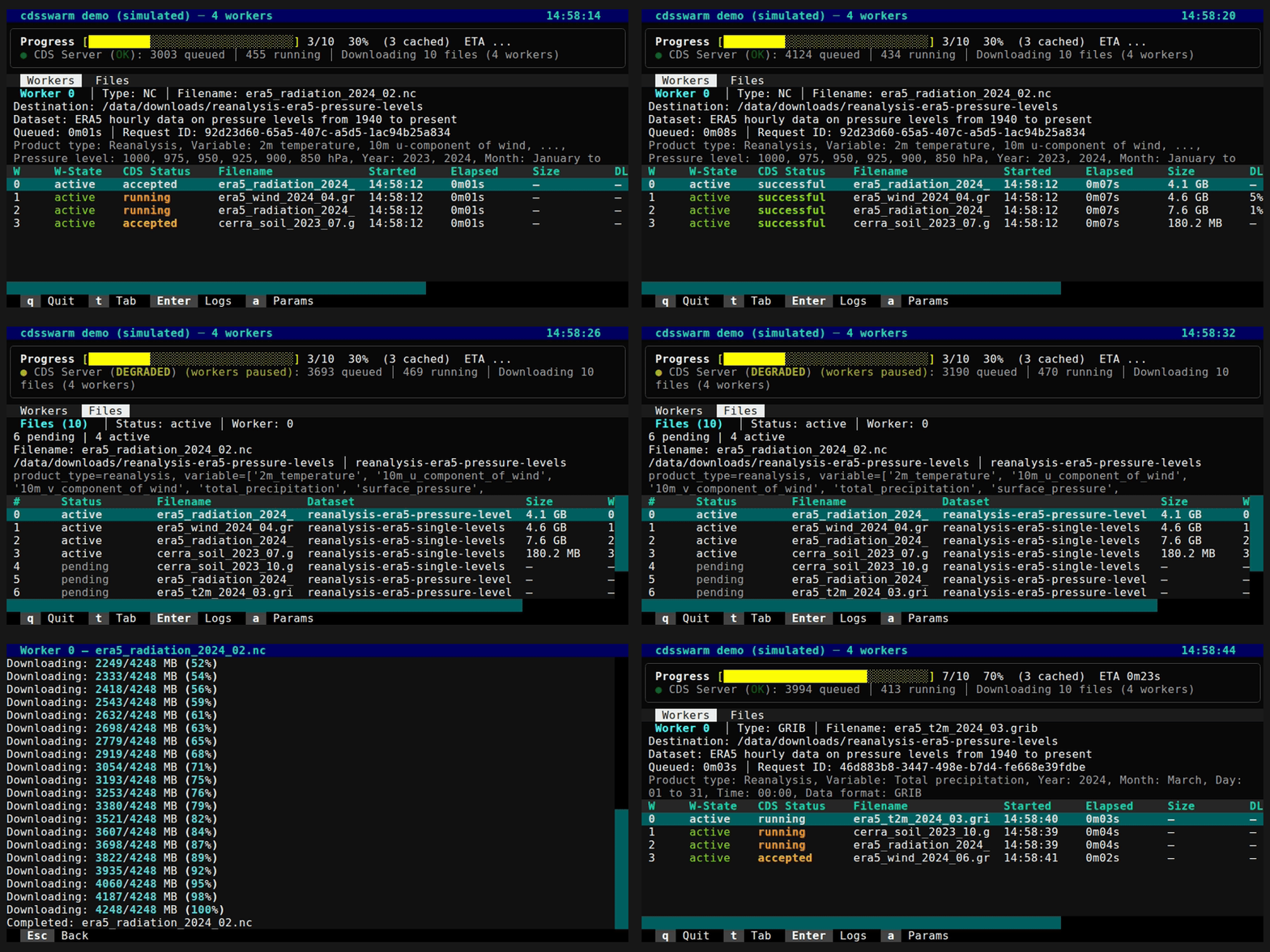
The interactive TUI (terminal user interface) is built with Textual and is available via the CLI only. It shows an htop-style DataTable with one row per worker:
W  │W-State  │CDS Status │Filename          │Started  │Elapsed  │Size    │DL %   │Request ID
0  │ active  │ running    │era5_2024_01.grib │22:31:24 │2h30m05s │15.2 GB│48%    │af1e2306-28c3...
1  │ active  │ successful │era5_2024_02.nc   │22:31:25 │1h15m00s │8.1 GB │100% ✓ │b2f4a891-...
The layout has two tabs (Workers and Files), an info panel above the table, and a progress footer with an overall progress bar and ETA.
Key bindings:
| Key | Action |
|---|---|
q |
Quit |
t / Tab |
Switch tab |
Enter |
Open scrollable log for the selected worker |
a |
Show full request parameters |
Esc |
Dismiss screen / go back |
Ctrl+C |
Cancel — in-flight CDS API requests are cancelled on the server |
Running Tests
pip install -e ".[dev]"
pytest -v
License
MIT
1 maintainer

Metadata
1 maintainer
Release files for cdsswarm 0.3.0
For a detailed explanation of source distributions (sdists) and built distributions (wheels), please see the package formats documentation.
Source distribution (sdist)
| File | Size | Uploaded | Provenance | Actions |
|---|---|---|---|---|
| cdsswarm-0.3.0.tar.gz | 890.1 kB | With provenance | Details for cdsswarm-0.3.0.tar.gz |
Built distribution (wheel)
| File | Interpreter | ABI | Platform | Actions Reset |
|---|---|---|---|---|
| cdsswarm-0.3.0-py3-none-any.whl | Python 3 | none | any | Details for cdsswarm-0.3.0-py3-none-any.whl |
Total release size: 939.5 kB
Release files / cdsswarm-0.3.0.tar.gz
| Download URL | cdsswarm-0.3.0.tar.gz |
|---|---|
| Size | 890.1 kB |
| Tags | Source |
|
SHA-256 checksum How to use checksums |
264160d3e27e7de6c0277c0453c406d80b62884aa99dc2fd87a36a77b41687b7
|
|
BLAKE2b-256 checksum How to use checksums |
75ac60fbc1f8f0b0520594a009f9ab48c9f73477c7a9904902642276e2035ed6
|
| Upload date | |
|
Uploaded using Trusted Publishing? What is trusted publishing? |
Yes |
| Uploaded via |
twine/7.0.0 CPython/3.13.14
|
Provenance
Provenance describes where a file came from. On PyPI, provenance is shared via attestations, which provide a verifiable record of the build or publishing details. View details, limitations and caveats.


PyPI Publish Attestation
PyPI verified that this artifact, at this checksum, originated from the publisher listed below.
Signed by GitHub Actions, verified by PyPI on Aug 1, 2026.
Transparency logRelease files / cdsswarm-0.3.0-py3-none-any.whl
| Download URL | cdsswarm-0.3.0-py3-none-any.whl |
|---|---|
| Size | 49.4 kB |
| Tags | Python 3 |
|
SHA-256 checksum How to use checksums |
0a6f40353348f2f17b03554ad91d0e73acdc7de78cb152163226a707063c583c
|
|
BLAKE2b-256 checksum How to use checksums |
870de4dbc6971816532fb28b0bd9589c54f4895036e967fca0f48feaa9a20390
|
| Upload date | |
|
Uploaded using Trusted Publishing? What is trusted publishing? |
Yes |
| Uploaded via |
twine/7.0.0 CPython/3.13.14
|
Provenance
Provenance describes where a file came from. On PyPI, provenance is shared via attestations, which provide a verifiable record of the build or publishing details. View details, limitations and caveats.
PyPI Publish Attestation
PyPI verified that this artifact, at this checksum, originated from the publisher listed below.
Signed by GitHub Actions, verified by PyPI on Aug 1, 2026.
Transparency logSecurity for cdsswarm 0.3.0
Provenance
Provenance describes where a file came from. On PyPI, provenance is shared via attestations, which provide a verifiable record of the build or publishing details. View details, limitations and caveats.
Full provenance
All 2 files in this release have been uploaded with provenance metadata.
Attestation for cdsswarm-0.3.0.tar.gz
PyPI Publish Attestation
PyPI verified that this artifact, at this checksum, originated from the publisher listed below.
Signed by GitHub Actions, verified by PyPI on Aug 1, 2026.
Transparency logA note on package security
PyPI is a repository for distributing packages, not a service for auditing them. While third-party security researchers and our staff do their best to detect and remove malicious packages, PyPI cannot guarantee the quality, security or suitability of any given package.
To learn more about protecting yourself from malicious actors, visit our package security documentation.














