
CellMet
A generalist algorithm to analyse cell shape from 3D labeled image.

This code is made to analyse cell shape from 3D labeled image. It is divide in three parts:
- Prerequisite that will create image containing one cell. This is mandatory to fasten the following analysis.
- We determine edges and faces associated to each cell. Quality of this analysis is dependant of the quality of the labeled image. There is no segmentation correction.
- Analysis of cells, faces and edges.
There is a Python API to allow user to integrate CellMet into your custom workflow.
Input/Output and datas organisation
Input
In order to be able to use this project. You first need to segment you image using CellPose (or any other software that gives 3D label image). You need to be satisfied by your label image, since there is no manual correction (only filter can be apply to remove cells that has a volume below a threshold for example).
Then, you can perform 3D cell segmentation with CellMet.
Output and datas organisation
You can generate ply/obj file for each cells.
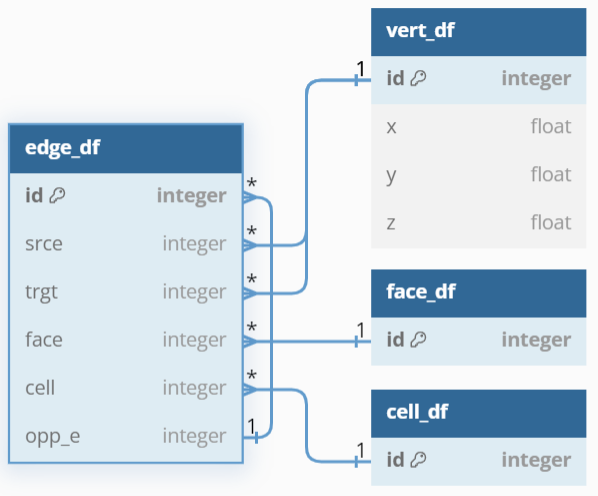
| Datas are organised as half-edge structures. The vertex, edge, face and cell tables are interconnected to represent and navigate through the mesh's elements. |
|

Prerequisite
It creates two folders names "npz" and "obj_mesh" that stores numpy array of binary one cell image and ply/obj file of each cell respectively. npz file are mandatory for the analyse, while obj_mesh allows to visualise cells in 3D with Blender. All files are named after the cell id in the original image.
Segmentation
This part consists of analysing the labelled image in order to determine neighbouring relationship between cells; contact between two cells (i.e. face); contact between three cells (i.e. edge).

Analysis
Cell information (cell_df.csv)
|
|
|

Cell plane information (cell_plane.csv)
|
Plane measure :
|
|

Edge information (edge_df.csv)
- Real distance $D_r$
- Short distance $D_s$
- Curvature index $1-(D_s/D_r)$
Face information (face_df.csv)
|
:warning: Only lateral face (coloured face in scheme)
|
|

Install
See INSTALL.md for a step by step install. A datasets to test the program can be found here.
Troubleshooting
Kernel crash due to lack of memory: reduce the number of core used for parallelized task.
Roadmap
- Add GUI with python or as a Napari plugin
1 maintainer

Metadata
1 maintainer
Release files for CellMet 1.1.0
For a detailed explanation of source distributions (sdists) and built distributions (wheels), please see the package formats documentation.
Source distribution (sdist)
| File | Size | Uploaded | Provenance | Actions |
|---|---|---|---|---|
| cellmet-1.1.0.tar.gz | 64.5 kB | Without provenance | Details for cellmet-1.1.0.tar.gz |
Built distribution (wheel)
| File | Interpreter | ABI | Platform | Actions Reset |
|---|---|---|---|---|
| cellmet-1.1.0-py3-none-any.whl | Python 3 | none | any | Details for cellmet-1.1.0-py3-none-any.whl |
Total release size: 136.3 kB
Release files / cellmet-1.1.0.tar.gz
| Download URL | cellmet-1.1.0.tar.gz |
|---|---|
| Size | 64.5 kB |
| Tags | Source |
|
SHA-256 checksum How to use checksums |
d69b000bcb4eaa4734901bf3967fb07de613c4a2c8f28c11e35ebb99369a6ae7
|
|
BLAKE2b-256 checksum How to use checksums |
26062acda04234508f790b0173a9573f441f3b614e9e9ea7f3605ae8b388cf1a
|
| Upload date | |
|
Uploaded using Trusted Publishing? What is trusted publishing? |
No |
| Uploaded via |
twine/6.1.0 CPython/3.11.5
|
Release files / cellmet-1.1.0-py3-none-any.whl
| Download URL | cellmet-1.1.0-py3-none-any.whl |
|---|---|
| Size | 71.8 kB |
| Tags | Python 3 |
|
SHA-256 checksum How to use checksums |
d3d8821ec8ff7b2e5c7be1a24945c92c29fb39608e7dadea9afb3b564d3ec5ac
|
|
BLAKE2b-256 checksum How to use checksums |
61fe1d485c93c3d64e793701a9a901da04531f9d967e5c53c591c76585d1e0fa
|
| Upload date | |
|
Uploaded using Trusted Publishing? What is trusted publishing? |
No |
| Uploaded via |
twine/6.1.0 CPython/3.11.5
|
Security for CellMet 1.1.0
Provenance
Provenance describes where a file came from. On PyPI, provenance is shared via attestations, which provide a verifiable record of the build or publishing details. View details, limitations and caveats.
No provenance found
None of the files in this release were uploaded with provenance metadata.
A note on package security
PyPI is a repository for distributing packages, not a service for auditing them. While third-party security researchers and our staff do their best to detect and remove malicious packages, PyPI cannot guarantee the quality, security or suitability of any given package.
To learn more about protecting yourself from malicious actors, visit our package security documentation.














