
CellMix
[plug-in] [Demo] [Paper] [BibTeX]
Introduction
Pathological image analysis, enhanced by deep learning, is critical for advancing diagnostic accuracy and improving patient outcomes. These images contain biomedical objects, or "instances," such as cells, tissues, and other structures across multiple scales. Their identities and spatial relationships significantly influence classification performance.
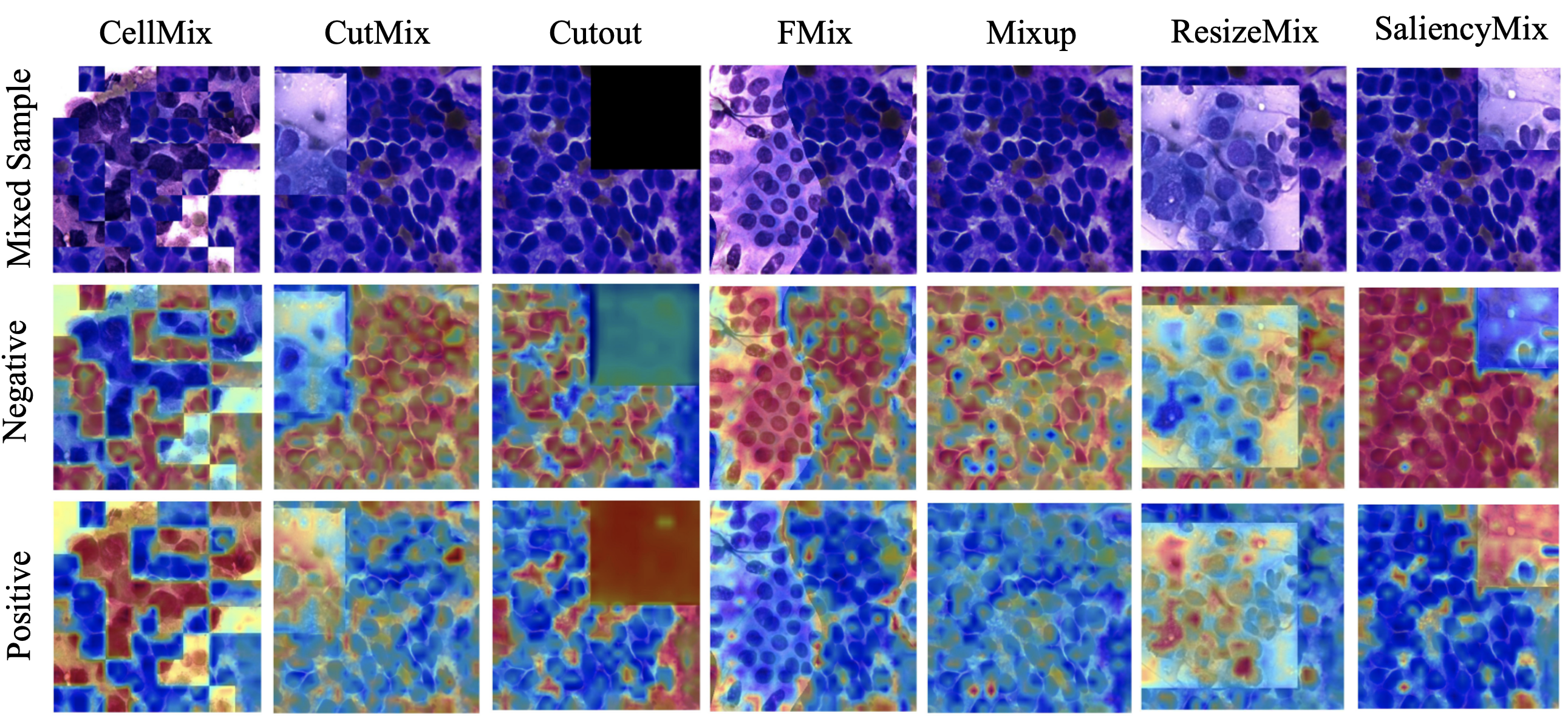
While current success heavily depends on data utilization, obtaining high-quality annotated pathological samples is extremely challenging. To overcome this challenge, data augmentation techniques generate pseudo-samples using mixing-based methods. However, these methods fail to fully consider the unique features of pathology images, such as local specificity, global distribution, and inner/outer-sample instance relationships.
Through mathematical exploration, we highlight the essence of shuffling to explicitly enhance the modeling of these instances. Accordingly, we introduce a novel, plug-and-play online data augmentation tool, CellMix, which explicitly augments instance relationships. Specifically, the input images are divided into patches based on the granularity of pathology instances, and the patches are in-place shuffled within the same batch. Thus, the absolute relationships among instances can be effectively preserved while new relationships can be further introduced. Moreover, to dynamically control task difficulty and explore multiple scales of instances, we incorporate a self-paced curriculum learning engine. This strategy enables the model to adaptively handle distribution-related noise and efficiently explore instances at various scales.
Extensive experiments on 11 pathological datasets, covering 8 diseases and 9 organs across 4 magnification scales, demonstrate state-of-the-art performance. Numerous ablation studies confirm its robust generalizability and scalability, providing novel insights into pathological image analysis and significant potential to enhance diagnostic precision. The proposed online data augmentation module is open-sourced as a plug-and-play tool to foster further research and clinical applications. It brings novel insights that potentially transform pathology image modeling approaches.

USAGE (plug-and-play)
You can import the whole set from pip [pip install CellMix]
from CellMix.online_augmentations import get_online_augmentation
from CellMix.schedulers import ratio_scheduler, patch_scheduler
or download github repo from [plug-in]
from utils.online_augmentations import get_online_augmentation
from utils.schedulers import ratio_scheduler, patch_scheduler
This is a pseudo-code demo for how to use CellMix online data augmentation
STEP 1: Set up the Augmentation for triggering online data augmentation in training
Augmentation = get_online_augmentation(augmentation_name='CellMix',
                                       p=0.5,  # this is the triggering chance of activation
                                       class_num=2,
                                       batch_size=4,
                                       edge_size=224,
                                       device='cpu')
augmentation_name: name of data-augmentation method, this repo supports:
- CellMix (and the ablations)
- CutOut
- CutMix
- MixUp
- ResizeMix
- SaliencyMix
- FMix
STEP 2: Set Up the dynamic (self-paced curriclum learning) schedulers for Online Data Augmentation During Training
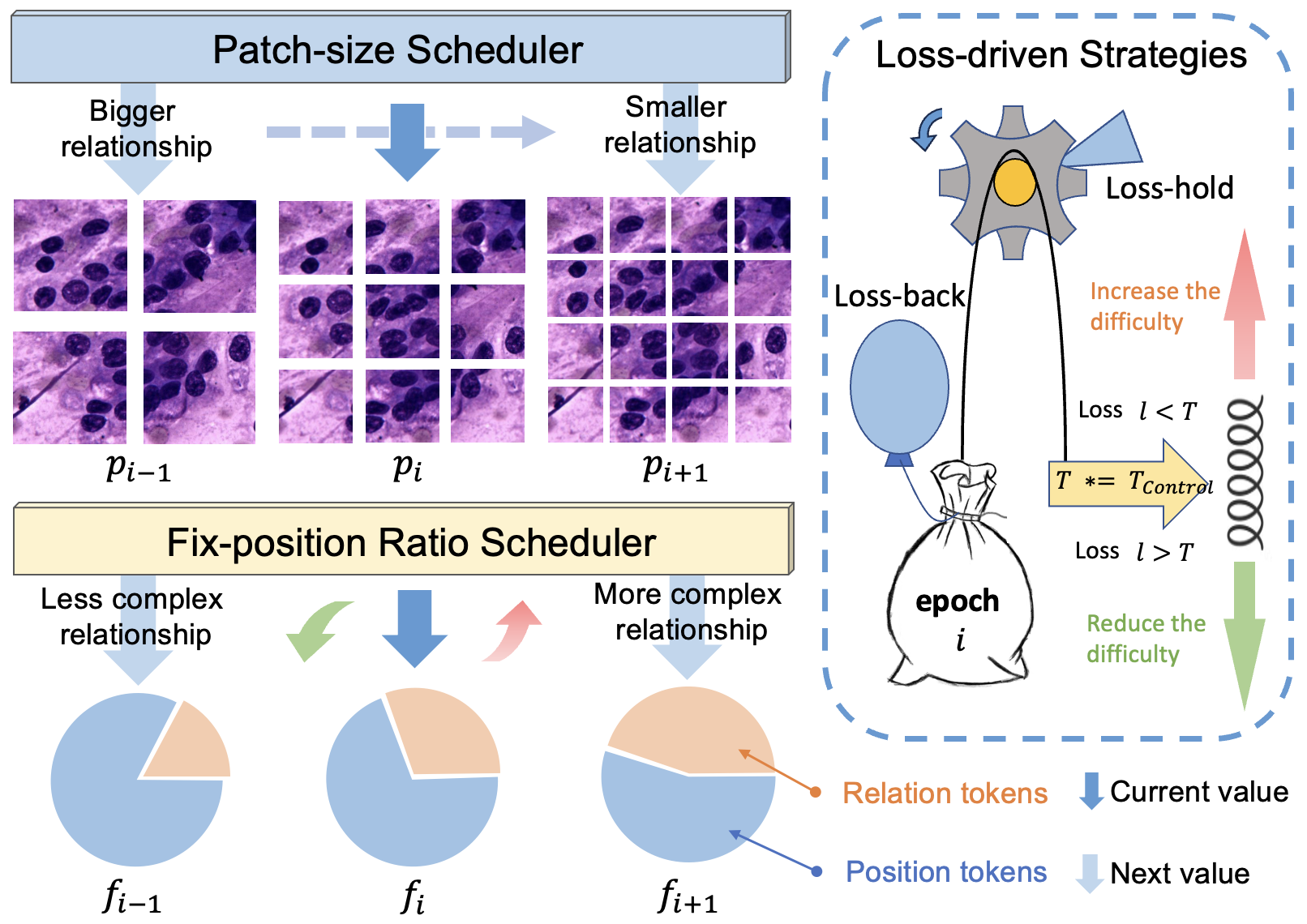
Patch Strategy (default is 'loop'):
puzzle_patch_size_scheduler = patch_scheduler(
    total_epochs=num_epochs,
    warmup_epochs=warmup_epochs,
    edge_size=224,
    basic_patch=16,
    strategy=patch_strategy,  # 'loop'
    threshold=loss_drive_threshold,
    fix_patch_size=None,  # Specify to fix to 16, 32, 48, 64, 96, 128, 192
    patch_size_jump=None  # Specify to 'odd' or 'even'
)
-
linear:
- Adjusts the patch size from small to large, managing the fix-position ratio plan after the warmup epochs.
-
reverse:
- Adjusts the patch size from large to small, managing the fix-position ratio plan after the warmup epochs.
-
random:
- Randomly chooses a specific patch size for each epoch.
-
loop:
- Tunes the patch size from small to large in a loop (e.g., a loop of 7 epochs through the patch size list), changing the patch size at most once every epoch.
-
loss-driven ('loss_hold' or 'loss_back'):
- Follows the reverse method but fixes the patch size if the loss-driven strategy is activated. This maintains the shuffling with instances at the same scale, guiding the model to learn the same or more fixed patches, reducing complexity by introducing fewer outer-sample instances.
Ratio Strategy (default is 'loop'):
fix_position_ratio_scheduler = ratio_scheduler(
    total_epochs=num_epochs,
    warmup_epochs=warmup_epochs,
    basic_ratio=0.5,
    strategy=ratio_strategy,  # 'linear'
    threshold=loss_drive_threshold,
    fix_position_ratio=None  # Specify to fix
)
-
decay ('decay' or 'ratio-decay'):
- A basic curriculum plan that reduces the fix-position ratio linearly, managing the fix-position ratio plan after the warmup epochs.
-
loss-driven ('loss_hold' or 'loss_back'):
- Dynamically adjusts the fix-position ratio based on the loss performance after the warmup epochs.
- If the loss value
lis less than the thresholdT, indicating sufficient learning of the current complexity, the shuffling complexity is increased by reducing the fix-position ratio following theratio_floor_factor. - If the loss value
lexceeds the thresholdT, indicating that the current complexity is too high, two strategies are employed:- loss-hold: Keeps the fix-position ratio unchanged in the next epoch, continuing with the current curriculum.
- loss-back: Reduces complexity by setting the fix-position ratio 10% higher than the current curriculum plan.
- If the loss value
- Dynamically adjusts the fix-position ratio based on the loss performance after the warmup epochs.
This setup ensures that the augmentation strategies dynamically adapt to the training process, optimizing learning efficiency and performance.
STEP 3: Apply the augmentations in the training loop:
if phase == 'train':
    # cellmix
    if fix_position_ratio_scheduler is not None and puzzle_patch_size_scheduler is not None:
        # epoch, epoch_loss is for the dynamic design in cellmix
        # epoch_loss is the average loss for each sample
        fix_position_ratio = fix_position_ratio_scheduler(epoch, epoch_loss)
        puzzle_patch_size = puzzle_patch_size_scheduler(epoch, epoch_loss)

        # inputs, labels is obtained from dataloader
        augment_images, augment_labels, GT_long_labels = Augmentation(inputs, labels,
                                                                      fix_position_ratio,
                                                                      puzzle_patch_size)
    # Counterpart augmentations
    else:
        augment_images, augment_labels, GT_long_labels = Augmentation(inputs, labels)
To force-triggering the data augmentation (such as visulization), you can use act=True
augment_images, augment_labels, GT_long_labels = Augmentation(inputs, labels, act=True)
To apply the dynamicaly self-pased curriculum learning, you can refer to our training demo in [training]
Citation
@article{zhang2023cellmix, title={CellMix: A General Instance Relationship based Method for Data Augmentation Towards Pathology Image Classification}, author={Zhang, Tianyi and Yan, Zhiling and Li, Chunhui and Ying, Nan and Lei, Yanli and Feng, Yunlu and Zhao, Yu and Zhang, Guanglei}, journal={arXiv preprint arXiv:2301.11513}, year={2023} }
1 maintainer

Download files
Download the file for your platform. If you're not sure which to choose, learn more about installing packages.
Source Distribution
Built Distribution
Filter files by name, interpreter, ABI, and platform.
If you're not sure about the file name format, learn more about wheel file names.
Copy a direct link to the current filters
File details
Details for the file CellMix-0.1.7.tar.gz.
File metadata
- Download URL: CellMix-0.1.7.tar.gz
- Upload date:
- Size: 26.5 kB
- Tags: Source
- Uploaded using Trusted Publishing? No
- Uploaded via:
twine/4.0.2 CPython/3.9.7
File hashes
| Algorithm | Hash digest | |
|---|---|---|
| SHA256 |
d60eafdfb12527e6bbc0dd43b9a7d2925f2038057713fb6e5f98f1374dac3095
|
|
| MD5 |
96142df5da9ffe77ef700a11fbd212e3
|
|
| BLAKE2b-256 |
5505a3fdcd0a31b3ad73be4de0e37d925a90e45ff70b8b29fa19e84ba8ef25aa
|
File details
Details for the file CellMix-0.1.7-py3-none-any.whl.
File metadata
- Download URL: CellMix-0.1.7-py3-none-any.whl
- Upload date:
- Size: 31.0 kB
- Tags: Python 3
- Uploaded using Trusted Publishing? No
- Uploaded via:
twine/4.0.2 CPython/3.9.7
File hashes
| Algorithm | Hash digest | |
|---|---|---|
| SHA256 |
f0036c271ddbc1989083c57f00b48933c7c80a5e487f122b19a6343265710b86
|
|
| MD5 |
7231014ddfadf68749caa9cd868bf561
|
|
| BLAKE2b-256 |
0ddee9e25108c32052b7aeb032fd541932862c66e6fbdd3e1b862d8471e03d6d
|













