
Chaos Toolkit Extension for Open Tracing


This project is an extension for the Chaos Toolkit for OpenTracing and OpenTelemetry.
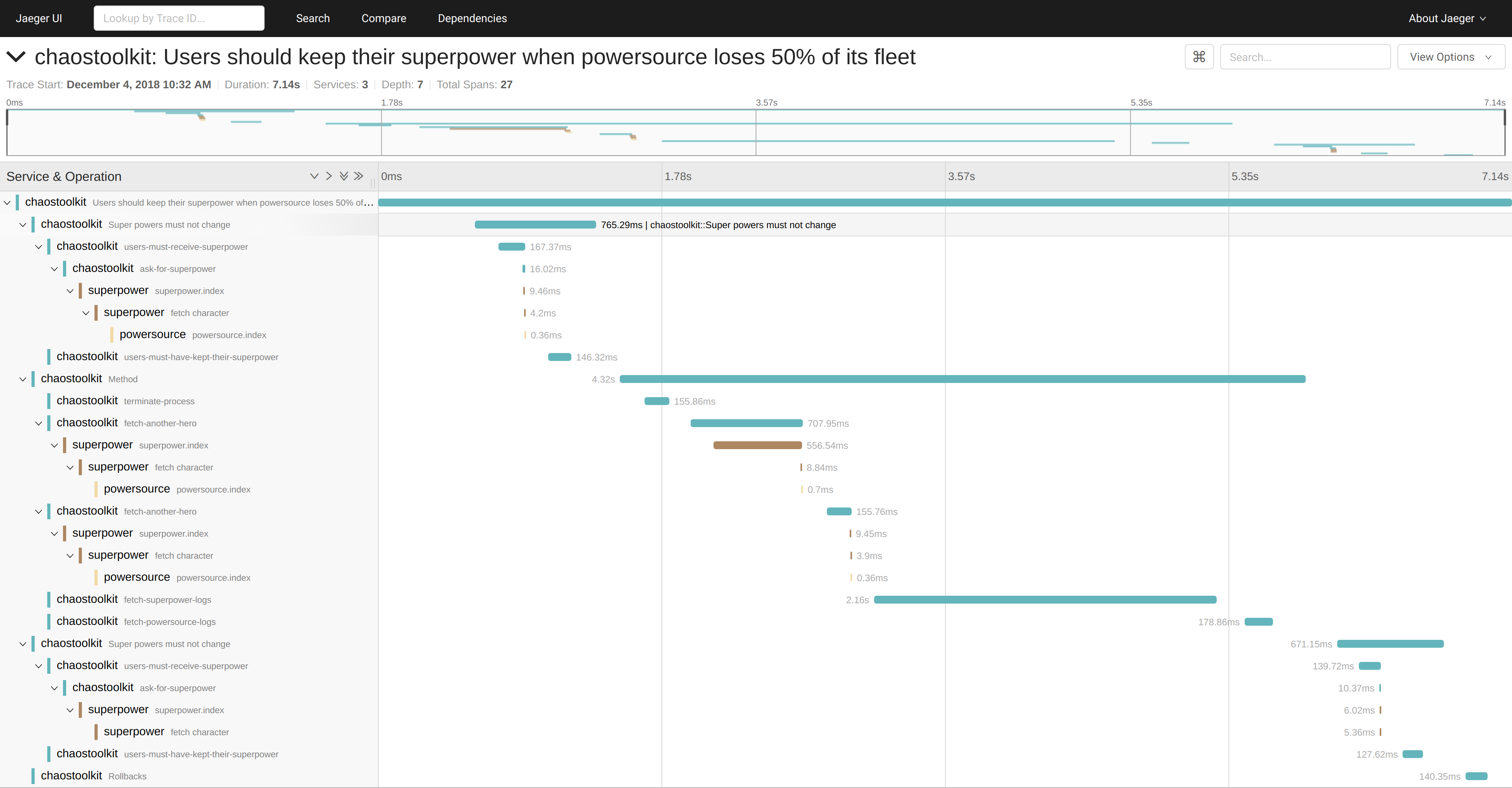
Here is an example of what it could look like with the Jaeger backend.
Install
This package requires Python 3.9+
To be used from your experiment, this package must be installed in the Python environment where chaostoolkit already lives.
$ pip install -U chaostoolkit-opentracing
Usage
This extension provides two controls to trace your Chaos Toolkit experiment:
- Open Telemetry
- Open Tracing (legacy)
The only supported one is Open Telemetry as the Open Tracing is no longer maintained.
Open Telemetry
To enable Open Telemetry tracing, simply add the following control to your experiment:
{
    "controls": [
      {
          "name": "opentelemetry",
          "provider": {
              "type": "python",
              "module": "chaostracing.oltp"
          }
      }
    ]
}
We suggest you make it the first extension so it runs before and after all other extensions.
To configure the various Open Telemetry settings, please use the standard OLTP environment variables:
- the sdk variables
- the exporter variables
Mostly, you should set:
OTEL_EXPORTER_OTLP_TRACES_ENDPOINTto point to your collector (for instance: http://localhost:4318/v1/traces)OTEL_EXPORTER_OTLP_TRACES_HEADERSto set any headers to pass to the exporter
NOTE: This extension supports OLTP over HTTP but not gRPC.
You can also instrument a variety of frameworks like this:
{
    "controls": [
      {
          "name": "opentelemetry",
          "provider": {
              "type": "python",
              "module": "chaostracing.oltp",
              "arguments": {
                "trace_httpx": true,
                "trace_requests": true,
                "trace_botocore": true
              }
          }
      }
    ]
}
This will enable the according instrumentation automatically.
AWS
This extension supports AWS X-Ray directly. Simply set the following variable:
export OTEL_VENDOR=aws
This can also be set in the configuration block:
{
    "configuration": {
        "otel_vendor": "aws"
    }
}
Google Cloud Platform Traces
If you intend on using Google Cloud Platform to export your traces to, please consider also installing the followings:
$ pip install opentelemetry-exporter-gcp-trace \
    opentelemetry-resourcedetector-gcp \
    opentelemetry-propagator-gcp
To authenticate the client, you can either:
- set
GOOGLE_APPLICATION_CREDENTIALSenvironment variable - pass the
otel_gcp_service_accountandotel_gcp_project_idvariables in the configuration block - set the
CHAOSTOOLKIT_OTEL_GCP_SAandCHAOSTOOLKIT_OTEL_GCP_PROJECT_IDenvironment variables
In all cases, point to a service account which has
the roles/cloudtrace.agent role as nthe name of the target project.
Finally, set the following variable:
export OTEL_VENDOR=gcp
This can also be set in the configuration block:
{
    "configuration": {
        "otel_vendor": "gcp"
    }
}
Azure Traces
To use this package to send traces to Azure monitors, please install the dependencies as follows:
$ pip install chaostoolkit-opentracing[azure]
Then set the APPLICATIONINSIGHTS_CONNECTION_STRING environment variable
appropriately.
Finally, set the following variable:
export OTEL_VENDOR=azure
This can also be set in the configuration block:
{
    "configuration": {
        "otel_vendor": "azure"
    }
}
See Azure documentation for more details:
- https://learn.microsoft.com/en-us/python/api/overview/azure/core-tracing-opentelemetry-readme
- https://learn.microsoft.com/en-us/python/api/overview/azure/monitor-opentelemetry-exporter-readme
Other Open Telemetry vendors
Other vendors should work out of the box with the default settings. Otherwise, feel free to open an issue.
Legacy Open Tracing
This extensions supports the Open Tracing export format but highly recommends you to switch to Open Telemetry instead. There will be no support for Open Tracing support.
NOTE: Please see at the bottom of the page all the supported clients and exporters this control supports.
Declare within the experiment
To use this control, you can declare it on a per experiment basis like this:
{
    "configuration": {
        "tracing_provider": "jaeger",
        "tracing_host": "127.0.0.1",
        "tracing_port": 6831,
        "tracing_propagation": "b3"
    },
    "controls": [
        {
            "name": "opentracing",
            "provider": {
                "type": "python",
                "module": "chaostracing.control"
            }
        }
    ]
}
This will automatically create a Jaeger client to emit traces onto the
address 127.0.0.1:6831 (over UDP).
Declare within the settings
You may also declare the control to be applied to all experiments by declaring the control from within the Chaos Toolkit settings file. In that case, you do not need to set the configuration or the controls at the experiment level and the control will be applied to every experiments you run.
controls:
  opentracing:
    provider:
      type: python
      module: chaostracing.control
      arguments:
        provider: jaeger
        host: 127.0.0.1
        port: 6831
        propagation: b3
Send traces from other extensions
You may also access the tracer from other extensions as follows.
For instance, assuming you have an extension that makes a HTTP call you want to trace specifically, you could do this from your extension's code:
from chaoslib import Configuration, Secrets
import requests
import opentracing

def some_function(configuration: Configuration, secrets: Secrets):
    tracer = opentracing.global_tracer()
    scope = tracer.scope_manager.active
    parent = scope.span

    with tracer.start_span("call-service1", child_of=parent) as span:
        span.set_tag('http.method','GET')
        span.set_tag('http.url', url)
        span.set_tag('span.kind', 'client')
        span.tracer.inject(span, 'http_headers', headers)

        r = requests.get(url, headers=headers)
        span.set_tag('http.status_code', r.status_code)
Because the opentracing exposes a noop tracer when non has been initialized, it should be safe to have that code in your extensions without having to determine if the extension has been enabled in the experiment.
Please note that, Open Tracing scope cannot be shared across threads (while spans can). So, when running this in a background activity, the tracer will not actually be set to the one that was initialized.
Open Tracing Provider Support
Jaeger tracer
The Jager tracer relies on the OpenTracing protocol which has now be superseded by OpenTelemetry. However, we still provide support for it.
To install the necessary dependencies for the Jaeger tracer, please run:
$ pip install -U jaeger-client~=4.8
Use the following configuration:
{
    "configuration": {
        "tracing_provider": "jaeger",
        "tracing_host": "127.0.0.1",
        "tracing_port": 6831,
        "tracing_propagation": "b3"
    },
    "controls": [
        {
            "name": "opentracing",
            "provider": {
                "type": "python",
                "module": "chaostracing.control"
            }
        }
    ]
}
Test
To run the tests for the project execute the following:
$ pdm run test
Contribute
If you wish to contribute more functions to this package, you are more than welcome to do so. Please, fork this project, make your changes following the usual PEP 8 code style, sprinkling with tests and submit a PR for review.
The Chaos Toolkit projects require all contributors must sign a Developer Certificate of Origin on each commit they would like to merge into the master branch of the repository. Please, make sure you can abide by the rules of the DCO before submitting a PR.
1 maintainer

Metadata
1 maintainer
Release files for chaostoolkit-opentracing 0.18.1
For a detailed explanation of source distributions (sdists) and built distributions (wheels), please see the package formats documentation.
Source distribution (sdist)
| File | Size | Uploaded | Provenance | Actions |
|---|---|---|---|---|
| chaostoolkit_opentracing-0.18.1.tar.gz | 19.1 kB | With provenance | Details for chaostoolkit_opentracing-0.18.1.tar.gz |
Built distribution (wheel)
| File | Interpreter | ABI | Platform | Actions Reset |
|---|---|---|---|---|
| chaostoolkit_opentracing-0.18.1-py3-none-any.whl | Python 3 | none | any | Details for chaostoolkit_opentracing-0.18.1-py3-none-any.whl |
Total release size: 36.5 kB
Release files / chaostoolkit_opentracing-0.18.1.tar.gz
| Download URL | chaostoolkit_opentracing-0.18.1.tar.gz |
|---|---|
| Size | 19.1 kB |
| Tags | Source |
|
SHA-256 checksum How to use checksums |
adac8f6b2707f36ec98bc98bde301a597f41c26368a7827779fcf1d5a9825049
|
|
BLAKE2b-256 checksum How to use checksums |
665bcc4707e997d076e17f52de856665a7533808875f6297021d77eaf1cdbad5
|
| Upload date | |
|
Uploaded using Trusted Publishing? What is trusted publishing? |
Yes |
| Uploaded via |
twine/6.1.0 CPython/3.12.9
|
Provenance
Provenance describes where a file came from. On PyPI, provenance is shared via attestations, which provide a verifiable record of the build or publishing details. View details, limitations and caveats.


PyPI Publish Attestation
PyPI verified that this artifact, at this checksum, originated from the publisher listed below.
Signed by GitHub Actions, verified by PyPI on Jun 30, 2025.
Transparency logRelease files / chaostoolkit_opentracing-0.18.1-py3-none-any.whl
| Download URL | chaostoolkit_opentracing-0.18.1-py3-none-any.whl |
|---|---|
| Size | 17.4 kB |
| Tags | Python 3 |
|
SHA-256 checksum How to use checksums |
430d7b5e3614c1dd8a78d7679c380cc069a3bedacc891925e153eb5c13ee18b3
|
|
BLAKE2b-256 checksum How to use checksums |
02d6fffae187c6b00d95bc0a3f40386a609bb00d3d10ca1236730dfb41e32614
|
| Upload date | |
|
Uploaded using Trusted Publishing? What is trusted publishing? |
Yes |
| Uploaded via |
twine/6.1.0 CPython/3.12.9
|
Provenance
Provenance describes where a file came from. On PyPI, provenance is shared via attestations, which provide a verifiable record of the build or publishing details. View details, limitations and caveats.
PyPI Publish Attestation
PyPI verified that this artifact, at this checksum, originated from the publisher listed below.
Signed by GitHub Actions, verified by PyPI on Jun 30, 2025.
Transparency logSecurity for chaostoolkit-opentracing 0.18.1
Provenance
Provenance describes where a file came from. On PyPI, provenance is shared via attestations, which provide a verifiable record of the build or publishing details. View details, limitations and caveats.
Full provenance
All 2 files in this release have been uploaded with provenance metadata.
Attestation for chaostoolkit_opentracing-0.18.1.tar.gz
PyPI Publish Attestation
PyPI verified that this artifact, at this checksum, originated from the publisher listed below.
Signed by GitHub Actions, verified by PyPI on Jun 30, 2025.
Transparency logA note on package security
PyPI is a repository for distributing packages, not a service for auditing them. While third-party security researchers and our staff do their best to detect and remove malicious packages, PyPI cannot guarantee the quality, security or suitability of any given package.
To learn more about protecting yourself from malicious actors, visit our package security documentation.














