
Charlie Brown is a program for compulsively checking your mail. It waits for notifications of new email via IMAP IDLE and pops up a KDialog with a preview of each message. The dialog has buttons to dismiss it without taking an action (“Keep”), mark the message as read (“Mark Read”), or move the message to your IMAP trash folder without marking it as read (“Trash”).
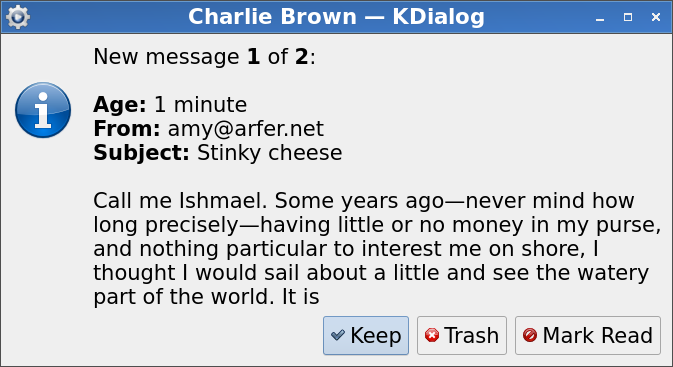
If you have lots of new messages at once (see max_itemized_messages below), you’ll get a single dialog box with just the number of messages, instead of one dialog box per message as usual.
Installation and usage
Although Charlie Brown has no programmatic interface, it’s distributed as a Python package (written in Hy). Install it via pip with the command pip install charlie_brown (the only dependency not automatically installed is KDialog) and run it with python3 -m charlie_brown. Charlie Brown doesn’t daemonize itself, but I like to daemonize it with a command like nohup python3 -m charlie_brown 2>/tmp/charlie-brown-debug >/dev/null &.
To run at all, Charlie Brown requires a JSON configuration file, which you should put in $XDG_CONFIG_HOME/charlie_brown.json. Here’s an example:
{
    "tempfile": "/tmp/charlie-brown",
    "server": "imap.example.com",
    "username": "igelfeldm",
    "password": "hunter2",
    "folder_monitor": "INBOX",
    "folder_trash": "Trash",
    "max_itemized_messages": 10,
    "global_timeout_seconds": 10,
    "idle_timeout_minutes": 5,
    "login_interval_minutes": 10,
    "body_preview_bytes": 256,
    "kdialog_max_word_len": 40
}
All options are required. Their meaning is as follows:
- tempfile
A path to save a temporary file. This is used for recording which messages have already been reported. For Charlie Brown to consider a message new, it has to be neither recorded here nor marked read on the IMAP side.
- server
The hostname of your IMAP server.
- username, password
Credentials for the server.
- folder_monitor
The IMAP folder to monitor for new messages.
- folder_trash
The IMAP folder to put files in when you click “Trash”.
- max_itemized_messages
How many messages to preview. If Charlie Brown has more than this to report at a single time, you just get a count instead of a dialog for each message.
- global_timeout_seconds
A general timeout value for IMAP operations.
- idle_timeout_minutes
A timeout for IDLE waiting.
- login_interval_minutes
A maximum time to wait before logging in again.
- body_preview_bytes
How many bytes of each message’s body are retrieved for making the preview.
- kdialog_max_word_len
The maximum number of sequential non-whitespace characters in the message preview before a newline is inserted, to work around KDialog’s behavior of truncating the whole dialog contents if a word is too long. If you don’t use big fonts like I do, you can probably set this higher.
Trivia
Although the first commit in this repository is from 2023, Charlie Brown is one of my oldest codebases that I still use. It started out as a Perl script no later than 2007.
License
This program is copyright 2023 Kodi B. Arfer.
This program is free software: you can redistribute it and/or modify it under the terms of the GNU General Public License as published by the Free Software Foundation, either version 3 of the License, or (at your option) any later version.
This program is distributed in the hope that it will be useful, but WITHOUT ANY WARRANTY; without even the implied warranty of MERCHANTABILITY or FITNESS FOR A PARTICULAR PURPOSE. See the GNU General Public License for more details.
1 maintainer

Metadata
1 maintainer
Release files for charlie-brown 0.1.1
For a detailed explanation of source distributions (sdists) and built distributions (wheels), please see the package formats documentation.
Source distribution (sdist)
| File | Size | Uploaded | Provenance | Actions |
|---|---|---|---|---|
| charlie_brown-0.1.1.tar.gz | 6.4 kB | Without provenance | Details for charlie_brown-0.1.1.tar.gz |
Release files / charlie_brown-0.1.1.tar.gz
| Download URL | charlie_brown-0.1.1.tar.gz |
|---|---|
| Size | 6.4 kB |
| Tags | Source |
|
SHA-256 checksum How to use checksums |
265a245722359be574f9e055de883864bd9eff98e0834a9d1c3e069d86ceea35
|
|
BLAKE2b-256 checksum How to use checksums |
1e591e200d4ce1e3ea9395611678ad9e8bf8aa25501940fa33e8f4c818e5f1fc
|
| Upload date | |
|
Uploaded using Trusted Publishing? What is trusted publishing? |
No |
| Uploaded via |
twine/4.0.1 CPython/3.10.7
|
Security for charlie-brown 0.1.1
Provenance
Provenance describes where a file came from. On PyPI, provenance is shared via attestations, which provide a verifiable record of the build or publishing details. View details, limitations and caveats.
No provenance found
None of the files in this release were uploaded with provenance metadata.
A note on package security
PyPI is a repository for distributing packages, not a service for auditing them. While third-party security researchers and our staff do their best to detect and remove malicious packages, PyPI cannot guarantee the quality, security or suitability of any given package.
To learn more about protecting yourself from malicious actors, visit our package security documentation.














