
charts.css.py
charts.css.py provides a python API to convert your 2-dimension data lists into html snippet,
which will be rendered into charts by CSS, when serving inside a browser.
- The output of
charts.css.pyis not images. Consequently,charts.css.pyis a pure Python package without any image library dependency. You can usecharts.css.pyon any platform. - The output of
charts.css.pyis a normal HTML table. Search engines and screen readers will be able to consume your data even when CSS rendering is unavailable. - Once the html snippet is delivered into the browser window, the rendering is done by CSS, which is typically faster than JS-heavy chart libraries.
- Since the output is normal HTML, you could customize its size and position, by defining your own CSS styles.
Installation
pip install charts.css.py
Usage
Just combine the output of charts.css.py functions and the predefined CSS style
<link rel="stylesheet" href="https://cdn.jsdelivr.net/npm/charts.css/dist/charts.min.css">
into your html page.
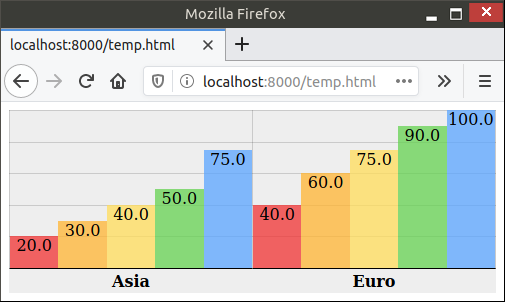
For example, the following code snippet can convert a 2-dimension list into column chart:
from charts.css import column
STYLESHEET = '<link rel="stylesheet" href="https://cdn.jsdelivr.net/npm/charts.css/dist/charts.min.css">'
chart = column(
    [
        ["Continent", "1st year", "2nd year", "3rd year", "4th year", "5th year"],
        ["Asia", 20.0, 30.0, 40.0, 50.0, 75.0],
        ["Euro", 40.0, 60.0, 75.0, 90.0, 100.0],
    ],
    headers_in_first_row=True,
    headers_in_first_column=True,
    )
# Now, variable chart contains html snippet of "<table>...</table>", and
# STYLESHEET is just a constant string of "<link href='https://.../charts.css'>".
# You can somehow insert them into the proper places of your full html page.
# Here in this sample, we take a shortcut by simply concatenating them.
open("output.html", "w").write(STYLESHEET + chart)
The output.html will be rendered in browser like this:
Advanced Usage
There are currently 4 different charts implemented: bar, column, line, area.
All those methods support many parameters to further customize the chart appearance.
bar() and column() also support stacking by value or stacking by percentage.
All those features are demonstrated in the
different samples in this document.
Lastly, this package also provides a command-line tool csv2chart.
You can use it to convert csv file into an html file.
For example, csv2chart sample.csv output.html.
You can also run csv2chart -h to know all the parameters it supports.
Versioning
charts.css.py uses Semantic Versioning.
1 maintainer

Metadata
1 maintainer
Release files for charts.css.py 0.4.0
For a detailed explanation of source distributions (sdists) and built distributions (wheels), please see the package formats documentation.
Source distribution (sdist)
| File | Size | Uploaded | |
|---|---|---|---|
| charts.css.py-0.4.0.tar.gz | 7.4 kB | Details |
Built distribution (wheel)
| File | Interpreter | ABI | Platform | Reset |
|---|---|---|---|---|
| charts.css.py-0.4.0-py2.py3-none-any.whl | Python 3, Python 2 | none | any | Details |
Total release size: 15.3 kB
Release files / charts.css.py-0.4.0.tar.gz
| Download URL | charts.css.py-0.4.0.tar.gz |
|---|---|
| Size | 7.4 kB |
| Tags | Source |
|
SHA-256 checksum How to use checksums |
2d47bc0dd9d881b04d90f869331c90b3363b83913689f8264605268059f4adf6
|
|
BLAKE2b-256 checksum How to use checksums |
422f93ca7c2c0ae9d4a558d2b1f2d5d4aaa9c3397e793b5cdef2811950806324
|
| Upload date | |
|
Uploaded using Trusted Publishing? What is trusted publishing? |
No |
| Uploaded via |
twine/3.4.1 importlib_metadata/4.6.0 pkginfo/1.7.0 requests/2.25.1 requests-toolbelt/0.9.1 tqdm/4.61.1 CPython/3.9.5
|
Release files / charts.css.py-0.4.0-py2.py3-none-any.whl
| Download URL | charts.css.py-0.4.0-py2.py3-none-any.whl |
|---|---|
| Size | 7.9 kB |
| Tags | Python 2 Python 3 |
|
SHA-256 checksum How to use checksums |
141b814bfad61067c670db27e6dd57f304e4a202cc4a99f82cbe284529df57c9
|
|
BLAKE2b-256 checksum How to use checksums |
0a733e95f3690478d6e11599e103f33a16cec890b81a7b210f3870cd3ae87113
|
| Upload date | |
|
Uploaded using Trusted Publishing? What is trusted publishing? |
No |
| Uploaded via |
twine/3.4.1 importlib_metadata/4.6.0 pkginfo/1.7.0 requests/2.25.1 requests-toolbelt/0.9.1 tqdm/4.61.1 CPython/3.9.5
|














