
ChatGPT-GUI




An unofficial GUI app for ChatGPT.
Note: This project is in a public alpha, and as such, many features are not complete.
Other Documents:
Table of Contents
Disclaimer:
ChatGPT-GUI is in no way associated with, endorsed by, or otherwise affiliated with OpenAI.
About:
ChatGPT-GUI is an application written using Qt for Python that allows you to easily talk to Assistant, the AI based on ChatGPT.
This project is a fork of my other project, HaloInfiniteGetter.
If you like this application, be sure to star :)
Features:
[x] Email/Password Login to ChatGPT Without Browser(Captcha solving is untested but implemented)
- Proxy Settings
- Supported Protocols are
HTTPandSOCKS5
- Supported Protocols are
- Executable Script in PATH (
chatgpt) - Desktop & Start Menu Shorcuts
- Session (token) Persistence
- Automatic Access Token Refreshing
- Multiple Concurrent Conversations
- Conversation Saving & Loading
- Multi-line input
- Exception Reporter & Traceback Viewer
- Themes
- Builtin themes are: [Breeze Dark, Breeze Light, and Legacy]
Todo:
- Pretty Conversation Views
- Retry AI Message
How to Use:
Installation:
- First, install Python 3.10 using this link
- Then, open command prompt (Win + R -- type in "cmd") and type
pip install chatgpt-gui- Optionally, to install the latest unstable version, type
pip install git+https://github.com/Cubicpath/ChatGPT-GUI.git
- Optionally, to install the latest unstable version, type
- And you are done! To launch the program simply type
chatgpt- Once launched, you can create a desktop shortcut by using the
Create Desktop Shortcuttool under theToolscontext menu
- Once launched, you can create a desktop shortcut by using the
Authentication:
Thanks to rawandahmad698 and tls-client, there exists a method to authenticate without
messing around with tokens or the browser. Simply sign in from the app itself!.
Google Chrome is currently required to automatically bypass cloudflare.
Email & Password login is currently not working. Refer to session token authentication in the meantime.
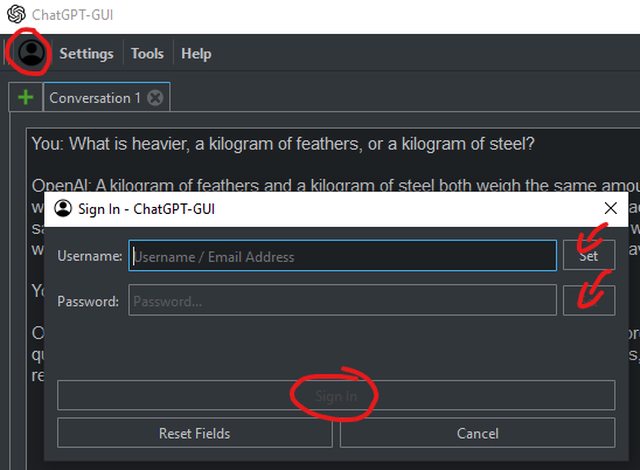
Session Token Guide:
- Sign in to ChatGPT on your browser
- Navigate to the Cookies for chat.openai.com
- On Firefox -- F12 > Move to the "Storage" tab > Under "Cookies" select https://chat.openai.com
- Double-click the
__Secure-next-auth.session-tokencookie value and copy with CTRL + C - Open the Settings window, unlock the input by pressing the "Edit Session Token" button, then paste the copied value.
- Press the Set button, and you should now be authenticated!
Session Data:
Session data is stored in a hidden file (~/.config/chatgpt_gui/.session.json), for persistence.
When you sign out or clear your session token, it automatically deletes all session data.
If you ever need to directly edit your session data, it follows the following format:
{
  "user": {
    "id": "Your user id (starting with a 'user-' prefix)",
    "name": "Your username (usually same as your email)",
    "email": "The email tied to your session",
    "image": "Link to your profiles image (usually same as your picture)",
    "picture": "Link to your profile picture",
    "groups": [],
    "features": []
  },
  "cloudflare": {
    "bm": "Value of the __cf_bm cookie",
    "clearance": "Value of the cf_clearance cookie",
    "expires": "1h from the time cf_clearance is acquired"
  },
  "expires": "Automatically acquired after refresh_auth()",
  "token": "Value of the __Secure-next-auth.session-token cookie",
  "user_agent": "User Agent the Client/Authenticator use"
}
Saving/Loading Conversations
You can save your currently selected conversation with ChatGPT by right-clicking any tab and
pressing the Export Conversation To... button. This will open a file dialog where you can rename
your conversation anything, which will show when loaded.
You can load a conversation that was previously saved by pressing the Import Conversation From...
button, and selecting the JSON file containing the conversation.
By default, all conversations are stored in the ~/.cache/chatgpt_gui/ directory.
But you can choose any folder when exporting.
NOTE: Conversations from one account CANNOT be accessed from another.
Conversation Format:
Conversations are stored as a linear list of messages, where each message is a response to the one before it. All UUID's are tracked, which allows the Client to continue conversations after import.
They are stored in the following data format:
{
  "id": "Conversation UUID",
  "messages": [
    {
      "id": "Message UUID",
      "role": "user",
      "content": {
        "content_type": "text",
        "parts": [
          "Your message to ChatGPT"
        ]
      }
    },
    {
      "id": "Message UUID",
      "role": "assistant",
      "content": {
        "content_type": "text",
        "parts": [
          "Response from ChatGPT"
        ]
      }
    }
  ]
}
Themes:
Themes are a way to style already-existing elements (Think CSS). They are held in a directory with their resources and stylesheet in the same folder level.
Theme File Structure:
../
│
├───[theme_id]/
│       ├─── [icon1_name].svg
│       ├─── [icon2_name].svg
│       ├─── [icon3_name].svg
│       └─── stylesheet.qss
│
The current builtin themes are:
Breeze DarkBreeze LightLegacy (Default Qt)
While the current breeze themes are slightly modified versions, you can view the original themes at BreezeStyleSheets.
1 maintainer

Metadata
1 maintainer
Release files for chatgpt-gui 0.4.1
For a detailed explanation of source distributions (sdists) and built distributions (wheels), please see the package formats documentation.
Source distribution (sdist)
| File | Size | Uploaded | Provenance | |
|---|---|---|---|---|
| chatgpt-gui-0.4.1.tar.gz | 138.3 kB | Without provenance | Details |
Built distribution (wheel)
| File | Interpreter | ABI | Platform | Reset |
|---|---|---|---|---|
| chatgpt_gui-0.4.1-py3-none-any.whl | Python 3 | none | any | Details |
Total release size: 338.8 kB
Release files / chatgpt-gui-0.4.1.tar.gz
| Download URL | chatgpt-gui-0.4.1.tar.gz |
|---|---|
| Size | 138.3 kB |
| Tags | Source |
|
SHA-256 checksum How to use checksums |
b8473f45b86c353c4021ff571aa280fbd63736815852e2cabfcff24dc7d44ed6
|
|
BLAKE2b-256 checksum How to use checksums |
bbb63b775a9aa020670728673e09398e03fd5f8aee132015699819300bc7b47d
|
| Upload date | |
|
Uploaded using Trusted Publishing? What is trusted publishing? |
No |
| Uploaded via |
twine/4.0.1 CPython/3.11.1
|
Release files / chatgpt_gui-0.4.1-py3-none-any.whl
| Download URL | chatgpt_gui-0.4.1-py3-none-any.whl |
|---|---|
| Size | 200.5 kB |
| Tags | Python 3 |
|
SHA-256 checksum How to use checksums |
f7731136298022847cf222e036c879cd0cc31f19144574e5ae36dfc0207e9ecd
|
|
BLAKE2b-256 checksum How to use checksums |
d8e6e98186c8df842b10d1400f36cb532d8f273c017cb90350f01a49c0a6f218
|
| Upload date | |
|
Uploaded using Trusted Publishing? What is trusted publishing? |
No |
| Uploaded via |
twine/4.0.1 CPython/3.11.1
|
Security for chatgpt-gui 0.4.1
Provenance
Provenance describes where a file came from. On PyPI, provenance is shared via attestations, which provide a verifiable record of the build or publishing details. View details, limitations and caveats.
No provenance found
None of the files in this release were uploaded with provenance metadata.
A note on package security
PyPI is a repository for distributing packages, not a service for auditing them. While third-party security researchers and our staff do their best to detect and remove malicious packages, PyPI cannot guarantee the quality, security or suitability of any given package.














