
ChEB-AI Graph
Graph-based models for molecular property prediction and ontology classification, built on top of the python-chebai codebase.
Installation
To install this repository, download it and run
pip install .
or install it directly with
pip install git+https://github.com/ChEB-AI/python-chebai-graph.git
The dependencies torch, torch_geometric and torch_scatter cannot be installed automatically.
Use the following command:
pip install torch torch_scatter torch_geometric -f https://data.pyg.org/whl/torch-${TORCH}+${CUDA}.html
Replace:
${TORCH}with a PyTorch version (e.g.,2.8.0; for later versions, check first if they are compatible with torch_scatter and torch_geometric)${CUDA}withcpu,cu118,cu121(or other, depending on your system and CUDA version)
If you already have torch installed, make sure that torch_scatter and torch_geometric are compatible with your
PyTorch version and are installed with the same CUDA version.
For a full list of currently available PyTorch versions and CUDA compatibility, please refer to libraries' official documentation:
Note for developers: If you want to install the package in editable mode, use the following command instead:
pip install -e .
Recommended Folder Structure
ChEB-AI Graph is not a standalone library. Instead, it provides additional models and datasets for python-chebai.
The training relies on config files that are located either in python-chebai or in this repository.
Therefore, for training, we recommend to clone both repositories into a common parent directory. For instance, your project can look like this:
my_projects/
├── python-chebai/
│   ├── chebai/
│   ├── configs/
│   └── ...
└── python-chebai-graph/
    ├── chebai_graph/
    ├── configs/
    └── ...
Training & Pretraining
Ontology Prediction
This example command trains a Residual Gated Graph Convolutional Network on the ChEBI50 dataset (see wiki).
The dataset has a customizable list of properties for atoms, bonds and molecules that are added to the graph.
The list can be found in the configs/data/chebi50_graph_properties.yml file.
python -m chebai fit --trainer=configs/training/default_trainer.yml --trainer.logger=configs/training/csv_logger.yml --model=../python-chebai-graph/configs/model/gnn_res_gated.yml --model.train_metrics=configs/metrics/micro-macro-f1.yml --model.test_metrics=configs/metrics/micro-macro-f1.yml --model.val_metrics=configs/metrics/micro-macro-f1.yml --data=../python-chebai-graph/configs/data/chebi50_graph_properties.yml --data.init_args.batch_size=128 --trainer.accumulate_grad_batches=4 --data.init_args.num_workers=10 --model.pass_loss_kwargs=false --data.init_args.chebi_version=241 --trainer.min_epochs=200 --trainer.max_epochs=200 --model.criterion=configs/loss/bce_weighted.yml
Augmented Graphs
See thesis related to this work here.
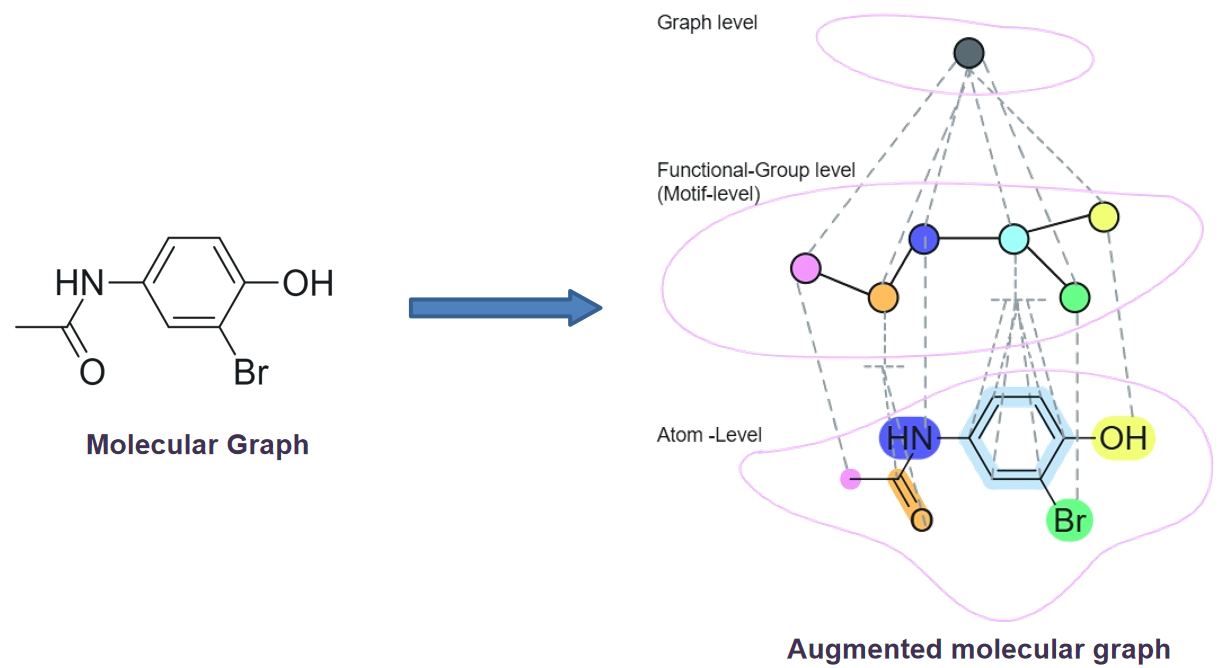
Graph Neural Networks (GNNs) often fail to explicitly leverage the chemically meaningful substructures present within molecules (i.e. functional groups (FGs)). To make this implicit information explicitly accessible to GNNs, we augment molecular graphs with artificial nodes that represent these substructures. The resulting graph are referred to as augmented graphs.
Note: Rings are also treated as functional groups in our work.
In these augmented graphs, each functional group node is connected to the atoms that constitute the group. Additionally, two functional group nodes are connected if any atom belonging to one group shares a bond with an atom from the other group. We further introduce a graph node, an extra node connected to all functional group nodes.
Among all the connection schemes we evaluated, this configuration delivered the strongest performance. We denote it using the abbreviation WFG_WFGE_WGN in our work and is shown in below figure.
Below is the command for the model and data configuration that achieved the best classification performance using augmented graphs.
python -m chebai fit --trainer=configs/training/default_trainer.yml --trainer.logger=configs/training/wandb_logger.yml --model=../python-chebai-graph/configs/model/gat_aug_amgpool.yml --model.train_metrics=configs/metrics/micro-macro-f1.yml --model.test_metrics=configs/metrics/micro-macro-f1.yml --model.val_metrics=configs/metrics/micro-macro-f1.yml --data=../python-chebai-graph/configs/data/chebi50_aug_prop_as_per_node.yml --data.init_args.batch_size=128 --trainer.accumulate_grad_batches=4 --data.init_args.num_workers=10 --model.pass_loss_kwargs=false --data.init_args.chebi_version=241 --trainer.min_epochs=200 --trainer.max_epochs=200 --model.criterion=configs/loss/bce_weighted.yml --trainer.logger.init_args.name=gatv2_amg_s0
Model Hyperparameters
GAT Architecture
To use a GAT-based model, choose one of the following configs:
-
Standard Pooling:
--model=../python-chebai-graph/configs/model/gat.ymlStandard pooling sums the learned representations from all the nodes to produce a single representation which is used for classification.
-
Atom-Augmented Node Pooling:
--model=../python-chebai-graph/configs/model/gat_aug_aagpool.ymlWith this pooling stratergy, the learned representations are first separated into two distinct sets: those from atom nodes and those from all artificial nodes (both functional groups and the graph node). The representations within each set are aggregated separately (using summation) to yield two distinct single vectors. These two resulting vectors are then concatenated before being passed to the classification layer.
-
Atom–Motif–Graph Node Pooling:
--model=../python-chebai-graph/configs/model/gat_aug_amgpool.ymlThis approach employs a finer granularity of separation, distinguishing learned representations into three distinct sets: atom nodes, Functional Group (FG) nodes, and the single graph node. Summation is performed separately on the atom node set and the FG node set, yielding two vectors. These two vectors are then concatenated along with the single vector corresponding to the graph node before the final linear layer.
GAT-specific hyperparameters
-
Number of message-passing layers:
--model.config.num_layers=5(default: 4) -
Attention heads:
--model.config.heads=4(default: 8)Note: The number of heads should be divisible by the output channels (or hidden channels if output channels are not specified).
-
To Use different GAT versions:
-
Use GAT:
--model.config.v2=False -
Use GATv2:
--model.config.v2=True(default)Note: GATv2 addresses the limitation of static attention in GAT by introducing a dynamic attention mechanism. For further details, please refer to the original GATv2 paper.
-
ResGated Architecture
To use a ResGated GNN model, choose one of the following configs:
- Atom–Motif–Graph Node Pooling:
--model=../python-chebai-graph/configs/model/res_aug_amgpool.yml - Atom-Augmented Node Pooling:
--model=../python-chebai-graph/configs/model/res_aug_aagpool.yml - Standard Pooling:
--model=../python-chebai-graph/configs/model/resgated.yml
Common Hyperparameters
These can be used for both GAT and ResGated architectures:
- Dropout:
--model.config.dropout=0.1(default: 0) - Number of final linear layers:
--model.n_linear_layers=2(default: 1)
Random Node Initialization
Static Node Initialization
In this type of node initialization, the node features (and/or edge features) of the given molecular graph are initialized only once during dataset creation with the given initialization scheme.
python -m chebai fit --trainer=configs/training/default_trainer.yml --trainer.logger=configs/training/wandb_logger.yml --model=../python-chebai-graph/configs/model/resgated.yml --model.config.in_channels=203 --model.config.edge_dim=11 --model.train_metrics=configs/metrics/micro-macro-f1.yml --model.test_metrics=configs/metrics/micro-macro-f1.yml --model.val_metrics=configs/metrics/micro-macro-f1.yml --data=../python-chebai-graph/configs/data/chebi50_graph_properties.yml --data.pad_node_features=45 --data.pad_edge_features=4 --data.init_args.batch_size=128 --trainer.accumulate_grad_batches=4 --data.init_args.num_workers=10 --data.init_args.persistent_workers=False --model.pass_loss_kwargs=false --data.init_args.chebi_version=241 --trainer.min_epochs=200 --trainer.max_epochs=200 --model.criterion=configs/loss/bce_weighted.yml --trainer.logger.init_args.name=gni_res_props+zeros_s0
In the above command, for each node we use the 158 node features (corresponding the node properties defined in chebi50_graph_properties.yml) which are retrieved from RDKit and additional 45 additional features (specified by --data.pad_node_features=45) drawn from a normal distribution (default).
You can change the distribution from which additional are drawn by using the following config in above command: --data.distribution=zeros
Available distributions: "normal", "uniform", "xavier_normal", "xavier_uniform", "zeros"
Similarly, each edge is initialized with 7 RDKit features and 4 additional features drawn from the given distribution.
If you want all node (and edge) features to be drawn from a given distribution (i.e., ignore RDKit features), use: --data=../python-chebai-graph/configs/data/chebi50_static_gni.yml
Refer to the data class code for details.
Dynamic Node Initialization
In this type of node initialization, the node features (and/or edge features) of the molecular graph are initialized at each forward pass of the model using the given initialization scheme.
Currently, dynamic node initialization is implemented only for the resgated architecture by specifying: --model=../python-chebai-graph/configs/model/resgated_dynamic_gni.yml
To keep RDKit features and add dynamically initialized features use the following config in the command:
--model.config.complete_randomness=False
--model.config.pad_node_features=45
The additional features are drawn from normal distribution (default). You can change it using:--model.config.distribution=uniform
If all features should be initialized from the given distribution, remove the complete_randomness flag (default is True).
Please find below the command for a typical dynamic node initialization:
python -m chebai fit --trainer=configs/training/default_trainer.yml --trainer.logger=configs/training/wandb_logger.yml --model=../python-chebai-graph/configs/model/resgated_dynamic_gni.yml --model.config.in_channels=203 --model.config.edge_dim=11 --model.config.complete_randomness=False --model.config.pad_node_features=45 --model.config.pad_edge_features=4 --model.train_metrics=configs/metrics/micro-macro-f1.yml --model.test_metrics=configs/metrics/micro-macro-f1.yml --model.val_metrics=configs/metrics/micro-macro-f1.yml --data=../python-chebai-graph/configs/data/chebi50_graph_properties.yml --data.init_args.batch_size=128 --trainer.accumulate_grad_batches=4 --data.init_args.num_workers=10 --data.init_args.persistent_workers=False --model.pass_loss_kwargs=false --data.init_args.chebi_version=241 --trainer.min_epochs=200 --trainer.max_epochs=200 --model.criterion=configs/loss/bce_weighted.yml --trainer.logger.init_args.name=gni_dres_props+rand_s0
2 maintainers


Metadata
2 maintainers
Release files for chebai-graph 1.2.3
For a detailed explanation of source distributions (sdists) and built distributions (wheels), please see the package formats documentation.
Source distribution (sdist)
| File | Size | Uploaded | Provenance | Actions |
|---|---|---|---|---|
| chebai_graph-1.2.3.tar.gz | 58.1 kB | With provenance | Details for chebai_graph-1.2.3.tar.gz |
Built distribution (wheel)
| File | Interpreter | ABI | Platform | Actions Reset |
|---|---|---|---|---|
| chebai_graph-1.2.3-py3-none-any.whl | Python 3 | none | any | Details for chebai_graph-1.2.3-py3-none-any.whl |
Total release size: 127.1 kB
Release files / chebai_graph-1.2.3.tar.gz
| Download URL | chebai_graph-1.2.3.tar.gz |
|---|---|
| Size | 58.1 kB |
| Tags | Source |
|
SHA-256 checksum How to use checksums |
cf56fcf628a7c5a87fc6f3bdfb2aca6140570d09b915826426586aac10f3d7a2
|
|
BLAKE2b-256 checksum How to use checksums |
04e18f8eedf7347b39b52f716d50af0568c808172c8312896f1d5c57dc7ed1e3
|
| Upload date | |
|
Uploaded using Trusted Publishing? What is trusted publishing? |
Yes |
| Uploaded via |
twine/7.0.0 CPython/3.13.14
|
Provenance
Provenance describes where a file came from. On PyPI, provenance is shared via attestations, which provide a verifiable record of the build or publishing details. View details, limitations and caveats.


PyPI Publish Attestation
PyPI verified that this artifact, at this checksum, originated from the publisher listed below.
Signed by GitHub Actions, verified by PyPI on Sep 1, 2026.
Transparency logRelease files / chebai_graph-1.2.3-py3-none-any.whl
| Download URL | chebai_graph-1.2.3-py3-none-any.whl |
|---|---|
| Size | 69.0 kB |
| Tags | Python 3 |
|
SHA-256 checksum How to use checksums |
20bbd4df31d0844c3270315df294d9d0cd0dbd3345689250f98121a186973431
|
|
BLAKE2b-256 checksum How to use checksums |
11050c778615bcabae737455bb9bc9290fa665d874ed0e385628a44b9c7e024e
|
| Upload date | |
|
Uploaded using Trusted Publishing? What is trusted publishing? |
Yes |
| Uploaded via |
twine/7.0.0 CPython/3.13.14
|
Provenance
Provenance describes where a file came from. On PyPI, provenance is shared via attestations, which provide a verifiable record of the build or publishing details. View details, limitations and caveats.
PyPI Publish Attestation
PyPI verified that this artifact, at this checksum, originated from the publisher listed below.
Signed by GitHub Actions, verified by PyPI on Sep 1, 2026.
Transparency logSecurity for chebai-graph 1.2.3
Provenance
Provenance describes where a file came from. On PyPI, provenance is shared via attestations, which provide a verifiable record of the build or publishing details. View details, limitations and caveats.
Full provenance
All 2 files in this release have been uploaded with provenance metadata.
Attestation for chebai_graph-1.2.3.tar.gz
PyPI Publish Attestation
PyPI verified that this artifact, at this checksum, originated from the publisher listed below.
Signed by GitHub Actions, verified by PyPI on Sep 1, 2026.
Transparency logA note on package security
PyPI is a repository for distributing packages, not a service for auditing them. While third-party security researchers and our staff do their best to detect and remove malicious packages, PyPI cannot guarantee the quality, security or suitability of any given package.
To learn more about protecting yourself from malicious actors, visit our package security documentation.














