


CherryTomato
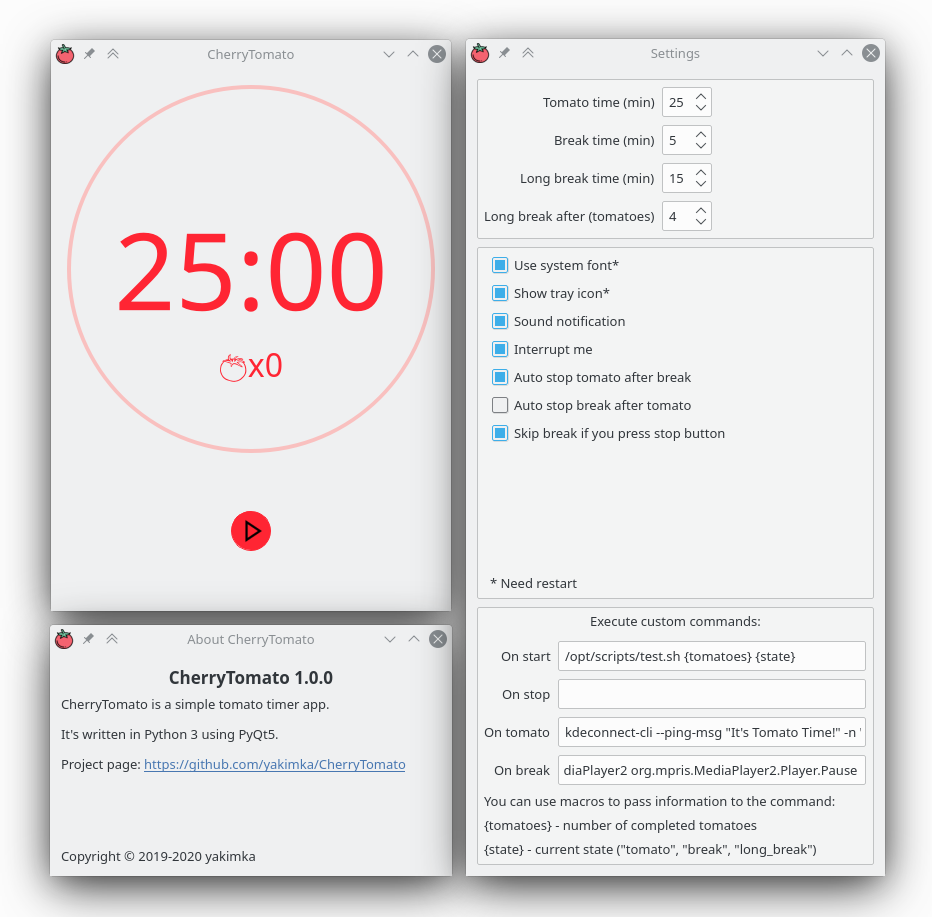
Features
- Easy to use, flexible Pomodoro Technique timer.
- Configurable intervals.
- Notification after time is over.
- Short and long break (after n tomatoes).
- Auto stop tomato and break.
- Tomatoes counter.
- Switch to tomato when user press stop.
- Execute custom commands when the timer is started, stopped or changed state.
Requirements
- Python>=3.6
- PyQt5
Tested on
- Arch Linux
- KDE5
- Xorg X server | Wayland session
- FullHD Display
- Python 3.7, 3.8, 3.9
Installing
pypi
pip install --user CherryTomato
Run in terminal: cherry_tomato (~/.local/bin must be in PATH environment variable)
Also, you can install *.desktop file for executing CherryTomato from Application Launcher or krunner.
Just create file ~/.local/share/applications/cherrytomato.desktop with content (change Icon section):
[Desktop Entry]
Type=Application
Name=CherryTomato
GenericName=Easy to use, flexible PyQt5 Pomodoro Technique timer
Icon=/home/USER/.local/lib/pythonVERSION/site-packages/CherryTomato/media/icon.png
Exec=$HOME/.local/bin/cherry_tomato
Terminal=false
Categories=Utility
Arch Linux
Also you can install CherryTomato from AUR:
yaourt -S cherrytomato
Execute custom commands
You can specify custom commands that will be triggered on some events like the timer is started, stopped or changed state.
Commands executed with python subprocess.Popen without shell=True option. It means that you can't use pipes or redirect output. You can read more about this in subprocess documentation.
But if you need pipes and other shell features you can write your own script, place it in filesystem and execute from CherryTomato.
NOTE: Processes started by commands that you executed will not be closed automatically on the CherryTomato exit.
Also, you can pass some info about timer to your custom commands with macros:
{tomatoes}- number of completed tomatoes{state}- current timer state ("tomato", "break" or "long_break")
Examples you can see on screenshot.
/opt/scripts/test.sh from screenshot example:
#!/bin/bash

tomatoes=$1
state=$2

if [ $tomatoes -gt 10 ]
then
    # ...
    # greater than 10 logic
    # ...
else
    # ...
    # lesser than 11 logic
    # ...
fi


if [ $state = "tomato" ]
then
    # ...
    # is tomato state logic
    # ...
elif [ $state = "break" ]
then
    # ...
    # is break state logic
    # ...
elif [ $state = "long_break" ]
then
    # ...
    # is long break state logic
    # ...
fi
Another examples:
-
You can play and pause music on Spotify with commands:
dbus-send --print-reply --dest=org.mpris.MediaPlayer2.spotify /org/mpris/MediaPlayer2 org.mpris.MediaPlayer2.Player.Playdbus-send --print-reply --dest=org.mpris.MediaPlayer2.spotify /org/mpris/MediaPlayer2 org.mpris.MediaPlayer2.Player.Pause -
You can send messages to your phone with KDE Connect:
kdeconnect-cli --ping-msg "It's Tomato Time!" -n "Phone name"
Troubleshooting
Tomato icon shows as empty box
See #13
Credits
- Icons made by Freepik from www.flaticon.com
- Notification sound by rhodesmas is licensed under CC BY 3.0
1 maintainer

Metadata
1 maintainer
Release files for CherryTomato 1.1.0
For a detailed explanation of source distributions (sdists) and built distributions (wheels), please see the package formats documentation.
Source distribution (sdist)
| File | Size | Uploaded | |
|---|---|---|---|
| CherryTomato-1.1.0.tar.gz | 458.5 kB | Details |
Built distribution (wheel)
| File | Interpreter | ABI | Platform | Reset |
|---|---|---|---|---|
| CherryTomato-1.1.0-py3-none-any.whl | Python 3 | none | any | Details |
Total release size: 931.0 kB
Release files / CherryTomato-1.1.0.tar.gz
| Download URL | CherryTomato-1.1.0.tar.gz |
|---|---|
| Size | 458.5 kB |
| Tags | Source |
|
SHA-256 checksum How to use checksums |
3b07a60ebf4e08cc7e57a988f2cc7ce3e0b1a033c0d9512efff4a41f42343af7
|
|
BLAKE2b-256 checksum How to use checksums |
2fe3a27373486cc81066e61def2bae79d092c9011f72b2f5ba1a83ad43bbb8ea
|
| Upload date | |
|
Uploaded using Trusted Publishing? What is trusted publishing? |
No |
| Uploaded via |
twine/3.7.1 importlib_metadata/4.10.1 pkginfo/1.8.2 requests/2.27.1 requests-toolbelt/0.9.1 tqdm/4.62.3 CPython/3.9.10
|
Release files / CherryTomato-1.1.0-py3-none-any.whl
| Download URL | CherryTomato-1.1.0-py3-none-any.whl |
|---|---|
| Size | 472.6 kB |
| Tags | Python 3 |
|
SHA-256 checksum How to use checksums |
41f2ce20f079597aef167add8c761b03f91819000f31a57def8291b3fea5001d
|
|
BLAKE2b-256 checksum How to use checksums |
f04381050db67c0fa6d6e3633ed4d2f71aa05b180e6c500429ad0c288c5383d3
|
| Upload date | |
|
Uploaded using Trusted Publishing? What is trusted publishing? |
No |
| Uploaded via |
twine/3.7.1 importlib_metadata/4.10.1 pkginfo/1.8.2 requests/2.27.1 requests-toolbelt/0.9.1 tqdm/4.62.3 CPython/3.9.10
|














