
TUI for chezmoi
Verified details
These details have been verified by PyPIProject links
GitHub Statistics
Maintainers

Project description
cheznav






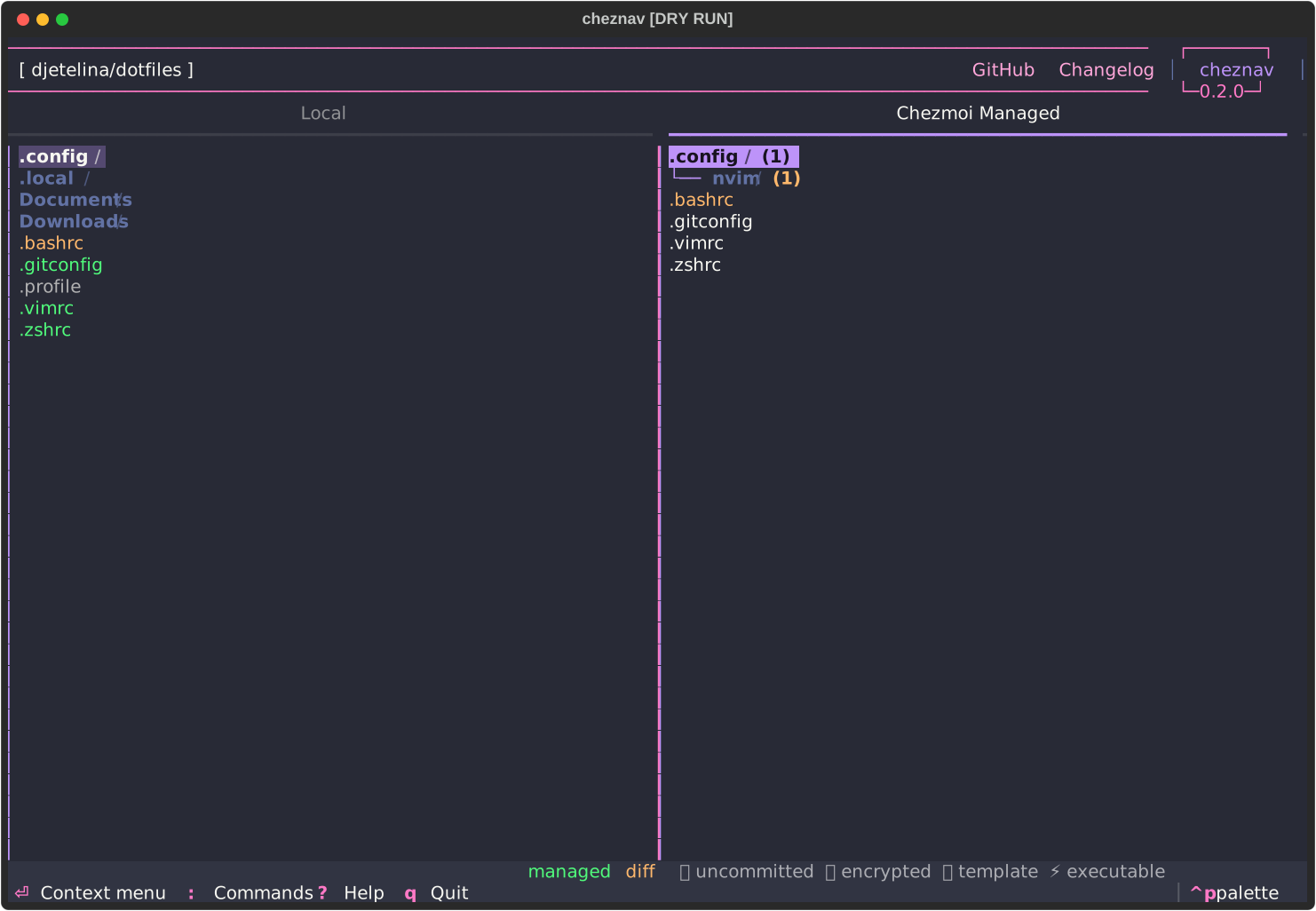
A TUI for chezmoi.
Dual-pane layout: local home directory on the left, chezmoi-managed files on the right. Cross-tree highlighting keeps selection in sync between panes.
Add, apply, diff, edit, forget, destroy, chattr, ignore — through context menus or direct keyboard shortcuts. Side-by-side diffs with accept left/right.
Supports encrypted files, templates, executables, symlinks, directories, externals, chezmoi config files, run scripts, and dry-run mode.
Install
pipx install cheznav

# or with Homebrew
brew install djetelina/tap/cheznav

# or from AUR
yay -S cheznav
Usage
cheznav            # normal
cheznav --dry-run  # pass -n to all chezmoi calls
cheznav --chezmoi-config ~/.config/chezmoi/work.toml  # use custom chezmoi config file
Controls
Navigation
| Key | Action |
|---|---|
| Left / Right | Switch panes |
| Up / Down | Move within tree |
| Space | Expand / collapse directory |
| Enter | Context menu (files), expand + context menu (directories) |
: |
Command palette |
? |
Help |
q |
Quit |
| Tab | Cycle focusable elements |
Direct shortcuts (no menu needed)
| Key | Local pane | Managed pane | Diff view |
|---|---|---|---|
a |
Add / Re-add | Apply | Accept left (keep disk) |
e |
Edit local | Edit source | |
d |
View diff | View diff | |
i |
Ignore | Ignore | |
x |
Forget | Forget | |
r |
Accept right (use chezmoi) | ||
v |
View file | View file |
Development
just init    # install pre-commit hooks + sync deps
just test    # run tests
just run     # run cheznav
just check   # run pre-commit on all files
Project details
Verified details
These details have been verified by PyPIProject links
GitHub Statistics
Maintainers


Download files
Download the file for your platform. If you're not sure which to choose, learn more about installing packages.
Source Distribution
Built Distribution
Filter files by name, interpreter, ABI, and platform.
If you're not sure about the file name format, learn more about wheel file names.
Copy a direct link to the current filters






