

Chill Electronica Streams
Description
This project is a directory of chill electronica streaming radio stations. If you like DEF CON radio or Groove Salad on Soma.fm, this is for you.
This project provides three things:
- A directory of streaming radio station URLs
- A Python API for accessing that directory
- A command-line utility to present a menu and launch VLC with a selected URL
Installation
Requirements
- OS:
- Probably most modern (reasonable) Linux distros, but late Ubuntu releases are known to work
- Late macOS versions (tested on macOS 11.4 with up-to-date homebrew installed)
- Windows probably won't work (but might be easily made to, let me know)
- Python >= 3.8 (3.9 preferred)
- VLC, with the
vlccommand line utility on your$PATH(the homebrew VLC cask on macOS sets this up for you)- Alternatively you may set
VLC_PATHto point to avlcexecutable: - e.g.
export VLC_PATH=~/Applications/VLC.app/Contents/MacOS/VLC
- Alternatively you may set
Note: VLC has a bug on Apple Silicon and ncurses is broken. Workarounds:
- Recommended: create a symlink inside
~/.terminfo:% mkdir ~/.terminfo % # if TERM=xterm-256color: % ln -s /usr/share/terminfo/78 ~/.terminfo/x % # if TERM=screen-256color: % ln -s /usr/share/terminfo/73 ~/.terminfo/s
- Install the x86-64 version
- Run with
--gui, disabling ncurses
Installation, but for real this time
You can install directly from PyPI:
pip3 install --user Chill-Streams
CLI utility: vlc-radio
The vlc-radio utility starts up VLC Media Player playing one of the stations in the directory.
It has a few modes of operation:
- VLC running in text (ncurses) mode or GUI mode
- An interactive menu of stations to select from
- Direct play by station number
- Direct play by station name
- If a partial station name is provided and the match is ambiguous, a reduced menu is presented
- First match: if the match is ambiguous, directly play the first option
CLI Options
usage: vlc-radio [-h] [-f] [--gui] [--write-shell-script] [--version]
                 [station]

Chill Streams: Chill electronica streaming [version 0.1.1.dev0]

positional arguments:
  station               Index or (partial) name of station to play

optional arguments:
  -h, --help            show this help message and exit
  -f, --first-match     Choose first partial station name match
  --gui                 Disable ncurses interface, run VLC in GUI mode
  --write-shell-script  Write a shell script that sets up environment and
                        executes vlc-radio
  --version             Print version string and exit
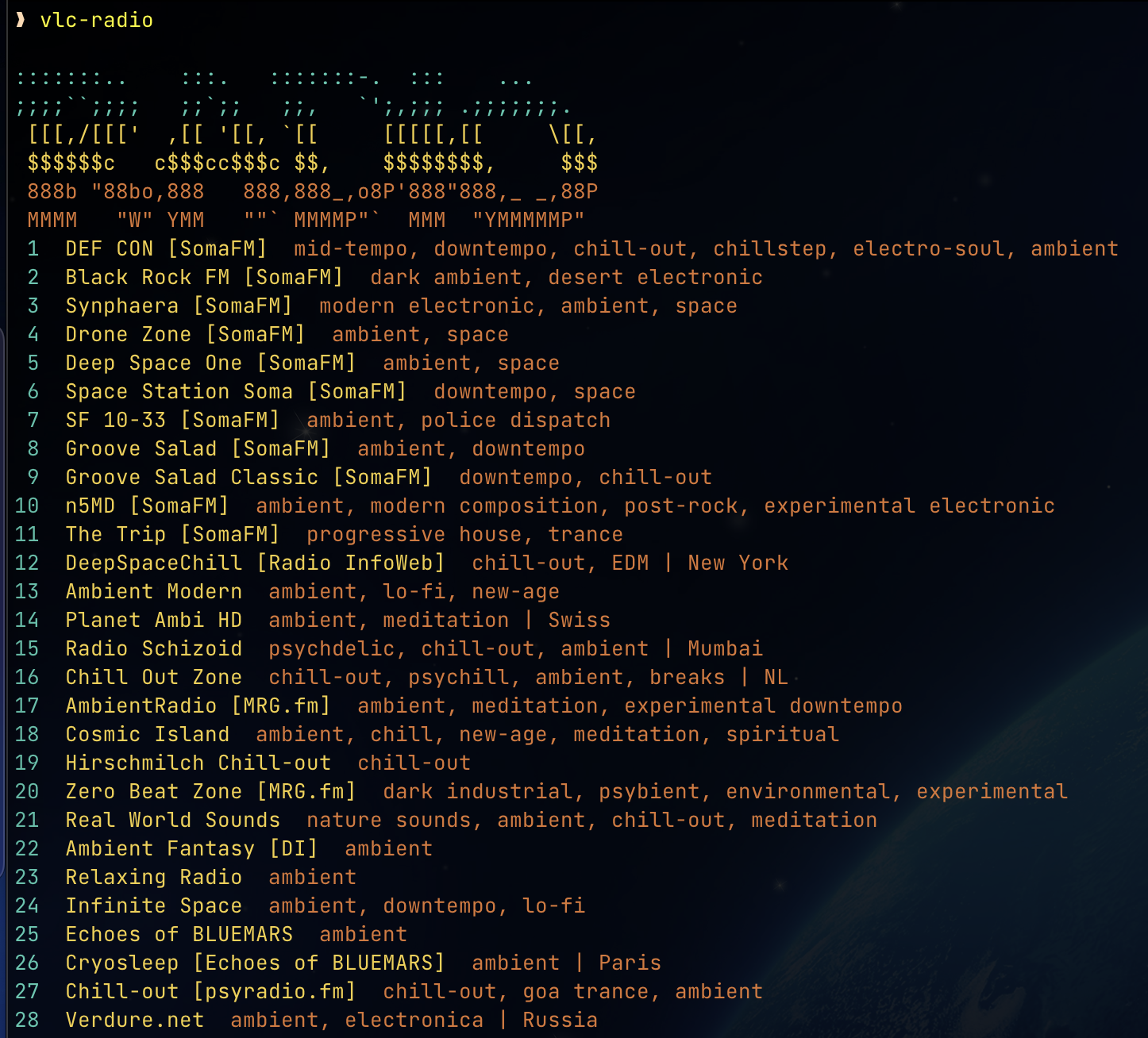
If you just run 'vlc-radio', you get a selection menu of what station to play:
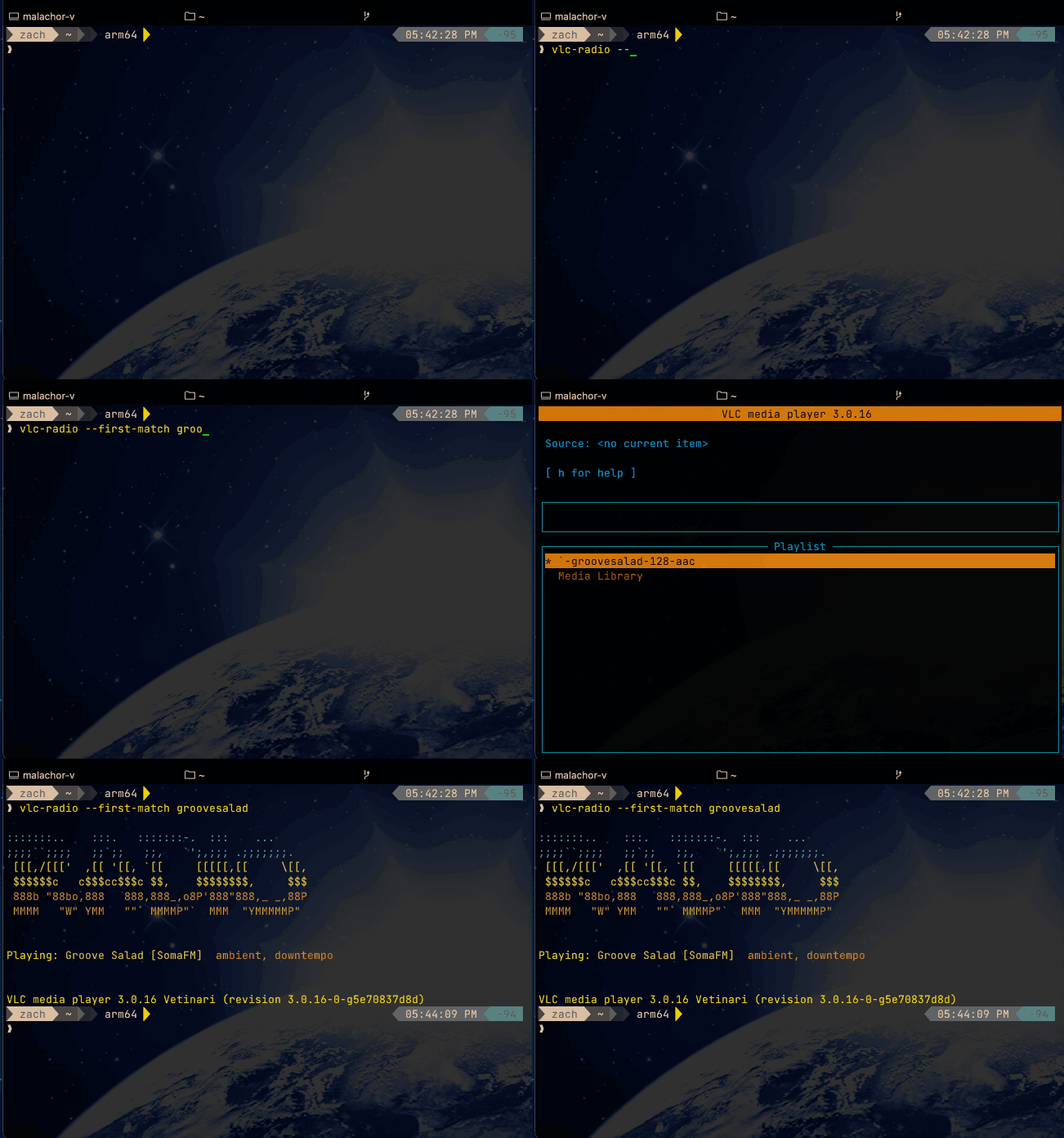
But, if you already know what station you want, you can ask for it directly:

If you know the name or partial name of a station, you can ask for it. If the match isn't ambiguous, vlc will play the station directly. If it is ambiguous, you'll get a reduced selection list:

Note that case and whitespace is ignored when asking for a station, so "DEF CON" and "defcon" are equivalent.
If you just want the first match (e.g., "groove salad" not "groove salad classic"), use the -f or --first-match option:
Bootstrap Script
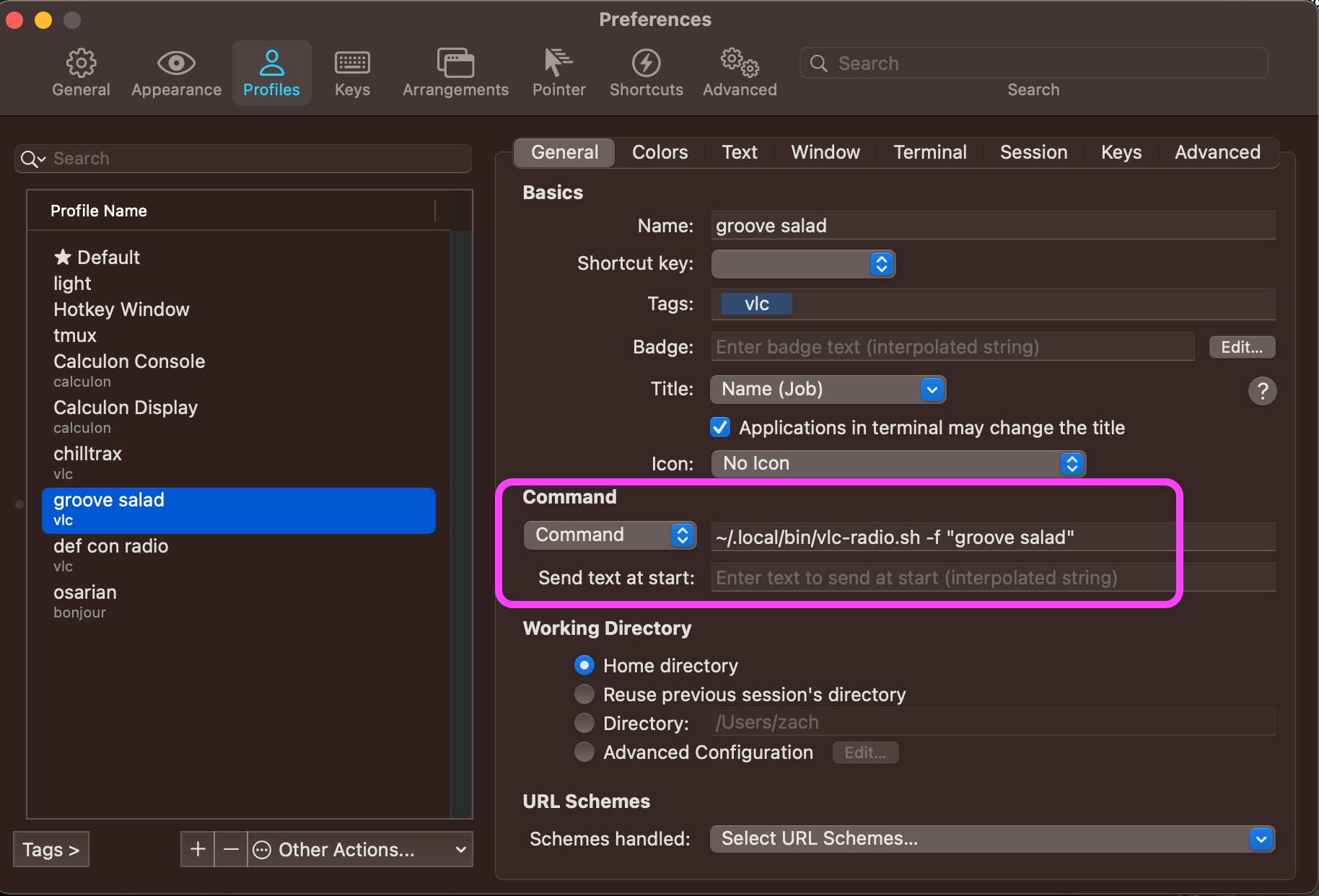
You can use the --write-shell-script option to write a shell script that will boostrap vlc-radio for use in minimal environments. This is useful, for example, to create a dedicated terminal profile that just runs vlc-radio with specific station. Since no shell gets initialized, $PATH may not be set, and the location of VLC may not be known.
Below is such a profile in iTerm2:
Credit
Thanks to nick3499 for the original project this is forked from, and for curating a comprehensive directory of shoutcast stations.
1 maintainer

Metadata
1 maintainer
Release files for Chill-Streams 0.4.4
For a detailed explanation of source distributions (sdists) and built distributions (wheels), please see the package formats documentation.
Source distribution (sdist)
| File | Size | Uploaded | |
|---|---|---|---|
| chill_streams-0.4.4.tar.gz | 17.6 kB | Details |
Built distribution (wheel)
| File | Interpreter | ABI | Platform | Reset |
|---|---|---|---|---|
| Chill_Streams-0.4.4-py3-none-any.whl | Python 3 | none | any | Details |
Total release size: 39.4 kB
Release files / chill_streams-0.4.4.tar.gz
| Download URL | chill_streams-0.4.4.tar.gz |
|---|---|
| Size | 17.6 kB |
| Tags | Source |
|
SHA-256 checksum How to use checksums |
4182d4f8f462922759be20a847b40118e630bd92a8650c7f916dd57f429b7bd3
|
|
BLAKE2b-256 checksum How to use checksums |
ecf19848ed1c453dba0525489bb144de70811e18801e637d50cf9522618e21c5
|
| Upload date | |
|
Uploaded using Trusted Publishing? What is trusted publishing? |
No |
| Uploaded via |
twine/5.1.1 CPython/3.13.0
|
Release files / Chill_Streams-0.4.4-py3-none-any.whl
| Download URL | Chill_Streams-0.4.4-py3-none-any.whl |
|---|---|
| Size | 21.8 kB |
| Tags | Python 3 |
|
SHA-256 checksum How to use checksums |
7c2c93de87a317f4762acbe9a45747bc7202622fc5ec7f509302c1daf6572df4
|
|
BLAKE2b-256 checksum How to use checksums |
2e6ad9286a103d923eec0eb6919a4051c4f533ad2a3e1b9af609ef70df9e819b
|
| Upload date | |
|
Uploaded using Trusted Publishing? What is trusted publishing? |
No |
| Uploaded via |
twine/5.1.1 CPython/3.13.0
|














