
chispa





chispa provides fast PySpark test helper methods that output descriptive error messages.
This library makes it easy to write high quality PySpark code.
Fun fact: "chispa" means Spark in Spanish ;)
Installation
Install the latest version with
pip install chispa
Or if you use Poetry add this library as a development dependency with
poetry add chispa --group dev
Column equality
Suppose you have a function that removes the non-word characters in a string.
def remove_non_word_characters(col):
    return F.regexp_replace(col, "[^\\w\\s]+", "")
Create a SparkSession so you can create DataFrames.
from pyspark.sql import SparkSession

spark = (SparkSession.builder
  .master("local")
  .appName("chispa")
  .getOrCreate())
Create a DataFrame with a column that contains strings with non-word characters, run the remove_non_word_characters function, and check that all these characters are removed with the chispa assert_column_equality method.
import pytest

from chispa.column_comparer import assert_column_equality
import pyspark.sql.functions as F

def test_remove_non_word_characters_short():
    data = [
        ("jo&&se", "jose"),
        ("**li**", "li"),
        ("#::luisa", "luisa"),
        (None, None)
    ]
    df = (spark.createDataFrame(data, ["name", "expected_name"])
        .withColumn("clean_name", remove_non_word_characters(F.col("name"))))
    assert_column_equality(df, "clean_name", "expected_name")
Let's write another test that'll fail to see how the descriptive error message lets you easily debug the underlying issue.
Here's the failing test:
def test_remove_non_word_characters_nice_error():
    data = [
        ("matt7", "matt"),
        ("bill&", "bill"),
        ("isabela*", "isabela"),
        (None, None)
    ]
    df = (spark.createDataFrame(data, ["name", "expected_name"])
        .withColumn("clean_name", remove_non_word_characters(F.col("name"))))
    assert_column_equality(df, "clean_name", "expected_name")
Here's the nicely formatted error message:
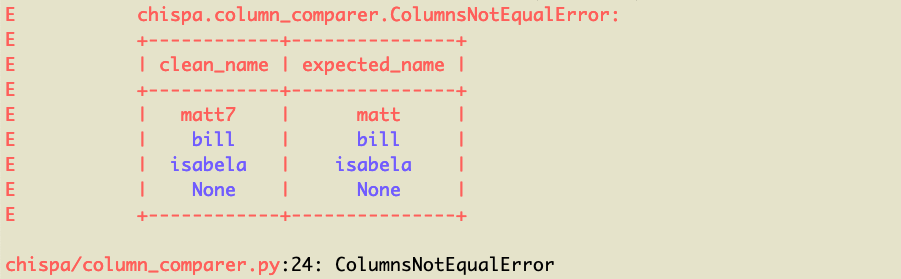
You can see the matt7 / matt row of data is what's causing the error (note it's highlighted in red). The other rows are colored blue because they're equal.
DataFrame equality
We can also test the remove_non_word_characters method by creating two DataFrames and verifying that they're equal.
Creating two DataFrames is slower and requires more code, but comparing entire DataFrames is necessary for some tests.
from chispa.dataframe_comparer import *

def test_remove_non_word_characters_long():
    source_data = [
        ("jo&&se",),
        ("**li**",),
        ("#::luisa",),
        (None,)
    ]
    source_df = spark.createDataFrame(source_data, ["name"])

    actual_df = source_df.withColumn(
        "clean_name",
        remove_non_word_characters(F.col("name"))
    )

    expected_data = [
        ("jo&&se", "jose"),
        ("**li**", "li"),
        ("#::luisa", "luisa"),
        (None, None)
    ]
    expected_df = spark.createDataFrame(expected_data, ["name", "clean_name"])

    assert_df_equality(actual_df, expected_df)
Let's write another test that'll return an error, so you can see the descriptive error message.
def test_remove_non_word_characters_long_error():
    source_data = [
        ("matt7",),
        ("bill&",),
        ("isabela*",),
        (None,)
    ]
    source_df = spark.createDataFrame(source_data, ["name"])

    actual_df = source_df.withColumn(
        "clean_name",
        remove_non_word_characters(F.col("name"))
    )

    expected_data = [
        ("matt7", "matt"),
        ("bill&", "bill"),
        ("isabela*", "isabela"),
        (None, None)
    ]
    expected_df = spark.createDataFrame(expected_data, ["name", "clean_name"])

    assert_df_equality(actual_df, expected_df)
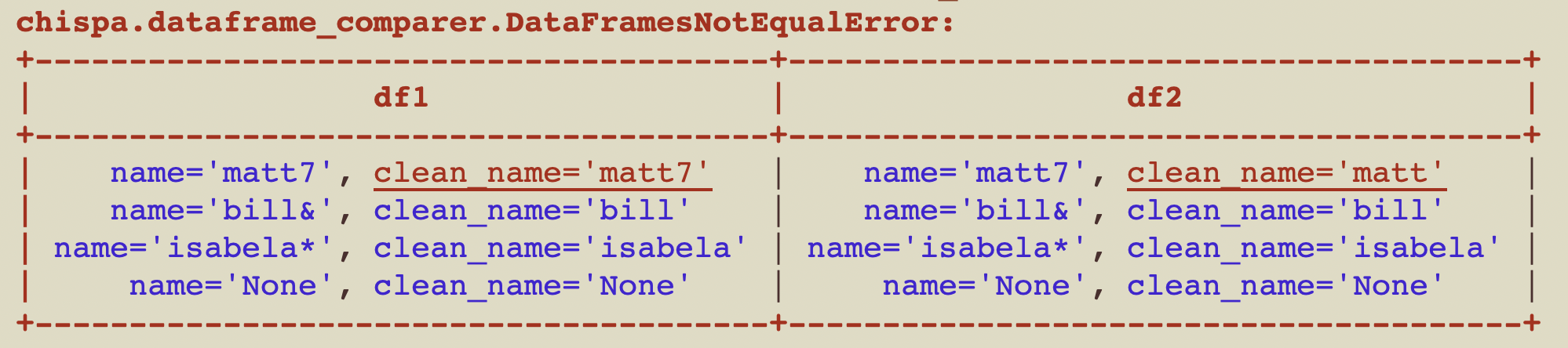
Here's the nicely formatted error message:
Ignore row order
You can easily compare DataFrames, ignoring the order of the rows. The content of the DataFrames is usually what matters, not the order of the rows.
Here are the contents of df1:
+--------+
|some_num|
+--------+
|       1|
|       2|
|       3|
+--------+
Here are the contents of df2:
+--------+
|some_num|
+--------+
|       2|
|       1|
|       3|
+--------+
Here's how to confirm df1 and df2 are equal when the row order is ignored.
assert_df_equality(df1, df2, ignore_row_order=True)
If you don't specify to ignore_row_order then the test will error out with this message:
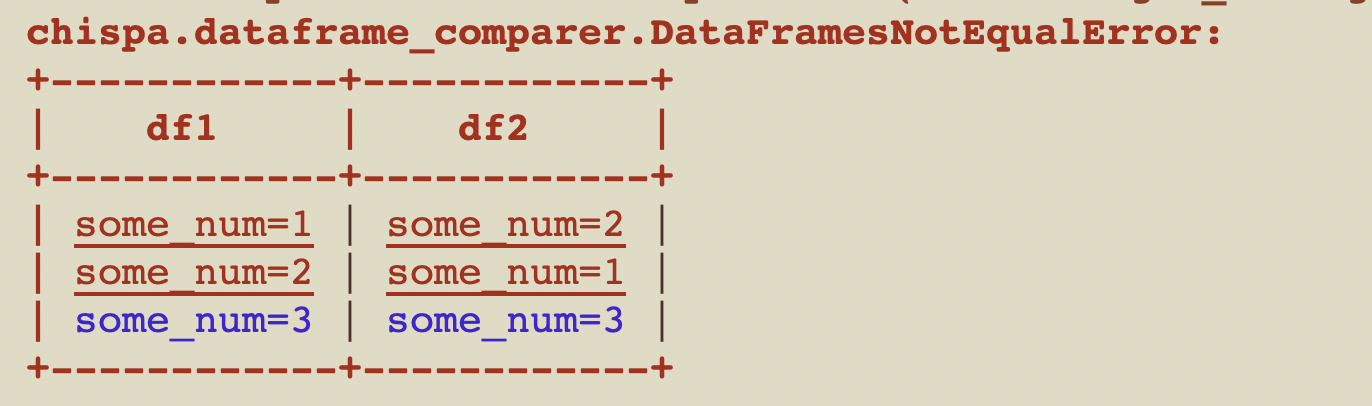
The rows aren't ordered by default because sorting slows down the function.
Ignore column order
This section explains how to compare DataFrames, ignoring the order of the columns.
Suppose you have the following df1:
+----+----+
|num1|num2|
+----+----+
|   1|   7|
|   2|   8|
|   3|   9|
+----+----+
Here are the contents of df2:
+----+----+
|num2|num1|
+----+----+
|   7|   1|
|   8|   2|
|   9|   3|
+----+----+
Here's how to compare the equality of df1 and df2, ignoring the column order:
assert_df_equality(df1, df2, ignore_column_order=True)
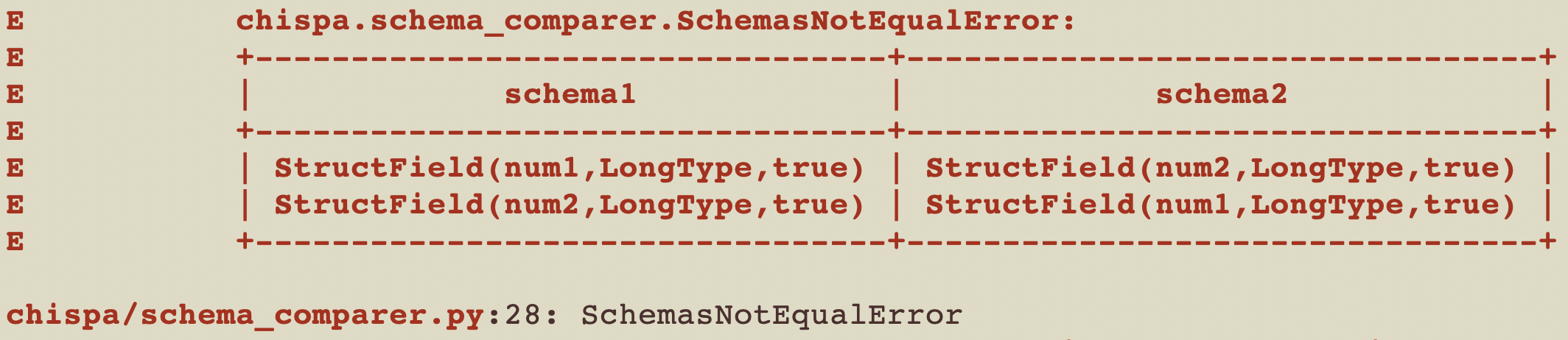
Here's the error message you'll see if you run assert_df_equality(df1, df2), without ignoring the column order.
Ignore specific columns
This section explains how to compare DataFrames, ignoring specific columns.
Suppose you have the following df1:
+------------+-------------+
|    name    | clean_name  |
+------------+-------------+
| "matt7"    |   "matt7"    |
| "bill&"    |   "bill"    |
| "isabela*" |   "isabela" |
| "None"     |   "None"    |
+------------+-------------+
Here are the contents of df2:
+------------+-------------+
|    name    | clean_name  |
+------------+-------------+
| "matt7"    |   "matt"    |
| "bill&"    |   "bill"    |
| "isabela*" |   "isabela" |
| "None"     |   "None"    |
+------------+-------------+
Here's how to compare the equality of df1 and df2, ignoring the column clean_name:
assert_df_equality(df1, df2, ignore_columns=["clean_name"])
Here's the error message you'll see if you run assert_df_equality(df1, df2), without ignoring the column clean_name.
Ignore nullability
Each column in a schema has three properties: a name, data type, and nullable property. The column can accept null values if nullable is set to true.
You'll sometimes want to ignore the nullable property when making DataFrame comparisons.
Suppose you have the following df1:
+-----+---+
| name|age|
+-----+---+
| juan|  7|
|bruna|  8|
+-----+---+
And this df2:
+-----+---+
| name|age|
+-----+---+
| juan|  7|
|bruna|  8|
+-----+---+
You might be surprised to find that in this example, df1 and df2 are not equal and will error out with this message:
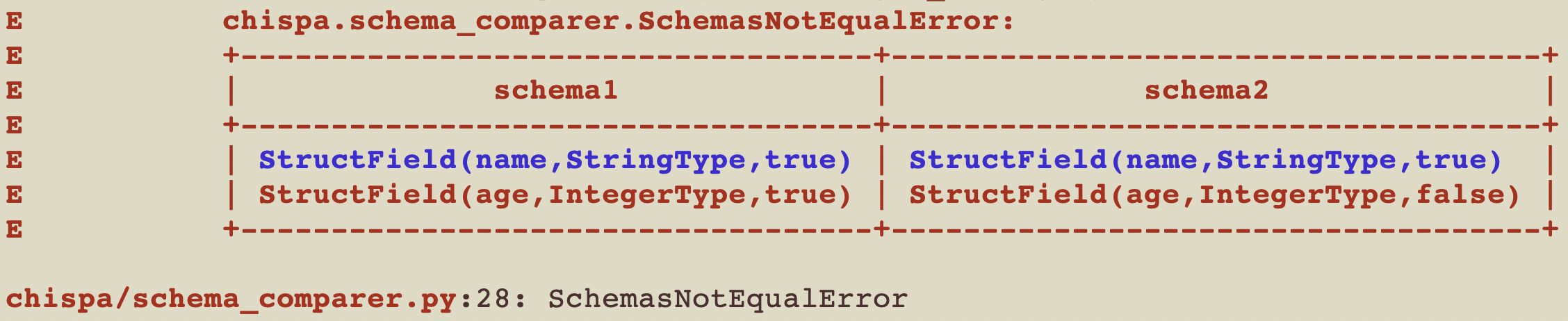
Examine the code in this contrived example to better understand the error:
def ignore_nullable_property():
    s1 = StructType([
       StructField("name", StringType(), True),
       StructField("age", IntegerType(), True)])
    df1 = spark.createDataFrame([("juan", 7), ("bruna", 8)], s1)
    s2 = StructType([
       StructField("name", StringType(), True),
       StructField("age", IntegerType(), False)])
    df2 = spark.createDataFrame([("juan", 7), ("bruna", 8)], s2)
    assert_df_equality(df1, df2)
You can ignore the nullable property when assessing equality by adding a flag:
assert_df_equality(df1, df2, ignore_nullable=True)
Elements contained within an ArrayType() also have a nullable property, in addition to the nullable property of the column schema. These are also ignored when passing ignore_nullable=True.
Again, examine the following code to understand the error that ignore_nullable=True bypasses:
def ignore_nullable_property_array():
    s1 = StructType([
        StructField("name", StringType(), True),
        StructField("coords", ArrayType(DoubleType(), True), True),])
    df1 = spark.createDataFrame([("juan", [1.42, 3.5]), ("bruna", [2.76, 3.2])], s1)
    s2 = StructType([
        StructField("name", StringType(), True),
        StructField("coords", ArrayType(DoubleType(), False), True),])
    df2 = spark.createDataFrame([("juan", [1.42, 3.5]), ("bruna", [2.76, 3.2])], s2)
    assert_df_equality(df1, df2)
Allow NaN equality
Python has NaN (not a number) values and two NaN values are not considered equal by default. Create two NaN values, compare them, and confirm they're not considered equal by default.
nan1 = float('nan')
nan2 = float('nan')
nan1 == nan2 # False
pandas considers NaN values to be equal by default, but this library requires you to set a flag to consider two NaN values to be equal.
assert_df_equality(df1, df2, allow_nan_equality=True)
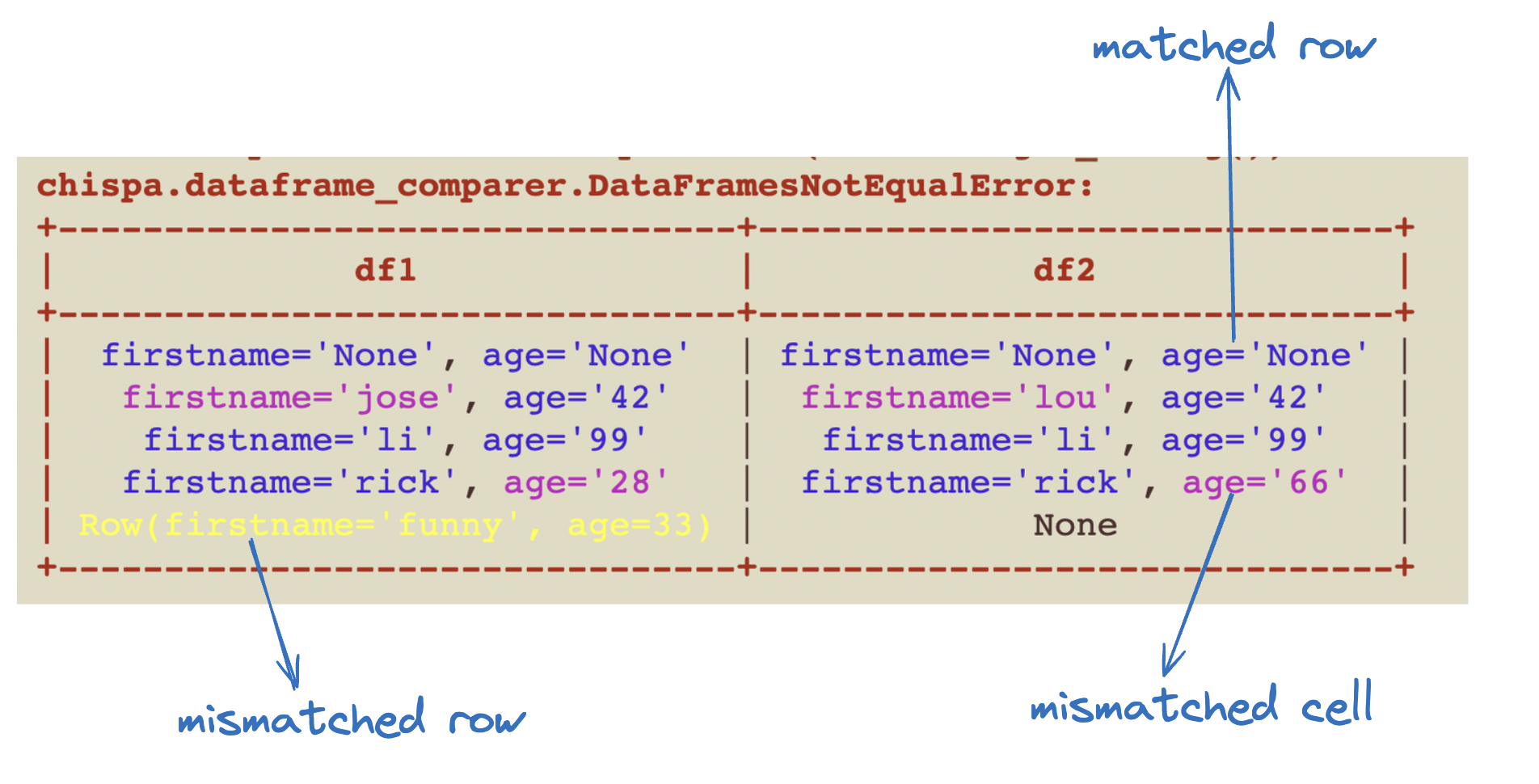
Customize formatting
You can specify custom formats for the printed error messages as follows:
from chispa import FormattingConfig

formats = FormattingConfig(
        mismatched_rows={"color": "light_yellow"},
        matched_rows={"color": "cyan", "style": "bold"},
        mismatched_cells={"color": "purple"},
        matched_cells={"color": "blue"},
    )

assert_basic_rows_equality(df1.collect(), df2.collect(), formats=formats)
or similarly:
from chispa import FormattingConfig, Color, Style

formats = FormattingConfig(
        mismatched_rows={"color": Color.LIGHT_YELLOW},
        matched_rows={"color": Color.CYAN, "style": Style.BOLD},
        mismatched_cells={"color": Color.PURPLE},
        matched_cells={"color": Color.BLUE},
    )

assert_basic_rows_equality(df1.collect(), df2.collect(), formats=formats)
You can also define these formats in conftest.py and inject them via a fixture:
@pytest.fixture()
def chispa_formats():
    return FormattingConfig(
        mismatched_rows={"color": "light_yellow"},
        matched_rows={"color": "cyan", "style": "bold"},
        mismatched_cells={"color": "purple"},
        matched_cells={"color": "blue"},
    )

def test_shows_assert_basic_rows_equality(chispa_formats):
  ...
  assert_basic_rows_equality(df1.collect(), df2.collect(), formats=chispa_formats)
Approximate column equality
We can check if columns are approximately equal, which is especially useful for floating number comparisons.
Here's a test that creates a DataFrame with two floating point columns and verifies that the columns are approximately equal. In this example, values are considered approximately equal if the difference is less than 0.1.
def test_approx_col_equality_same():
    data = [
        (1.1, 1.1),
        (2.2, 2.15),
        (3.3, 3.37),
        (None, None)
    ]
    df = spark.createDataFrame(data, ["num1", "num2"])
    assert_approx_column_equality(df, "num1", "num2", 0.1)
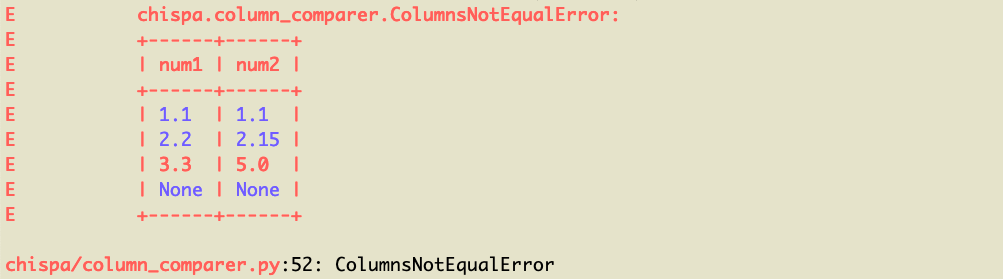
Here's an example of a test with columns that are not approximately equal.
def test_approx_col_equality_different():
    data = [
        (1.1, 1.1),
        (2.2, 2.15),
        (3.3, 5.0),
        (None, None)
    ]
    df = spark.createDataFrame(data, ["num1", "num2"])
    assert_approx_column_equality(df, "num1", "num2", 0.1)
This failing test will output a readable error message so the issue is easy to debug.
Approximate DataFrame equality
Let's create two DataFrames and confirm they're approximately equal.
def test_approx_df_equality_same():
    data1 = [
        (1.1, "a"),
        (2.2, "b"),
        (3.3, "c"),
        (None, None)
    ]
    df1 = spark.createDataFrame(data1, ["num", "letter"])

    data2 = [
        (1.05, "a"),
        (2.13, "b"),
        (3.3, "c"),
        (None, None)
    ]
    df2 = spark.createDataFrame(data2, ["num", "letter"])

    assert_approx_df_equality(df1, df2, 0.1)
The assert_approx_df_equality method is smart and will only perform approximate equality operations for floating point numbers in DataFrames. It'll perform regular equality for strings and other types.
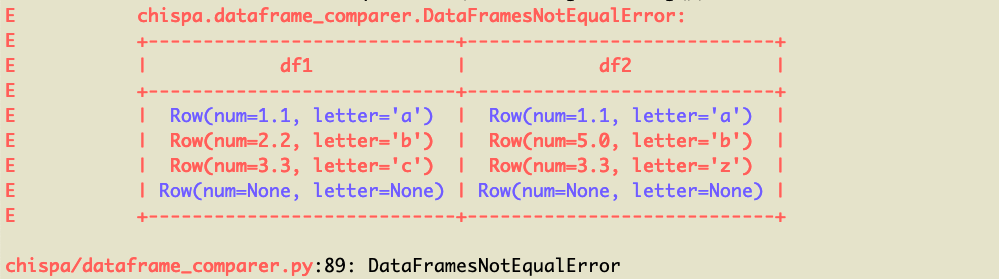
Let's perform an approximate equality comparison for two DataFrames that are not equal.
def test_approx_df_equality_different():
    data1 = [
        (1.1, "a"),
        (2.2, "b"),
        (3.3, "c"),
        (None, None)
    ]
    df1 = spark.createDataFrame(data1, ["num", "letter"])

    data2 = [
        (1.1, "a"),
        (5.0, "b"),
        (3.3, "z"),
        (None, None)
    ]
    df2 = spark.createDataFrame(data2, ["num", "letter"])

    assert_approx_df_equality(df1, df2, 0.1)
Here's the pretty error message that's outputted:
Schema mismatch messages
DataFrame equality messages peform schema comparisons before analyzing the actual content of the DataFrames. DataFrames that don't have the same schemas should error out as fast as possible.
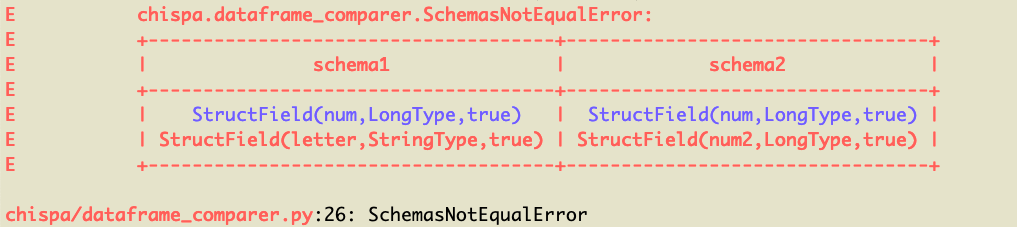
Let's compare a DataFrame that has a string column an integer column with a DataFrame that has two integer columns to observe the schema mismatch message.
def test_schema_mismatch_message():
    data1 = [
        (1, "a"),
        (2, "b"),
        (3, "c"),
        (None, None)
    ]
    df1 = spark.createDataFrame(data1, ["num", "letter"])

    data2 = [
        (1, 6),
        (2, 7),
        (3, 8),
        (None, None)
    ]
    df2 = spark.createDataFrame(data2, ["num", "num2"])

    assert_df_equality(df1, df2)
Here's the error message:
Supported PySpark / Python versions
chispa currently supports PySpark 2.4+ and Python 3.5+.
Use chispa v0.8.2 if you're using an older Python version.
PySpark 2 support will be dropped when chispa 1.x is released.
Benchmarks
TODO: Need to benchmark these methods vs. the spark-testing-base ones
Developing chispa on your local machine
You are encouraged to clone and/or fork this repo.
This project uses Poetry for packaging and dependency management.
- Setup the virtual environment with
poetry install - Run the tests with
poetry run pytest tests
Studying the codebase is a great way to learn about PySpark!
Contributing
Anyone is encouraged to submit a pull request, open an issue, or submit a bug report.
We're happy to promote folks to be library maintainers if they make good contributions.
1 maintainer

Metadata
1 maintainer
Release files for chispa 0.12.0
For a detailed explanation of source distributions (sdists) and built distributions (wheels), please see the package formats documentation.
Source distribution (sdist)
| File | Size | Uploaded | Provenance | |
|---|---|---|---|---|
| chispa-0.12.0.tar.gz | 19.7 kB | With provenance | Details |
Built distribution (wheel)
| File | Interpreter | ABI | Platform | Reset |
|---|---|---|---|---|
| chispa-0.12.0-py3-none-any.whl | Python 3 | none | any | Details |
Total release size: 40.7 kB
Release files / chispa-0.12.0.tar.gz
| Download URL | chispa-0.12.0.tar.gz |
|---|---|
| Size | 19.7 kB |
| Tags | Source |
|
SHA-256 checksum How to use checksums |
4dcf4de9481979af77f8d697cb0f27f2599c21244537b4995204cdc529ce9a1b
|
|
BLAKE2b-256 checksum How to use checksums |
806b271e73b92c72ae4c4223a9e98ec5d7c8cb6349f33e33e64a2688116751b7
|
| Upload date | |
|
Uploaded using Trusted Publishing? What is trusted publishing? |
Yes |
| Uploaded via |
twine/6.1.0 CPython/3.13.7
|
Provenance
Provenance describes where a file came from. On PyPI, provenance is shared via attestations, which provide a verifiable record of the build or publishing details. View details, limitations and caveats.


PyPI Publish Attestation
PyPI verified that this artifact, at this checksum, originated from the publisher listed below.
Signed by GitHub Actions, verified by PyPI on Mar 24, 2026.
Transparency logRelease files / chispa-0.12.0-py3-none-any.whl
| Download URL | chispa-0.12.0-py3-none-any.whl |
|---|---|
| Size | 21.0 kB |
| Tags | Python 3 |
|
SHA-256 checksum How to use checksums |
e7a04239d5edf2001f3d5b1f349ce6378233684901915e8c984609ea5837f91d
|
|
BLAKE2b-256 checksum How to use checksums |
80199a431f9f52cbaa5ba5b0d46f489337f51948cf579cb7eea7137c675fdb73
|
| Upload date | |
|
Uploaded using Trusted Publishing? What is trusted publishing? |
Yes |
| Uploaded via |
twine/6.1.0 CPython/3.13.7
|
Provenance
Provenance describes where a file came from. On PyPI, provenance is shared via attestations, which provide a verifiable record of the build or publishing details. View details, limitations and caveats.
PyPI Publish Attestation
PyPI verified that this artifact, at this checksum, originated from the publisher listed below.
Signed by GitHub Actions, verified by PyPI on Mar 24, 2026.
Transparency logSecurity for chispa 0.12.0
Provenance
Provenance describes where a file came from. On PyPI, provenance is shared via attestations, which provide a verifiable record of the build or publishing details. View details, limitations and caveats.
Full provenance
All 2 files in this release have been uploaded with provenance metadata.
Attestation for chispa-0.12.0.tar.gz
PyPI Publish Attestation
PyPI verified that this artifact, at this checksum, originated from the publisher listed below.
Signed by GitHub Actions, verified by PyPI on Mar 24, 2026.
Transparency logA note on package security
PyPI is a repository for distributing packages, not a service for auditing them. While third-party security researchers and our staff do their best to detect and remove malicious packages, PyPI cannot guarantee the quality, security or suitability of any given package.
To learn more about protecting yourself from malicious actors, visit our package security documentation.














