
CIDR-Man


Built due to frustrations with python's built-in ipaddress library's performance, code complexity, and accuracy.
CIDR-Man is an accurate high-performance IP address subnetting library.
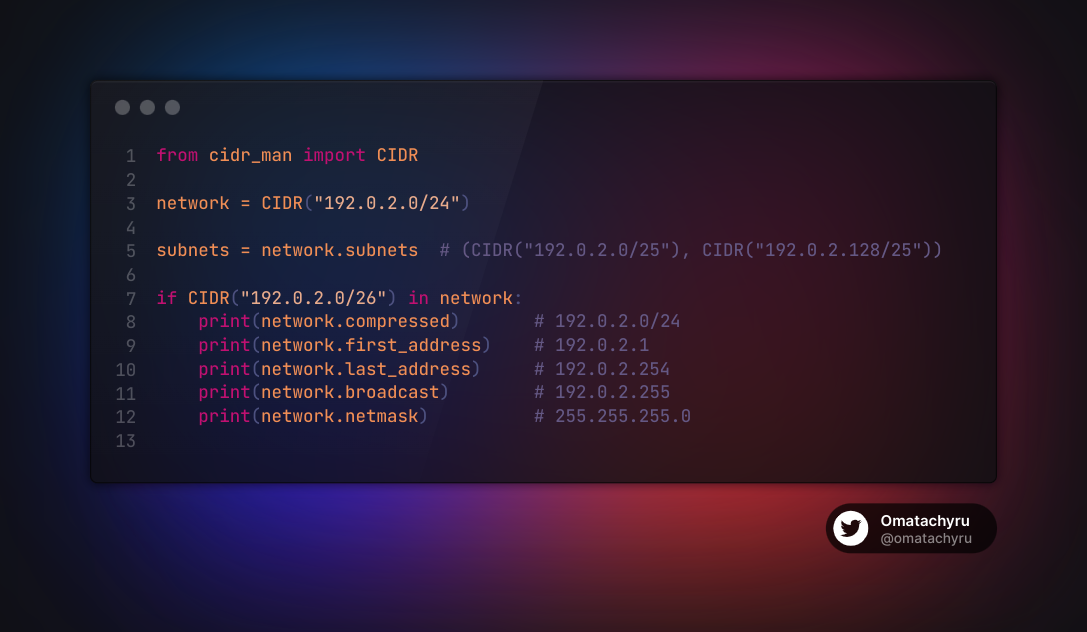
While the interface of this new library is a little different from that of the built-in library, we think you'll find it to be more "pythonic", and quite intuitive.
NOTE: While writing tests for this library we discovered that a number of the is_<address type> flags from the python built-in library were returning incorrect results. CIDR-Man is accurate as per the RFCs at the time of writing, thus our responses may differ.
Key performance metrics (vs Built-in ipaddress)
__init__: 7.822xsupernet: 2.186xsubnet_of: 8.516xsubnets: 3.966xcompressed: 1.303x
CIDRs explained
CIDR (or Classless Inter-Domain Routing) is a way of representing and handling IP addresses and networks. Introduced in 1993 to replace the previous IP address class architecture, CIDRs offer more flexibility in addressing hierarchy in network designs. A block of IP addresses in CIDR notation would be represented as the first IP in the block followed by the number of bits in the bitmask separated by a forward slash.
For example, the CIDR 192.0.2.0/24 represents an IP address block spanning 192.0.2.0 to 192.0.2.255. Expanding this out we get the following:
Network:                                192.0.2.0
Network (as binary):                    11000000000000000000001000000000
Netmask:                                255.255.255.0
Netmask (as binary):                    11111111111111111111111100000000
Broadcast IP:                           192.0.2.255
Broadcast IP (as binary):               11000000000000000000001011111111
First usable IP (normally the Gateway): 192.0.2.1
First usable IP (as binary):            11000000000000000000001000000001
Last usable IP:                         192.0.2.255
Last usable IP (as binary):             11000000000000000000001011111110
Using this representation a single IP address is simply one with a full bitmask, thus 192.0.2.1/32 is the same as 192.0.2.1.
This means that our network subnetting library only needs a single class CIDR.
Utilising a single type CIDR to represent both network objects and individual addresses results in considerably more concise code.
Usage
Initialisation
Initialising a new CIDR object is easy and supports all common input types (presentation format, integer format, network/big-endian byte format, and built-in IP & Network types).
from cidr_man import CIDR, Version

## Create from string (presentation format)
network = CIDR("192.0.2.0/24")
ip = CIDR("192.0.2.1")

network_v6 = CIDR("2001:db8::/56")
machine_alloc_v6 = CIDR("2001:db8::/64")
ip_v6 = CIDR("2001:db8::1")

## Create from built-in
network = CIDR(IPv4Network("192.0.2.0/24"))
ip = CIDR(IPv4Address("192.0.2.1"))

network_v6 = CIDR(IPv6Network("2001:db8::/56"))
machine_alloc_v6 = CIDR(IPv6Network("2001:db8::/64"))
ip_v6 = CIDR(IPv6Address("2001:db8::1"))


## Create from integer
network = CIDR(3221225984, version=Version.v4, prefix_len=24)
ip = CIDR(3221225985, version=Version.v4)

network_v6 = CIDR(42540766411282592856903984951653826560, version=Version.v6, prefix_len=56)
ip_v6 = CIDR(42540766411282592856903984951653826561, version=Version.v6)


## Create from byte
network = CIDR(b'\xc0\x00\x02\x01', prefix_len=24)
ip = CIDR(b'\xc0\x00\x02\x01')

network_v6 = CIDR(b' \x01\r\xb8\x00\x00\x00\x00\x00\x00\x00\x00\x00\x00\x00\x01', prefix_len=56)
ip_v6 = CIDR(b' \x01\r\xb8\x00\x00\x00\x00\x00\x00\x00\x00\x00\x00\x00\x01')
Get subnets
Retrieving the direct subnets of a network is easy.
To get the pair
network = CIDR("192.0.2.0/24")
subnets = network.subnets  # (CIDR("192.0.2.0/25"), CIDR("192.0.2.128/25"))
To get only the "left" (low-bit subnet)
left = network.left # CIDR("192.0.2.0/25")
To get only the "right" (high-bit subnet)
right = network.right # CIDR("192.0.2.128/25")
These can be chained for quick traversal
left_of_left = network.left.left  # CIDR("192.0.2.0/26")
right_of_left = network.left.right  # CIDR(192.0.2.64/26")
Get supernets
Retrieving the direct supernet of a network is easy.
network = CIDR("192.0.2.0/25")
supernet = network.supernet()  # CIDR("192.0.2.0/24")
Contains
Checking if an address or network is the subnet of another is made simpler, with subnet in supernet syntax fully supported.
network_1 = CIDR("192.0.2.0/24")
network_2 = CIDR("192.0.2.0/26")

result = network_2 in network_1
# or
result = network_1.contains(network_2)
Alternatively if you prefer the built-in library's style we've included subnet_of for compatibility.
network_2.subnet_of(network_1)
As well as additional support for subnet < supernet,subnet <= supernet,subnet > supernet, subnet >= supernet, and subnet == supernet
*NOTE: These are perhaps counter-intuitive as this in the inverse of the size of the address space, but as this is how python's library defines the operations we're maintaining compatibility
subnet < supernet   # Returns True if subnet has less specific prefix than supernet
subnet <= supernet  # Returns True if subnet has a less than or equal prefix than supernet
subnet > supernet   # Returns True if subnet has a less specific prefix than supernet
subnet >= supernet  # Returns True if subnet has a greater than or equal prefix supernet
subnet == supernet  # Returns True if subnet is exactly equal to supernet
Packed (Byte format)
ip_b = ip.packed  # b'\xc0\x00\x02\x01'

ipv6_b = ip.packed  # b' \x01\r\xb8\x00\x00\x00\x00\x00\x00\x00\x00\x00\x00\x00\x01'
Compressed (String / Presentation format)
CIDRs that have a prefix_len equal to the maximum for their IP version (that is 32 for IPv4, and 128 for IPv6) will be presented in IP presentation format.
Therefore, both CIDR("192.0.2.1") and CIDR("192.0.2.1/32") produce the presentation format "192.0.2.1".
# IPv4

ip_s = ip.compressed                # "192.0.2.1"
### or
ip_s = str(ip)                      # "192.0.2.1"


## CIDRs who's prefix is not the max_prefix are presented in CIDR presentation format
network_s = network.compressed      # "192.0.2.0/24"
### or
network_s = str(ip)                 # "192.0.2.0/24"


# IPv6
ipv6_s = ip.compressed              # "2001:db8::1"
### or
ipv6_s = str(ip)                    # "2001:db8::1"


network_v6_s = network.compressed   # "2001:db8::/56"
## or
network_v6_s = str(ip)              # "2001:db8::/56"
Important addresses
network_address, broadcast_address, netmask, inverse_netmask, first_address, and last_address each provide the relevant addresses as new CIDR objects.
# IPv4
net_address         = network.network_address     # 192.0.2.0
first_address       = network.first_address       # 192.0.2.1
last_address        = network.last_address        # 192.0.2.254
broadcast_address   = network.broadcast_address   # 192.0.2.255
netmask             = network.netmask             # 255.255.255.0
inverse_netmask     = network.inverse_netmask     # 0.0.0.255

# IPv6
net_address_v6         = network_v6.network_address    # 2001:db8::
first_address_v6       = network_v6.first_address      # 2001:db8::1
last_address_v6        = network_v6.last_address       # 2001:db8:0:ff:ffff:ffff:ffff:fffe
broadcast_address_v6   = network_v6.broadcast_address  # 2001:db8:0:ff:ffff:ffff:ffff:ffff
netmask_v6             = network_v6.netmask            # ffff:ffff:ffff:ff00::
inverse_netmask_v6     = network_v6.inverse_netmask    # ::ff:ffff:ffff:ffff:ffff
is_ flags
NOTE: While writing tests for this library we discovered that a number of the is_<address type> flags from the python built-in library were returning incorrect results. CIDR-Man is accurate as per the RFCs at the time of writing, thus our responses may differ.
is_multicast    = network.is_multicast  # True if the address is reserved for multicast use by RFCs.
is_global       = network.is_global     # True if the address is allocated for public networks.
is_private      = network.is_private    # True if the address is allocated for private networks.
is_reserved     = network.is_reserved   # True if the address is otherwise IETF reserved.
is_loopback     = network.is_loopback   # True if this is a loopback address.
is_link_local   = network.is_link_local # True if the address is reserved for link-local usage.
Installation (from pip):
pip install cidr_man
Installation (from source):
git clone https://gitlab.com/geoip.network/cidr_man
poetry install
Theme song
CIDR-Man, CIDR-Man, Does what ever a CIDR can...
Thwip! Thwip! """""""""""""""""""""""""""""""""""""""""""""""""
1 maintainer

Metadata
1 maintainer
Release files for CIDR-Man 1.5.4
For a detailed explanation of source distributions (sdists) and built distributions (wheels), please see the package formats documentation.
Source distribution (sdist)
| File | Size | Uploaded | |
|---|---|---|---|
| cidr_man-1.5.4.tar.gz | 7.3 kB | Details |
Built distribution (wheel)
| File | Interpreter | ABI | Platform | Reset |
|---|---|---|---|---|
| cidr_man-1.5.4-py3-none-any.whl | Python 3 | none | any | Details |
Total release size: 15.0 kB
Release files / cidr_man-1.5.4.tar.gz
| Download URL | cidr_man-1.5.4.tar.gz |
|---|---|
| Size | 7.3 kB |
| Tags | Source |
|
SHA-256 checksum How to use checksums |
043ac4be9636b8ffb235fc6250b95a998cdefa6270e6cc24255e63a16d1b607e
|
|
BLAKE2b-256 checksum How to use checksums |
6e30354edbecd9868d59c9679667e0cb42e08cf36cd574f867d5f05cc085620b
|
| Upload date | |
|
Uploaded using Trusted Publishing? What is trusted publishing? |
No |
| Uploaded via |
poetry/2.1.3 CPython/3.13.5 Linux/5.15.154+
|
Release files / cidr_man-1.5.4-py3-none-any.whl
| Download URL | cidr_man-1.5.4-py3-none-any.whl |
|---|---|
| Size | 7.8 kB |
| Tags | Python 3 |
|
SHA-256 checksum How to use checksums |
27aa24ab3bb3169da9949fc8db718622c23e564efd2102264fd82e5f9d698642
|
|
BLAKE2b-256 checksum How to use checksums |
7ac037e0d0468b3e94d5e24456009a71a216628b5faa21998290865af9b31ae6
|
| Upload date | |
|
Uploaded using Trusted Publishing? What is trusted publishing? |
No |
| Uploaded via |
poetry/2.1.3 CPython/3.13.5 Linux/5.15.154+
|














