




Clearbox AI Preprocessor
This repository contains the continuation of the work presented in our series of blogposts "The whys and hows of data preparation" (part 1, part 2, part 3).
The new version of Preprocessor exploits Polars library's features to achieve blazing fast tabular data manipulation.
It is possible to input the Preprocessor a Pandas.DataFrame, a Polars.DataFrame or a Polars.LazyFrame.
Installation
You can install the preprocessor by running the following command:
$ pip install clearbox-preprocessor
Preprocessing customization
A bunch of options are available to customize the preprocessing.
The Preprocessor class features the following input arguments, besides the input dataset:
-
discarding_threshold: float (default = 0.9)Float number between 0 and 1 to set the threshold for discarding categorical features. If more than discarding_threshold * 100 % of values in a categorical feature are different from each other, then the column is discarded. For example, if discarding_threshold=0.9, a column will be discarded if more than 90% of its values are unique.
-
get_discarded_info: bool (defatult = False)When set to 'True', the preprocessor will feature the methods preprocessor.get_discarded_features_reason, which provides information on which columns were discarded and the reason why, and preprocessor.get_single_valued_columns, which provides the values of the single-valued discarded columns. Note that setting get_discarded_info=True will considerably slow down the processing operation! The list of discarded columns will be available even if get_discarded_info=False, so consider setting this flag to True only if you need to know why a column was discarded or, if it contained just one value, what that value was.
-
excluded_col: (default = [])List containing the names of the columns to be excluded from processing. These columns will be returned in the final dataframe withouth being manipulated.
-
time: (default = None)String name of the time column by which to sort the dataframe in case of time series.
-
scaling_method: (default="none")Specifies the scaling operation to perform on numerical features.
- "none" : no scaling is applied
- "normalize" : applies normalization to numerical features
- "standardize" : applies standardization to numerical features
- "quantile" : Transforms numerical features using quantiles information
-
num_fill_null: (default = "mean")Specifies the value to fill null values with or the strategy for filling null values in numerical features.
- value : fills null values with the specified value
- "mean" : fills null values with the average of the column
- "forward" : fills null values with the previous non-null value in the column
- "backward" : fills null values with the following non-null value in the column
- "min" : fills null values with the minimum value of the column
- "max" : fills null values with the maximum value of the column
- "zero" : fills null values with zeros
- "one" : fills null values with ones
-
n_bins: (default = 0)Integer number that determines the number of bins into which numerical features are discretized. When set to 0, the preprocessing step defaults to the scaling method specified in the 'scaling' atgument instead of discretization.
Note that if n_bins is different than 0, discretization will take place instead of scaling, regardless of whether the 'scaling' argument is specified.
Timeseries
The Prperocessor also features a timeseries manipulation and feature extraction method called extract_ts_features().
This method takes as input:
- the preprocessed dataframe
- the target vector in the form of a
Pandas.Seriesor aPolars.Series - the name of the time column
- the name of the id column to group by
It returns the most relevant features selected among a wide range of features.
Usage
You can start using the Preprocessor by importing it and creating a Pandas.DataFrame or a Polars.LazyFrame:
import polars as pl
from clearbox_preprocessor import Preprocessor

q = pl.LazyFrame(
    {
        "cha": ["x", None, "z", "w", "x", "k"],
        "int": [123, 124, 223, 431, 435, 432],
        "dat": ["2023-1-5T00:34:12.000Z", "2023-2-3T04:31:45.000Z", "2023-2-4T04:31:45.000Z", None, "2023-5-12T21:41:58.000Z", "2023-6-1T17:52:22.000Z"],
        "boo": [True, False, None, True, False, False],
        "equ": ["a", "a", "a", "a", None, "a"],
        "flo": [43.034, 343.1, 224.23, 75.3, None, 83.2],
        "str": ["asd", "fgh", "fgh", "", None, "cvb"]
    }
).with_columns(pl.col('dat').str.to_datetime("%Y-%m-%dT%H:%M:%S.000Z"))

q.collect()
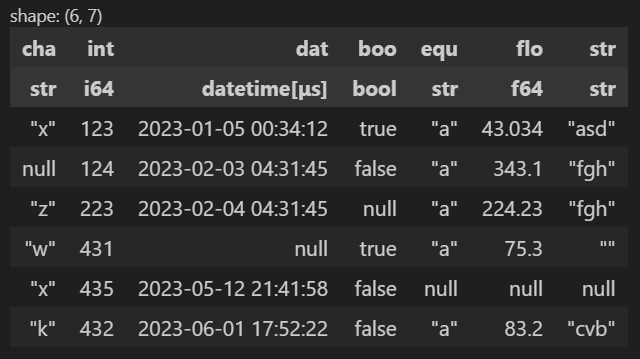
At this point, you can initialize the Preprocessor by passing the LazyFrame or DataFrame created to it and then calling the transform() method to materialize the processed dataframe.
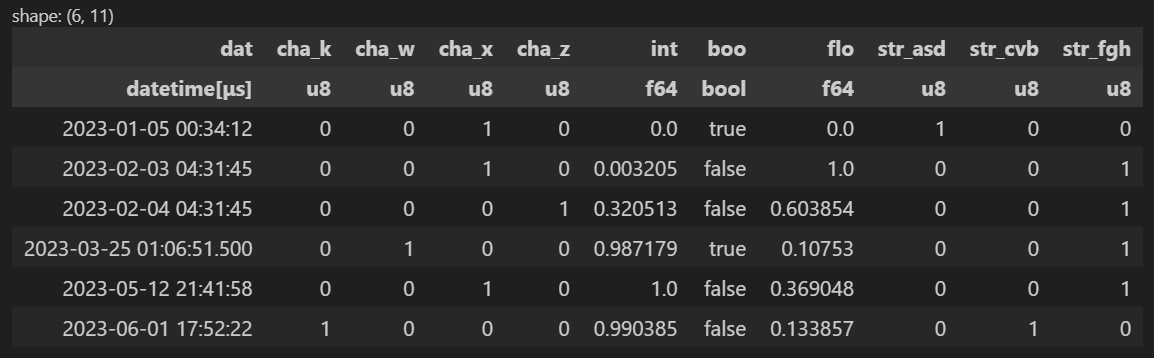
Note that if no argument is specified beyond the dataframe q, the default settings are employed for preprocessing:
preprocessor = Preprocessor(q)
df = preprocessor.transform(q)
df
Customization example
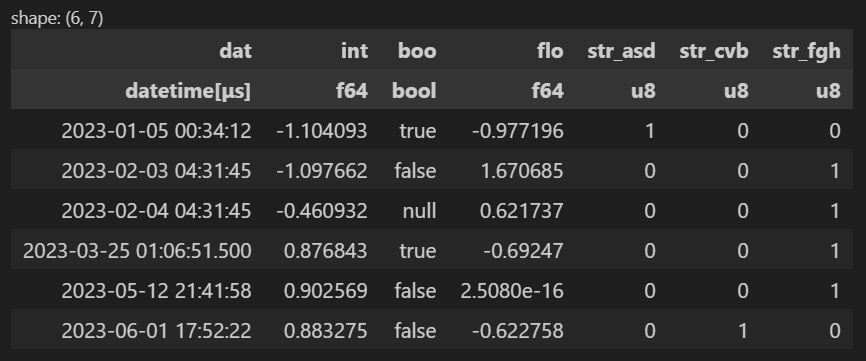
In the following example, when the Preprocessor is initialized:
- The discarding threshold is lowered from 90% to 80% (a column will be discarded if more than 80% of its values are unique).
- The discarding featrues informations are stored in the
preprocessorinstance. - The column "boo" is excluded from the preprocessing and is preserved unchanged.
- The scaling method of the numerical features chosen is standardization
- The fill null strategy for numerical features is "forward".
preprocessor    = Preprocessor(q,
                               get_discarded_info=True,
                               discarding_threshold = 0.8,
                               excluded_col = ["boo"],
                               scaling = "standardize",
                               num_fill_null = "forward"
                            )
df = preprocessor.transform(q)
df
It is possible to inverse transform the processed dataframe with the method preprocessor.inverse_transform().
preprocessor = Preprocessor(q)
df = preprocessor.transform(q)
inverse_df = preprocessor.inverse_transform(df)
If the Processor's argument get_discarded_info is set to True during initialization, it is possible to call the method get_discarded_features_reason() to display the discarded features.
In the case of discarded single-valued columns, the value contained is also displayed and is available in a dictionary called single_value_columns, stored in the Preprocessor instance, and can be used as metadata.
preprocessor.get_discarded_features_reason()

To do
- Implement unit tests
1 maintainer

Release files for clearbox-preprocessor 0.12.7
For a detailed explanation of source distributions (sdists) and built distributions (wheels), please see the package formats documentation.
Source distribution (sdist)
| File | Size | Uploaded | |
|---|---|---|---|
| clearbox-preprocessor-0.12.7.tar.gz | 22.4 kB | Details |
Built distribution (wheel)
| File | Interpreter | ABI | Platform | Reset |
|---|---|---|---|---|
| clearbox_preprocessor-0.12.7-py3-none-any.whl | Python 3 | none | any | Details |
Total release size: 44.2 kB
Release files / clearbox-preprocessor-0.12.7.tar.gz
| Download URL | clearbox-preprocessor-0.12.7.tar.gz |
|---|---|
| Size | 22.4 kB |
| Tags | Source |
|
SHA-256 checksum How to use checksums |
1faada7aab6872069d3407df0a1a6d0235cec1aa2992e1cecf893c5878c1fc80
|
|
BLAKE2b-256 checksum How to use checksums |
119013f55176610244d8e6a61c401d67fadc4e94c112d797ef7c58d571944cdc
|
| Upload date | |
|
Uploaded using Trusted Publishing? What is trusted publishing? |
No |
| Uploaded via |
twine/6.1.0 CPython/3.10.18
|
Release files / clearbox_preprocessor-0.12.7-py3-none-any.whl
| Download URL | clearbox_preprocessor-0.12.7-py3-none-any.whl |
|---|---|
| Size | 21.8 kB |
| Tags | Python 3 |
|
SHA-256 checksum How to use checksums |
da5dbc8c1e7bbb607b4155f5ed76ecc9116e1d818e2322e34267110b798bbeea
|
|
BLAKE2b-256 checksum How to use checksums |
97246538070d3ced2ba35325047d785d18a2b92e1a4654351b4fac4db65ea1c5
|
| Upload date | |
|
Uploaded using Trusted Publishing? What is trusted publishing? |
No |
| Uploaded via |
twine/6.1.0 CPython/3.10.18
|














