
Comet CLI
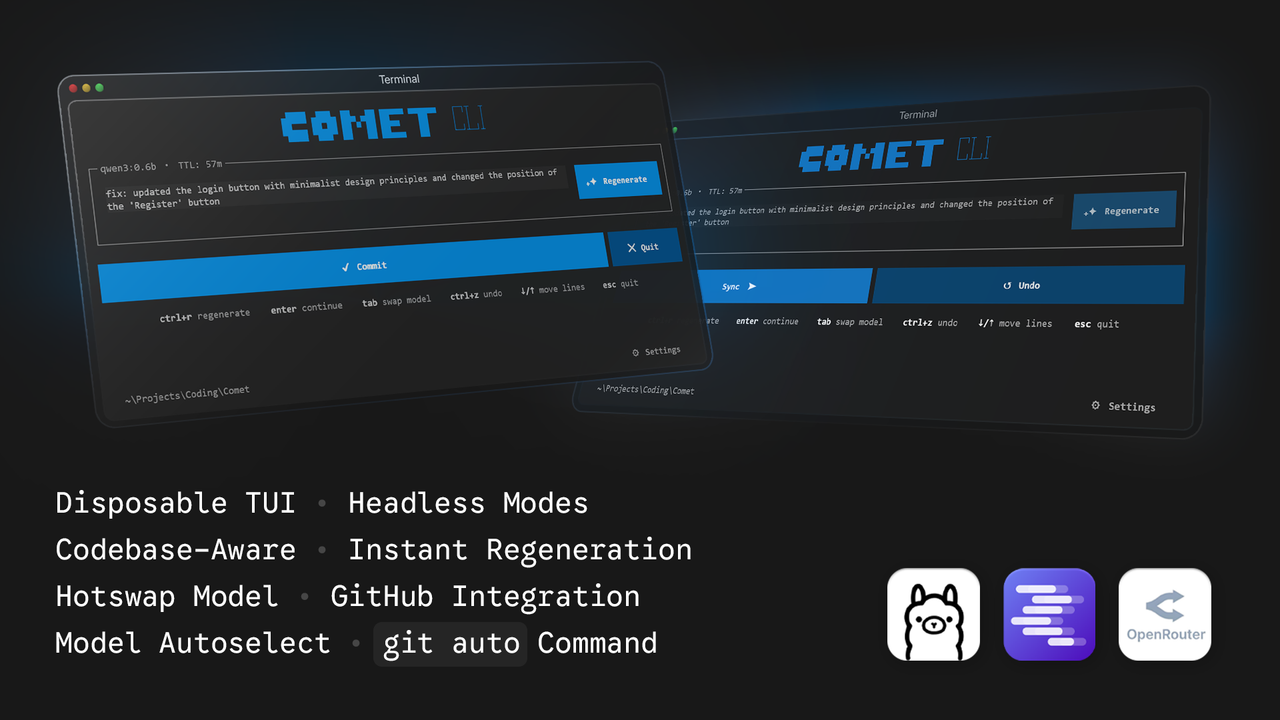
Comet is a lightweight disposable terminal user interface application that automatically generates descriptive git commit messages using local language models (Ollama, LMStudio) or the cloud (OpenRouter). It analyzes your staged git diffs and provides a clean interface to review, edit, regenerate, and commit your changes instantly.
AI commit messages are silently burning through your API limits.
An unoptimized
git diffcan easily consume 15,000+ tokens per request. If an average developer makes 3 commits per hour, a standard 4-hour coding session would blast through over 180,000 tokens!Comet uses only 1500/hr tokens! Saving you roughly 174,000 tokens of unnecessary API costs in the same 4 hours!
Features
- Instant Boot: The UI renders instantly with zero latency, utilizing background threading for network auto-detection and initialization.
- Disposable TUI: The interface runs as an alternate terminal screen. When you exit, your previous command history, compiler errors, and statements are completely preserved exactly as they were.
- Headless Automation: Run
comet --auto(or-a) to skip the UI entirely and automatically generate, commit, and push in one command. - Terminal User Interface: Built with Textual. It provides a dedicated text area to edit the generated message.
- Git Integration: Commit your changes and immediately push them to your remote repository with a second press of the commit button.
- Native Git Command: Run
git autoto use Comet as if it were a native git command. - Model Auto-Selection: Automatically detects the smallest model that can run on your system to minimize token usage and response latency.
- Hotswap Models: Press
tabto quickly cycle through available models directly from the interface. - Local & Cloud Generation: Connects to your local AI servers or the OpenRouter API to generate commit messages.
- Context Aware: Automatically pulls in the last 5 commits to understand your codebase.
- Token Optimization: Actively strips massive metadata from the diff payload, drastically reducing API costs and Time-To-First-Token.
Requirements
- Python 3.10 or higher
- Git installed and accessible in your system path
- Ollama or LMStudio running locally, or an OpenRouter API key
Installation
You can install Comet using standard pip:
pip install cli-comet
However, the recommended way to install Comet is globally using pipx to avoid dependency conflicts with other python packages:
pipx install cli-comet
Installation from Source
Clone the repository and install the required dependencies:
git clone https://github.com/razoring/CometCLI.git
cd CometCLI
python -m venv .venv

# On Windows
.venv\Scripts\activate

# On Unix/macOS
source .venv/bin/activate

pip install -e .
Usage
Ensure you have staged your changes using git add and that Ollama or LMStudio is running in the background.
Run the Comet application:
comet
Or run it as a native git command:
git auto
To bypass the UI and automatically generate, commit, and push your changes in one step:
comet --auto
# or
comet -a
Keyboard Shortcuts
enter: Commit the current text. If pressed again, it will push the commit to the remote repository.tab: Swap the active language model.ctrl+r: Regenerate the commit message with the current model.ctrl+z: Undo the most recent local commit.ctrl+t: Terminate the application.down arrow: Add a new line when at the bottom of the text area.up arrow: Remove the previous empty line.
Architecture
Comet uses the subprocess module to run git commands and capture diffs. It reads the local comet/system.md file for system instructions and sends the diff to the selected provider's API. The interface is built using Textual, providing responsive keyboard bindings and a resilient terminal layout. All blocking network logic runs in an asynchronous @work thread to ensure 0ms UI start latency.
License
This project is licensed under the GNU General Public License v3.0 (GPL-3.0). See the LICENSE file for details.
1 maintainer

Metadata
1 maintainer
Release files for cli-comet 1.4.2
For a detailed explanation of source distributions (sdists) and built distributions (wheels), please see the package formats documentation.
Source distribution (sdist)
| File | Size | Uploaded | Provenance | |
|---|---|---|---|---|
| cli_comet-1.4.2.tar.gz | 28.9 kB | With provenance | Details |
Built distribution (wheel)
| File | Interpreter | ABI | Platform | Reset |
|---|---|---|---|---|
| cli_comet-1.4.2-py3-none-any.whl | Python 3 | none | any | Details |
Total release size: 58.2 kB
Release files / cli_comet-1.4.2.tar.gz
| Download URL | cli_comet-1.4.2.tar.gz |
|---|---|
| Size | 28.9 kB |
| Tags | Source |
|
SHA-256 checksum How to use checksums |
be333dbc167bbdbd63ca99299d9cded0c204f923b8adf191fb0587eb65189cfb
|
|
BLAKE2b-256 checksum How to use checksums |
06d8b705ece66107d75b3e02562409dcd8ba36f0c23752259d4f2c0bc66d1d43
|
| Upload date | |
|
Uploaded using Trusted Publishing? What is trusted publishing? |
Yes |
| Uploaded via |
twine/6.1.0 CPython/3.13.12
|
Provenance
Provenance describes where a file came from. On PyPI, provenance is shared via attestations, which provide a verifiable record of the build or publishing details. View details, limitations and caveats.


PyPI Publish Attestation
PyPI verified that this artifact, at this checksum, originated from the publisher listed below.
Signed by GitHub Actions, verified by PyPI on Jun 8, 2026.
Transparency logRelease files / cli_comet-1.4.2-py3-none-any.whl
| Download URL | cli_comet-1.4.2-py3-none-any.whl |
|---|---|
| Size | 29.3 kB |
| Tags | Python 3 |
|
SHA-256 checksum How to use checksums |
34d607e56a2c29925a9c5305fd52aa7da4d8eca1db6c8ba78e01bca7bf7a8cf7
|
|
BLAKE2b-256 checksum How to use checksums |
bff1637923d1c0ef8dd0a9b0d6c790e0e11479d71dc9b42c66f80d850905dd6a
|
| Upload date | |
|
Uploaded using Trusted Publishing? What is trusted publishing? |
Yes |
| Uploaded via |
twine/6.1.0 CPython/3.13.12
|
Provenance
Provenance describes where a file came from. On PyPI, provenance is shared via attestations, which provide a verifiable record of the build or publishing details. View details, limitations and caveats.
PyPI Publish Attestation
PyPI verified that this artifact, at this checksum, originated from the publisher listed below.
Signed by GitHub Actions, verified by PyPI on Jun 8, 2026.
Transparency logSecurity for cli-comet 1.4.2
Provenance
Provenance describes where a file came from. On PyPI, provenance is shared via attestations, which provide a verifiable record of the build or publishing details. View details, limitations and caveats.
Full provenance
All 2 files in this release have been uploaded with provenance metadata.
Attestation for cli_comet-1.4.2.tar.gz
PyPI Publish Attestation
PyPI verified that this artifact, at this checksum, originated from the publisher listed below.
Signed by GitHub Actions, verified by PyPI on Jun 8, 2026.
Transparency logA note on package security
PyPI is a repository for distributing packages, not a service for auditing them. While third-party security researchers and our staff do their best to detect and remove malicious packages, PyPI cannot guarantee the quality, security or suitability of any given package.
To learn more about protecting yourself from malicious actors, visit our package security documentation.














