
Codex Usage Tracker


Local-first usage analytics for Codex, Claude Code, and Cursor.
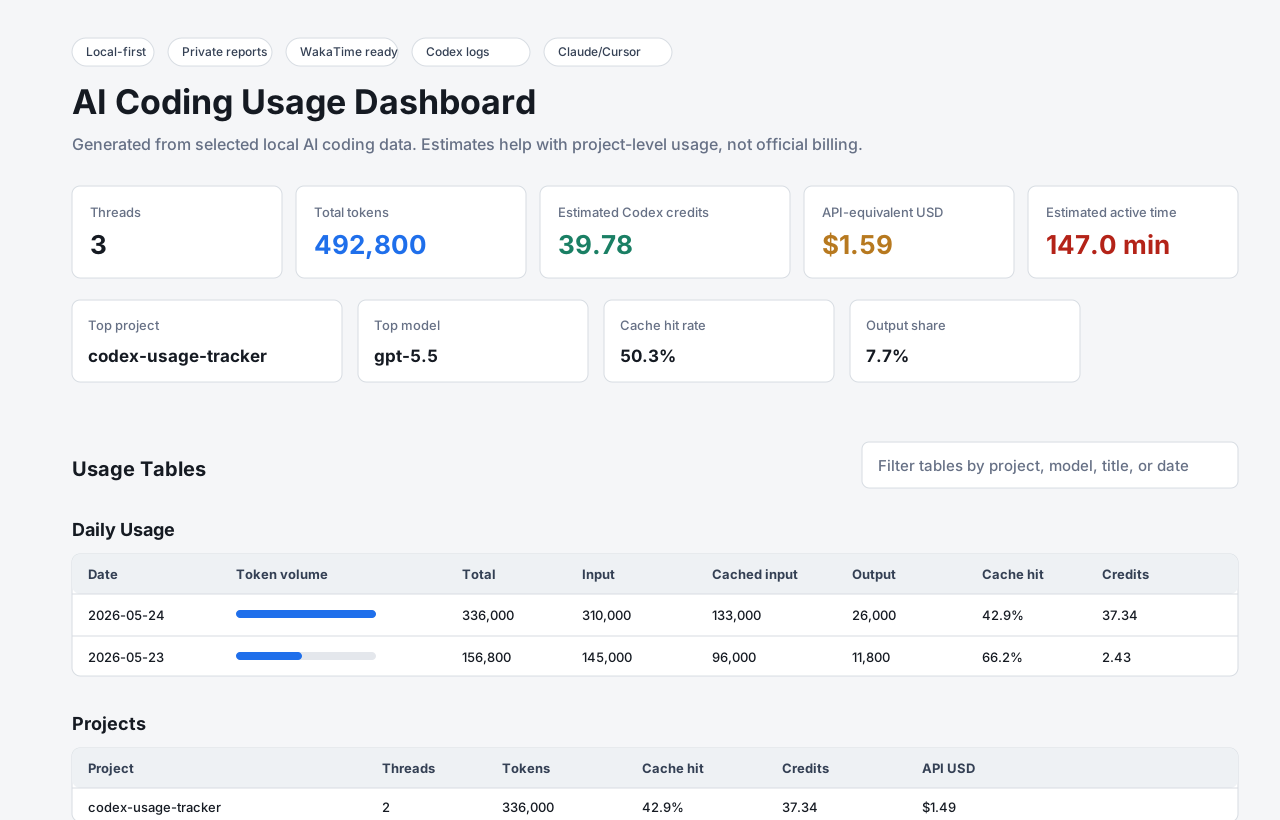
Codex Usage Tracker reads local AI coding data and generates a private dashboard for token usage, app/source totals, estimated Codex credits, API-equivalent cost estimates, project breakdowns, terminal reports, and optional WakaTime ai coding time.
Why
AI coding tools can burn through tokens, but it is hard to answer basic questions:
- Which project used the most tokens?
- Which thread was the most expensive?
- How much active AI coding time did I spend today?
- How much of my input was cached?
- Can my Codex app activity show up in WakaTime?
This tool gives you those answers locally, without uploading Codex transcripts to another service.
Features
- Reads local Codex app rollout logs from
~/.codex - Reads Claude Code project transcripts from
~/.claude/projects - Reads Cursor AI edit activity from
~/.cursor/ai-tracking/ai-code-tracking.db - Generates
HTML,CSV, andJSONreports - Prints
daily,weekly,monthly,session,project,model, andsourceterminal reports - Estimates Codex credits from input, cached input, and output tokens
- Shows API-equivalent USD estimates for rough comparison
- Includes
doctoranddemocommands for first-run confidence - Supports date filters with
--days,--since,--until, and--timezone - Supports share-safe output with
--redactand--hash-projects - Sends optional WakaTime
ai codingheartbeats - Works without an OpenAI API key
Install
Install from PyPI with pipx:
pipx install codex-usage-tracker
codex-usage-tracker demo
Or install with pip:
python -m pip install codex-usage-tracker
codex-usage-tracker demo
For local development, clone the repo:
git clone https://github.com/SuvenSeo/codex-usage-tracker.git
cd codex-usage-tracker
Run directly with Python:
python codex_app_tracker.py report
Or install the CLI locally:
pip install -e .
codex-usage-tracker report
Windows users can also download CodexUsageTracker.exe from the
latest release.
The release includes a SHA256 checksum file.
Quick Start
Check your machine:
codex-usage-tracker doctor
Generate the full local dashboard:
codex-usage-tracker report
Include Codex, Claude Code, and Cursor in one report:
codex-usage-tracker --sources all report
Open:
out/dashboard.html
Open the live native desktop dashboard:
codex-usage-tracker --days 7 --timezone Asia/Colombo gui
The GUI uses Python's built-in Tkinter toolkit, polls selected local sources every 10
seconds by default, and includes a button to generate the normal out/
HTML/CSV/JSON reports. Change the interval with:
codex-usage-tracker gui --refresh-seconds 5
Build a double-clickable Windows EXE:
python -m pip install -e ".[build]"
.\scripts\build_windows_exe.ps1
The generated app is written to dist\CodexUsageTracker.exe. Double-clicking it
opens the live GUI. It reads only selected local data folders on your machine.
Try a safe public demo:
codex-usage-tracker demo
That writes synthetic reports to out/demo/.
CLI Reports
Global scope and privacy flags go before the command:
codex-usage-tracker --days 7 daily
codex-usage-tracker --since 2026-05-01 --until 2026-05-24 weekly
codex-usage-tracker --timezone Asia/Colombo monthly
codex-usage-tracker --sources all source
codex-usage-tracker session --limit 10 --compact
codex-usage-tracker project --format json
codex-usage-tracker model --format csv
Create a share-safe report:
codex-usage-tracker --sources all --redact --hash-projects report
Source selection is opt-in. The default is --sources codex; use
--sources claude, --sources cursor, or a comma-separated list such as
--sources codex,claude.
WakaTime
WakaTime sync is optional. It requires wakatime-cli and a normal ~/.wakatime.cfg file.
Generate reports and sync recent Codex activity:
codex-usage-tracker run --sync-wakatime
The tracker sends conservative heartbeats with:
- category:
ai coding - entity type:
app - project name/folder
- timestamp
It does not send prompts, responses, transcripts, or token totals to WakaTime. WakaTime sync currently uses Codex records only; Claude Code and Cursor are included in reports but not synced as WakaTime heartbeats.
On Windows, you can install a scheduled task:
.\install_scheduled_task.ps1
Remove it:
.\uninstall_scheduled_task.ps1
Output
By default, reports are written to out/:
dashboard.htmlcodex_usage_summary.jsonthreads.csvdaily.csvsources.csvprojects.csvmodels.csv
Do not commit generated reports. They can include private local paths, project names, thread titles, and usage details unless you use privacy flags.
Cost Estimates
The tracker reports local token counts where app logs provide them.
Cost estimates are not an invoice:
estimated_codex_creditsuses OpenAI's current Codex token-based rate card for Codex records.estimated_api_usd_equivuses public OpenAI API standard short-context prices as an equivalent estimate when a known OpenAI model rate exists.- Claude Code token totals are parsed from local Claude Code transcripts, but Anthropic billing is not estimated yet.
- Cursor local AI tracking exposes AI edit activity, request counts, models, timestamps, and active time, but not exact token totals.
- The included rates were verified against official OpenAI docs on 2026-05-29.
- Real billing/credit balance, fast-mode uplifts, taxes, and any workspace exceptions should be checked with the vendor.
Pricing can change. The current source pages are OpenAI's Codex rate card and API pricing. Review and update MODEL_RATES in codex_app_tracker.py when OpenAI updates rates.
Privacy
This is a local parser. Depending on --sources, it reads from ~/.codex,
~/.claude/projects, and/or ~/.cursor/ai-tracking. It writes local reports.
Use --redact to hide thread titles, local folders, and log paths. Use --hash-projects to replace project names with stable anonymous labels.
See docs/PRIVACY.md before sharing dashboards or CSV files.
Comparison
| Tool | Best For | Difference |
|---|---|---|
| Codex Usage Tracker | AI coding users who want local Codex, Claude Code, and Cursor visibility | Dependency-light, private generated dashboard with Codex token/cost depth |
| ccusage | Multi-agent terminal usage reports | Broader agent support and mature CLI reporting |
| agentsview | Local multi-agent session intelligence | Richer local web app and session indexing |
| codex-wakatime | Codex CLI WakaTime hook | Focused time tracking, not token/cost dashboards |
The near-term goal is to keep Codex as the deepest parser while adding honest local visibility for adjacent AI coding tools.
Development
Run checks:
python -m py_compile codex_app_tracker.py
python -m unittest discover -s tests -v
Build package artifacts:
python -m pip install build
python -m build
New contributors can start with good first issues or the current roadmap. See CONTRIBUTING.md for the privacy rules and PR checklist.
Roadmap
See docs/ROADMAP.md.
Built By
Built by SuvenSeo for developers who want local visibility into AI coding usage.
Status
Early alpha. Codex, Claude Code, and Cursor local storage formats may change, so
parser compatibility can break. The v0.2.0 GitHub release adds multi-source
reports. The Python package is published on
PyPI and can be installed with
pipx install codex-usage-tracker or python -m pip install codex-usage-tracker.
Issues and PRs are welcome.
1 maintainer

Release files for codex-usage-tracker 0.2.0
For a detailed explanation of source distributions (sdists) and built distributions (wheels), please see the package formats documentation.
Source distribution (sdist)
| File | Size | Uploaded | |
|---|---|---|---|
| codex_usage_tracker-0.2.0.tar.gz | 35.8 kB | Details |
Built distribution (wheel)
| File | Interpreter | ABI | Platform | Reset |
|---|---|---|---|---|
| codex_usage_tracker-0.2.0-py3-none-any.whl | Python 3 | none | any | Details |
Total release size: 66.1 kB
Release files / codex_usage_tracker-0.2.0.tar.gz
| Download URL | codex_usage_tracker-0.2.0.tar.gz |
|---|---|
| Size | 35.8 kB |
| Tags | Source |
|
SHA-256 checksum How to use checksums |
4ab30f65776fc9eda661c1221095616004353e1e95e1d98e2011e96372cef169
|
|
BLAKE2b-256 checksum How to use checksums |
ef3f4464cca4c89485a3187209273be00136e8de425d1b7a1e1c192e103d72d4
|
| Upload date | |
|
Uploaded using Trusted Publishing? What is trusted publishing? |
Yes |
| Uploaded via |
twine/6.1.0 CPython/3.13.12
|
Provenance
Provenance describes where a file came from. On PyPI, provenance is shared via attestations, which provide a verifiable record of the build or publishing details. View details, limitations and caveats.


PyPI Publish Attestation
PyPI verified that this artifact, at this checksum, originated from the publisher listed below.
Signed by GitHub Actions, verified by PyPI on May 30, 2026.
Transparency logRelease files / codex_usage_tracker-0.2.0-py3-none-any.whl
| Download URL | codex_usage_tracker-0.2.0-py3-none-any.whl |
|---|---|
| Size | 30.3 kB |
| Tags | Python 3 |
|
SHA-256 checksum How to use checksums |
7a99293c6fbaea7411fd3aaa7f4ee81629c0a1a1369dfb4bf652b46508b59a51
|
|
BLAKE2b-256 checksum How to use checksums |
c7d2923709e93f15001ca7bd8a446313ab2ab95e35870880712e2524d0c5e2ad
|
| Upload date | |
|
Uploaded using Trusted Publishing? What is trusted publishing? |
Yes |
| Uploaded via |
twine/6.1.0 CPython/3.13.12
|
Provenance
Provenance describes where a file came from. On PyPI, provenance is shared via attestations, which provide a verifiable record of the build or publishing details. View details, limitations and caveats.
PyPI Publish Attestation
PyPI verified that this artifact, at this checksum, originated from the publisher listed below.
Signed by GitHub Actions, verified by PyPI on May 30, 2026.
Transparency log













