

collective.fontawesome
This add-on registers Font Awesome into Plone CSS registry.
Features
Version of Font Awesome: 5.2.0.
Includes a GenericSetup profile example for Replacing Plone’s default icons with FontAwesome fonts.
Includes a Example View working, go to http://site_url/@@example.collective.fontawesome
Translations
This product has been translated into
Spanish (thanks, Leonardo J. Caballero G. aka macagua)
Installation
This add-on can be installed with the typical Plone add-on installation process. Please see the official documentation for a description.
For Plone 5, import the “collective.fontawesome (Plone 5)” profile.
How to use
Since version 5, FontAwesome changed the way it works and the Free version includes 2 fonts : “Font Awesome 5 Free” and “Font Awesome 5 Brands”.
Depending on the icon you want to use, you have to use the “fa” or “fab” class :
To use an icon from the “Font Awesome 5 Free” add class=”fa fa-X”, to use an icon from “Font Awesome 5 Brands”, add class=”fab fa-X” to your tag where X is the icon you want:
<ul>
    <li class="fa fa-glass-martini">item 1</li>
    <li class="fa fa-music">item 2</li>
    <li class="fa fa-search">item 3</li>
</ul>
<ul>
    <li class="fab fa-angular">item 1</li>
    <li class="fab fa-apple">item 2</li>
    <li class="fab fa-avianex">item 3</li>
</ul>
Or just use CSS for your class ‘myclass’:
.myclass:before {
    content: "\f000";
    font-family: "Font Awesome 5 Free";
    font-weight: 900;
    font-style: normal;
    font-weight: normal;
    text-decoration: inherit;
}
Available CSS classes and values for the content attribute can be found in the Font Awesome cheat sheet or in the source code (file: font-awesome.css#L171 at the time of writing).
Full list of useable icons may be found here : Font Awesome free icons
An example page is available in the add-on, here is a screenshot:
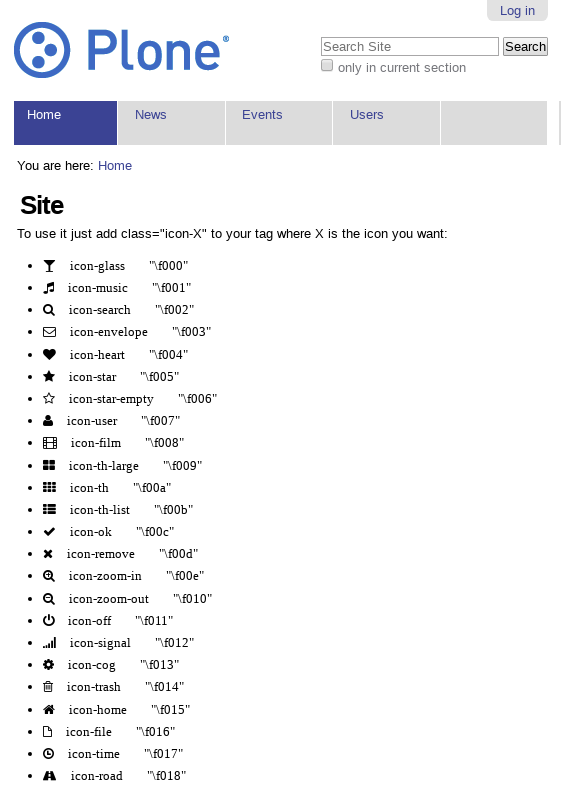
Replacing Plone’s default icons with FontAwesome fonts
There is now a separate Generic Setup profile called replace-plone-icons which will replace Plone’s default icons (e.g. for content types and actions) with Font Awesome icons.
IMPORTANT: You still need to install the default profile as well.
A replace-plone-icons profile example is available in the add-on, here is a screenshot:
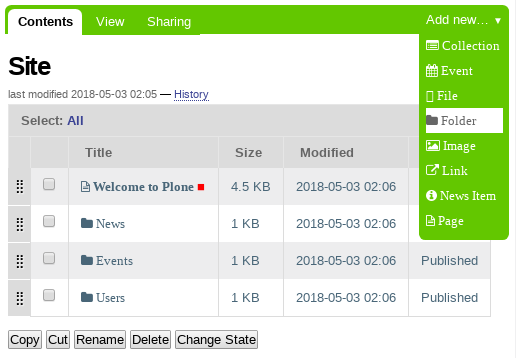
Contribute
Issue Tracker: https://github.com/collective/collective.fontawesome/issues
Source Code: https://github.com/collective/collective.fontawesome
Credits
Companies
Makina-Corpus http://www.makina-corpus.com
People
JeanMichel FRANCOIS aka toutpt <toutpt@gmail.com>
Eric Bréhault, <ebrehault@gmail.com>
Gauthier Bastien, <gauthier.bastien@imio.be>
Leonardo J. Caballero G. aka macagua <leonardocaballero@gmail.com>
License
The Font Awesome font is licensed under the SIL Open Font License http://scripts.sil.org/OFL
Font Awesome CSS, LESS, and SASS files are licensed under the MIT License https://opensource.org/licenses/mit-license.html
The Font Awesome pictograms are licensed under the CC BY 3.0 License https://creativecommons.org/licenses/by/3.0/
Attribution is no longer required in Font Awesome 3.0, but much appreciated: “Font Awesome by Dave Gandy - https://fontawesome.com/ “
Changelog
1.1 (2018-08-01)
Fixed warning: no files found matching *.rst and *.txt under directory collective from MANIFEST.in file [macagua]
Added more strings classifiers items for this package [macagua]
Added i18n support [macagua]
Added Spanish translation [macagua]
Moved to fontawesome 5.2.0 [gbastien]
1.0.5 (2017-05-23)
Updated to fontawesome 4.7.0 [ewohnlich]
Updated sample in @@example.collective.fontawesome to show what is new in version 4.7.0 [gbastien]
1.0.4 (2016-12-05)
Update to fontawesome 4.6.3 [gbastien]
Include *.woff2 in MANIFEST.in so file is present in the release or we have an error in the browser console while trying to import file fontawesome-webfont.woff2 [gbastien]
1.0.3 (2015-07-10)
Update to fontawesome 4.1.0 [jcbrand]
Update to fontawesome 4.3.0 [ebrehault]
Add new GenericSetup profile that replaces Plone’s default icons for content types and actions with FontAwesome fonts. [jcbrand]
Plone 5 compliancy [ebrehault]
1.0.2 (2013-05-14)
Update to fontawesome 3.1.1
1.0.1 (2013-05-06)
Fix packaging (manifest)
1.0 (2013-05-06)
Package created using templer [JeanMichel aka toutpt]
5 maintainers


Release files for collective.fontawesome 1.1
For a detailed explanation of source distributions (sdists) and built distributions (wheels), please see the package formats documentation.
Source distribution (sdist)
| File | Size | Uploaded | |
|---|---|---|---|
| collective.fontawesome-1.1.tar.gz | 1.3 MB | Details |
Release files / collective.fontawesome-1.1.tar.gz
| Download URL | collective.fontawesome-1.1.tar.gz |
|---|---|
| Size | 1.3 MB |
| Tags | Source |
|
SHA-256 checksum How to use checksums |
f1f44e9808551b61e59bf7d29a8a5ad553f17e5ff45a4cbb6defc732b930ce0e
|
|
BLAKE2b-256 checksum How to use checksums |
8d4bd8ab1de34fb27b970506b1d570cee38fbd9a3f45d0aa3af5335073a2b102
|
| Upload date | |
|
Uploaded using Trusted Publishing? What is trusted publishing? |
No |
| Uploaded via |
twine/1.11.0 pkginfo/1.4.2 requests/2.18.4 setuptools/39.1.0 requests-toolbelt/0.8.0 tqdm/4.23.2 CPython/2.7.10
|














