
Introduction
This product aims to simplify running and writing third-party Generic Setup upgrade steps in Plone.
It provides a control panel for running multiple upgrades at once, based on the upgrade mechanism of Generic Setup (portal_setup).
Further a base class for writing upgrade steps with a variety of helpers for common tasks is provided.
Relation with ftw.upgrade
This package is a fork of ftw.upgrade, which is no longer maintained.
The package structure and codebase is almost identical to ftw.upgrade, provided that you update the import paths from ftw.upgrade to collective.ftw.upgrade.
With version 4 some new features have been added, some bugs were fixed and the code was modernized, but no big refactoring was done.
Features
The main features of this package are:
-
Managing upgrades: Provides an advanced view for upgrading third-party Plone packages using Generic Setup. It enables upgrading multiple packages at once with an easy to use user interface. By resolving the dependency graph it is able to optimize the upgrade step order so that the upgrade is hassle free.
-
Writing upgrades: The package provides a base upgrade class with various helpers for common upgrade tasks.
-
Upgrade directories with less ZCML: By registering a directory as upgrade-directory, no additional ZCML is needed for each upgrade step. By using a timestamp as version number we have less (merge-) conflicts and less error potential.
-
Import profile upgrade steps: Sometimes an upgrade step consists solely of importing a purpose-made generic setup profile. A new
upgrade-step:importProfileZCML directive makes this much simpler.
Installation
- Install
collective.ftw.upgradeby adding it to the list of eggs in your buildout. Then run buildout and restart your instance:
[instance]
eggs +=
    collective.ftw.upgrade
- Go to Site Setup of your Plone site and activate the
collective.ftw.upgradeadd-on.
Installing collective.ftw.upgrade's console script
If you include collective.ftw.upgrade in the list of eggs of a
plone.recipe.zope2instance based section, the bin/upgrade script
should be generated automatically for you (that is, if you haven't
limited or suppressed script generation via the scripts option).
Otherwise, installing the console script bin/upgrade can be done with
an additional buildout part:
[buildout]
parts += upgrade

[upgrade]
recipe = zc.recipe.egg:scripts
eggs = collective.ftw.upgrade
Compatibility
This is the table that shows which versions of collective.ftw.upgrade is compatible with which version of Plone and Python:
| Version | Plone | Python |
|---|---|---|
| 4.x | 6.0+ | 3.10+ |
Manage upgrades
The @@manage-upgrades view allows to upgrade multiple packages at
once:
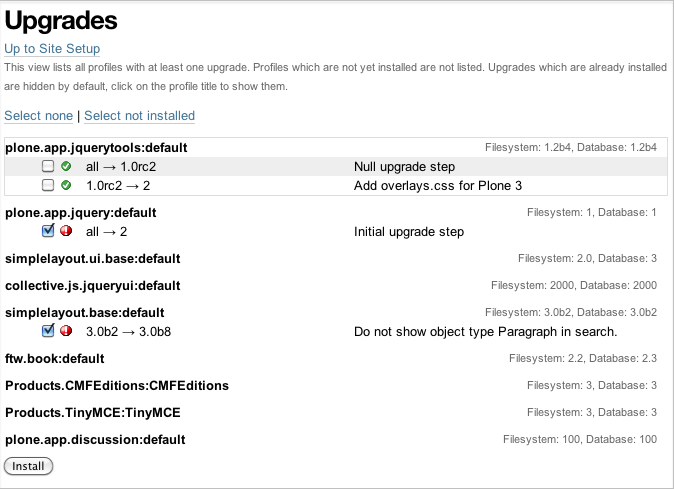
Fallback view
The @@manage-upgrades-plain view acts as a fallback view for
@@manage-upgrades. It does not include Plone's main template and thus
might be able to render when the default view fails for some reason.
The bin/upgrade script
Refer to the console script installation section for instructions on how to install bin/upgrade.
The bin/upgrade console script enables management of upgrades on the
filesystem (creating new upgrades, changing upgrade order) as well as
interacting with an installed Plone site, listing profiles and upgrades
and installing upgrades.
Some examples:
bin/upgrade create "AddCatalogIndex"
bin/upgrade touch my/package/upgrades/20110101000000_add_catalog_index
bin/upgrade sites
bin/upgrade list -s Plone --auth admin:admin --upgrades
bin/upgrade install -s Plone --auth admin:admin  --proposed --intermediate-commit
The full documentation of the bin/upgrade script is available using
its help system:
bin/upgrade help
Upgrade step helpers
The UpgradeStep base class provides various tools and helpers useful
when writing upgrade steps. It can be used by registering the
classmethod directly. Be aware that the class is very special: it acts
like a function and calls itself automatically.
Example upgrade step definition (defined in a upgrades.py):
from collective.ftw.upgrade import UpgradeStep

class UpdateFooIndex(UpgradeStep):
    """The index ``foo`` is a ``FieldIndex`` instead of a
    ``KeywordIndex``. This upgrade step changes the index type
    and reindexes the objects.
    """

    def __call__(self):
        index_name = 'foo'
        if self.catalog_has_index(index_name):
            self.catalog_remove_index(index_name)

        self.catalog_add_index(index_name, 'KeywordIndex')
        self.catalog_rebuild_index(index_name)
Registration in configure.zcml (assuming it's in the same directory):
<configure
    xmlns="http://namespaces.zope.org/zope"
    xmlns:genericsetup="http://namespaces.zope.org/genericsetup"
    i18n_domain="my.package">

    <genericsetup:upgradeStep
        profile="my.package:default"
        source="4"
        destination="5"
        title="Update index 'foo'."
        handler=".upgrades.UpdateFooIndex"
        />

</configure>
Updating objects with progress logging
Since an upgrade step often updates a set of objects indexed in the
catalog, there is a useful helper method self.objects() which combines
querying the catalog with the Progress Logger.
The catalog is queried unrestricted so that we handle all the objects.
Here is an example for updating all objects of a particular type:
from collective.ftw.upgrade import ProgressLogger
from collective.ftw.upgrade import UpgradeStep

class ExcludeFilesFromNavigation(UpgradeStep):

    def __call__(self):
        for obj in self.objects({'portal_type': 'File'},
                                'Enable exclude from navigation for files'):
            obj.setExcludeFromNav(True)
When running the upgrade step you'll be shown a progress log:
INFO ftw.upgrade STARTING Enable exclude from navigation for files
INFO ftw.upgrade 1 of 10 (10%): Enable exclude from navigation for files
INFO ftw.upgrade 5 of 50 (50%): Enable exclude from navigation for files
INFO ftw.upgrade 10 of 10 (100%): Enable exclude from navigation for files
INFO ftw.upgrade DONE: Enable exclude from navigation for files
Methods
The UpgradeStep class has various helper functions:
self.getToolByName(tool_name) Returns the tool with the name
tool_name of the upgraded site.
self.objects(catalog_query, message, logger=None, savepoints=None)
Queries the catalog (unrestricted) and an iterator with full objects.
The iterator configures and calls a ProgressLogger with the passed
message.
self.catalog_rebuild_index(name) Reindex the portal_catalog index
identified by name.
self.catalog_reindex_objects(query, idxs=None, savepoints=None)
Reindex all objects found in the catalog with query. A list of indexes
can be passed as idxs for limiting the indexed indexes. The
savepoints argument will be passed to self.objects().
self.catalog_has_index(name) Returns whether there is a catalog index
name.
self.catalog_add_index(name, type_, extra=None) Adds a new index to
the portal_catalog tool.
self.catalog_remove_index(name) Removes an index from the
portal_catalog tool.
self.actions_remove_action(category, action_id) Removes an action
identified by action_id within the given category from the
portal_actions tool.
self.catalog_unrestricted_get_object(brain) Returns the unrestricted
object of a brain. Dead brains, for which there is no longer an object,
are removed from the catalog and None is returned.
self.catalog_unrestricted_search(query, full_objects=False) Searches
the catalog without checking security. When full_objects is True,
unrestricted objects are returned instead of brains. Upgrade steps
should generally use unrestricted catalog access since all objects
should be upgraded - even if the manager running the upgrades has no
access on the objects.
self.actions_add_type_action(self, portal_type, after, action_id, **kwargs)
Add a portal_types action from the type identified by portal_type,
the position can be defined by the after attribute. If the after
action can not be found, the action will be inserted at the end of the
list.
self.actions_remove_type_action(portal_type, action_id) Removes a
portal_types action from the type identified by portal_type with the
action id action_id.
self.set_property(context, key, value, data_type='string') Safely set
a property with the key key and the value value on the given
context. The property is created with the type data_type if it does
not exist.
self.add_lines_to_property(context, key, lines) Updates a property
with key key on the object context adding lines. The property is
expected to be of type "lines". If the property does not exist it is
created.
self.setup_install_profile(profileid, steps=None) Installs the generic
setup profile identified by profileid. If a list step names is passed
with steps (e.g. ['actions']), only those steps are installed. All
steps are installed by default.
self.ensure_profile_installed(profileid) Install a generic setup
profile only when it is not yet installed.
self.install_upgrade_profile(steps=None) Installs the generic setup
profile associated with this upgrade step. The profile may be associated
to upgrade steps by using either the upgrade-step:importProfile or the
upgrade-step:directory directive.
self.is_profile_installed(profileid) Checks whether a generic setup
profile is installed. Respects product uninstallation via
quickinstaller.
self.is_product_installed(product_name) Check whether a product is
installed.
self.uninstall_product(product_name) Uninstalls a product using the
quick installer.
self.migrate_class(obj, new_class) Changes the class of an object. It
has a special handling for BTreeFolder2Base based containers.
self.remove_broken_browserlayer(name, dottedname) Removes a browser
layer registration whose interface can't be imported any more from the
persistent registry.
Messages like these on instance boot time can be an
indication of this problem:
WARNING OFS.Uninstalled Could not import class 'IMyProductSpecific' from module 'my.product.interfaces'
self.update_security(obj, reindex_security=True) Update the security
of a single object (checkboxes in manage_access). This is useful in
combination with the ProgressLogger. It is possible to skip reindexing
the object security in the catalog (allowedRolesAndUsers). This speeds
up the update but should only be disabled when there are no changes for
the View permission.
self.update_workflow_security(workflow_names, reindex_security=True, savepoints=None)
Update all objects which have one of a list of workflows. This is useful
when updating a bunch of workflows and you want to make sure that the
object security is updated properly.
self.base_profile The attribute base_profile contains the profile
name of the upgraded profile including the profile- prefix. Example:
u"profile-the.package:default". This information is only available
when using the upgrade-step:directory directive.
self.target_version The attribute target_version contains the target
version of the upgrade step as a bytestring. Example with upgrade step
directory: "20110101000000". This information is only available when
using the upgrade-step:directory directive.
Progress logger
When an upgrade step is taking a long time to complete (e.g. while performing a data migration), the administrator needs to have information about the progress of the update. It is also important to have continuous output for avoiding proxy timeouts when accessing Zope through a webserver / proxy.
The ProgressLogger makes logging progress very easy:
from collective.ftw.upgrade import ProgressLogger
from collective.ftw.upgrade import UpgradeStep

class MyUpgrade(UpgradeStep):

    def __call__(self):
        objects = self.catalog_unrestricted_search(
            {'portal_type': 'MyType'}, full_objects=True)

        for obj in ProgressLogger('Migrate my type', objects):
            self.upgrade_obj(obj)

    def upgrade_obj(self, obj):
        do_something_with(obj)
The logger will log the current progress every 5 seconds (default). Example log output::
INFO ftw.upgrade STARTING Migrate MyType
INFO ftw.upgrade 1 of 10 (10%): Migrate MyType
INFO ftw.upgrade 5 of 50 (50%): Migrate MyType
INFO ftw.upgrade 10 of 10 (100%): Migrate MyType
INFO ftw.upgrade DONE: Migrate MyType
Workflow Chain Updater
When the workflow is changed for a content type, the workflow state is reset to the init state of new workflow for every existing object of this type. This can be really annoying.
The WorkflowChainUpdater takes care of setting every object to the
correct state after changing the chain (the workflow for the type):
from collective.ftw.upgrade.workflow import WorkflowChainUpdater
from collective.ftw.upgrade import UpgradeStep

class UpdateWorkflowChains(UpgradeStep):

    def __call__(self):
        query = {'portal_type': ['Document', 'Folder']}
        objects = self.catalog_unrestricted_search(
            query, full_objects=True)

        review_state_mapping={
            ('intranet_workflow', 'plone_workflow'): {
                'external': 'published',
                'pending': 'pending'}}

        with WorkflowChainUpdater(objects, review_state_mapping):
            # assume that the profile 1002 does install a new workflow
            # chain for Document and Folder.
            self.setup_install_profile('profile-my.package.upgrades:1002')
The workflow chain updater migrates the workflow history by default. The
workflow history migration can be disabled by setting
migrate_workflow_history to False:
with WorkflowChainUpdater(objects, review_state_mapping,
                            migrate_workflow_history=False):
    # code
If a transition mapping is provided, the actions in the workflow history entries are migrated according to the mapping so that the translations work for the new workflow:
transition_mapping = {
    ('intranet_workflow', 'new_workflow'): {
        'submit': 'submit-for-approval'}}

with WorkflowChainUpdater(objects, review_state_mapping,
                            transition_mapping=transition_mapping):
    # code
Placeful Workflow Policy Activator
When manually activating a placeful workflow policy all objects with a new workflow might be reset to the initial state of the new workflow.
ftw.upgrade has a tool for enabling placeful workflow policies without breaking the review state by mapping it from the old to the new workflows:
from collective.ftw.upgrade.placefulworkflow import PlacefulWorkflowPolicyActivator
from collective.ftw.upgrade import UpgradeStep

class ActivatePlacefulWorkflowPolicy(UpgradeStep):

    def __call__(self):
        portal_url = self.getToolByName('portal_url')
        portal = portal_url.getPortalObject()

        context = portal.unrestrictedTraverse('path/to/object')

        activator = PlacefulWorkflowPolicyActivator(context)
        activator.activate_policy(
            'local_policy',
            review_state_mapping={
                ('intranet_workflow', 'plone_workflow'): {
                    'external': 'published',
                    'pending': 'pending'}})
The above example activates a placeful workflow policy recursively on
the object under path/to/object, enabling the placeful workflow policy
local_policy.
The mapping then maps the intranet_workflow to the plone_workflow by
defining which old states (key, intranet_workflow) should be changed to
the new states (value, plone_workflow).
Options:
activate_in: Activates the placeful workflow policy for the passed in object (Trueby default).activate_below: Activates the placeful workflow policy for the children of the passed in object, recursively (Trueby default).update_security: Update object security and reindex allowedRolesAndUsers (Trueby default).
Upgrade directories
The upgrade-step:directory ZCML directive allows us to use a new
upgrade step definition syntax with these advantages:
-
The directory is once registered (ZCML) and automatically scanned at Zope boot time. This reduces the ZCML used for each upgrade step and avoids the redundancy created by having to specify the profile version in multiple places.
-
Timestamps are used instead of version numbers. Because of that we have less merge-conflicts.
-
The version in the profile's
metadata.xmlis removed and dynamically set at Zope boot time to the version of the latest upgrade step. We no longer have to maintain this version in upgrades. -
Each upgrade is automatically a Generic Setup profile. An instance of the
UpgradeStepclass knows which profile it belongs to, and that profile can easily be imported withself.install_upgrade_profile(). -
The
manage-upgradesview shows us when we have accidentally merged upgrade steps with older timestamps than already executed upgrade steps. This helps us detect a long-term-branch merge problem.
Setting up an upgrade directory
- Register an upgrade directory for your profile
(e.g.
my/package/configure.zcml):
<configure
    xmlns="http://namespaces.zope.org/zope"
    xmlns:upgrade-step="http://namespaces.zope.org/collective.ftw.upgrade"
    i18n_domain="my.package">

    <include package="ftw.upgrade" file="meta.zcml" />

    <upgrade-step:directory
        profile="my.package:default"
        directory="./upgrades"
        />

</configure>
-
Create the configured upgrade step directory (e.g.
my/package/upgrades) and put an empty__init__.pyin this directory (prevents some python import warnings). -
Remove the version from the
metadata.xmlof the profile for which this upgrade step directory is configured (e.g.my/package/profiles/default/metadata.xml):
    <?xml version="1.0"?>
    <metadata>
        <dependencies>
            <dependency>profile-other.package:default</dependency>
        </dependencies>
    </metadata>
Declare upgrades soft dependencies
When having optional dependencies (extras_require), we sometimes need
to tell ftw.upgrade that our optional dependency's upgrades needs to
be installed before our upgrades are installed.
We do that by declare a soft dependency in the upgrade-step:directory
directive. It is possible to declare multiple dependencies by separating
them with whitespace.
<configure
    xmlns="http://namespaces.zope.org/zope"
    xmlns:upgrade-step="http://namespaces.zope.org/collective.ftw.upgrade"
    i18n_domain="my.package">

    <include package="ftw.upgrade" file="meta.zcml" />

    <upgrade-step:directory
        profile="my.package:default"
        directory="./upgrades"
        soft_dependencies="other.package:default
                            collective.fancy:default"
        />

</configure>
Creating an upgrade step
Upgrade steps can be generated with ftw.upgrade's bin/upgrade
console script. The idea is to install this script with buildout using
zc.recipe.egg.
Once installed, upgrade steps can simply be scaffolded with the script:
bin/upgrade create AddControlpanelAction
The create command searches for your upgrades directory by resolving
the *.egg-info/top_level.txt file. If you have no egg-infos or your
upgrades directory is named differently the automatic discovery does not
work and you can provide the path to the upgrades directory using the
--path argument.
Global create-upgrade script
The create-upgrade
script helps you create upgrade steps in any directory (also when not named upgrades).
Download it and place it somewhere in your PATH, cd into the directory and create an upgrade
step:
create-upgrade add_control_panel_action
Reordering upgrade steps
The bin/upgrade console script provides a touch for reordering
generated upgrade steps. With the optional arguments --before and
--after upgrade steps can be moved to a specific position. When the
optional arguments are omitted, the upgrade step timestamp is set to the
current time.
Examples:
bin/upgrade touch upgrades/20141218093045_add_controlpanel_action
bin/upgrade touch 20141218093045_add_controlpanel_action --before 20141220181500_update_registry
bin/upgrade touch 20141218093045_add_controlpanel_action --after 20141220181500_update_registry
Creating an upgrade step manually
- Create a directory for the upgrade step in the upgrades directory.
The directory name must contain a timestamp and a description,
concatenated by an underscore,
e.g.
YYYYMMDDHHMMII_description_of_what_is_done:
mkdir my/package/upgrades/20141218093045_add_controlpanel_action
- Next, create the upgrade step code in an
upgrade.pyin the above directory. This file needs to be created, otherwise the upgrade step is not registered.
# my/package/upgrades/20141218093045_add_controlpanel_action/upgrade.py

from collective.ftw.upgrade import UpgradeStep

class AddControlPanelAction(UpgradeStep):
    """Adds a new control panel action for the package.
    """
    def __call__(self):
        # maybe do something
        self.install_upgrade_profile()
        # maybe do something
-
You must inherit from
UpgradeStep. -
Give your class a proper name, although it does not show up anywhere.
-
Add a descriptive docstring to the class, the first consecutive lines are used as upgrade step description.
-
Do not forget to execute
self.install_upgrade_profile()if you have Generic Setup based changes in your upgrade. -
Put Generic Setup files in the same upgrade step directory, it automatically acts as a Generic Setup profile just for this upgrade step. The
install_upgrade_profileknows what to import.For our example this means we put a file at
my/package/upgrades/20141218093045_add_controlpanel_action/controlpanel.xmlwhich adds the new control panel action.
The resulting directory structure should be something like this:
my/
    package/
    configure.zcml                              # registers the profile and the upgrade directory
    upgrades/                                   # contains the upgrade steps
        __init__.py                               # prevents python import warnings
        20141218093045_add_controlpanel_action/   # our first upgrade step
        upgrade.py                              # should contain an ``UpgradeStep`` subclass
        controlpanel.xml                        # Generic Setup data to import
        20141220181500_update_registry/           # another upgrade step
        upgrade.py
        *.xml
    profiles/
        default/                                  # the default Generic Setup profile
        metadata.xml
Deferrable upgrades
Deferrable upgrades are a special type of upgrade that can be omitted on demand. They still will be proposed and installed by default but can be excluded from installation by setting a flag. Deferrable upgrades can be used to decouple upgrades that need not be run right now, but only eventually, from the critical upgrade path. This can be particularly useful for long running data migrations or for fix-scripts.
Upgrade-steps can be marked as deferrable by setting a class attribute
deferrable on a subclass of UpgradeStep:
# my/package/upgrades/20180709135657_long_running_upgrade/upgrade.py

from collective.ftw.upgrade import UpgradeStep

class LongRunningUpgrade(UpgradeStep):
    """Potentially long running upgrade which is deferrable.
    """
    deferrable = True

    def __call__(self):
        pass
When you install upgrades from the command line, you can skip the installation of deferred upgrade steps with:
bin/upgrade install -s plone --proposed --skip-deferrable
When you install upgrades with the @@manage-upgrades view, deferrable
upgrade steps show an additional icon and can be deselected manually.
JSON API
The JSON API allows to get profiles and upgrades for a Plone site and execute upgrades.
Authentication and authorization
The API is available for users with the "cmf.ManagePortal" permission, usually the "Manager" role is required.
Versioning
A specific API version can be requested by adding the version to the URL. Example:
curl -uadmin:admin http://localhost:8080/upgrades-api/v1/list_plone_sites
API Discovery
The API is discoverable and self descriptive. The API description is returned when the API action is omitted:
$ curl -uadmin:admin http://localhost:8080/upgrades-api/
{
    "api_version": "v1",
    "actions": [
        {
            "request_method": "GET",
            "required_params": [],
            "name": "current_user",
            "description": "Return the current user when authenticated properly. This can be used for testing authentication."
        },
        {
            "request_method": "GET",
            "required_params": [],
            "name": "list_plone_sites",
            "description": "Returns a list of Plone sites."
        }
    ]
}
Listing Plone sites
$ curl -uadmin:admin http://localhost:8080/upgrades-api/list_plone_sites
[
    {
        "path": "/Plone",
        "id": "Plone",
        "title": "Website"
    }
]
Listing profiles and upgrades
Listing all installed Generic Setup profiles with upgrades for a Plone site:
$ curl -uadmin:admin http://localhost:8080/Plone/upgrades-api/list_profiles
[
    {
        "id": "Products.CMFEditions:CMFEditions",
        "db_version": "4",
        "product": "Products.CMFEditions",
        "title": "CMFEditions",
        "outdated_fs_version": false,
        "fs_version": "4",
        "upgrades": [
            {
                "proposed": false,
                "title": "Fix portal_historyidhandler",
                "outdated_fs_version": false,
                "orphan": false,
                "deferred": false,
                "dest": "3",
                "done": true,
                "source": "2.0",
                "id": "3@Products.CMFEditions:CMFEditions"
            },
    ...
Listing a single profile and its upgrades:
$ curl -uadmin:admin "http://localhost:8080/Plone/upgrades-api/get_profile?profileid=Products.TinyMCE:TinyMCE"
{
    "id": "Products.TinyMCE:TinyMCE",
    "db_version": "7",
    "product": "Products.TinyMCE",
    "title": "TinyMCE Editor Support",
    "outdated_fs_version": false,
    "fs_version": "7",
    "upgrades": [
        {
            "proposed": false,
            "title": "Upgrade TinyMCE",
            "outdated_fs_version": false,
            "orphan": false,
            "deferred": false,
            "dest": "1.1",
            "done": true,
            "source": "1.0",
            "id": "1.1@Products.TinyMCE:TinyMCE"
        },
...
Listing all profiles proposing upgrades, each profile only including upgrades which are propsosed:
$ curl -uadmin:admin http://localhost:8080/Plone/upgrades-api/list_profiles_proposing_upgrades
...
Listing all proposed upgrades without the wrapping profile infos:
$ curl -uadmin:admin http://localhost:8080/Plone/upgrades-api/list_proposed_upgrades
[
    {
        "proposed": true,
        "title": "Foo.",
        "outdated_fs_version": false,
        "orphan": true,
        "deferred": false,
        "dest": "20150114104527",
        "done": false,
        "source": "10000000000000",
        "id": "20150114104527@ftw.upgrade:default"
    }
]
Executing upgrades
When executing upgrades the response is not of type JSON but a streamed upgrade log.
If the request is correct, the response status will always be 200 OK, no matter whether the upgrades will install correctly or not.
If an upgrade fails, the request and the transaction is aborted and the response content will end with.
Result: FAILURE
If the upgrade succeeds, the response content will end with:
Result: SUCCESS
Executing selected upgrades
Selected upgrades can be executed by their API-ID (format: <dest>@<profileid).
When upgrade groups are used the API-ID is kind of ambiguous and identifies / installs all upgrade
steps of the same profile with the same target version.
All upgrade steps are reordered to the installation order proposed by
collective.ftw.upgrade.
It is not possible to change the order within one request, use multiple requests for unproposed installation order. The installation order is done by topogically ordering the profiles by their dependencies and ordering the upgrades within each profile by their target version.
Example for executing a selected set of upgrades:
$ curl -uadmin:admin -X POST "http://localhost:8080/Plone/upgrades-api/execute_upgrades?upgrades:list=7@Products.TinyMCE:TinyMCE&upgrades:list=20150114104527@ftw.upgrade:default"
2015-01-14 11:16:14 INFO ftw.upgrade ______________________________________________________________________
2015-01-14 11:16:14 INFO ftw.upgrade UPGRADE STEP Products.TinyMCE:TinyMCE: Upgrade TinyMCE 1.3.4 to 1.3.5
2015-01-14 11:16:14 INFO ftw.upgrade Ran upgrade step Upgrade TinyMCE 1.3.4 to 1.3.5 for profile Products.TinyMCE:TinyMCE
2015-01-14 11:16:14 INFO ftw.upgrade Upgrade step duration: 1 second
2015-01-14 11:16:14 INFO ftw.upgrade ______________________________________________________________________
2015-01-14 11:16:14 INFO ftw.upgrade UPGRADE STEP ftw.upgrade:default: Foo.
2015-01-14 11:16:14 INFO GenericSetup.rolemap Role / permission map imported.
2015-01-14 11:16:14 INFO GenericSetup.archetypetool Archetype tool imported.
2015-01-14 11:16:14 INFO ftw.upgrade Ran upgrade step Foo. for profile ftw.upgrade:default
2015-01-14 11:16:14 INFO ftw.upgrade Upgrade step duration: 1 second
Result: SUCCESS
Execute all proposed upgrades
Example for executing all proposed upgrades of a Plone site:
$ curl -uadmin:admin -X POST http://localhost:8080/Plone/upgrades-api/execute_proposed_upgrades
2015-01-14 11:17:34 INFO ftw.upgrade ______________________________________________________________________
2015-01-14 11:17:34 INFO ftw.upgrade UPGRADE STEP ftw.upgrade:default: Bar.
2015-01-14 11:17:35 INFO GenericSetup.rolemap Role / permission map imported.
2015-01-14 11:17:35 INFO GenericSetup.archetypetool Archetype tool imported.
2015-01-14 11:17:35 INFO ftw.upgrade Ran upgrade step Bar. for profile ftw.upgrade:default
2015-01-14 11:17:35 INFO ftw.upgrade Upgrade step duration: 1 second
Result: SUCCESS
To commit after each upgrade, pass the intermediate_commit argument:
$ curl -uadmin:admin -X POST http://localhost:8080/Plone/upgrades-api/execute_proposed_upgrades?intermediate_commit=true
Installing profiles
You can install complete profiles. When the profile is already installed, nothing is done. Usually you will want to install the default profile, but it is fine to install an uninstall profile.
Note that we do nothing with the portal_quickinstaller.
So if you install an uninstall profile, you may still see the product as installed.
But for default profiles everything works as you would expect.
Example for installing PloneFormGen (which was not installed yet) and ftw.upgrade (which was already installed):
$ curl -uadmin:admin -X POST "http://localhost:8080/Plone/upgrades-api/execute_profiles?profiles:list=Products.PloneFormGen:default&profiles:list=ftw.upgrade:default"
2016-01-05 13:09:46 INFO ftw.upgrade Installing profile Products.PloneFormGen:default.
2016-01-05 13:09:46 INFO GenericSetup.rolemap Role / permission map imported.
...
2016-01-05 13:09:48 INFO GenericSetup.types 'FieldsetEnd' type info imported.
2016-01-05 13:09:48 INFO GenericSetup.factorytool FactoryTool settings imported.
2016-01-05 13:09:48 INFO ftw.upgrade Done installing profile Products.PloneFormGen:default.
2016-01-05 13:09:48 INFO ftw.upgrade Ignoring already installed profile ftw.upgrade:default.
Result: SUCCESS
By default, already installed profiles are skipped. When supplying the
force_reinstall=True request parameter, already installed profiles
will be reinstalled.
Upgrading Plone
You can migrate your Plone Site. This is what you would manually do in the @@plone-upgrade view, which is linked to in the overview control panel (or the ZMI) when your Plone Site needs updating.
Example for upgrading Plone:
$ curl -uadmin:admin -X POST "http://localhost:8080/test/upgrades-api/plone_upgrade"
"Plone Site has been updated."
Example for upgrading Plone when no upgrade is needed:
$ curl -uadmin:admin -X POST "http://localhost:8080/test/upgrades-api/plone_upgrade"
"Plone Site was already up to date."
For checking whether a Plone upgrade is needed, you can do:
$ curl -uadmin:admin -X POST "http://localhost:8080/test/upgrades-api/plone_upgrade_needed"
Import-Profile Upgrade Steps
Sometimes an upgrade step consists solely of importing a purpose-made generic setup profile. Creating such upgrade steps are often much simpler than doing the change in python, because we can simply copy the necessary parts of the new default generic setup profile into the upgrade step profile.
Normally to do this, we would have to register an upgrade step and a Generic Setup profile and write an upgrade step handler importing the profile.
collective.ftw.upgrade makes this much simpler by providing an importProfile ZCML
directive specifically for this use case.
Example configure.zcml meant to be placed in your upgrades
sub-package:
<configure
    xmlns="http://namespaces.zope.org/zope"
    xmlns:upgrade-step="http://namespaces.zope.org/collective.ftw.upgrade"
    i18n_domain="my.package">

    <include package="ftw.upgrade" file="meta.zcml" />

    <upgrade-step:importProfile
        title="Update email_from_address"
        profile="my.package:default"
        source="1007"
        destination="1008"
        directory="profiles/1008"
        />

</configure>
This example upgrade step updates the email_from_address property.
A generic setup profile is automatically registered and hooked up with the generated upgrade step handler.
Simply put a properties.xml in the folder profiles/1008 relative to
the above configure.zcml and the upgrade step is ready for deployment.
Optionally, a handler may be defined. The handler, a subclass of
UpgradeStep, can import the associated generic setup profile with
self.install_upgrade_profile().
IPostUpgrade adapter
By registering an IPostUpgrade adapter it is possible to run custom
code after running upgrades. All adapters are executed after each time
upgrades were run, regardless of which upgrades are run. The name of the
adapters should be the profile of the package, so that collective.ftw.upgrade is
able to execute the adapters in order of the GS dependencies.
Example adapter:
from collective.ftw.upgrade.interfaces import IPostUpgrade
from zope.interface import implementer

@implementer(IPostUpgrade)
class MyPostUpgradeAdapter(object):

    def __init__(self, portal, request):
        self.portal = portal
        self.request = request

    def __call__(self):
        # custom code, e.g. import a generic setup profile for customizations
Registration in ZCML:
<configure xmlns="http://namespaces.zope.org/zope">
    <adapter
        factory=".adapters.MyPostUpgradeAdapter"
        provides="collective.ftw.upgrade.interfaces.IPostUpgrade"
        for="Products.CMFPlone.interfaces.siteroot.IPloneSiteRoot
                zope.interface.Interface"
        name="my.package:default" />
</configure>
Savepoints
Certain iterators of collective.ftw.upgrade are wrapped with a
SavepointIterator, creating savepoints after each batch of items. This
allows us to keep the memory footprint low.
The threshold for the savepoint iterator can be passed to certain
methods, such as self.objects in an upgrade, or it can be configured
globally with an environment variable:
UPGRADE_SAVEPOINT_THRESHOLD=1000
The default savepoint threshold is 1000.
Memory optimization while running upgrades
Zope is optimized for executing many smaller requests. The ZODB pickle cache keeps objects in the memory, so that they can be used for the next request.
Running a large upgrade is a long-running request though, increasing the chance of a memory problem.
collective.ftw.upgrade tries to optimize the memory usage by creating savepoints
and triggering the pickle cache garbage collector.
In order for this to work properly you should configure your ZODB cache
sizes correctly (zodb-cache-size-bytes or zodb-cache-size).
Prevent collective.ftw.upgrade from marking upgrades as installed
collective.ftw.upgrade automatically marks all upgrade steps of a profile as
installed when the full profile is imported.
This is important for the initial installation.
In certain situations you may want to import the profile but not mark the upgrade steps as installed. For example this could be done in a big migration project where the default migration path cannot be followed.
You can do that like this for all generic setup profiles:
from collective.ftw.upgrade.directory.subscribers import no_upgrade_step_marking

with no_upgrade_step_marking():
    # install profile with portal_setup
or for certain generic setup profiles:
from collective.ftw.upgrade.directory.subscribers import no_upgrade_step_marking

with no_upgrade_step_marking('my.package:default'):
    # install profile with portal_setup
Links
- Github: https://github.com/collective/collective.ftw.upgrade
- Issues: https://github.com/collective/collective.ftw.upgrade/issues
- Pypi: https://pypi.org/project/collective.ftw.upgrade/
- Continuous integration: https://github.com/collective/collective.ftw.upgrade/actions
Copyright
collective.ftw.upgrade is licensed under GNU General Public License, version 2.


Release files for collective.ftw.upgrade 4.0.0
For a detailed explanation of source distributions (sdists) and built distributions (wheels), please see the package formats documentation.
Source distribution (sdist)
| File | Size | Uploaded | |
|---|---|---|---|
| collective_ftw_upgrade-4.0.0.tar.gz | 270.6 kB | Details |
Built distribution (wheel)
| File | Interpreter | ABI | Platform | Reset |
|---|---|---|---|---|
| collective_ftw_upgrade-4.0.0-py3-none-any.whl | Python 3 | none | any | Details |
Total release size: 484.4 kB
Release files / collective_ftw_upgrade-4.0.0.tar.gz
| Download URL | collective_ftw_upgrade-4.0.0.tar.gz |
|---|---|
| Size | 270.6 kB |
| Tags | Source |
|
SHA-256 checksum How to use checksums |
5f20508ae74b02581a9240c676924d0b9b3102786f1b1c8669d269d03b7735ce
|
|
BLAKE2b-256 checksum How to use checksums |
143fc2fa3462d11647fdb6af5675caffb12dbcabfa4bd46f47c186a31c7cd465
|
| Upload date | |
|
Uploaded using Trusted Publishing? What is trusted publishing? |
No |
| Uploaded via |
twine/6.2.0 CPython/3.12.11
|
Release files / collective_ftw_upgrade-4.0.0-py3-none-any.whl
| Download URL | collective_ftw_upgrade-4.0.0-py3-none-any.whl |
|---|---|
| Size | 213.8 kB |
| Tags | Python 3 |
|
SHA-256 checksum How to use checksums |
b3aca694b4db2f9cd950b715a139ec82e81d1abc63bb43e511d130a6f2dd0269
|
|
BLAKE2b-256 checksum How to use checksums |
3a9510988d85c967173d7b099a5541c8812787f3816517a6ebcffce52eec7f27
|
| Upload date | |
|
Uploaded using Trusted Publishing? What is trusted publishing? |
No |
| Uploaded via |
twine/6.2.0 CPython/3.12.11
|














