
This release is a pre-release and may not be stable for production use.

Text-to-Speech
Life, the Universe, and Everything
This package enables speech synthesis in the Plone CMS.
It is currently based on ResponsiveVoice, an HTML5-based Text-To-Speech library designed to add voice features to web sites across multiple plataforms.
ResponsiveVoice supports 51 languages through 168 voices and is free for non-commercial use.
Mostly Harmless



Got an idea? Found a bug? Let us know by opening a support.
Known Issues
Voice playback rate is slow on Android native browser
Voice is cut off in shorter text on Android native browser
Audio doesn’t play on Firefox Android
For more information, see ResponsiveVoice FAQ.
Some browser add-ons (e.g., Privacy Badger), could block ResponsiveVoice library disabling the Text-to-Speech feature. In those cases the ‘Listen’ button will not be available, neither the Text-to-Speech control panel configlet will work.
Don’t Panic
Installation
To enable this package in a buildout-based installation:
Edit your buildout.cfg and add add the following to it:
[buildout]
...
eggs =
    collective.texttospeech
After updating the configuration you need to run ‘’bin/buildout’’, which will take care of updating your system.
Go to the ‘Site Setup’ page in a Plone site and click on the ‘Add-ons’ link.
Check the box next to collective.texttospeech and click the ‘Activate’ button.
How does it work
We use JavaScript to extract all text inside an element with id="content" in the page. The text extraction will ignore any <iframe> elements present. Currently, <img> elements are neither processed but that could change in the future.
It is possible to avoid reading some text that, regardless being present on the text flow, make little sense on the reading flow. Examples of this are image captions and side quotes.
We have included a list of CSS classes that can be blacklisted to implement this feature. The list is configurable via an option in the control panel configlet. Any text inside an element with one of those CSS classes applied will be ignored.
The blacklist defaults to some CSS classes used in Plone 4:
image-caption: used for image captions
pullquote: used for side quotes
Usage
After installing the package, go to the Text-to-Speech configlet on Site Setup.
Select which content types will have the feature enabled and select which voice will be used.
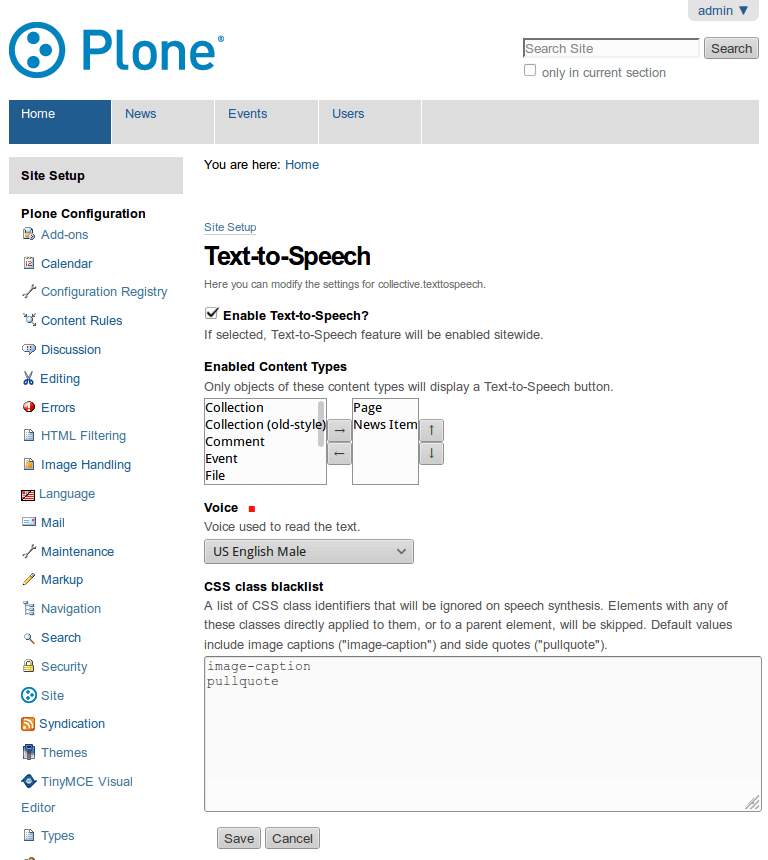
The Text-to-Speech control panel configlet.
A viewlet with a ‘Listen’ button will be displayed on objects with the feature enabled.
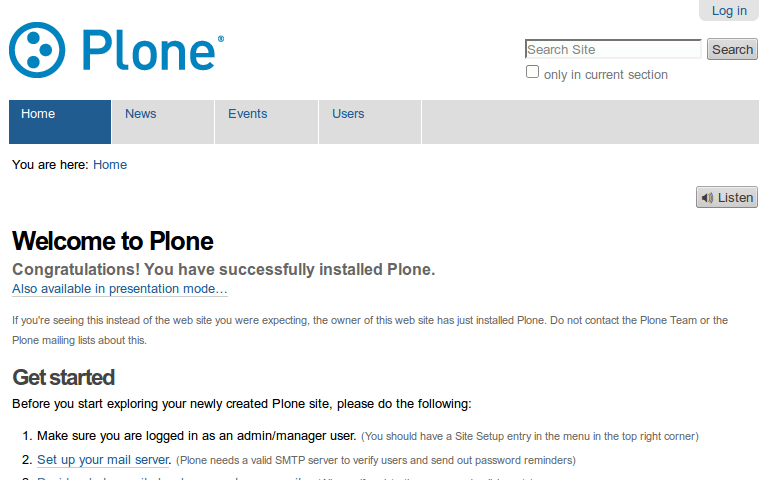
The speech synthesis feature enabled.
You can pause/resume the reader at any time by selecting ‘Pause’/’Resume’.
Changelog
1.0rc1 (2016-07-11)
Ignore <iframe> tags explicitly and fix button visibility. [rodfersou]
Show the ‘Listen’ button to anonymous users only. [hvelarde]
1.0b2 (2016-07-08)
Review text extraction logic; it is now possible to ignore parts of the text via a blacklist of CSS classes accessible in the control panel configlet. [rodfersou, hvelarde]
To avoid displaying the ‘Listen’ button with an incorrect voice, the feature is now globally disabled by default at installation time. [hvelarde]
ResponsiveVoice library is now only loaded when needed. [hvelarde]
The ‘Listen’ button is now shown only after ResponsiveVoice library has been loaded. [rodfersou]
1.0b1 (2016-06-14)
Use version 1.4 of the ResponsiveVoice API. [hvelarde]
Package is now compatible with Plone 5.0 and Plone 5.1. [rodfersou, hvelarde]
Implement i18n on the widget and update translations. [rodfersou, hvelarde]
Simplify static files stack. [rodfersou]
1.0a2 (2016-03-28)
Add Brazilian Portuguese and Spanish translations. [hvelarde]
Fix an issue with package JavaScript. [rodfersou]
1.0a1 (2016-03-28)
Initial release.
2 maintainers


Metadata
2 maintainers
Release files for collective.texttospeech 1.0rc1
For a detailed explanation of source distributions (sdists) and built distributions (wheels), please see the package formats documentation.
Source distribution (sdist)
| File | Size | Uploaded | |
|---|---|---|---|
| collective.texttospeech-1.0rc1.tar.gz | 83.5 kB | Details |
Release files / collective.texttospeech-1.0rc1.tar.gz
| Download URL | collective.texttospeech-1.0rc1.tar.gz |
|---|---|
| Size | 83.5 kB |
| Tags | Source |
|
SHA-256 checksum How to use checksums |
4d1a2f6a7be465f8ee654ee8311e0898133fcaa843d4696bda140084c8aa0956
|
|
BLAKE2b-256 checksum How to use checksums |
31df25724dfce0ed359c84d0284759f8e329b0ef5231b7070d0f9b1207994f00
|
| Upload date | |
|
Uploaded using Trusted Publishing? What is trusted publishing? |
No |














