
The coloredlogs.ColoredStreamHandler class is a simple logging handler that inherits from logging.StreamHandler and uses ANSI escape sequences to render your logging messages in color. It uses only standard colors so it should work on any UNIX terminal. Currently this module does not support non-UNIX terminals (e.g. the Windows console). Here is a screenshot of the demo that is printed when coloredlogs.py is executed directly:
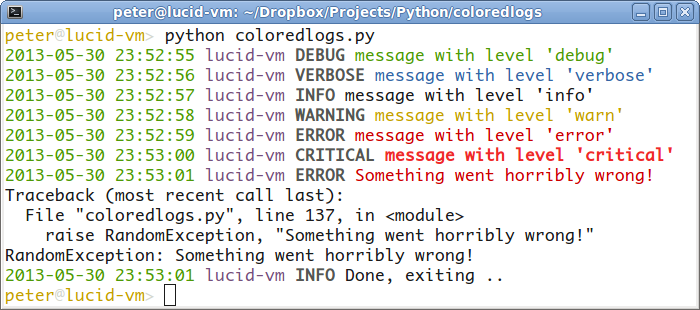
Note that the screenshot above includes the custom logging level VERBOSE defined by my verboselogs module: if you install both coloredlogs and verboselogs it will Just Work (verboselogs is of course not required to use coloredlogs).
The logging handler does not use ANSI escape sequences when output redirection applies (for example when the standard error stream is being redirected to a file or another program) so if you like the format (see below) you can use it for your log files as well.
Format of log messages
As can be seen in the screenshot above, the logging handler includes four fields in every logged message by default:
A timestamp indicating when the event was logged. This field is visible by default. To hide it you can pass the keyword argument show_timestamps=False when you create the handler.
The hostname of the system on which the event was logged. This field is visible by default. To hide it you can pass the keyword argument show_hostname=False when you create the handler.
The name of the logger that logged the event. This field is visible by default. To hide it you can pass the keyword argument show_name=False when you create the handler.
The human friendly name of the log level / severity.
The message that was logged.
Usage
Here’s an example of how you would use the logging handler:
# Configure your logger.
import logging, coloredlogs
logger = logging.getLogger('your-module')
logger.addHandler(coloredlogs.ColoredStreamHandler())

# Some examples.
logger.setLevel(logging.DEBUG)
logger.debug("this is a debugging message")
logger.info("this is an informational message")
logger.warn("this is a warning message")
logger.error("this is an error message")
logger.fatal("this is a fatal message")
logger.critical("this is a critical message")
You can change the formatting of the output to a limited amount by subclassing ColoredStreamHandler and overriding the method(s) of your choice. For details take a look at the source code (it’s only +/- 160 lines of code, including documentation).
For people who like Vim
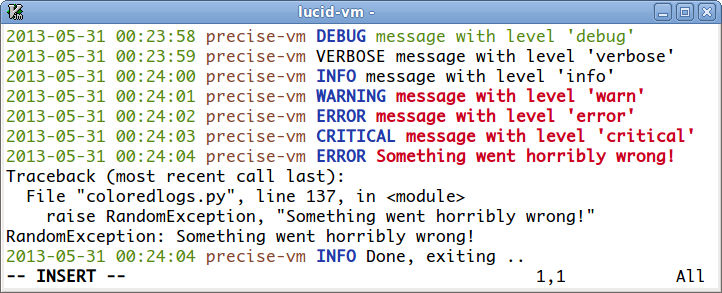
Although the logging handler was originally meant for interactive use, it can also be used to generate log files. In this case the ANSI escape sequences are not used so the log file will contain plain text and no colors. If you use Vim and coloredlogs and would like to view your log files in color, you can try the two Vim scripts included in the coloredlogs source distributions and git repository:
For people who like cron
When coloredlogs is used in a cron job, the output that’s e-mailed to you by cron won’t contain any ANSI escape sequences because coloredlogs realizes that it’s not attached to an interactive terminal. If you’d like to have colors e-mailed to you by cron there’s a simple way to set it up:
MAILTO="your-email-address@here"
CONTENT_TYPE="text/html"
* * * * * root ansi2html your-command
The ansi2html program is installed when you install coloredlogs. It runs your-command under the external program script (you need to have this installed to get ansi2html working). This makes your-command think that it’s attached to an interactive terminal which means it will output ANSI escape sequences and ansi2html converts these to HTML. Yes, this is a bit convoluted, but it works great :-)
You can use ansi2html without coloredlogs, but please note that it only supports normal text, bold text and text with one of the foreground colors black, red, green, yellow, blue, magenta, cyan and white (these are the portable ANSI color codes).
Contact
The latest version of coloredlogs is available on PyPi and GitHub. For bug reports please create an issue on GitHub. If you have questions, suggestions, etc. feel free to send me an e-mail at peter@peterodding.com.
License
This software is licensed under the MIT license.
© 2013 Peter Odding.
1 maintainer

Metadata
1 maintainer
Release files for coloredlogs 0.4.3
For a detailed explanation of source distributions (sdists) and built distributions (wheels), please see the package formats documentation.
Source distribution (sdist)
| File | Size | Uploaded | Provenance | Actions |
|---|---|---|---|---|
| coloredlogs-0.4.3.tar.gz | 8.7 kB | Without provenance | Details for coloredlogs-0.4.3.tar.gz |
Release files / coloredlogs-0.4.3.tar.gz
| Download URL | coloredlogs-0.4.3.tar.gz |
|---|---|
| Size | 8.7 kB |
| Tags | Source |
|
SHA-256 checksum How to use checksums |
4512924057201aa6dcd72e919a642f94b4d7418acf846f250fc80d6bbf92ce41
|
|
BLAKE2b-256 checksum How to use checksums |
2b66f22ccc45de21b0976e44a51c3b4e0dd7706ce322343930d25f5c127b08f0
|
| Upload date | |
|
Uploaded using Trusted Publishing? What is trusted publishing? |
No |
Security for coloredlogs 0.4.3
Provenance
Provenance describes where a file came from. On PyPI, provenance is shared via attestations, which provide a verifiable record of the build or publishing details. View details, limitations and caveats.
No provenance found
None of the files in this release were uploaded with provenance metadata.
A note on package security
PyPI is a repository for distributing packages, not a service for auditing them. While third-party security researchers and our staff do their best to detect and remove malicious packages, PyPI cannot guarantee the quality, security or suitability of any given package.
To learn more about protecting yourself from malicious actors, visit our package security documentation.














