
Color Generator 
Handle color calculation in a pythonic way !
Feel free to contribute !!! Source Code
Installation
https://pypi.org/project/colorGenerator/
Install from Pypi :
pip install colorGenerator
Import into your code and ready to go
import colorGenerator as cG
First step using colorGenerator
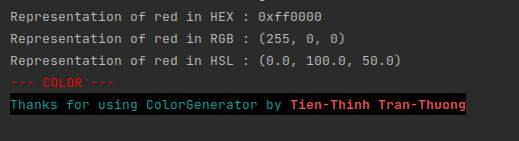
1 Converting RGB to HEX and HSL
import colorGenerator as cG

# Print some color
red = cG.Color(rgb=(255, 0, 0))

# Representation of red in HEX
print(f"Representation of red in HEX : {red}")

# Representation of red in RGB
r, g, b = red.__repr__()
print(f"Representation of red in RGB : {(r, g, b)}")

# References
# http://en.wikipedia.org/wiki/HLS_color_space
# Representation of red in HSL
h, s, l = red.hsl()
print(f"Representation of red in HSL : {(h*360, s*100, l*100)}")

# Show the color in the Terminal
red.show()

cG.credits()
2 Finding complementary of a color and median of a palette
import colorGenerator as cG

red = cG.Color(rgb=(255, 0, 0))
blue = cG.Color(rgb=(0, 255, 0))

# Find the complementary of red
c_red = red.complementary()
print("The complementary of red is : ", end="")
c_red.show()

# Find the median of red and blue
# We create a palette
palette = cG.Palette(colors=[red, blue])
med = palette.average_hsl()
print("The median of red and blue is : ", end="")
med.show()

3 Saving and Loading color and palette of colors
import colorGenerator as cG

red = cG.Color(rgb=(255, 0, 0))
blue = cG.Color(rgb=(0, 255, 0))

# Save red into test3-red.json
red.save("test3-red.json")
# Loading saved color
load_red = cG.Color.load("test3-red.json")
print("The saved color is : ", end="")
load_red.show()

# We create a palette
palette = cG.Palette(colors=[red, blue])
# Save the palette test3-palette.json
palette.save("test3-palette.json")
# Loading saved palette
load_palette = cG.Palette.load("test3-palette.json")
print("The saved palette of red and blue is : ", end="")
load_palette.show()

4 Selecting automatically text color for an image
import colorGenerator as cG
import cv2, requests
from PIL import Image, ImageDraw, ImageFont

# Let's Download the background image at
url = "https://raw.githubusercontent.com/tttienthinh/colorGenerator/main/test/test4-bg.jpg"
image = requests.get(url)
open("test4-bg.jpg", "wb").write(image.content)

# Pick two colors from the image
img = cv2.imread("test4-bg.jpg")
up_left_color = cG.Color(rgb=img[300, 480, ::-1])
down_right_color = cG.Color(rgb=img[1500, 2400, ::-1])

# This is the 2 picked colors from the image
up_left_color.show()
down_right_color.show()

# Creating the palette
palette = cG.Palette(colors=[
    up_left_color,
    down_right_color,
])

# Extrating the text color as the average
text_color = palette.average_hsl().invert_luminosity()
text_color.show()

# opening the image and writing text
img = Image.open("test4-bg.jpg")
draw = ImageDraw.Draw(img)
font = ImageFont.truetype("test4-font.ttf", 335)
draw.text((150, 320), text="colorGenerator", font=font, fill=text_color.__repr__())
img.save("test4-result.jpg")

5 Picking color with Tkinter
import colorGenerator as cG
from tkinter.colorchooser import askcolor

# Ask for a color
color = askcolor()
print(color[1])
r, g, b = color[0]

# Creating the color
new_color = cG.Color(rgb=(r, g, b))
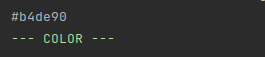
new_color.show()
1 maintainer

Metadata
1 maintainer
Release files for colorGenerator 1.2.1
For a detailed explanation of source distributions (sdists) and built distributions (wheels), please see the package formats documentation.
Source distribution (sdist)
| File | Size | Uploaded | |
|---|---|---|---|
| colorGenerator-1.2.1.tar.gz | 5.8 kB | Details |
Built distribution (wheel)
| File | Interpreter | ABI | Platform | Reset |
|---|---|---|---|---|
| colorGenerator-1.2.1-py3-none-any.whl | Python 3 | none | any | Details |
Total release size: 11.0 kB
Release files / colorGenerator-1.2.1.tar.gz
| Download URL | colorGenerator-1.2.1.tar.gz |
|---|---|
| Size | 5.8 kB |
| Tags | Source |
|
SHA-256 checksum How to use checksums |
559266807c3302b9c11f91e46ff6b45520d8a952d8816bfb3a08d848e855d051
|
|
BLAKE2b-256 checksum How to use checksums |
4931b9fd7bc917e6f0bcff2fd7b10b9b2d5e99f34bbc618b6791c38e820f508e
|
| Upload date | |
|
Uploaded using Trusted Publishing? What is trusted publishing? |
No |
| Uploaded via |
twine/3.4.1 importlib_metadata/3.10.0 pkginfo/1.7.0 requests/2.25.1 requests-toolbelt/0.9.1 tqdm/4.60.0 CPython/3.8.5
|
Release files / colorGenerator-1.2.1-py3-none-any.whl
| Download URL | colorGenerator-1.2.1-py3-none-any.whl |
|---|---|
| Size | 5.2 kB |
| Tags | Python 3 |
|
SHA-256 checksum How to use checksums |
e0f72a3cd17b626c445deb111412ada542d911143cd411e749572c110b584c0a
|
|
BLAKE2b-256 checksum How to use checksums |
c7e93ce0e74ec1e13311d431f68a7a89027d3750b728f7a3bf6722e36e7fbc5c
|
| Upload date | |
|
Uploaded using Trusted Publishing? What is trusted publishing? |
No |
| Uploaded via |
twine/3.4.1 importlib_metadata/3.10.0 pkginfo/1.7.0 requests/2.25.1 requests-toolbelt/0.9.1 tqdm/4.60.0 CPython/3.8.5
|














