
colouredlogs: Coloured terminal output for Python’s logging module
NOTE: This is a parody of the great python-colouredlogs project by Peter Odding. Please use that package as I currently have no plans to maintain this one. All I’ve done is s/color/colour/g.
The colouredlogs package enables coloured terminal output for Python’s logging module. The ColouredFormatter class inherits from logging.Formatter and uses ANSI escape sequences to render your logging messages in colour. It uses only standard colours so it should work on any UNIX terminal. It’s currently tested on Python 2.6, 2.7, 3.4, 3.5, 3.6 and PyPy. On Windows colouredlogs automatically pulls in Colourama as a dependency and enables ANSI escape sequence translation using Colourama. Here is a screen shot of the demo that is printed when the command colouredlogs --demo is executed:
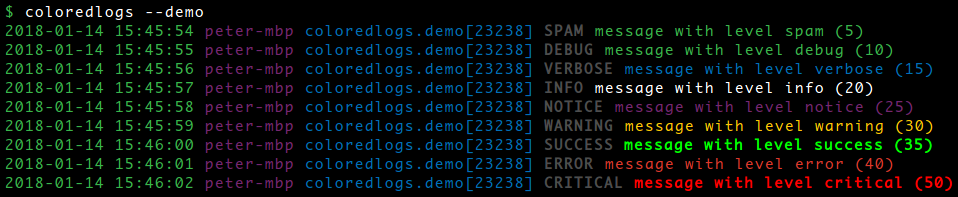
Note that the screenshot above includes custom logging levels defined by my verboselogs package: if you install both colouredlogs and verboselogs it will Just Work (verboselogs is of course not required to use colouredlogs).
Installation
The colouredlogs package is available on PyPI which means installation should be as simple as:
$ pip install colouredlogsThere’s actually a multitude of ways to install Python packages (e.g. the per user site-packages directory, virtual environments or just installing system wide) and I have no intention of getting into that discussion here, so if this intimidates you then read up on your options before returning to these instructions ;-).
Usage
Here’s an example of how easy it is to get started:
import colouredlogs, logging

# Create a logger object.
logger = logging.getLogger(__name__)

# By default the install() function installs a handler on the root logger,
# this means that log messages from your code and log messages from the
# libraries that you use will all show up on the terminal.
colouredlogs.install(level='DEBUG')

# If you don't want to see log messages from libraries, you can pass a
# specific logger object to the install() function. In this case only log
# messages originating from that logger will show up on the terminal.
colouredlogs.install(level='DEBUG', logger=logger)

# Some examples.
logger.debug("this is a debugging message")
logger.info("this is an informational message")
logger.warning("this is a warning message")
logger.error("this is an error message")
logger.critical("this is a critical message")
Format of log messages
The ColouredFormatter class supports user defined log formats so you can use any log format you like. The default log format is as follows:
%(asctime)s %(hostname)s %(name)s[%(process)d] %(levelname)s %(message)s
This log format results in the following output:
2015-10-23 03:32:22 peter-macbook colouredlogs.demo[30462] DEBUG message with level 'debug'
2015-10-23 03:32:23 peter-macbook colouredlogs.demo[30462] VERBOSE message with level 'verbose'
2015-10-23 03:32:24 peter-macbook colouredlogs.demo[30462] INFO message with level 'info'
...
You can customize the log format and styling using environment variables as well as programmatically, please refer to the online documentation for details.
Enabling millisecond precision
If you’re switching from logging.basicConfig() to colouredlogs.install() you may notice that timestamps no longer include milliseconds. This is because colouredlogs doesn’t output milliseconds in timestamps unless you explicitly tell it to. There are three ways to do that:
The easy way is to pass the milliseconds argument to colouredlogs.install():
colouredlogs.install(milliseconds=True)
This became supported in release 7.1 (due to #16).
Alternatively you can change the log format to include ‘msecs’:
%(asctime)s,%(msecs)03d %(hostname)s %(name)s[%(process)d] %(levelname)s %(message)s
Here’s what the call to colouredlogs.install() would then look like:
colouredlogs.install(fmt='%(asctime)s,%(msecs)03d %(hostname)s %(name)s[%(process)d] %(levelname)s %(message)s')
Customizing the log format also enables you to change the delimiter that separates seconds from milliseconds (the comma above). This became possible in release 3.0 which added support for user defined log formats.
If the use of %(msecs)d isn’t flexible enough you can instead add %f to the date/time format, it will be replaced by the value of %(msecs)03d. Support for the %f directive was added to release 9.3 (due to #45).
Changing text styles and colours
The online documentation contains an example of customizing the text styles and colours.
Coloured output from cron
When colouredlogs is used in a cron job, the output that’s e-mailed to you by cron won’t contain any ANSI escape sequences because colouredlogs realizes that it’s not attached to an interactive terminal. If you’d like to have colours e-mailed to you by cron there are two ways to make it happen:
Modifying your crontab
Here’s an example of a minimal crontab:
MAILTO="your-email-address@here"
CONTENT_TYPE="text/html"
* * * * * root colouredlogs --to-html your-command
The colouredlogs program is installed when you install the colouredlogs Python package. When you execute colouredlogs --to-html your-command it runs your-command under the external program script (you need to have this installed). This makes your-command think that it’s attached to an interactive terminal which means it will output ANSI escape sequences which will then be converted to HTML by the colouredlogs program. Yes, this is a bit convoluted, but it works great :-)
Modifying your Python code
The ColouredCronMailer class provides a context manager that automatically enables HTML output when the $CONTENT_TYPE variable has been correctly set in the crontab.
This requires my capturer package which you can install using pip install 'colouredlogs[cron]'. The [cron] extra will pull in capturer 2.4 or newer which is required to capture the output while silencing it - otherwise you’d get duplicate output in the emails sent by cron.
The context manager can also be used to retroactively silence output that has already been produced, this can be useful to avoid spammy cron jobs that have nothing useful to do but still email their output to the system administrator every few minutes :-).
Contact
The latest version of colouredlogs is available on PyPI and GitHub. The online documentation is available on Read The Docs and includes a changelog. For bug reports please create an issue on GitHub. If you have questions, suggestions, etc. feel free to send me an e-mail at peter@peterodding.com.
License
This software is licensed under the MIT license.
© 2018 Peter Odding.
1 maintainer

Metadata
1 maintainer
Release files for colouredlogs 10.0.1
For a detailed explanation of source distributions (sdists) and built distributions (wheels), please see the package formats documentation.
Source distribution (sdist)
| File | Size | Uploaded | Provenance | Actions |
|---|---|---|---|---|
| colouredlogs-10.0.1.tar.gz | 272.9 kB | Without provenance | Details for colouredlogs-10.0.1.tar.gz |
Built distribution (wheel)
| File | Interpreter | ABI | Platform | Actions Reset |
|---|---|---|---|---|
| colouredlogs-10.0.1-py2.py3-none-any.whl | Python 2, Python 3 | none | any | Details for colouredlogs-10.0.1-py2.py3-none-any.whl |
Total release size: 316.8 kB
Release files / colouredlogs-10.0.1.tar.gz
| Download URL | colouredlogs-10.0.1.tar.gz |
|---|---|
| Size | 272.9 kB |
| Tags | Source |
|
SHA-256 checksum How to use checksums |
cbf6ebea0da0e977315026ac369e534a2bce669c4d21c77243d6d7bf0f0d56cb
|
|
BLAKE2b-256 checksum How to use checksums |
28db0cfca46d92e80649e63038ec414658c2917217265a20a7cac87498df8580
|
| Upload date | |
|
Uploaded using Trusted Publishing? What is trusted publishing? |
No |
| Uploaded via |
twine/1.13.0 pkginfo/1.5.0.1 requests/2.22.0 setuptools/41.0.1 requests-toolbelt/0.9.1 tqdm/4.32.2 CPython/3.7.2
|
Release files / colouredlogs-10.0.1-py2.py3-none-any.whl
| Download URL | colouredlogs-10.0.1-py2.py3-none-any.whl |
|---|---|
| Size | 43.9 kB |
| Tags | Python 2 Python 3 |
|
SHA-256 checksum How to use checksums |
2fe1cb555c0d065baf81de4003da4fd87095117ab43de788aade0d8b69766108
|
|
BLAKE2b-256 checksum How to use checksums |
7553fe47f29a355f90e424f853a4c8c0c379d0e01a038f8643d2ca5416418f7f
|
| Upload date | |
|
Uploaded using Trusted Publishing? What is trusted publishing? |
No |
| Uploaded via |
twine/1.13.0 pkginfo/1.5.0.1 requests/2.22.0 setuptools/41.0.1 requests-toolbelt/0.9.1 tqdm/4.32.2 CPython/3.7.2
|
Security for colouredlogs 10.0.1
Provenance
Provenance describes where a file came from. On PyPI, provenance is shared via attestations, which provide a verifiable record of the build or publishing details. View details, limitations and caveats.
No provenance found
None of the files in this release were uploaded with provenance metadata.
A note on package security
PyPI is a repository for distributing packages, not a service for auditing them. While third-party security researchers and our staff do their best to detect and remove malicious packages, PyPI cannot guarantee the quality, security or suitability of any given package.
To learn more about protecting yourself from malicious actors, visit our package security documentation.














