
COM Port Monitor
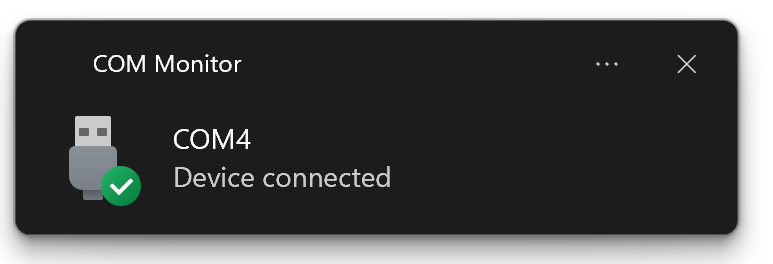
Ever find yourself plugging and unplugging devices into your computer and needing to know their associated COM ports? I did, so I wrote COM Port Monitor. All it does is keep track of COM ports that are added or removed, and shows helpful system notifications to let you know about it.
To use this, you can install it via pip install com-monitor (you might want to create a virtual environment and
activate it first), then you run it from the command line simply via commonitor (no dash). To quit the app,
right-click it's icon in the system tray and select 'Exit' from the pop up menu.
Next up:
- Get installation via pipx working (not sure why it doesn't work at the moment)
- Support OSes other than Windows
- Build executables for supported platforms
Hope you find this helpful!
USB Disconnected and USB Connected icons by Icons8
1 maintainer

Metadata
1 maintainer
Release files for com-monitor 0.1.1.post1
For a detailed explanation of source distributions (sdists) and built distributions (wheels), please see the package formats documentation.
Source distribution (sdist)
| File | Size | Uploaded | |
|---|---|---|---|
| com-monitor-0.1.1.post1.tar.gz | 25.4 kB | Details |
Built distribution (wheel)
| File | Interpreter | ABI | Platform | Reset |
|---|---|---|---|---|
| com_monitor-0.1.1.post1-py3-none-any.whl | Python 3 | none | any | Details |
Total release size: 35.3 kB
Release files / com-monitor-0.1.1.post1.tar.gz
| Download URL | com-monitor-0.1.1.post1.tar.gz |
|---|---|
| Size | 25.4 kB |
| Tags | Source |
|
SHA-256 checksum How to use checksums |
eff21313cd963bfb138b127ad711e3f60240e6948b91b0b23798ccd9939fc4c3
|
|
BLAKE2b-256 checksum How to use checksums |
21ecce8917d23c14a8872ae57740114e0f8013351ee0abba1652cc144c528033
|
| Upload date | |
|
Uploaded using Trusted Publishing? What is trusted publishing? |
No |
| Uploaded via |
python-requests/2.28.1
|
Release files / com_monitor-0.1.1.post1-py3-none-any.whl
| Download URL | com_monitor-0.1.1.post1-py3-none-any.whl |
|---|---|
| Size | 9.8 kB |
| Tags | Python 3 |
|
SHA-256 checksum How to use checksums |
452fd68ec2b2752397ab4f041e36abdaa0a5b4823afad3745598902c5bc019e6
|
|
BLAKE2b-256 checksum How to use checksums |
6c63cf7d47ecef6428572a11e337007b088458f53e485d1c02716fdb7b76d989
|
| Upload date | |
|
Uploaded using Trusted Publishing? What is trusted publishing? |
No |
| Uploaded via |
python-requests/2.28.1
|














