
dokr - Make your docker and ecs tasks easy
A Helper pip package for docker and ECS tasks. This pip package helps you automate your CI/CD pipeline. If your using docker and Amazon ECS for deployments, this tool can be really helpful. This package uses aws cli and ecs cli. Mak
Assumptions:
- Assuming python is installed on your system.
- Docker is installed on your system
- aws-cli is installed and credentials are configured on your system.
- ecs-cli is installed on system [For Log Command only]
Install dokr on your system using :
pip install dokr
ECS Options
- login into ecs directly (Assuming awscli is installed and configured)
dokr ecs login

- Deploy an image on a cluster
dokr ecs deploy --cluster cluster_name --service service_name --tag image_version

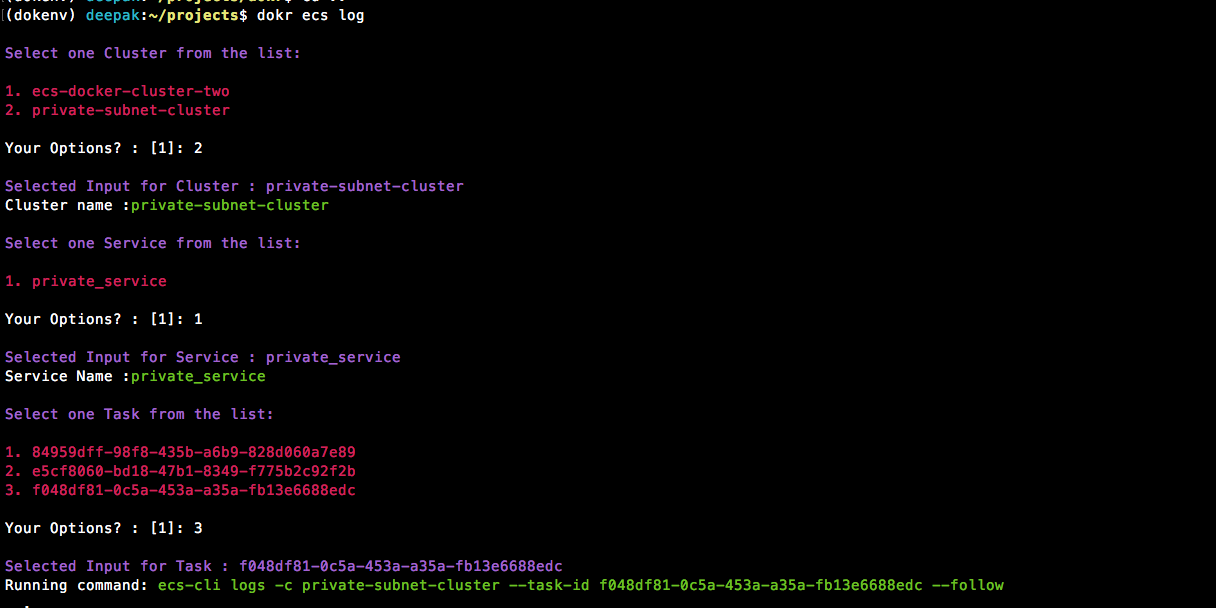
- Check ecs running logs of a Task - this command will ask for cluster/service and task defination.
Note: Install ecs-cli before running this command from here: https://docs.aws.amazon.com/AmazonECS/latest/developerguide/ECS_CLI_installation.html
dokr ecs log
Docker Helper Commands
- Prune whole system - Cleans unused images, containers and volumes.
dokr dock --clean-all

- Delete all the images matching the pattern
dokr dock --clean pattern_xxx

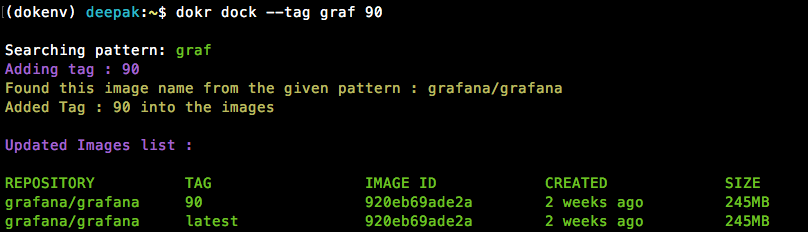
- Add a tag to the existing image matching the provided pattern (for latest tag only)
dokr dock --tag pattern_xxx tag_name
- Push all images on a system matching a pattern
This will push all images matching pattern 'pat'
dokr dock --push pat

AWS Commands
- Check current public ip of a machine on AWS
dokr aws --ip jenkins

Run Apps (subsitute to docker run command and DockerCompose)
- Configure your default values(like docker registry, port mapping, volume mapping etc. that will be same for all apps):

- Add an new app for deployment:

- Run all configured apps:

- Run a particular app from ECR tags:

- Run a particular app by providing a tag:

Development:
- Clean ununsed:
rm -rf build/ dist/ *egg* **.pyc __pycache__ - Build package:
python setup.py bdist_wheel - deploy package:
python -m twine upload dist/*
follow this link for more details https://dzone.com/articles/executable-package-pip-install
1 maintainer

Metadata
1 maintainer
Release files for Conjunto-bravo1996 0.2.1
For a detailed explanation of source distributions (sdists) and built distributions (wheels), please see the package formats documentation.
Source distribution (sdist)
| File | Size | Uploaded | |
|---|---|---|---|
| Conjunto-bravo1996-0.2.1.tar.gz | 2.3 kB | Details |
Built distribution (wheel)
| File | Interpreter | ABI | Platform | Reset |
|---|---|---|---|---|
| Conjunto_bravo1996-0.2.1-py3-none-any.whl | Python 3 | none | any | Details |
Total release size: 4.7 kB
Release files / Conjunto-bravo1996-0.2.1.tar.gz
| Download URL | Conjunto-bravo1996-0.2.1.tar.gz |
|---|---|
| Size | 2.3 kB |
| Tags | Source |
|
SHA-256 checksum How to use checksums |
3fe45e94444a492475d1cbddd30e1926123a60e7179ebae399c2fe129b6a9f1d
|
|
BLAKE2b-256 checksum How to use checksums |
f2f554c2ba281c3a4bd5e6d0e003bfe1610864d924f5aeac1811b6d2a143a3d5
|
| Upload date | |
|
Uploaded using Trusted Publishing? What is trusted publishing? |
No |
| Uploaded via |
twine/3.4.1 importlib_metadata/4.5.0 pkginfo/1.7.0 requests/2.25.1 requests-toolbelt/0.9.1 tqdm/4.46.0 CPython/3.7.7
|
Release files / Conjunto_bravo1996-0.2.1-py3-none-any.whl
| Download URL | Conjunto_bravo1996-0.2.1-py3-none-any.whl |
|---|---|
| Size | 2.4 kB |
| Tags | Python 3 |
|
SHA-256 checksum How to use checksums |
a5a20d8b9a3c84f1571c2128289e95e953e6649d6a379e6a32db66926ae4276f
|
|
BLAKE2b-256 checksum How to use checksums |
545cf20cf0d0af78e9cf1310dc48ad9c05d375f33e7aea94f317b3287ea9c2e7
|
| Upload date | |
|
Uploaded using Trusted Publishing? What is trusted publishing? |
No |
| Uploaded via |
twine/3.4.1 importlib_metadata/4.5.0 pkginfo/1.7.0 requests/2.25.1 requests-toolbelt/0.9.1 tqdm/4.46.0 CPython/3.7.7
|














