
A simple Python console (terminal) menu that work's on any OS

Project description
What's this?
A simple Python console (terminal) menu that work's on any OS and is navigable by only using a keyboard.
Usage
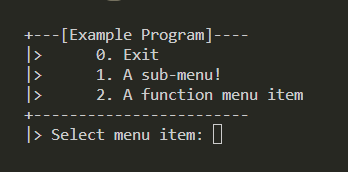
Example code:
import consolemenu_py as cm

async def main():
    # Create the main menu. The name should usually be the name of your program
    mm = cm.MainMenu("Example Program")

    # This will enter an empty sub-menu
    mm.add_item(cm.Menu("A sub-menu!"))

    # This will print "Hello World!" to the console
    mm.add_item(cm.FunctionMenuItem("A function menu item", lambda _: print("Hello World!")))

    # This will only return if the user exists the main menu
    await mm.run()
Will look like this:
License
This package is licensed under MIT, see LICENSE


Download files
Download the file for your platform. If you're not sure which to choose, learn more about installing packages.
Source Distribution
consolemenu.py-0.2.2.tar.gz
(4.6 kB
view details)
Built Distribution
Filter files by name, interpreter, ABI, and platform.
If you're not sure about the file name format, learn more about wheel file names.
Copy a direct link to the current filters






