


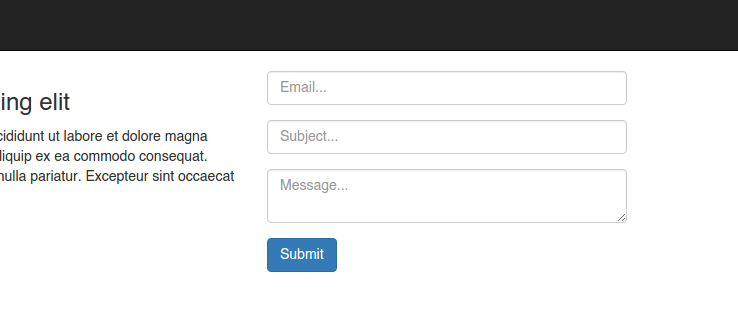
A simple contact form widget for Django.
Install
Django Contact Widget is available directly from PyPI:
$ pip install django-contact-widget
*). And don’t forget to add contact_widget to your INSTALLED_APPS.
Database Migration
$ ./manage.py makemigrations contact_widget
$ ./manage.py migrate contact_widget
Requirement
Django>=1.10.1
Setting Configuration
Email Configuration in file of settings.py
EMAIL_HOST = 'smtp.gmail.com'  # eg: 'smtp.gmail.com'
EMAIL_PORT = 587
EMAIL_HOST_USER = 'your_email@domain.com'
EMAIL_HOST_PASSWORD = 'your_password'
EMAIL_USE_TLS = True
DEFAULT_FROM_EMAIL = EMAIL_HOST_USER
EMAIL_BACKEND = 'django.core.mail.backends.smtp.EmailBackend'
URL configuration
The easiest way to set up the views in django-contact-widget is to just use the provided URLconf, found at contact_widget.urls. You can include it wherever you like in your site’s URL configuration; for example, to have it live at the URL /contact/:
from django.conf.urls import include, url

urlpatterns = [
    # ....
    url(r'^contact/', include('contact_widget.urls')),
]
Usage
Include the tempalte from contact_widget/contact.html to your sidebar for example.
{% include "contact_widget/contact.html" %}
License
1 maintainer

Metadata
1 maintainer
Release files for contact_widget 1.0.0
For a detailed explanation of source distributions (sdists) and built distributions (wheels), please see the package formats documentation.
Source distribution (sdist)
| File | Size | Uploaded | Provenance | |
|---|---|---|---|---|
| contact_widget-1.0.0.tar.gz | 4.9 kB | Without provenance | Details |
Release files / contact_widget-1.0.0.tar.gz
| Download URL | contact_widget-1.0.0.tar.gz |
|---|---|
| Size | 4.9 kB |
| Tags | Source |
|
SHA-256 checksum How to use checksums |
4919e39e5391897e082b43a550f545e5fbb812a94909b7be42abf206fd037089
|
|
BLAKE2b-256 checksum How to use checksums |
79f9ede1e91850db55f6d5c383fe6f23d2a2920c8a2903df198890cce6fbfe53
|
| Upload date | |
|
Uploaded using Trusted Publishing? What is trusted publishing? |
No |
Security for contact_widget 1.0.0
Provenance
Provenance describes where a file came from. On PyPI, provenance is shared via attestations, which provide a verifiable record of the build or publishing details. View details, limitations and caveats.
No provenance found
None of the files in this release were uploaded with provenance metadata.
A note on package security
PyPI is a repository for distributing packages, not a service for auditing them. While third-party security researchers and our staff do their best to detect and remove malicious packages, PyPI cannot guarantee the quality, security or suitability of any given package.













