
covizpy 



covizpy is a Python package that provides easy access to Covid-19 data from Our World in Data, as well as functions to generate relevant Covid-19 charts and summaries easily. We aim to make covizpy simple and easy to use. Our goal is to enable anyone with basic Python programming knowledge to access and visualize Covid-19 data, and make their own informed decisions and conclusions.
There are existing Python packages that allow users to download and generate Covid-19 charts. For example, covid19pandas is a package that presents COVID-19 data from Johns Hopkins University and The New York Times in pandas dataframes, to make analysis and visualization easier in a Python environment.
While other packages have more advanced plotting capabilities, we provide simpler functions that allow users to answer questions regarding the Covid-19 pandemic as quickly as possible.
Features
This package contains four functions: plot_metric, plot_spec, get_data and plot_summary.
-
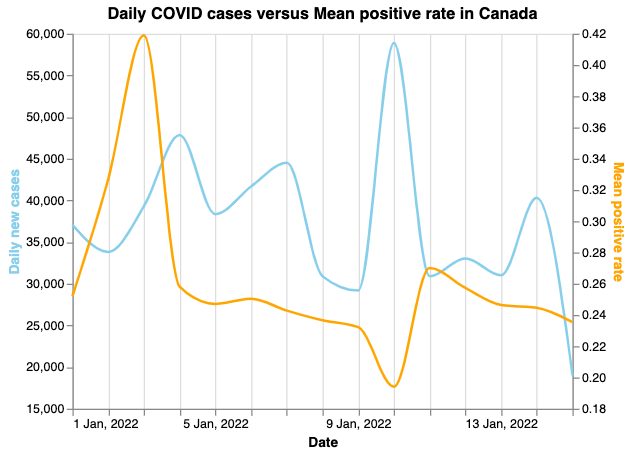
plot_metric: Create a line chart presenting COVID total new cases versus another metric within a time period -
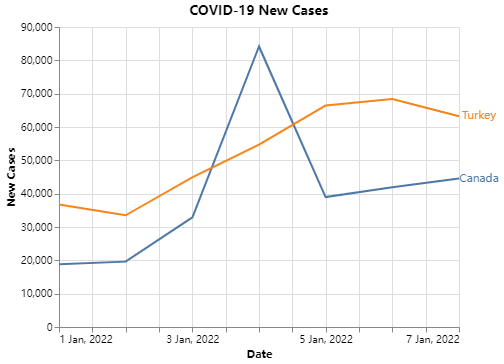
plot_spec: Create a line chart presenting specific country/countries COVID information within a time period -
get_data: User can retrieve the COVID data from the source as a pandas dataframe. Specific data can be retrieved by passing the date range and the list of countries -
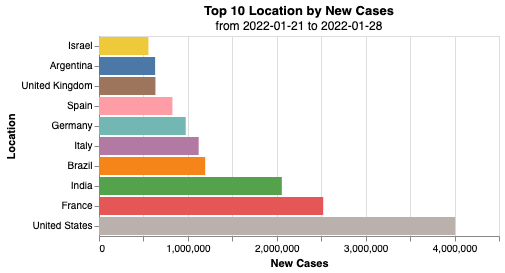
plot_summary: Create a horizontal bar chart summarising a specified variable and value within a time period
Dependencies
Before installing the package, following packages must be installed:
- python = "^3.9"
- pandas = "^1.3.5"
- altair = "^4.2.0"
- altair-saver = "^0.5.0"
Installation
pip install covizpy
Usage and Examples
To use the package, import the package with following commands:
from covizpy.get_data import get_data
from covizpy.plot_summary import plot_summary
from covizpy.plot_metric import plot_metric
from covizpy.plot_spec import plot_spec
To use the functions, see below examples:
Retrieve COVID-19 data with specified date range and default all locations
df = get_data(date_from="2022-01-01", date_to="2022-01-21")
Plot summary graph (bar chart)
plot_summary(df, var="location", val="new_cases", fun="sum", date_from="2022-01-01", date_to="2022-01-15", top_n=10)
Plot COVID-19 cases for specific countries (line chart)
plot_spec(df, location=["Canada", "Turkey"], val="new_cases", date_from="2022-01-01", date_to="2022-01-07")
Plot new COVID-19 cases versus another metric (line chart)
plot_metric(location="Canada", metric="positive_rate", date_from="2022-01-01", date_to="2022-01-15")
Contributors
- Rohit Rawat
- Rong Li
- Thomas Siu
- Ting Zhe Yan
Contributing
Interested in contributing? Check out the contributing guidelines. Please note that this project is released with a Code of Conduct. By contributing to this project, you agree to abide by its terms.
License
covizpy was created by Rohit Rawat, Rong Li, Thomas Siu, Ting Zhe Yan . It is licensed under the terms of the MIT license.
Credits
covizpy was created with cookiecutter and the py-pkgs-cookiecutter template.
1 maintainer

Metadata
1 maintainer
Release files for covizpy 1.0.24
For a detailed explanation of source distributions (sdists) and built distributions (wheels), please see the package formats documentation.
Source distribution (sdist)
| File | Size | Uploaded | Provenance | Actions |
|---|---|---|---|---|
| covizpy-1.0.24.tar.gz | 8.8 kB | Without provenance | Details for covizpy-1.0.24.tar.gz |
Built distribution (wheel)
| File | Interpreter | ABI | Platform | Actions Reset |
|---|---|---|---|---|
| covizpy-1.0.24-py3-none-any.whl | Python 3 | none | any | Details for covizpy-1.0.24-py3-none-any.whl |
Total release size: 18.6 kB
Release files / covizpy-1.0.24.tar.gz
| Download URL | covizpy-1.0.24.tar.gz |
|---|---|
| Size | 8.8 kB |
| Tags | Source |
|
SHA-256 checksum How to use checksums |
c3aa28f05f7d833979b101d92f2bc8a49e881d2fcc63094b64293aff8ce97d43
|
|
BLAKE2b-256 checksum How to use checksums |
471d03c065677a3a0fd16f3793ec4d30c7b1fcb0df904762f5e85f4677d20118
|
| Upload date | |
|
Uploaded using Trusted Publishing? What is trusted publishing? |
No |
| Uploaded via |
twine/3.8.0 pkginfo/1.8.2 readme-renderer/32.0 requests/2.27.1 requests-toolbelt/0.9.1 urllib3/1.26.8 tqdm/4.62.3 importlib-metadata/4.10.1 keyring/23.5.0 rfc3986/2.0.0 colorama/0.4.4 CPython/3.9.10
|
Release files / covizpy-1.0.24-py3-none-any.whl
| Download URL | covizpy-1.0.24-py3-none-any.whl |
|---|---|
| Size | 9.7 kB |
| Tags | Python 3 |
|
SHA-256 checksum How to use checksums |
6817b76bfa7043df4b5501b341315e9e8249a65b101a972199318f4483578752
|
|
BLAKE2b-256 checksum How to use checksums |
5c88b35677ef9e2554592566f81d4617af30ada63f9be0a860a34152a02a5adc
|
| Upload date | |
|
Uploaded using Trusted Publishing? What is trusted publishing? |
No |
| Uploaded via |
twine/3.8.0 pkginfo/1.8.2 readme-renderer/32.0 requests/2.27.1 requests-toolbelt/0.9.1 urllib3/1.26.8 tqdm/4.62.3 importlib-metadata/4.10.1 keyring/23.5.0 rfc3986/2.0.0 colorama/0.4.4 CPython/3.9.10
|
Security for covizpy 1.0.24
Provenance
Provenance describes where a file came from. On PyPI, provenance is shared via attestations, which provide a verifiable record of the build or publishing details. View details, limitations and caveats.
No provenance found
None of the files in this release were uploaded with provenance metadata.
A note on package security
PyPI is a repository for distributing packages, not a service for auditing them. While third-party security researchers and our staff do their best to detect and remove malicious packages, PyPI cannot guarantee the quality, security or suitability of any given package.
To learn more about protecting yourself from malicious actors, visit our package security documentation.














