
cpGrader: A Python Package to Grade Programming Assignments Automatically



cpGrader is designed to be used with the course "NTNU CSIE Computer Programming I/II" by instructor neokent (紀博文 Po-Wen Chi).
Thanks for your Contribution 🌟






Installation
pip install cpGrader
How does it works?
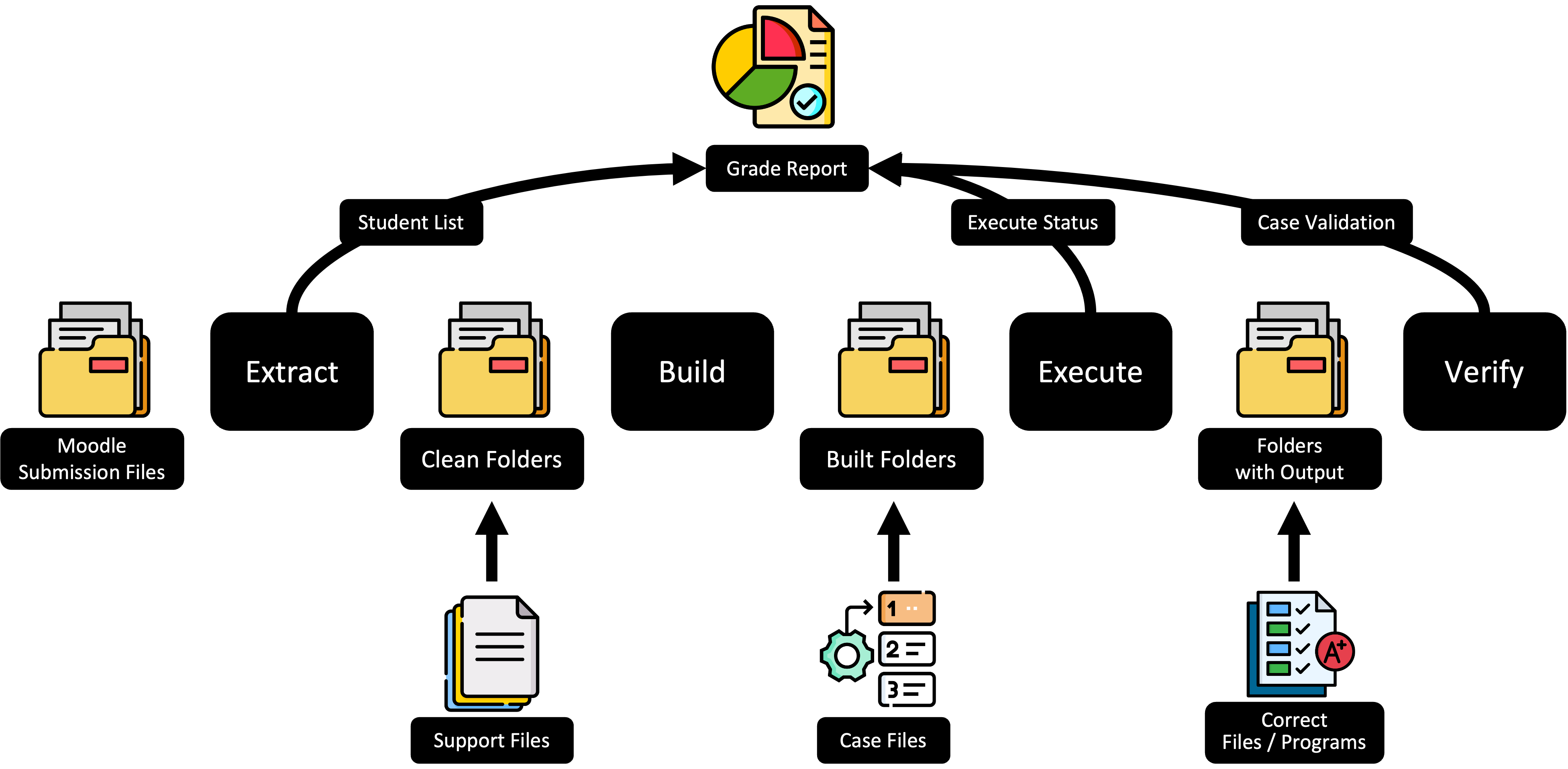
Stage (You can enable/disable the stage)
Extract: Get all the students's source file from moodle submission folder.Build: Copy the support files to the student's folder and Compile the student's program.Execute: Run the student's program by the testcase and Generate output file by each testcase.Verify: Compare the student's output with the correct plaintext output or the correct program's output.
Step
- Download all the student submissions from Moodle.
- Think about the testcases and strategies that how to grade the student's assignment.
- Write a config file.
- Design the verify function.
- Run your grader.
Getting Started
TOML Config File
global: the global settings (Field below is just for global).support [list]: the files copied to the student's folder.
case: the testcase settings (Each case can be independent).name [string]: name of testcase.file [string]: filepath of testcase file.pts [float | int]: grading points.correct [string]: the correct file which is program file (.c,.py) or plain text file (.txt,.out).command [string]: the command to run student's program.
Basic Example
Config File
[global]
support = ["input.bmp", "assignment.h"]
correct = "./correct.c"
command = "./assignment"

[[case]]
name = "case1"
file = "./testcase/1.in"
pts = 5

[[case]]
name = "case2"
file = "./testcase/2.in"
pts = 10
Python Code
from cpGrader import Grader

grader = Grader()

@grader.setcase()
def verify(case_name: str, student_output: str, correct_output: str):
    assert student_output == correct_output

grader.run(
    moodle_submission_dir="/path/to/submissions_dir"
)
GO AND SEE MORE REAL EXAMPLES HERE.
Pytest Testing
Run All Examples Test
pytest
Choose the Test to Run (Wildcard)
pytest -k 2023-cp1-hw01
Details and Muti-Threading
pytest -vs -n auto
1 maintainer

Metadata
1 maintainer
Release files for cpGrader 0.1.4
For a detailed explanation of source distributions (sdists) and built distributions (wheels), please see the package formats documentation.
Source distribution (sdist)
| File | Size | Uploaded | |
|---|---|---|---|
| cpgrader-0.1.4.tar.gz | 20.2 kB | Details |
Built distribution (wheel)
| File | Interpreter | ABI | Platform | Reset |
|---|---|---|---|---|
| cpgrader-0.1.4-py3-none-any.whl | Python 3 | none | any | Details |
Total release size: 40.5 kB
Release files / cpgrader-0.1.4.tar.gz
| Download URL | cpgrader-0.1.4.tar.gz |
|---|---|
| Size | 20.2 kB |
| Tags | Source |
|
SHA-256 checksum How to use checksums |
4fcbf15a1e42e01ac6917c629c044934362686bae197fa5582505363a64f10bd
|
|
BLAKE2b-256 checksum How to use checksums |
5fbb6e86c3d74c6dcb72745e3116e68b83b4a0ab3c2e983e3f97fff87fa9a457
|
| Upload date | |
|
Uploaded using Trusted Publishing? What is trusted publishing? |
No |
| Uploaded via |
poetry/1.8.2 CPython/3.12.1 Linux/6.8.0-1021-azure
|
Release files / cpgrader-0.1.4-py3-none-any.whl
| Download URL | cpgrader-0.1.4-py3-none-any.whl |
|---|---|
| Size | 20.3 kB |
| Tags | Python 3 |
|
SHA-256 checksum How to use checksums |
c339d6f30450f52b30e283f550b6d274fd307f891e6dcea709e08e6e915b4966
|
|
BLAKE2b-256 checksum How to use checksums |
cdc7d5a52b99445e42936afcd46b84865b8eebf746fd83d809dccfa67c327f4f
|
| Upload date | |
|
Uploaded using Trusted Publishing? What is trusted publishing? |
No |
| Uploaded via |
poetry/1.8.2 CPython/3.12.1 Linux/6.8.0-1021-azure
|














