
CrewAI + Memanto: Persistent Multi-Agent Memory
This package provides CrewAI tools for integrating Memanto's persistent, cross-agent memory capabilities into your CrewAI pipelines.
Installation
pip install crewai-memanto
A real-world example of CrewAI agents using Memanto as their shared, persistent memory layer. Two agents collaborate through a semantic memory database that survives across sessions, agents, and runs.
What This Demonstrates
- Cross-agent memory sharing: A Research Agent stores findings that a Writer Agent retrieves
- Cross-session persistence: Run the researcher today, run the writer tomorrow -- memories persist
- Typed semantic memory: 13 memory types (fact, observation, decision, etc.) with confidence scoring
- Contradictory memory handling: Detect and resolve conflicting facts (bonus)
Architecture
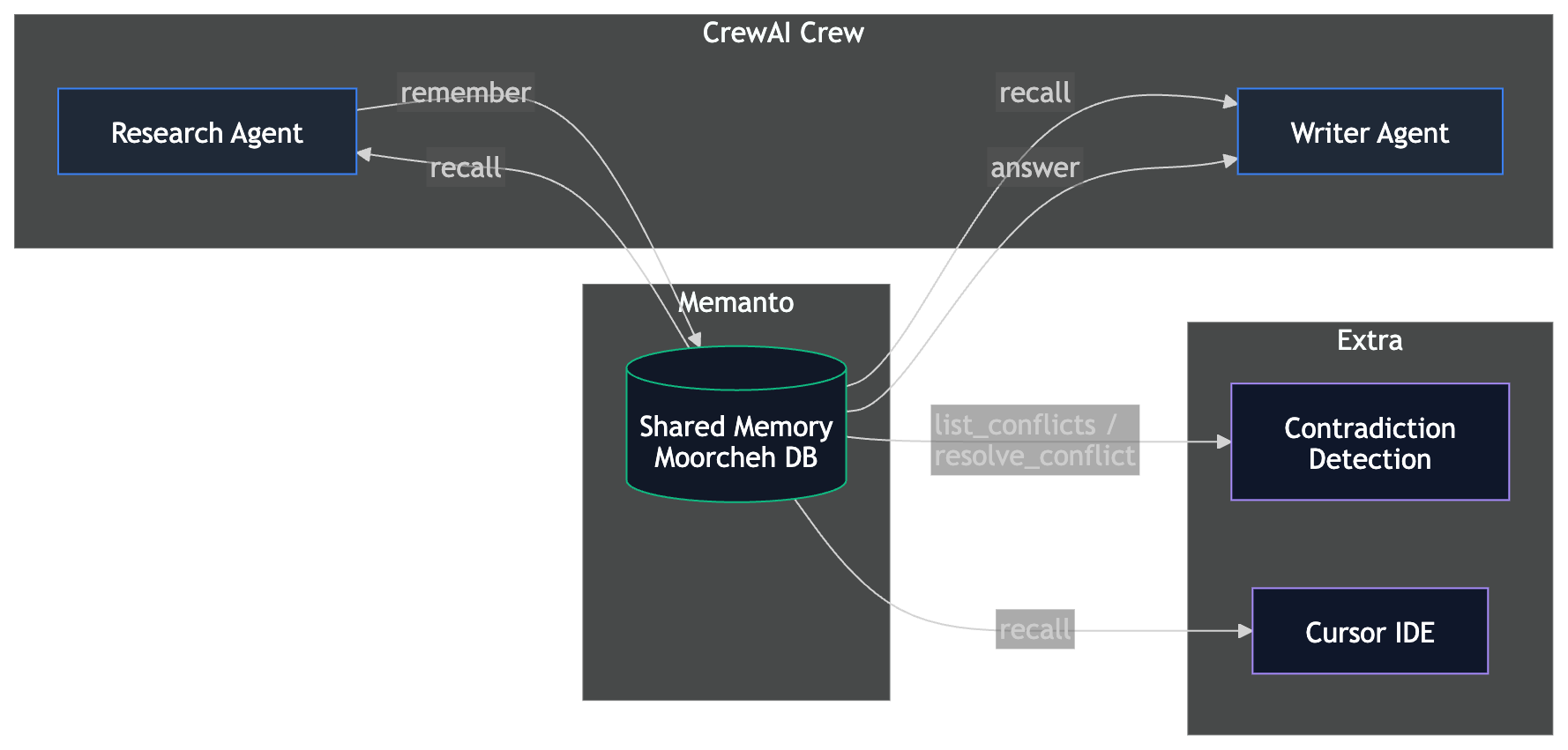
Both CrewAI agents share the same Memanto agent ID (crewai-research-team), giving them access to a shared memory namespace.
Prerequisites
- Python 3.10+
- A Moorcheh API key (free tier: 100K ops/month)
- An OpenRouter API key (for CrewAI's LLM — free tier available)
Setup
# 1. Clone the repo (if you haven't already)
git clone https://github.com/moorcheh-ai/memanto.git
cd memanto/examples/crewai-memory

# 2. Create a virtual environment
python -m venv venv
source venv/bin/activate  # Windows: venv\Scripts\activate

# 3. Install dependencies
pip install -r requirements.txt

# 4. Configure API keys
cp .env.example .env
# Edit .env and add your MOORCHEH_API_KEY and OPENROUTER_API_KEY
Quick Start
Run the full pipeline (Research Agent + Writer Agent) in one command:
python run_full_pipeline.py
Step-by-Step Demo (Proves Persistence)
This is the recommended flow for your terminal recording:
# Step 1: Research Agent stores findings in Memanto
python run_research.py

# Step 2: Writer Agent retrieves those memories in a NEW session
# (This proves memories persist across sessions!)
python run_writer.py

# Step 3 (Bonus): Demonstrate contradictory memory handling
python run_contradiction.py
Architecture: Why Tool-Based Integration?
CrewAI offers two ways to plug in external memory:
-
Native
StorageBackendoverride — Implement CrewAI'sStorageBackendprotocol and pass it viaMemory(storage=my_backend). CrewAI's memory pipeline (LLM analysis, consolidation, composite scoring) runs on top of your backend. -
Tool-based integration — Provide Memanto operations as CrewAI tools that agents call directly.
This example uses the tool-based approach. Here's why:
-
API mismatch: CrewAI's
StorageBackend.search()receives a pre-computed vector embedding. By the time it reaches the storage layer, the original query text is lost. Memanto's API performs semantic search from natural language text, not raw vectors. There's no clean way to bridge this gap without redundant embedding work or losing Memanto's search quality. -
Rich metadata: The tool-based approach lets the LLM choose the right memory type (out of 13 semantic types), set confidence scores, and add tags at write time. A native backend override only receives what CrewAI's encoding pipeline extracts, which doesn't map to Memanto's type system.
-
No dual memory risk: We explicitly set
memory=Falseon all Crews to prevent CrewAI from injecting its own LanceDB-backed memory tools alongside the Memanto tools. Whenmemory=True, CrewAI auto-injects "Search memory" and "Save to memory" tools into every agent — running both systems would cause duplicate storage and retrieval confusion.
Note: Native
StorageBackendintegrations (like Hindsight or Mengram) work well when the external system accepts vector embeddings directly. Memanto's information-theoretic search operates on text, making the tool-based pattern the better fit.
Namespace Design
All CrewAI agents in this example share a single Memanto agent ID (crewai-research-team), which maps to one Memanto namespace. This is intentional: the Research Agent stores findings and the Writer Agent retrieves them from the same namespace. Memanto's scope system (memanto_agent_{agent_id}) provides the isolation boundary — different crews or projects should use different agent IDs.
How to Swap CrewAI Memory for Memanto
Before: CrewAI's Built-in Memory
from crewai import Crew

# CrewAI's built-in memory uses LanceDB locally
# When memory=True, CrewAI auto-injects "Search memory" and
# "Save to memory" tools into every agent
crew = Crew(
    agents=[researcher, writer],
    tasks=[research_task, writing_task],
    memory=True,  # Uses LanceDB, lost when storage is cleared
)
After: Memanto Memory (Persistent)
from memanto.cli.client.sdk_client import SdkClient
from crewai_memanto import MemantoSetup, create_memanto_tools

# 1. Set up Memanto (one-time per session)
setup = MemantoSetup(api_key="your-moorcheh-key")
client = setup.setup(agent_id="my-crew")

# 2. Create memory tools bound to your agent
tools = create_memanto_tools(client, agent_id="my-crew")

# 3. Give agents Memanto tools instead of using memory=True
researcher = Agent(
    role="Researcher",
    goal="Research and store findings",
    backstory="...",
    tools=[tools["remember"], tools["recall"]],  # Persistent memory!
)

writer = Agent(
    role="Writer",
    goal="Retrieve findings and write",
    backstory="...",
    tools=[tools["recall"], tools["answer"]],  # Reads persistent memory!
)

# 4. Run the crew with memory=False to prevent dual memory systems
crew = Crew(
    agents=[researcher, writer],
    tasks=[...],
    memory=False,  # Memanto handles memory via tools
)
crew.kickoff()
Key differences:
| Feature | CrewAI Memory | Memanto Memory |
|---|---|---|
| Persistence | Session only | Permanent |
| Cross-agent | Same crew only | Any agent, any session |
| Search | Embedding-based | Semantic (Moorcheh) |
| Memory types | Untyped | 13 semantic types |
| Confidence scoring | No | Yes (0.0-1.0) |
| Conflict detection | No | Yes |
| Cost at idle | N/A | Zero (serverless) |
File Structure
examples/crewai-memory/
├── README.md              # This file
├── requirements.txt       # Python dependencies
├── .env.example           # API key template
├── memanto_tools.py       # CrewAI Tool wrappers around Memanto SdkClient
├── agents.py              # Research Agent + Writer Agent definitions
├── tasks.py               # Task definitions
├── crew.py                # Crew orchestration factories
├── run_research.py        # Run 1: Research Agent stores findings
├── run_writer.py          # Run 2: Writer Agent recalls (proves persistence)
├── run_full_pipeline.py   # Full pipeline in one run
└── run_contradiction.py   # Bonus: contradictory memory handling
Bonus: Cursor Integration
After running the CrewAI pipeline, you can access the same memories from Cursor:
# Connect Cursor to Memanto globally (all projects)
memanto connect cursor --global

# Or for a specific project directory
memanto connect cursor --project-dir /path/to/your/project
This creates .cursor/rules/memanto.mdc (memory instructions) and .cursor/skills/memanto/SKILL.md (memory type guide). Open any project in Cursor and ask it to recall your research findings -- it accesses the same Memanto memory namespace used by the CrewAI agents.
Example Cursor prompt after running the CrewAI pipeline:
"Use memanto recall to find what the research team stored about AI agent market size"
Troubleshooting
- "MOORCHEH_API_KEY not set": Copy
.env.exampleto.envand add your key - "No active session": The setup manager handles this automatically; check your API key is valid
- "Agent already exists": This is normal -- the setup reuses existing agents
- CrewAI LLM errors: Ensure
OPENROUTER_API_KEYis set, or override withCREWAI_LLMenv var
Learn More
- Memanto Documentation
- CrewAI Documentation
- Moorcheh API Keys
- OpenRouter — unified LLM gateway (free tier available)
1 maintainer

Metadata
1 maintainer
Release files for crewai-memanto 0.1.0
For a detailed explanation of source distributions (sdists) and built distributions (wheels), please see the package formats documentation.
Source distribution (sdist)
| File | Size | Uploaded | Provenance | Actions |
|---|---|---|---|---|
| crewai_memanto-0.1.0.tar.gz | 7.6 kB | Without provenance | Details for crewai_memanto-0.1.0.tar.gz |
Built distribution (wheel)
| File | Interpreter | ABI | Platform | Actions Reset |
|---|---|---|---|---|
| crewai_memanto-0.1.0-py3-none-any.whl | Python 3 | none | any | Details for crewai_memanto-0.1.0-py3-none-any.whl |
Total release size: 15.4 kB
Release files / crewai_memanto-0.1.0.tar.gz
| Download URL | crewai_memanto-0.1.0.tar.gz |
|---|---|
| Size | 7.6 kB |
| Tags | Source |
|
SHA-256 checksum How to use checksums |
f549e34e35a83df22339c3c54f34f7ca367bc69a0128152878c121a8065219fa
|
|
BLAKE2b-256 checksum How to use checksums |
5b6d8afbc6646c6cbeddc87d19bfd3b0bb778d3907654a364d51e6ba12d50d00
|
| Upload date | |
|
Uploaded using Trusted Publishing? What is trusted publishing? |
No |
| Uploaded via |
twine/6.1.0 CPython/3.13.12
|
Release files / crewai_memanto-0.1.0-py3-none-any.whl
| Download URL | crewai_memanto-0.1.0-py3-none-any.whl |
|---|---|
| Size | 7.8 kB |
| Tags | Python 3 |
|
SHA-256 checksum How to use checksums |
984daf016d3481c0d3b88f3da8fd0a27975f3946c8aaeab6c37b82ef6dc1adf0
|
|
BLAKE2b-256 checksum How to use checksums |
1f9a337777a48ee4aaa1167b4d0ad977e343388e54dc1fa91ebd4f16cc9b2629
|
| Upload date | |
|
Uploaded using Trusted Publishing? What is trusted publishing? |
No |
| Uploaded via |
twine/6.1.0 CPython/3.13.12
|
Security for crewai-memanto 0.1.0
Provenance
Provenance describes where a file came from. On PyPI, provenance is shared via attestations, which provide a verifiable record of the build or publishing details. View details, limitations and caveats.
No provenance found
None of the files in this release were uploaded with provenance metadata.
A note on package security
PyPI is a repository for distributing packages, not a service for auditing them. While third-party security researchers and our staff do their best to detect and remove malicious packages, PyPI cannot guarantee the quality, security or suitability of any given package.
To learn more about protecting yourself from malicious actors, visit our package security documentation.













