
Crystal
A realtime plotting and project management library built using Plotly
What can it do?
Crystal is an alternative to the amazingly useful visualization tool Tensorboard with some additional features that make it useful not just for Machine Learning but, in any project that needs realtime data visualizations. You can include realtime plots in your python (more languages to come) easily with just two line of code.
Some features provided by crystal include;
- Centralized database to store the results of all projects.
- Easy way to download results from the database if needed.
- Plots supported include scalar, histogram and images with more to come.
To get started just install crystal using pip as follows:
$ pip install crystal
The installation adds a path to crystal script to PATH variable on linux which allows you to run
the crystal dashboard from any directory as follows:
$ crystal
Note:
- If you install it on a virtual environment then you will only be able to run it only when the environment is activated.
Here's how you'd plot a sine wave using crystal:
"""
realtime_sinewave.py
"""

import time
import numpy as np
from crystal import Crystal

cr = Crystal(project_name="Realtime_sine")
x_range = np.arange(0, 1000, 0.1)

for i in x_range:
    value = np.sin(2*np.pi*i)
    cr.scalar(value=value, step=i, name="sine_wave")
    print("step: {} \t value: {}".format(i, value))
    time.sleep(1)  # one value a second
Let's have a closer look at some of the functions used in the above code:
cr = Crystal(project_name=..)creates a new project in the database, if no project name is provided then, the script name is used as the project name.cr.scalar(value=..)plots a scalar value and takes three parameters,valuestores the y-axis value which in this case is the sin output,stepsaves the x-axis value andnameprovides a title for the plot.- Each run in a project is assigned a unique run id that contains the time stamp. You can see them in the terminal and also the dashboard (described below).
- All the data is stores under
~/Crystal_data/crystal.db.
Output:
Run
$ crystal
and select a project and run name. You will see a plot that looks something like this:
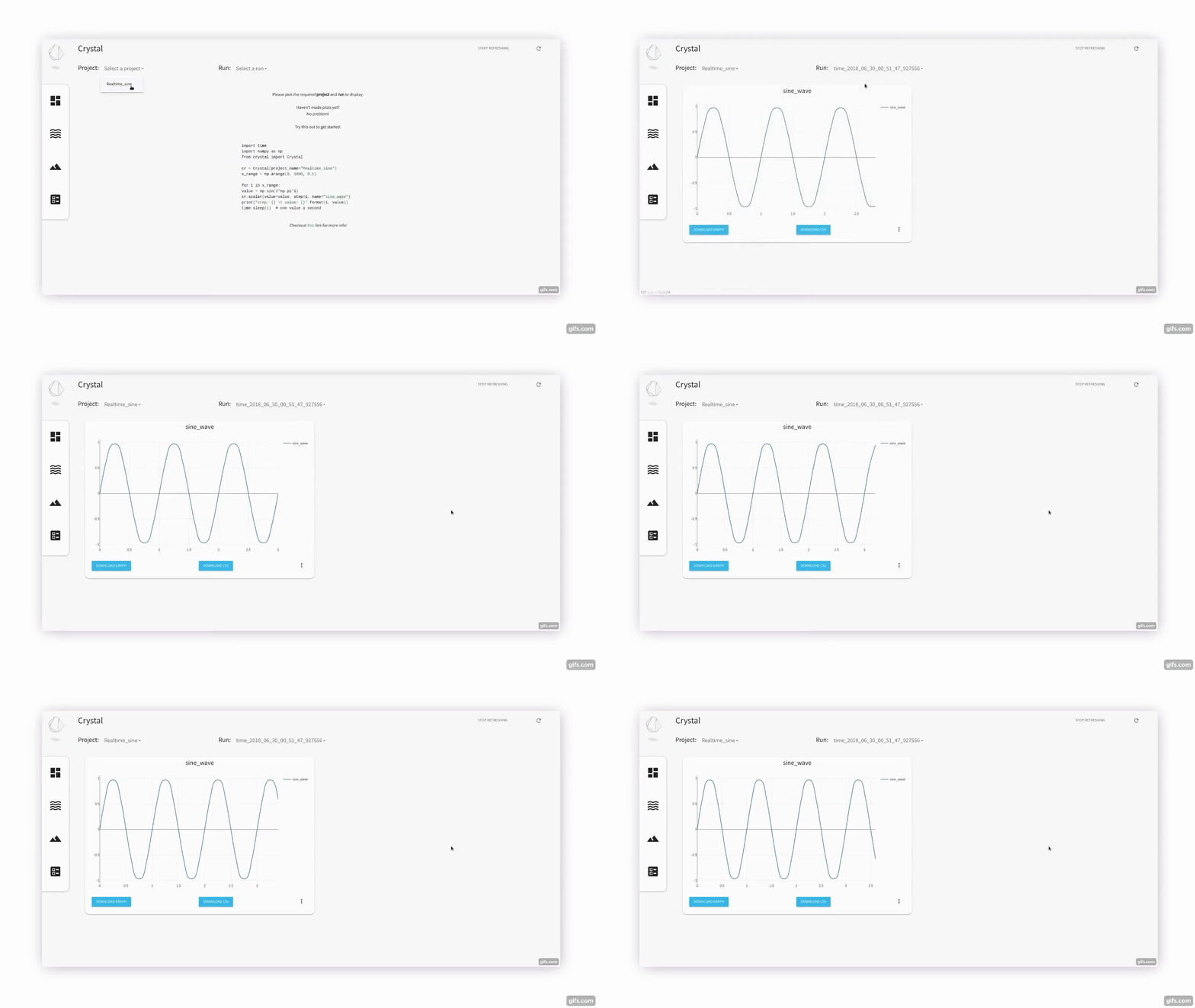
Crystal Dashboard in action
Where can I learn more?
Docs are still being worked on. Feel free to contribute in documenting the usage!
Built With
- Plotly - Graphing library
- Flask - Microframework used to build the dashboard backend
- Material Design for Bootstrap - Styling the dashboard
Contributing
Please read CONTRIBUTING.md for details on our code of conduct, and the process for submitting pull requests to us.
Versioning
We use SemVer for versioning. For the versions available, see the tags on this repository.
Authors
- Naresh Nagabushan - Initial work - naresh1318
See also the list of contributors who participated in this project.
License
This project is licensed under the MIT License - see the LICENSE.md file for details
Acknowledgments
- Inspired by Tensorboard
1 maintainer

Release files for crystal 0.1.0
For a detailed explanation of source distributions (sdists) and built distributions (wheels), please see the package formats documentation.
Source distribution (sdist)
| File | Size | Uploaded | |
|---|---|---|---|
| crystal-0.1.0.tar.gz | 2.1 MB | Details |
Built distribution (wheel)
| File | Interpreter | ABI | Platform | Reset |
|---|---|---|---|---|
| crystal-0.1.0-py3-none-any.whl | Python 3 | none | any | Details |
Total release size:4.3 MB
Release files / crystal-0.1.0.tar.gz
| Download URL | crystal-0.1.0.tar.gz |
|---|---|
| Size | 2.1 MB |
| Tags | Source |
|
SHA-256 checksum How to use checksums |
cf0a41928ce25fd7f15c5eac02611b440a3d32baca3fd780afac7b5eb2e62d7c
|
|
BLAKE2b-256 checksum How to use checksums |
79aba685fd1603f0d04bda9ad9509a14bb388f53d947cd037ee929d3e1e4a674
|
| Upload date | |
|
Uploaded using Trusted Publishing? What is trusted publishing? |
No |
Release files / crystal-0.1.0-py3-none-any.whl
| Download URL | crystal-0.1.0-py3-none-any.whl |
|---|---|
| Size | 2.1 MB |
| Tags | Python 3 |
|
SHA-256 checksum How to use checksums |
8314d65dd6efd840549d20daf937d5b94fb52bdd2aca46da8d5815e21d7d926e
|
|
BLAKE2b-256 checksum How to use checksums |
64825fd3cf3681159ba0b40d64d3a95353f050be38073ddd07d39e7a4d4e9574
|
| Upload date | |
|
Uploaded using Trusted Publishing? What is trusted publishing? |
No |













