
CT Head Deformation


Author: Mark Gardner
The CTHeadDeformation module is an open-sourced library for taking CT and cone-beam CT (CBCT) scans and deforming these scans in a way that simulates realistic head motion. Deforming CT and CBCT scans can be used for:
- Studying how realistic patient motion can affect the treatment plan/delivered treatment dose.
- Data augmentation for training robust deep-learning networks.
- Simulating how realistic patient motion can affect the accuracy of CT/CBCT reconstructions.
- Other applications involving realistic patient head motion.
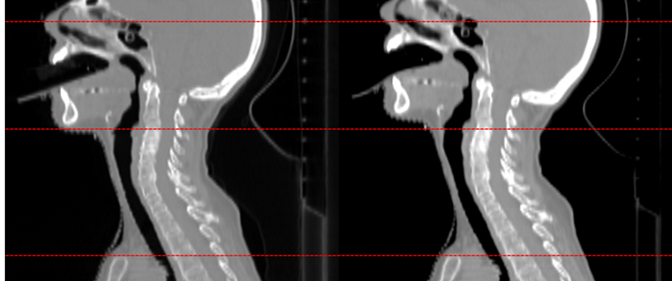
The image below shows example of how the original CT volume (left) can be realistically deformed to simulate a patient tilting their head up (right). The red lines are added to show how the anatomical landmarks have either moved or remained stationary after the deformation is complete.
Further information can be found in the repo wiki (https://github.sydney.edu.au/ACRF-Image-X-Institute/CTHeadDeformation/wiki) which is updated (semi) regularly.
Setup/Build/Install
The module can be installed using pip:
pip install CTHeadDeformation
This code uses the platipy repo (https://github.com/pyplati/platipy). If the platipy module is not automatically installed when installing the CTHeadDeformation code, the platipy library can be installed separately using the installation instructions (https://pyplati.github.io/platipy/getting_started.html).
Install elastix (https://elastix.lumc.nl/index.php)
Add the elastix.exe program pathfile to the system path.
Usage
The code DeformVolume.py is the main function. The deformation information is passed to this function in the form of a .json file. There are examples of .json files in the examples directory. The path to this json file is then the main input for the function DeformVolume.py
Example: Open up the file OneAxisRotation.json and tell the json file to deform the dicom files in directory "dicomSource" by changing
"InputDirectory":""
to
"InputDirectory":"dicomSource"
Also change the variable "name" to the 'Patient's name' variable as defined in the dicom metadata.
Run in python script
from DeformHeadCT.DeformVolume import DeformationScript
JsonInfoFile = 'examples/OneAxisRotation.json'
DeformationScript(JsonInfoFile)
Command Line
In a command line (such as anaconda command prompt) navigate to the directory that the CTHeadDeformation repo was cloned to and run
python DeformVolume.py examples/OneAxisRotation.json
By default the code will automatically use the elastix parameter in the examples folder, and will automatially locate the BoneMask volume required for the deformation.
Dicom Files of head and neck CT scans are avaiable at (https://www.cancerimagingarchive.net/collections/), subject to their licence agreements.
Directory Structure
-
DeformHeadCT - Contains the main python script and supporting functions
-
examples - contains example .json files as well as an example elastix file.
1 maintainer

Metadata
1 maintainer
Release files for CTHeadDeformation 0.1.4
For a detailed explanation of source distributions (sdists) and built distributions (wheels), please see the package formats documentation.
Source distribution (sdist)
| File | Size | Uploaded | Provenance | Actions |
|---|---|---|---|---|
| CTHeadDeformation-0.1.4.tar.gz | 16.1 kB | Without provenance | Details for CTHeadDeformation-0.1.4.tar.gz |
Built distribution (wheel)
| File | Interpreter | ABI | Platform | Actions Reset |
|---|---|---|---|---|
| CTHeadDeformation-0.1.4-py3-none-any.whl | Python 3 | none | any | Details for CTHeadDeformation-0.1.4-py3-none-any.whl |
Total release size: 35.9 kB
Release files / CTHeadDeformation-0.1.4.tar.gz
| Download URL | CTHeadDeformation-0.1.4.tar.gz |
|---|---|
| Size | 16.1 kB |
| Tags | Source |
|
SHA-256 checksum How to use checksums |
a5eae7c471bebfee86f3c270f91cce1e857c01acde10c322196b10fb405aa93f
|
|
BLAKE2b-256 checksum How to use checksums |
2cb9acb87130959eb2f4b200d805ae27b24cdd7e9fb25713ccaf1e16875f9367
|
| Upload date | |
|
Uploaded using Trusted Publishing? What is trusted publishing? |
No |
| Uploaded via |
twine/4.0.2 CPython/3.9.15
|
Release files / CTHeadDeformation-0.1.4-py3-none-any.whl
| Download URL | CTHeadDeformation-0.1.4-py3-none-any.whl |
|---|---|
| Size | 19.8 kB |
| Tags | Python 3 |
|
SHA-256 checksum How to use checksums |
20c80b516a6c0dd20557d727339dd769e4d0fc203824b7236636002c4c1e7587
|
|
BLAKE2b-256 checksum How to use checksums |
7e8cd90dc633f60f1ecefd320bce16d3c839b377e31f52d8d03ab70313246292
|
| Upload date | |
|
Uploaded using Trusted Publishing? What is trusted publishing? |
No |
| Uploaded via |
twine/4.0.2 CPython/3.9.15
|
Security for CTHeadDeformation 0.1.4
Provenance
Provenance describes where a file came from. On PyPI, provenance is shared via attestations, which provide a verifiable record of the build or publishing details. View details, limitations and caveats.
No provenance found
None of the files in this release were uploaded with provenance metadata.
A note on package security
PyPI is a repository for distributing packages, not a service for auditing them. While third-party security researchers and our staff do their best to detect and remove malicious packages, PyPI cannot guarantee the quality, security or suitability of any given package.
To learn more about protecting yourself from malicious actors, visit our package security documentation.














