
CTkCodeBoxPlus
A code editor widget for customtkinter (Enhanced Edition).
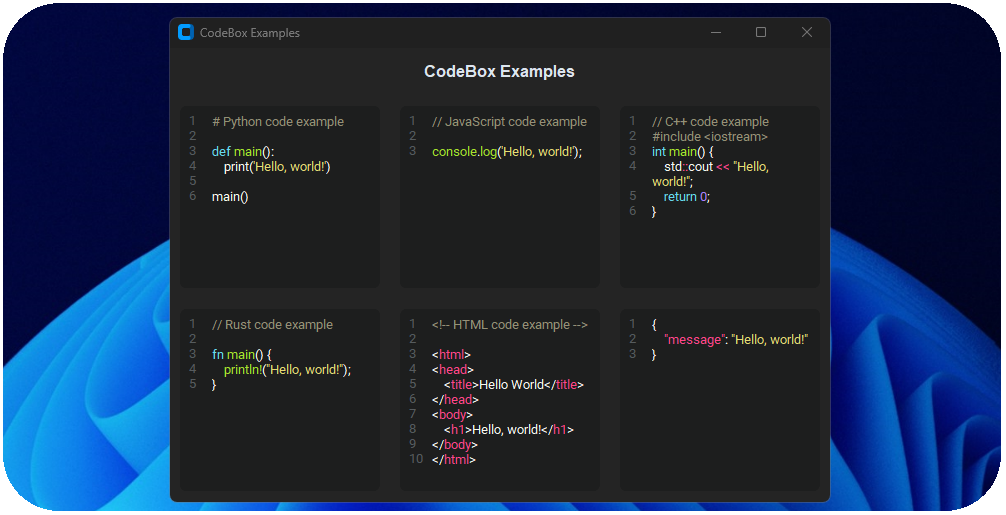
Features
- Multiple language support
- Code syntax highlighting
- Line highlighting (Enhanced)
- Auto-Indent and Outdent (Enhanced)
- Custom history with undo and redo (Enhanced)
- Smart selection on double and triple click (Enhanced)
- Implemented actions like copy, paste, cut (Enhanced)
- Search with highlight and replace methods
- Keybindings for implemented actions (Enhanced)
- Multiple Themes
- Right-click menu (Enhanced)
- Line numbers on left side
- Fully customizable
- Easy to Use
Installation
pip install CTkCodeBoxPlus
Simple Usage
import customtkinter
from CTkCodeBoxPlus import *

root = customtkinter.CTk()

codebox = CTkCodeBox(root, language="python")
codebox.pack(padx=10, pady=10, expand=True,fill="both")

root.mainloop()
Arguments
| Parameter | Type | Default | Description |
|---|---|---|---|
| master | Widget | - | Parent widget |
| language | str/pygments.lexer.Lexer | - | Pygments language name (str) or a lexer class |
| height | int | 200 | Widget height in pixels (passed to CTkTextbox) |
| theme | str | "solarized-light" | Pygments style name used for highlighting |
| numbering_settings | NumberingSettings | NumberingSettings() | NumberingSettings object for the line nums |
| menu_settings | MenuSettings | MenuSettings() | MenuSettings object for the context menu |
| keybinding_settings | KeybindingSettings | KeybindingSettings() | KeybindingSettings object for keybindings |
| search_window_settings | SearchWindowSettings | SearchWindowSettings() | SearchWindowSettings object by default for search & replace window |
| wrap | bool | True | Enable word wrap |
| select_color | str | None | Override selection background color |
| cursor_color | str | None | Cursor color I (blinking) |
| highlight_current_line | bool | True | Highlight the active line |
| highlight_current_line_color | str | None | Explicit color for active line |
| history_settings | HistorySettings | HistorySettings() | HistorySettings object for custom history. |
| indent_width | int | 4 | Number of spaces for indent/outdent. |
| **kwargs | various | - | Additional CTkTextBox parameters |
Methods
- .insert(index, code, push_history): Insert code/text in the box and trigger a non-editing highlight update with pushing history (if push_history is True)
- .get(index1, index2): Get code/text from the box
- .configure(kwargs): Change parameters of the codebox
- .cget(parameter): Get the parameter value from the codebox by name
- .update_code(): Schedule a debounced re-highlight and update edited flag
- .clear_code(): Remove all highlighting tags while preserving selection
- .set_wrap(enabled): Enable/disable word wrap
- .toggle_wrap(): Toggle wrap mode
- .is_edited(): Return True if the text has been edited since last reset
- .reset_edited(): Reset edited state flag to False
- .cut_text(): Cut selected text to clipboard and notify change
- .copy_text(): Copy selected text to clipboard
- .replace(symbols_to_find, symbols_to_replace, replace_all, index_range, match_case, words, regex): Replace occurrences of text
- .search(pattern, match_case, words, regex, start, end): Find all matches and highlight them
- .open_search_window(search_window_settings): Open search & replace window
- .close_search_window(): Close search & replace window
- .paste_text(): Paste clipboard text, replacing selection if present, and refresh highlighting/lines with notify change
- .clear_search_highlight(): Remove all search highlight tags
- .clear_all_text(): Delete all content and notify change
- .select_all_text(): Select all content
- .set_history_enabled(enabled): Enable/disable the internal undo/redo history
- .set_history_limit(limit): Set maximum number of undo frames to keep
- .clear_history(): Clear undo and redo stacks
- .undo(): Undo the last change if history is enabled
- .redo(): Redo the last undone change if available
Dataclasses
@dataclass(frozen=True)
class SearchWindowSettings:
    title: str = "Search & Replace"
    width: int = 400
    height: int = 250
    display_text_translation: dict = field(default_factory=lambda: {
        "find": "Find",
        "search_pattern": "Search pattern",
        "replace": "Replace",
        "replace_with": "Replace with",
        "replace_all": "Replace All",
        "match_case": "Match case",
        "whole_words": "Whole words",
        "prev": "Prev",
        "next": "Next",
        "close": "Close",
        "error": "Error",
        "replaced": "Replaced",
        "no_matches": "No matches"
    })

@dataclass(frozen=True)
class MenuSettings:
    enabled: bool = True
    fg_color: Optional[str] = None
    text_color: Optional[str] = None
    hover_color: Optional[str] = None
    commands: dict = field(default_factory=lambda: {
        # label: (special type for states or "", callable or attribute of codebox in str, displaying accelerator,
        # additional check (callable with return or attr of codebox in str for cget) or None)
        # or
        # "separator": additional check (callable with return or attr of codebox in str for cget) or None
        "Copy": ("has_selection", "copy_text", "Ctrl+C", None),
        "Paste": ("has_clip", "paste_text", "Ctrl+V", None),
        "Cut": ("has_selection", "cut_text", "Ctrl+X", None),
        "Select All": ("has_text", "select_all_text", "Ctrl+A", None),
        "Search & Replace": ("has_text", "open_search_window", "Ctrl+F", None),
        "separator": "history_enabled",
        "Undo": ("has_undo", "undo", "Ctrl+Z", "history_enabled"),
        "Redo": ("has_redo", "redo", "Ctrl+Shift+Z", "history_enabled"),
    })

@dataclass()
class HistorySettings:
    enabled: bool = True
    cooldown: int = 1500  # ms
    max: int = 100,
    built_in_undo: bool = False

@dataclass(frozen=True)
class NumberingSettings:
    enabled: bool = True
    color: Optional[str] = None
    justify: str = "left"
    padx: int = 30
    auto_padx: bool = True

@dataclass(frozen=True)
class KeybindingSettings:  # If you want to disable keybind just write ""
    # Keybindings for common editing actions (widget scope)
    R_select_all_text: str = "CmdOrCtrl+A"
    R_cut_text: str = "CmdOrCtrl+X"
    R_copy_text: str = "CmdOrCtrl+C"
    R_paste_text: str = "CmdOrCtrl+V"
    R_redo: str = "CmdOrCtrl+Shift+Z"
    R_undo: str = "CmdOrCtrl+Z"
    # Indentation keybinds
    R__on_tab: str = "TAB"
    # Use Shift-Tab for outdent
    R__on_shift_tab: str = "Shift+TAB"
    R__on_return: str = "RETURN"
    # Quote wrapping on selection
    B__on_quote_single: str = "<KeyPress-'>"
    B__on_quote_double: str = '<KeyPress-">'
    B__on_backtick: str = "<KeyPress-grave>"  # `
    # Bracket/angle wrapping on selection
    B__on_parenleft: str = "<KeyPress-parenleft>"  # (
    B__on_bracketleft: str = "<KeyPress-bracketleft>"  # [
    B__on_braceleft: str = "<KeyPress-braceleft>"  # {
    B__on_less: str = "<KeyPress-less>"  # <
    # Pair backspace handler
    B__on_backspace: str = "<KeyPress-BackSpace>"
    # Smarter selection on double-click and triple-click
    B__on_double_click: str = "<Double-Button-1>"
    B__on_triple_click: str = "<Triple-Button-1>"

@dataclass(frozen=True)
class ReplaceResult:
    """Result of a replace operation."""
    count: int
    error: Optional[str] = None
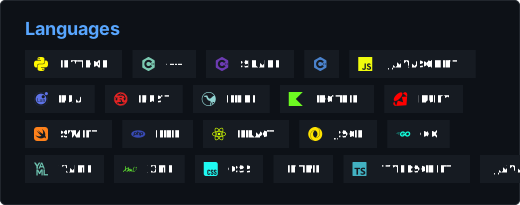
More lexers available here: https://pygments.org/docs/lexers/
Color Themes
abap, arduino, autumn, borland, colorful, default, dracula, emacs,
friendly_grayscale, friendly, fruity, github-dark, gruvbox-dark,
gruvbox-light, igor, inkpot, lightbulb, lilypond, lovelace, manni, material,
monokai, murphy, native, nord-darker, nord, one-dark, paraiso-dark, paraiso-light,
pastie, perldoc, rainbow_dash, rrt, sas, solarized-dark, solarized-light, staroffice,
stata-dark, stata-light, tango, trac, vim, vs, xcode, zenburn
More style examples given here: https://pygments.org/styles/
Support & Issues
- GitHub Issues: Report bugs or request features
- Discussions: Community support and questions
Authors
- Original Author: Akash Bora (Akascape) - CTkCodeBox
- Author: xzyqox (KiTant) - CTkCodeBoxPlus (Enhanced version with new\better features)
License
This project is licensed under the MIT License.
1 maintainer

Metadata
1 maintainer
Release files for CTkCodeBoxPlus 1.4.1
For a detailed explanation of source distributions (sdists) and built distributions (wheels), please see the package formats documentation.
Source distribution (sdist)
| File | Size | Uploaded | |
|---|---|---|---|
| ctkcodeboxplus-1.4.1.tar.gz | 28.6 kB | Details |
Built distribution (wheel)
| File | Interpreter | ABI | Platform | Reset |
|---|---|---|---|---|
| ctkcodeboxplus-1.4.1-py3-none-any.whl | Python 3 | none | any | Details |
Total release size: 60.6 kB
Release files / ctkcodeboxplus-1.4.1.tar.gz
| Download URL | ctkcodeboxplus-1.4.1.tar.gz |
|---|---|
| Size | 28.6 kB |
| Tags | Source |
|
SHA-256 checksum How to use checksums |
ec3982d2867981adb7af192e7497c18025464eb036e69e7d53d7c8edc05279af
|
|
BLAKE2b-256 checksum How to use checksums |
3e42567c9ae36b898c6baeb363eac2ce57ae50adc0908193cddd83c82da77791
|
| Upload date | |
|
Uploaded using Trusted Publishing? What is trusted publishing? |
Yes |
| Uploaded via |
twine/6.1.0 CPython/3.13.7
|
Provenance
Provenance describes where a file came from. On PyPI, provenance is shared via attestations, which provide a verifiable record of the build or publishing details. View details, limitations and caveats.


PyPI Publish Attestation
PyPI verified that this artifact, at this checksum, originated from the publisher listed below.
Signed by GitHub Actions, verified by PyPI on Apr 1, 2026.
Transparency logRelease files / ctkcodeboxplus-1.4.1-py3-none-any.whl
| Download URL | ctkcodeboxplus-1.4.1-py3-none-any.whl |
|---|---|
| Size | 32.0 kB |
| Tags | Python 3 |
|
SHA-256 checksum How to use checksums |
ef908c4016f1f72ff436f29689147fb1b0f556f6987753e910eaa01fa7bd8d62
|
|
BLAKE2b-256 checksum How to use checksums |
4d177a98bd965cfd467b841db494415a39b40cefebc2d6cc8319204d13b563d1
|
| Upload date | |
|
Uploaded using Trusted Publishing? What is trusted publishing? |
Yes |
| Uploaded via |
twine/6.1.0 CPython/3.13.7
|
Provenance
Provenance describes where a file came from. On PyPI, provenance is shared via attestations, which provide a verifiable record of the build or publishing details. View details, limitations and caveats.
PyPI Publish Attestation
PyPI verified that this artifact, at this checksum, originated from the publisher listed below.
Signed by GitHub Actions, verified by PyPI on Apr 1, 2026.
Transparency log













