
CTkListbox
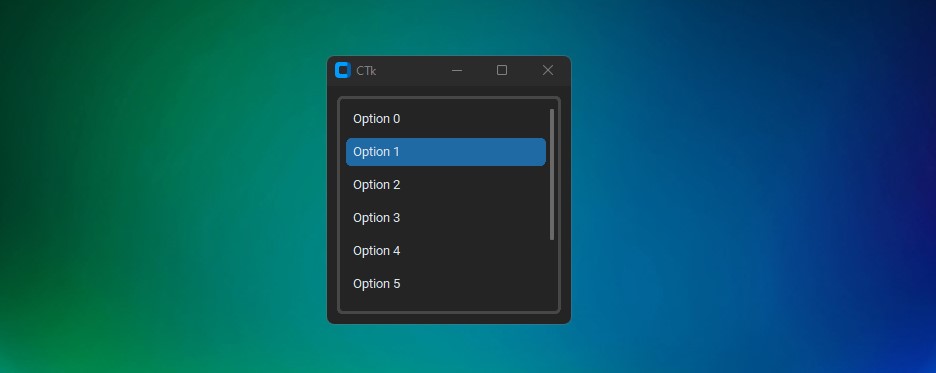
This is a listbox widget for customtkinter, works just like the tkinter listbox.
Installation
pip install CTkListbox

Usage
import customtkinter
from CTkListbox import *

def show_value(selected_option):
    print(selected_option)

root = customtkinter.CTk()

listbox = CTkListbox(root, command=show_value)
listbox.pack(fill="both", expand=True, padx=10, pady=10)

listbox.insert(0, "Option 0")
listbox.insert(1, "Option 1")
listbox.insert(2, "Option 2")
listbox.insert(3, "Option 3")
listbox.insert(4, "Option 4")
listbox.insert(5, "Option 5")
listbox.insert(6, "Option 6")
listbox.insert(7, "Option 7")
listbox.insert("END", "Option 8")

root.mainloop()
Arguments
| Parameter | Description |
|---|---|
| master | parent widget |
| width | optional, set width of the listbox |
| height | optional, set height of the listbox |
| fg_color | foreground color of the listbox |
| border_color | border color of the listbox frame |
| border_width | width of the border frame |
| text_color | set the color of the option text |
| hover | Enable/Disable hover effect (bool) |
| hover_color | set hover color of the options |
| button_color | set color of unselected buttons |
| highlight_color | set the selected color of the option |
| font | set font of the option text, must be a tuple or CTkFont |
| wraplength | change the number of letter per option line |
| justify | change the text anchor; left, right or center |
| command | calls a command when a option is selected |
| multiple_selection | select multiple options in the listbox, default=False |
| listvariable | use a tkinter variable to change the listbox content |
| *other_parameters | all other parameters of ctk_scrollable frame can be passed |
Methods
- .insert(index, option) add new option to the listbox
- .get() get the selected option(s)
- .delete(index)
delete any option from the listbox.
.delete("all")deletes all options - .size() get the size of the listbox
- .activate(index) activate any option
- .deactivate(index) deactivate any option
- .curselection() returns indexes of selected options
- .configure() change some parameters for the listbox.
- .see(index) move the listbox scrollbar to the index place
- .move_up(index)/.move_down(index) Reorder options in the listbox
Thanks for visiting! Hope it will help :)
1 maintainer

Metadata
1 maintainer
Release files for CTkListbox 1.5
For a detailed explanation of source distributions (sdists) and built distributions (wheels), please see the package formats documentation.
Source distribution (sdist)
| File | Size | Uploaded | |
|---|---|---|---|
| ctklistbox-1.5.tar.gz | 6.9 kB | Details |
Built distribution (wheel)
| File | Interpreter | ABI | Platform | Reset |
|---|---|---|---|---|
| ctklistbox-1.5-py3-none-any.whl | Python 3 | none | any | Details |
Total release size: 14.1 kB
Release files / ctklistbox-1.5.tar.gz
| Download URL | ctklistbox-1.5.tar.gz |
|---|---|
| Size | 6.9 kB |
| Tags | Source |
|
SHA-256 checksum How to use checksums |
21ed8431375572352d0c0d0cab6f680dda56cf8da2262a389e74545f01b3fa8e
|
|
BLAKE2b-256 checksum How to use checksums |
3a20a96b8ef7da7ece49ada9f409cc83280d41a59d4e9088c6a65320fb3d8455
|
| Upload date | |
|
Uploaded using Trusted Publishing? What is trusted publishing? |
No |
| Uploaded via |
twine/6.1.0 CPython/3.9.6
|
Release files / ctklistbox-1.5-py3-none-any.whl
| Download URL | ctklistbox-1.5-py3-none-any.whl |
|---|---|
| Size | 7.2 kB |
| Tags | Python 3 |
|
SHA-256 checksum How to use checksums |
139434219ca6194870a2fc9c67e35426c6a1dc2cb5fe9a57c21a0d0b00e5a7af
|
|
BLAKE2b-256 checksum How to use checksums |
903cad449c54fbd93b67f9a81f79122df3c4806af695c192e4ea4e35fc6ada5e
|
| Upload date | |
|
Uploaded using Trusted Publishing? What is trusted publishing? |
No |
| Uploaded via |
twine/6.1.0 CPython/3.9.6
|














