
CTkMenuBar
Modern menu bar widget library for customtkinter.
Features
- Custom dropdown menus
- Add menu in top of title bar
- Classic and modern menubar with full customisability
- Add commands and submenus
Installation
pip install CTkMenuBar

Menu Types
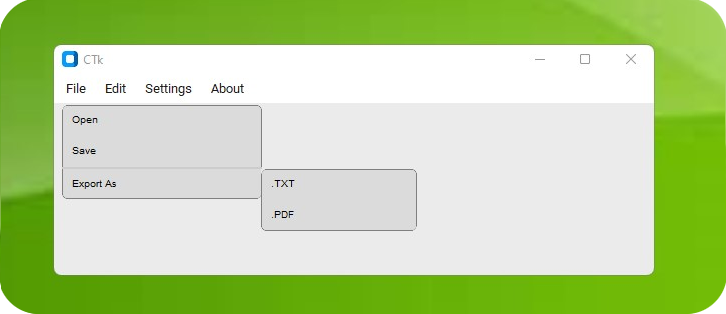
Usage
from CTkMenuBar import *
...
menu = CTkMenuBar(master=root)
menu.add_cascade("Menu")
...
Methods
- .add_cascade(text, ctk_button_args...): add new menu button in the menu bar
- .configure(*frame_kwargs)
Arguments
| Parameter | Description |
|---|---|
| master | define the master widget, can be root or frame |
| bg_color | set the bg color of the menu bar |
| height | set height of the menu bar |
| width | set width of the menu bar buttons |
| padx | set internal padding between menu bar buttons |
| pady | set internal padding in top and bottom of menu bar |
| postcommand | add a command before spawing the dropdown |
| *other frame parameters | other ctk frame parameters can also be passed |
This title menu is only supported in windows OS!
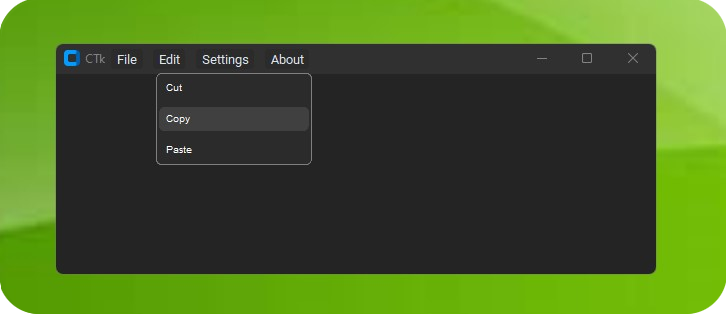
Usage
from CTkMenuBar import *
...
menu = CTkTitleMenu(master=root)
menu.add_cascade("Menu")
...
Methods
- .add_cascade(text, ctk_button_kwargs...): add new menu button in the menu bar
Arguments
| Parameter | Description |
|---|---|
| master | define the master window, can be root or toplevel only |
| bg_color | set the bg color of the menu bar |
| title_bar_color | set color to the header (only works with windows 11), RGB order: 0x00rrggbb |
| width | set width of the menu bar buttons |
| padx | set internal padding between menu bar buttons |
| x_offset | set the x distance from the header |
| y_offset | set the y distance from the header |
| postcommand | add a command before spawing the dropdown |
| *other frame parameters | other ctk frame parameters can also be passed |
CustomDropdownMenu
This is the common dropdown menu class which is used by both ctkmenubar and ctktitlemenu.
Usage
from CTkMenuBar import *
...
dropdown = CustomDropdownMenu(widget=button)
dropdown.add_option(option="value")
dropdown.add_separator()
submenu = dropdown.add_submenu("submenu")
submenu.add_option(option="value")
...
Methods
- .add_option(option, command): add option to the dropdown and attach the command
- .add_separator(): add a separator line between the options
- .add_submenu(submenu_name): add a submenu as option
- **.configure(**args): change dropdown menu options
Arguments
| Parameter | Description |
|---|---|
| widget | attach the dropdown to the cascade widget |
| master | optional, change the spawn window if required |
| bg_color | set the bg color of the dropdown |
| fg_color | set the option button fg color |
| text_color | set the text color |
| hover_color | set hover color of the option button |
| separator_color | change the separator line color |
| font | change the font of the text |
| width | set width of the dropdown |
| height | set height of the dropdown |
| padx | set padding in x for the dropdown frame |
| pady | set padding in y for the dropdown frame |
| *other frame parameters | other ctk frame parameters can also be passed |
Credits goes to LucianoSaldivia for providing this dropdown menu class.
1 maintainer

Metadata
1 maintainer
Release files for CTkMenuBar 0.9
For a detailed explanation of source distributions (sdists) and built distributions (wheels), please see the package formats documentation.
Source distribution (sdist)
| File | Size | Uploaded | |
|---|---|---|---|
| ctkmenubar-0.9.tar.gz | 14.9 kB | Details |
Built distribution (wheel)
| File | Interpreter | ABI | Platform | Reset |
|---|---|---|---|---|
| ctkmenubar-0.9-py3-none-any.whl | Python 3 | none | any | Details |
Total release size: 31.8 kB














