

dafontdownloader
A python script to download fonts directly from dafont site.
Install
First way
To avoid using sudo, installation requires these steps:
- Use
pipto install the package with all dependencies required:
pip install dafontdownloader --user
- Use
exportto persistent use of dafontdownloader script:
echo "export PATH=${PATH}:"$HOME"/.local/bin" >> "$HOME"/.bashrc
- Use
sourceto start using script in command line:
source .bashrc
Second Way
-
Download this repository, or use
git clone https://github.com/resilientcod/dafontdownloader.git -
Open repository directory.
-
Use
python3 setup.py install -
Follow the steps 2 and 3, to persistent use of dafontdownloader script.
Third Way (with sudo)
Attention: use at your own risk!
sudo pip install dafontdownloader
This allow install in bin directory, making it unnecessary to use steps 2 and 3 in the first way.
Usage
After installation, type dafontdownloader in the terminal to verify that everything is correct,
as in the image:
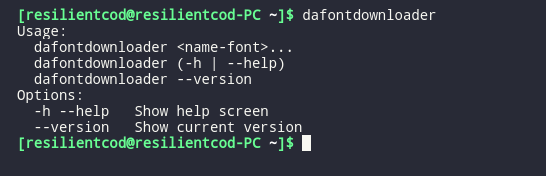
Then use: dafontdownloader <name-font> to download and install fonts from dafont site.
Example:
dafontdownloader Nemesis Grant
Attention: Make sure you type the name correctly!
More info
The fonts are installed in the user's local .fonts directory
Enjoy!
1 maintainer

Metadata
1 maintainer
Release files for dafontdownloader 0.5
For a detailed explanation of source distributions (sdists) and built distributions (wheels), please see the package formats documentation.
Source distribution (sdist)
| File | Size | Uploaded | |
|---|---|---|---|
| dafontdownloader-0.5.tar.gz | 3.6 kB | Details |
Release files / dafontdownloader-0.5.tar.gz
| Download URL | dafontdownloader-0.5.tar.gz |
|---|---|
| Size | 3.6 kB |
| Tags | Source |
|
SHA-256 checksum How to use checksums |
81fbbc2492377b844aae59fb9c068f003cf30289c491aaa9f931ee00965921d7
|
|
BLAKE2b-256 checksum How to use checksums |
ab02f20f6ec5f477f7eb228432a2e560583ed04445f3f30d7ce02547e3a8c72d
|
| Upload date | |
|
Uploaded using Trusted Publishing? What is trusted publishing? |
No |
| Uploaded via |
twine/3.1.1 pkginfo/1.5.0.1 requests/2.23.0 setuptools/41.2.0 requests-toolbelt/0.9.1 tqdm/4.46.0 CPython/3.8.2
|














