
dao-modman
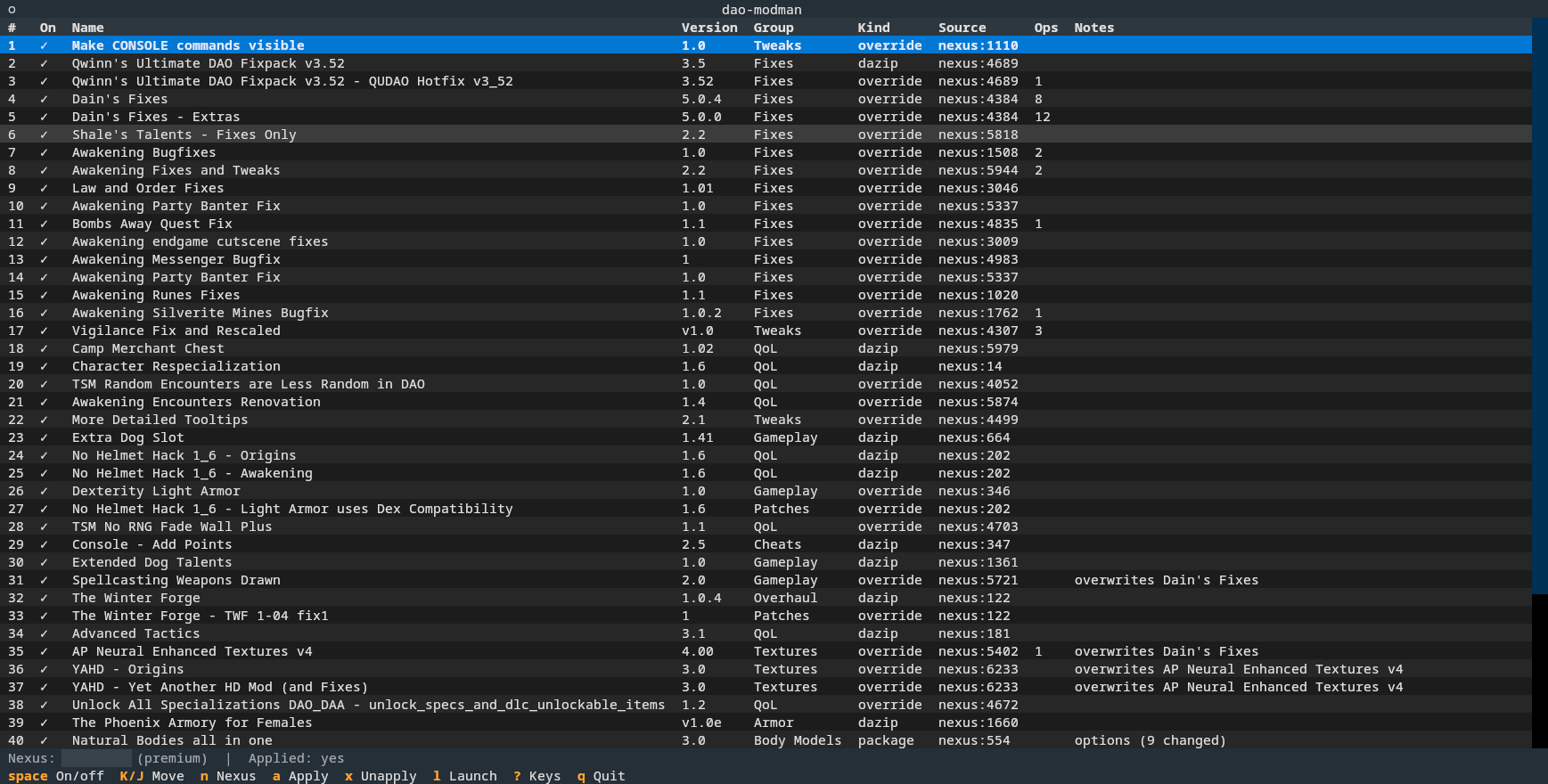
Terminal based mod manager for Dragon Age: Origins on Steam/Proton (Linux), heavily inspired by MO2.
A tribute to a masterpiece
DA:O is, in the author's opinion, one of the greatest RPGs ever made. It was released in 2009, more than 15 years ago, and is still the best entry of its series. While the writing has aged perfectly, the graphics have not, and the mechanics only in part. Combat is still fun, especially at higher difficulty levels.
Motivation
The computer you are running this on is probably very different from the one you used when this game came out. If you have moved on from Windows to Linux since then like the author did, the goal of this project is to be the only tool you need.
Features
- Nexus Integration: Download mods from nexusmods
- Archive formats:
.dazip,.override,.zip,.7zand.rar, also nested - Conflict Detection and Resolving
- Mod Ordering: no more prefixes for mod directories - load order is defined in the manager
- Mix and Match: pick which parts of a mod you want, in the UI. This selection persists if you disable a mod and reenable it later
- Setup: to get the game running smoothly,
dao-modmanhandles the technical stuff:- LAA Patch so the game can use 4GB of RAM instead of its intended 2GB
- enabling the developer console
- scaling down (modded) textures on heavily modded games to fit into the 4GB limit
dazipinstallation: No need to rundaoupdateror other tools via winechargenmorphcfg.xmlmerging: runs automatically if you add/remove a mod containing character morphs- Mixed mods with both
addinsandoverridefiles: these often need manual steps with the Windows-based mod managers. Some very popular mods have a lot of posts about this problem, like the Winter Forge. - Configurable mods: supports the
.overrideformat introduced by DAO-Modmanager - Item Browser: list items added by a mod. Automatically writes the item DB for Add any item visual deluxe when installed, freeing you from yet another windows tool to run manually.
Supported platforms
Currently only the Steam release on Linux (Proton). Windows and the GOG/EA releases are not supported yet. Porting is not a big deal, but it needs testing on those setups: volunteers are welcome.
Setup
Install it from PyPI with uv, or with pipx:
uv tool install dao-modman # or: pipx install dao-modman
Then store your personal API key from nexusmods.com where dao-modman finds it:
mkdir -p ~/.config/dao-modman
echo 'NEXUS_API_TOKEN=...' > ~/.config/dao-modman/.env
chmod 600 ~/.config/dao-modman/.env
The token is read from the environment, ./.env, or ~/.config/dao-modman/.env.
Go to Account Settings/API Keys to create a token.
The usual security recommendations apply. If this gets more than 10 users, the author will apply for an app-specific API key.
Run
To run the mod manager in UI mode, use:
dao-modman # run the TUI
Most functionality is also exposed via a command line interface:
dao-modman nxm 'nxm://...'             # hand a "Mod Manager Download" link to the TUI
dao-modman install-nxm-handler         # register as nxm:// handler
dao-modman laa status|restore|patch --exe PATH   # Large Address Aware patch
dao-modman console status|enable|disable   # developer console
dao-modman revisions init              # keep a git history of the library's metadata
dao-modman chargen                     # check the merged character creator list
dao-modman conflicts                   # which mods ship the same files, and who wins
dao-modman conflicts accept NAME ... | --all   # mark conflicts as intended
.rar archives need unrar, 7z or bsdtar on PATH; they are tried in that order, since
bsdtar cannot read solid archives. Some mods on Nexus are only available as .rar.
UI Hotkeys
The bar at the bottom shows the everyday keys; ? lists all of them.
| Key | Action |
|---|---|
space |
enable / disable mod |
K / J |
move mod up / down in the load order |
r |
rename mod (display name only) |
g |
set group |
p |
options of an override package |
n |
add mod from Nexus (URL, id or nxm://) |
i |
import a local archive |
e |
edit path operations |
o |
open the mod's Nexus page in the browser |
c |
check Nexus for updates |
u |
update the selected mod in place |
v |
conflicts of the selected mod |
L |
items the mod adds, by in-game name |
a / x |
apply / unapply |
l |
launch the game through Steam |
h |
hide / show the game's official DLC |
/ |
filter by name or group (esc clears) |
t |
tools (LAA, textures, all conflicts ...) |
delete |
remove mod from the library |
Usage
See the user and behind-the-scenes documentation.
License
MIT: free to use, change and pass on, as long as the copyright notice naming the author stays with it.
Disclosure
Most of the code in this project was co-authored by claude. In-game testing was all done by a human, namely the author of this project.
Contributing
Testers on other platforms are very welcome: Windows, and the GOG and EA releases of the game. If you have such a setup and want to help, open an issue and say what you run.
Pull requests are welcome too. Please run the tests and the linter (see below) before sending one.
Development
To work from source, clone this repository and run uv sync; then start it with uv run dao-modman.
uv run pytest                                  # tests
uv run ruff check . && uv run ruff format .    # lint and format
1 maintainer

Metadata
1 maintainer
Release files for dao-modman 0.1.0
For a detailed explanation of source distributions (sdists) and built distributions (wheels), please see the package formats documentation.
Source distribution (sdist)
| File | Size | Uploaded | |
|---|---|---|---|
| dao_modman-0.1.0.tar.gz | 315.7 kB | Details |
Built distribution (wheel)
| File | Interpreter | ABI | Platform | Reset |
|---|---|---|---|---|
| dao_modman-0.1.0-py3-none-any.whl | Python 3 | none | any | Details |
Total release size: 406.3 kB
Release files / dao_modman-0.1.0.tar.gz
| Download URL | dao_modman-0.1.0.tar.gz |
|---|---|
| Size | 315.7 kB |
| Tags | Source |
|
SHA-256 checksum How to use checksums |
914a21cb917216f057c8903c0ec122511f0e6da6d965f0d52540826307df3c18
|
|
BLAKE2b-256 checksum How to use checksums |
06c1431831b04ac260aeb180eaca8df3c561b32c8ee9a1b2e79598ca11a53552
|
| Upload date | |
|
Uploaded using Trusted Publishing? What is trusted publishing? |
No |
| Uploaded via |
uv/0.12.24 {"installer":{"name":"uv","version":"0.12.24","subcommand":["publish"]},"python":null,"implementation":{"name":null,"version":null},"distro":{"name":"CachyOS Linux","version":null,"id":null,"libc":null},"system":{"name":null,"release":null},"cpu":null,"openssl_version":null,"setuptools_version":null,"rustc_version":null,"ci":null}
|
Release files / dao_modman-0.1.0-py3-none-any.whl
| Download URL | dao_modman-0.1.0-py3-none-any.whl |
|---|---|
| Size | 90.6 kB |
| Tags | Python 3 |
|
SHA-256 checksum How to use checksums |
6ed8c69828f709c05c9a848b7f2fe1942dece83a2670e7ea7ca2b66d5e0808f6
|
|
BLAKE2b-256 checksum How to use checksums |
34cb13f199f908f80e481ddcdda9284cd9c4a26c007c6502d30be4242bf1d645
|
| Upload date | |
|
Uploaded using Trusted Publishing? What is trusted publishing? |
No |
| Uploaded via |
uv/0.12.24 {"installer":{"name":"uv","version":"0.12.24","subcommand":["publish"]},"python":null,"implementation":{"name":null,"version":null},"distro":{"name":"CachyOS Linux","version":null,"id":null,"libc":null},"system":{"name":null,"release":null},"cpu":null,"openssl_version":null,"setuptools_version":null,"rustc_version":null,"ci":null}
|













