
### Grid
`Grid` makes use of the
[CSS grid](https://css-tricks.com/getting-started-css-grid/)
to make creating dashboard-like layouts super easy in Dash.
### ControlPanel
`ControlPanel` adds a panel to the side of the grid which contains input components to change the state of the plot grid.
##### A Simple Example Grid
This example is found in `simple_demo.py`
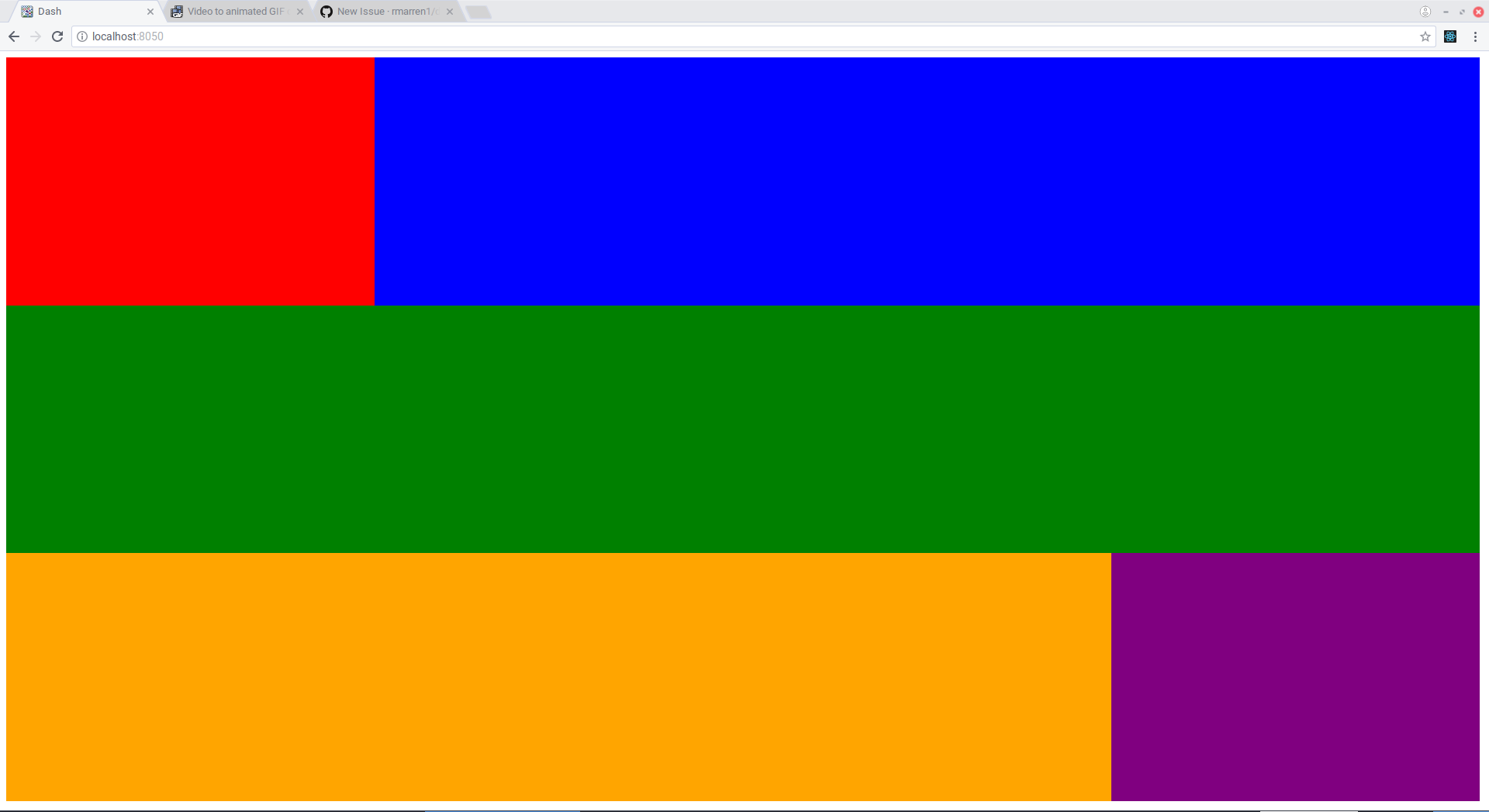
First we add the external css url `https://codepen.io/rmarren1/pen/mLqGRg.css`.
This is necessary for the grid to work. If you cannot use this (e.g. you
are serving stylesheets locally) you can just serve the file at https://github.com/rmarren1/dash-ui/blob/master/dash_ui/style/css/grid.css .
Next, we create a grid with the following call:
`grid = dui.Grid(_id="grid", num_rows=12, num_cols=12, grid_padding=5)`
* `num_rows` is the number of rows in the grid, and must be between 1 and 12
* `num_cols` is the number of columns in the grid, and must be between 1 and 12
* `grid_padding` is the number of pixels to pad between grid elements, and must
be one of [0, 1, 2, 5, 10, 25, 50, 100].
Now you can add any dash element as a grid element like so:
```
grid.add_element(col=1, row=1, width=3, height=4, element=html.Div(
style={"background-color": "red", "height": "100%", "width": "100%"}
))
```
* `row` is the starting row in the grid layout
* `col` is the starting column in the grid layout
* `height` is the number of rows the element should span.
* `width` is the number of columns the element should span
Note that the rows and columns are one indexed.
Finally, we create the layout using the function
`dui.Layout(grid=grid,)`
and set `app.layout` as the object this function returns.
##### A Grid with ControlPanel
This example shows the grid with real plots (see `advanced_demo.py`)
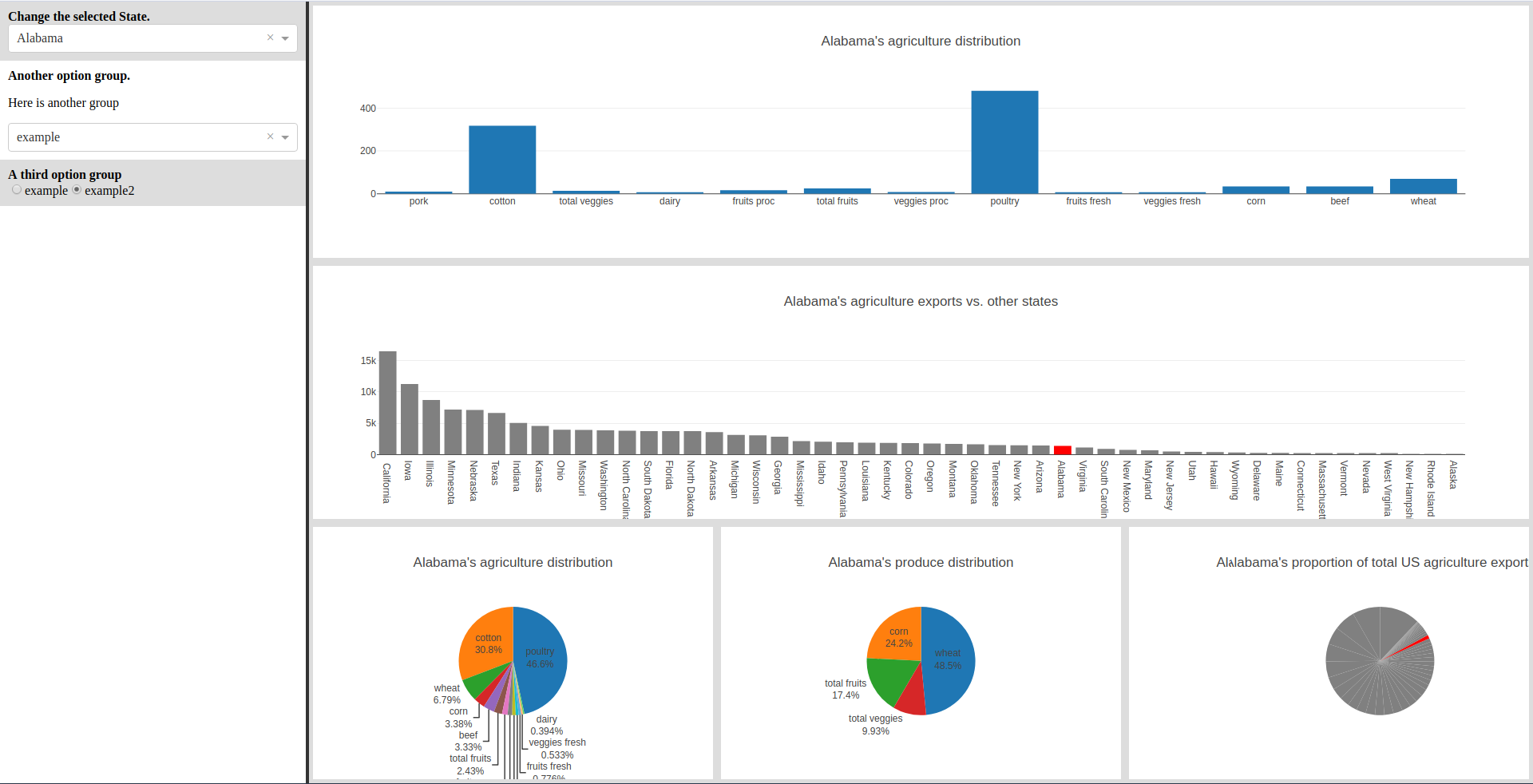
If a `ControlPanel` is not included, the grid will take up the entire screen.
To include the `ControlPanel`, create one using code like the following:
```
controlpanel = dui.ControlPanel(_id="controlpanel")
controlpanel.create_group(
group="State",
group_title="Change the selected State."
)
state_select = dcc.Dropdown(
id="state-dropdown",
options=[{
'label': x.title(),
'value': x
} for x in df["state"].tolist()
],
value=df["state"].tolist()[0]
)
controlpanel.add_element(state_select, "State")
```
then include the `controlpanel` instance as an argument to the `dui.Layout` function, e.g.
```
app.layout = dui.Layout(
grid=grid,
controlpanel=controlpanel
)
```
We can also add plotly graph elements with the shortcut
`grid.add_graph(col=1, row=1, width=3, height=4, graph_id="all-pie")`
which creates a grid element with a graph with the `id` declared in `graph_id`.
We can end up with this really nice interactive dashboard, with only
200 lines of code.
### Customizing the style
To have your own flavor of dashboard, simply fork the source SASS [here](https://codepen.io/rmarren1/pen/mLqGRg), make changes, then add the css from codepen to your project using:
```
my_css_urls = [
"https://codepen.io/your-codepen-name/pen/your-pen-identifier.css",
]
for url in my_css_urls:
app.css.append_css({
"external_url": url
})
```
1 maintainer

Metadata
1 maintainer
Release files for dash_ui 0.4.0
For a detailed explanation of source distributions (sdists) and built distributions (wheels), please see the package formats documentation.
Source distribution (sdist)
| File | Size | Uploaded | Provenance | Actions |
|---|---|---|---|---|
| dash_ui-0.4.0.tar.gz | 4.3 kB | Without provenance | Details for dash_ui-0.4.0.tar.gz |
Release files / dash_ui-0.4.0.tar.gz
| Download URL | dash_ui-0.4.0.tar.gz |
|---|---|
| Size | 4.3 kB |
| Tags | Source |
|
SHA-256 checksum How to use checksums |
a9d771a7db41c67c0a01a208fda09064a90ab528b20bf1a223e931f8825640cc
|
|
BLAKE2b-256 checksum How to use checksums |
d3b90daa84e7f4048c7b77d88886f86e431a4bc270daf3bb642019a3e9fc1c97
|
| Upload date | |
|
Uploaded using Trusted Publishing? What is trusted publishing? |
No |
Security for dash_ui 0.4.0
Provenance
Provenance describes where a file came from. On PyPI, provenance is shared via attestations, which provide a verifiable record of the build or publishing details. View details, limitations and caveats.
No provenance found
None of the files in this release were uploaded with provenance metadata.
A note on package security
PyPI is a repository for distributing packages, not a service for auditing them. While third-party security researchers and our staff do their best to detect and remove malicious packages, PyPI cannot guarantee the quality, security or suitability of any given package.
To learn more about protecting yourself from malicious actors, visit our package security documentation.














