
Introduction
Databricks SQL CLI is a command line interface (CLI) for Databricks SQL that can do auto-completion and syntax highlighting, and is a proud member of the dbcli community.
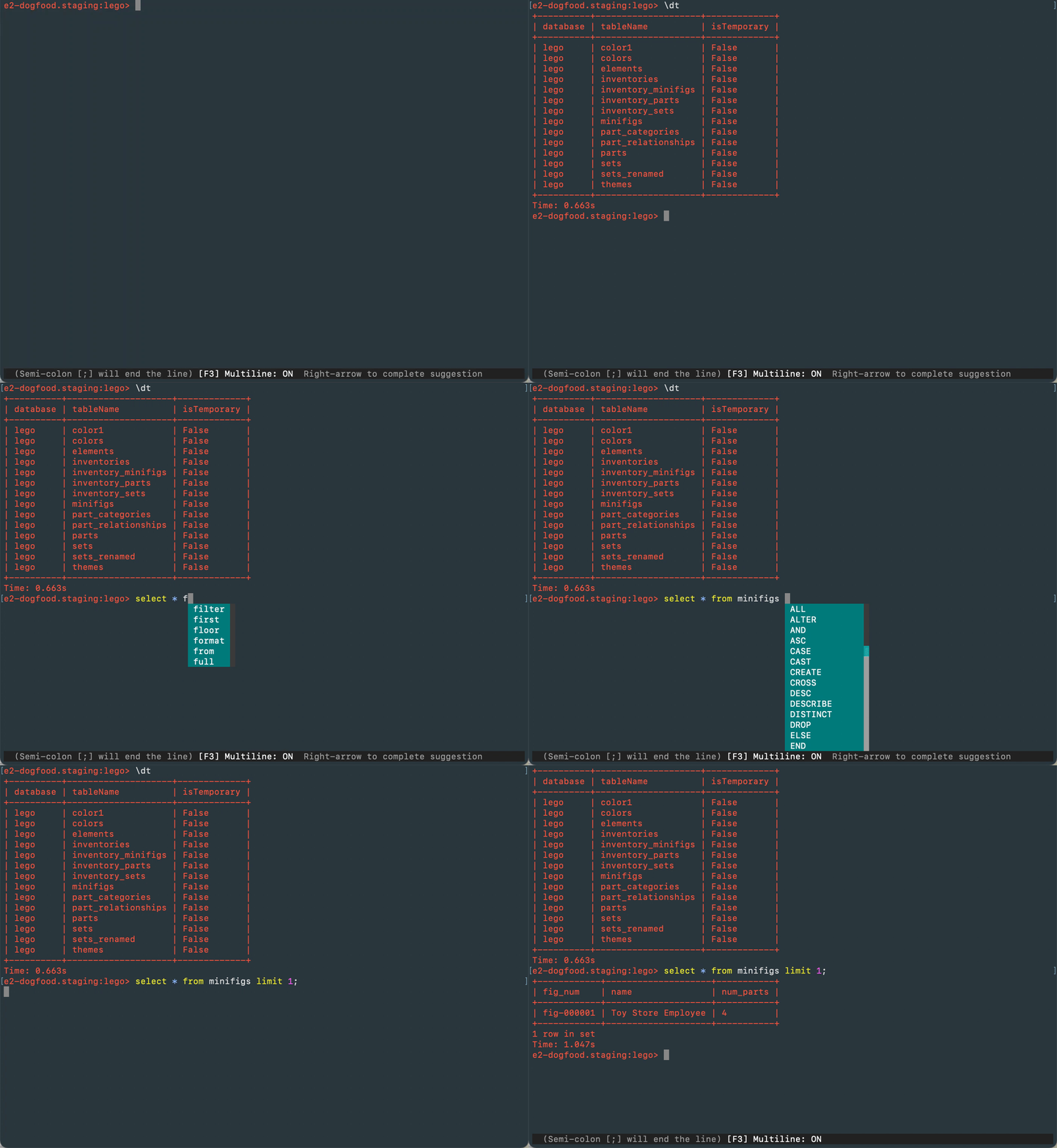
Quick Start
Install via pip
You'll need Python 3.7 or newer.
python3 -m pip install databricks-sql-cli
You can now run dbsqlcli from your terminal.
Authentication
To connect with SQL Endpoints dbsqlcli needs the host name and http path from the connection details screen in Databricks SQL and a personal access token. You can provide these to dbsqlcli as command line arguments, by setting environment variables, or by writing them into the [credentials] section of the dbsqlclirc file (see below).
Config
A config file is automatically created at ~/.dbsqlcli/dbsqlclirc at first launch (run dbsqlcli). See the file itself for a description of all available options.
Run a query
$ dbsqlcli -e 'select id, name from minifigs LIMIT 10'
Run a .sql file
$ dbsqlcli -e query.sql
Run a .sql file and save to CSV
$ dbsqlcli -e query.sql > output.csv
REPL
$ cd <directory containing dbsqlcli binary>
$ ./dbslqcli [<database_name>]
Run the help; command to see a list of shortcuts
Features
- Auto-completes as you type for SQL keywords as well as tables and columns in the database.
- Syntax highlighting.
- Smart-completion will suggest context-sensitive completion.
SELECT * FROM <tab>will only show table names.SELECT * FROM users WHERE <tab>will only show column names.
- Pretty prints tabular data and various table formats.
- Some special commands. e.g. Favorite queries.
- Alias support. Column completions will work even when table names are aliased.
Usages
$ dbsqlcli --help
Usage: dbsqlcli [OPTIONS] [DATABASE]

  A DBSQL terminal querying client with auto-completion and syntax
  highlighting.

  Examples:
    - dbsqlcli
    - dbsqlcli my_database

Options:
  -e, --execute TEXT   Execute a command (or a file) and quit.
  --hostname TEXT      Hostname  [env var: DBSQLCLI_HOST_NAME]
  --http-path TEXT     HTTP Path  [env var: DBSQLCLI_HTTP_PATH]
  --access-token TEXT  Access Token  [env var: DBSQLCLI_ACCESS_TOKEN]
  --clirc FILE         Location of clirc file.
  --table-format TEXT  Table format used with -e option.
  --help               Show this message and exit.
Contributions
We use Poetry for development. Follow the instructions to install Poetry on your system.
- Clone this repository
poetry installwill install its dependenciespoetry shellwill activate the local virtual environmentpython app.pywill rundbsqlcliincorporating any of your local changes
Credits
Huge thanks to the maintainers of https://github.com/dbcli/athenacli upon which this project is built.
Similar projects
The DBCLI organization on Github maintains CLIs for numerous database platforms including MySQL, Postgres, and MSSQL.


Release files for databricks-sql-cli 0.3.3
For a detailed explanation of source distributions (sdists) and built distributions (wheels), please see the package formats documentation.
Source distribution (sdist)
| File | Size | Uploaded | Provenance | Actions |
|---|---|---|---|---|
| databricks_sql_cli-0.3.3.tar.gz | 40.9 kB | Without provenance | Details for databricks_sql_cli-0.3.3.tar.gz |
Built distribution (wheel)
| File | Interpreter | ABI | Platform | Actions Reset |
|---|---|---|---|---|
| databricks_sql_cli-0.3.3-py3-none-any.whl | Python 3 | none | any | Details for databricks_sql_cli-0.3.3-py3-none-any.whl |
Total release size: 89.3 kB
Release files / databricks_sql_cli-0.3.3.tar.gz
| Download URL | databricks_sql_cli-0.3.3.tar.gz |
|---|---|
| Size | 40.9 kB |
| Tags | Source |
|
SHA-256 checksum How to use checksums |
29bf9e666d6955730483697d8aac5f242166161fad794595f5f829360e23157a
|
|
BLAKE2b-256 checksum How to use checksums |
fcb14c803e13899293f8cd30638665f1aec07df877a104d24bb6cd2326ffb866
|
| Upload date | |
|
Uploaded using Trusted Publishing? What is trusted publishing? |
No |
| Uploaded via |
poetry/1.5.1 CPython/3.10.2 Linux/5.15.0-1042-azure
|
Release files / databricks_sql_cli-0.3.3-py3-none-any.whl
| Download URL | databricks_sql_cli-0.3.3-py3-none-any.whl |
|---|---|
| Size | 48.4 kB |
| Tags | Python 3 |
|
SHA-256 checksum How to use checksums |
7305a51d9d4f84d1727a50980b4c4679bdf67a35b1c78257ab5a881a8badceba
|
|
BLAKE2b-256 checksum How to use checksums |
74a7668bb6a8935e32f441b4e5501164912d0e03235047b6a3c2f162e727befd
|
| Upload date | |
|
Uploaded using Trusted Publishing? What is trusted publishing? |
No |
| Uploaded via |
poetry/1.5.1 CPython/3.10.2 Linux/5.15.0-1042-azure
|
Security for databricks-sql-cli 0.3.3
Provenance
Provenance describes where a file came from. On PyPI, provenance is shared via attestations, which provide a verifiable record of the build or publishing details. View details, limitations and caveats.
No provenance found
None of the files in this release were uploaded with provenance metadata.
A note on package security
PyPI is a repository for distributing packages, not a service for auditing them. While third-party security researchers and our staff do their best to detect and remove malicious packages, PyPI cannot guarantee the quality, security or suitability of any given package.
To learn more about protecting yourself from malicious actors, visit our package security documentation.














