
Data Fluent for PostgreSQL



Build a better understanding of your data in PostgreSQL.
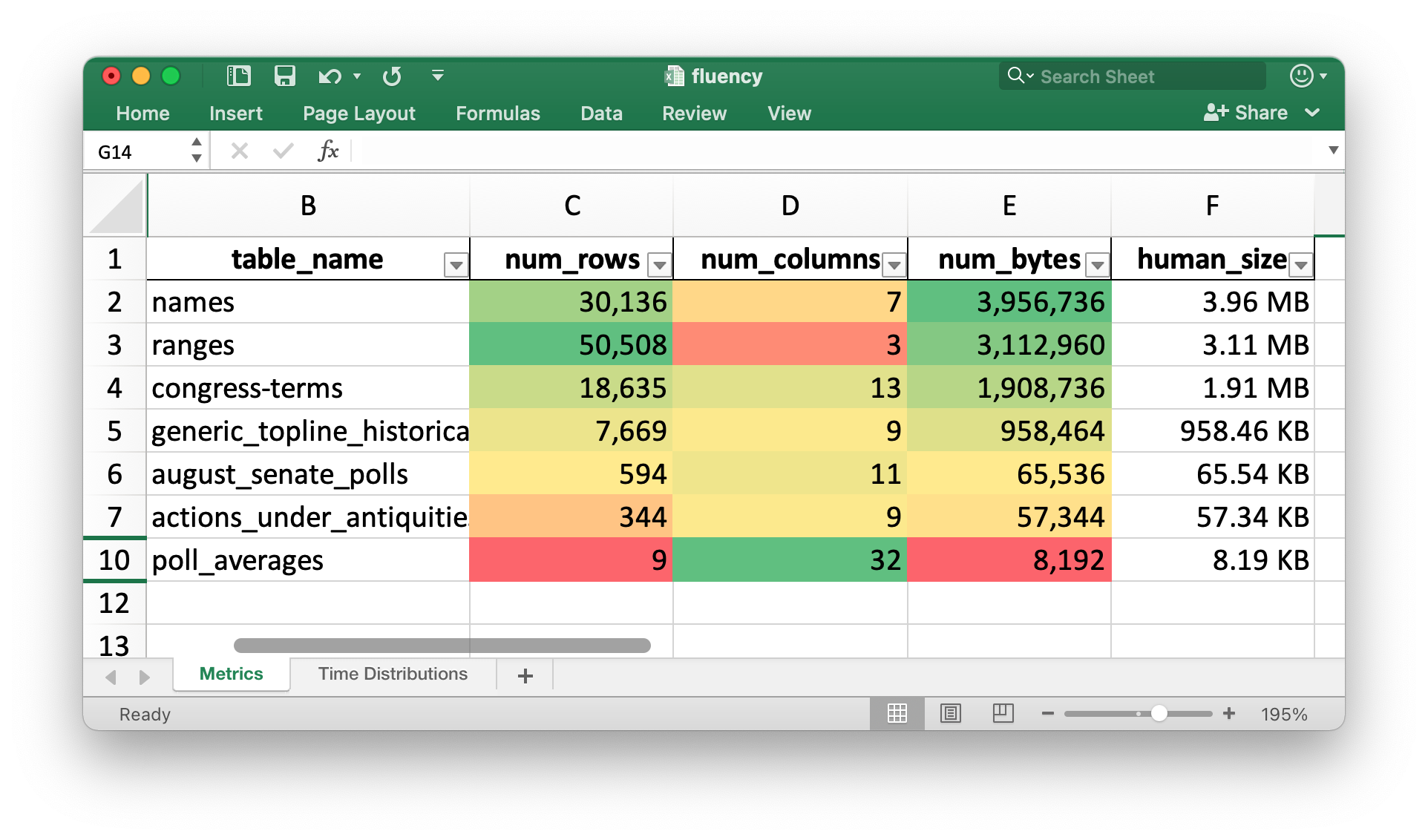
The following shows an example report generated by this tool. It gives the numbers of rows, columns, bytes as well as human-friendly size counts for each table within a given PostgreSQL database.
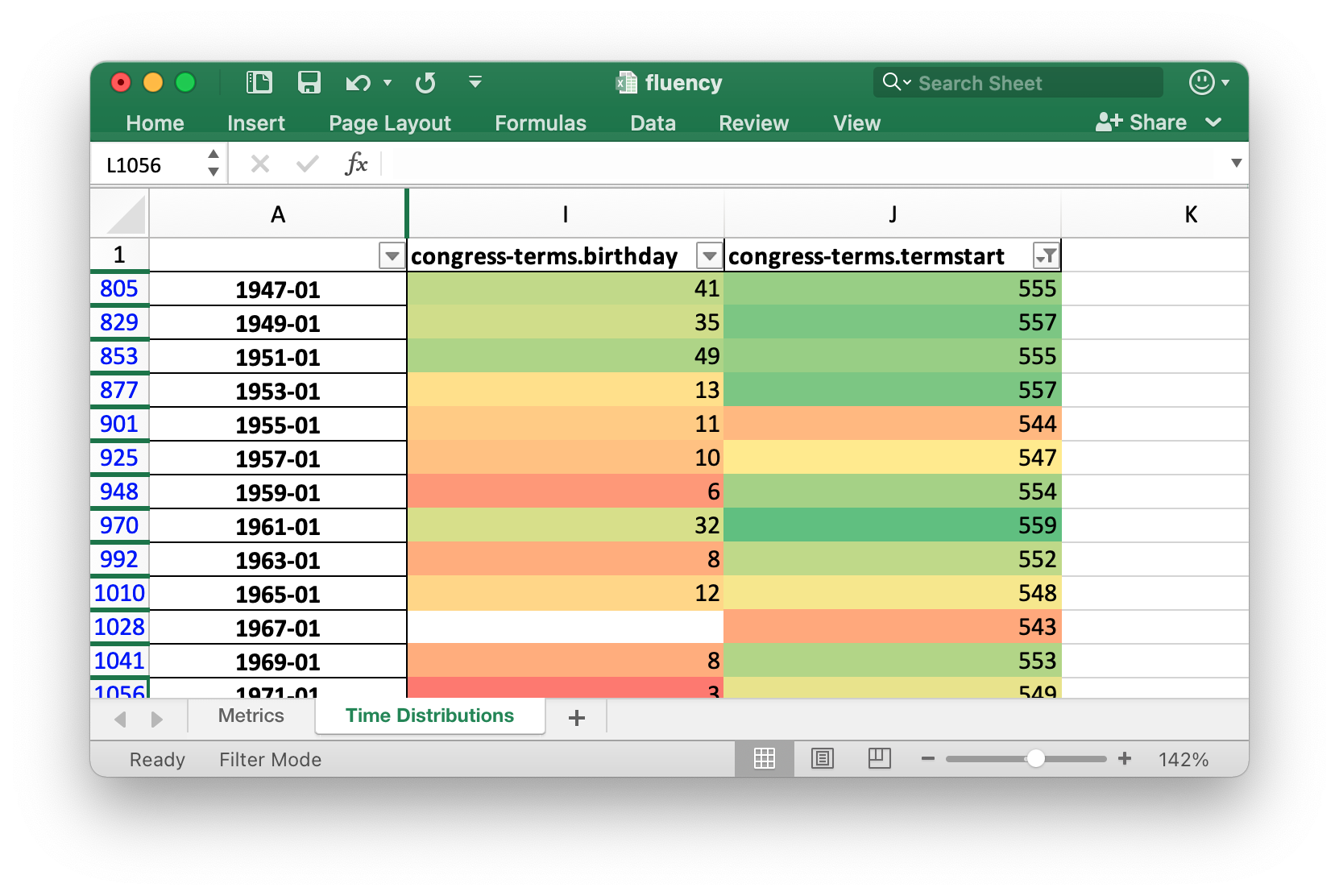
The following shows the row count for every column that represents a date grouped by year and month.
Installation
On Ubuntu 20:
$ wget -qO- \
    https://www.postgresql.org/media/keys/ACCC4CF8.asc \
        | sudo apt-key add -
$ echo "deb http://apt.postgresql.org/pub/repos/apt/ xenial-pgdg main" \
    | sudo tee /etc/apt/sources.list.d/pgdg.list

$ sudo apt update
$ sudo apt install \
    git \
    python3-pip \
    python3-virtualenv \
    postgresql-13 \
    postgresql-client-13 \
    postgresql-contrib
On macOS:
$ brew install \
    git \
    postgresql \
    virtualenv
Then, regardless of platform, setup a virtual environment and install this software package.
$ virtualenv ~/.fluency
$ source ~/.fluency/bin/activate
$ python3 -m pip install datafluent
Example Analysis
Clone fivethirtyeight's data repo. It has a large number of CSV-formatted datasets.
$ git clone https://github.com/fivethirtyeight/data.git ~/538data
Make sure you can access a PostgreSQL database on your machine. Here I'm creating an intel database for the mark user on my Ubuntu 20 machine.
$ sudo -u postgres \
    bash -c "psql -c \"CREATE USER mark
                       WITH PASSWORD 'test'
                       SUPERUSER;\""
With PostgreSQL access setup, create a database called intel.
$ createdb intel
I'll import one of the datasets within fivethirtyeight's repo. Note, because the dates within this dataset are not formatted in YYYY-MM-DD format, I needed to override the format so that the MM/DD/YYYY format would be read properly.
$ csvsql --db postgresql:///intel \
         --insert ~/538data/congress-generic-ballot/generic_topline_historical.csv \
         --datetime-format="%m/%d/%Y"
I'll run the Excel Report Generator:
$ datafluent_pg
This will result in a fluency.xlsx file being produced with two worksheets: Metrics and Time Distributions.
If you need to override any parameters, please refer to the documentation:
$ datafluent_pg --help
Usage: datafluent [OPTIONS]

Options:
  --dns TEXT                      [default: postgresql://localhost:5432/intel]
  --output TEXT                   [default: fluency.xlsx]
  --install-completion [bash|zsh|fish|powershell|pwsh]
                                  Install completion for the specified shell.
  --show-completion [bash|zsh|fish|powershell|pwsh]
                                  Show completion for the specified shell, to
                                  copy it or customize the installation.

  --help                          Show this message and exit.
1 maintainer

Metadata
1 maintainer
Release files for datafluent 0.0.12
For a detailed explanation of source distributions (sdists) and built distributions (wheels), please see the package formats documentation.
Source distribution (sdist)
| File | Size | Uploaded | Provenance | Actions |
|---|---|---|---|---|
| datafluent-0.0.12.tar.gz | 5.7 kB | Without provenance | Details for datafluent-0.0.12.tar.gz |
Built distribution (wheel)
| File | Interpreter | ABI | Platform | Actions Reset |
|---|---|---|---|---|
| datafluent-0.0.12-py3-none-any.whl | Python 3 | none | any | Details for datafluent-0.0.12-py3-none-any.whl |
Total release size: 11.4 kB
Release files / datafluent-0.0.12.tar.gz
| Download URL | datafluent-0.0.12.tar.gz |
|---|---|
| Size | 5.7 kB |
| Tags | Source |
|
SHA-256 checksum How to use checksums |
f9bbd385bc1f3eb813a36acc84ba536920d35ba5b6a31a4bb808613acd8525fe
|
|
BLAKE2b-256 checksum How to use checksums |
2f12f9d0284ec90dd555f498eda444b226b5c49009dca7c2fff747e5ade8556c
|
| Upload date | |
|
Uploaded using Trusted Publishing? What is trusted publishing? |
No |
| Uploaded via |
twine/3.4.1 importlib_metadata/4.6.1 pkginfo/1.7.1 requests/2.25.1 requests-toolbelt/0.9.1 tqdm/4.61.2 CPython/3.9.5
|
Release files / datafluent-0.0.12-py3-none-any.whl
| Download URL | datafluent-0.0.12-py3-none-any.whl |
|---|---|
| Size | 5.7 kB |
| Tags | Python 3 |
|
SHA-256 checksum How to use checksums |
239b19cb0a158444999b255c3907e5c1147556d2d42badd89f96ece3cedcd16d
|
|
BLAKE2b-256 checksum How to use checksums |
489952bc66cc7bbc3efec8a4b891b2385bf3ceee93e87fd4f7fefa0e0c4f685d
|
| Upload date | |
|
Uploaded using Trusted Publishing? What is trusted publishing? |
No |
| Uploaded via |
twine/3.4.1 importlib_metadata/4.6.1 pkginfo/1.7.1 requests/2.25.1 requests-toolbelt/0.9.1 tqdm/4.61.2 CPython/3.9.5
|
Security for datafluent 0.0.12
Provenance
Provenance describes where a file came from. On PyPI, provenance is shared via attestations, which provide a verifiable record of the build or publishing details. View details, limitations and caveats.
No provenance found
None of the files in this release were uploaded with provenance metadata.
A note on package security
PyPI is a repository for distributing packages, not a service for auditing them. While third-party security researchers and our staff do their best to detect and remove malicious packages, PyPI cannot guarantee the quality, security or suitability of any given package.
To learn more about protecting yourself from malicious actors, visit our package security documentation.














