
dbfbridge
dbfbridge is a standalone, loss-aware migration toolkit for Visual FoxPro
DBF/FPT data:
- read DBF/FPT files directly — inspection, schema, streaming records (read-only);
- export DBF directory trees to CSV, JSON, JSONL, and XLSX;
- reconstruct DBF/FPT directory trees from one exported format and companion schemas;
- verify exported files and run diagnostic DBF → JSONL → DBF round trips;
- preserve Polish legacy text with cp1250 → cp852 → Mazovia fallback;
- expose the same operations as a typed Python API through
from dbfbridge import ....
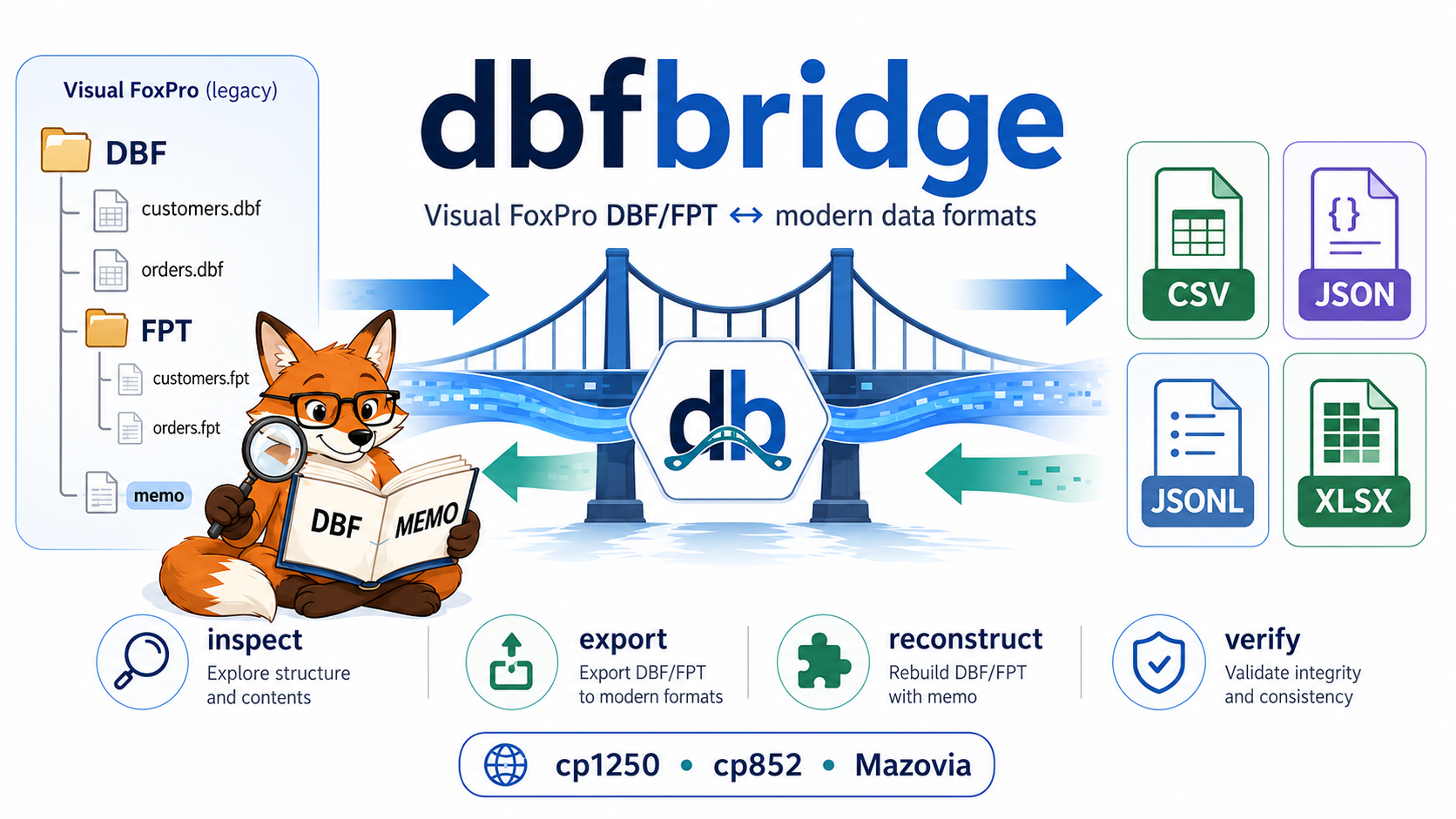
The diagram is a conceptual overview: inspect_table() itself is header-only,
while record contents are read through iter_records() / read_records();
reconstruction guarantees and CDX/raw-layout limitations are documented in the
compatibility guide, and the encoding labels are selected legacy Polish
examples rather than an exhaustive codec list.
Status: dbfbridge 1.1.0 (v1.1 public contract) — the declared v1.1 architecture is implemented on
main: all nine protected v1.0 operations plus the additive v1.1 Direct Write contract (docs/api-1.1.md). This commit is the dbfbridge 1.1.0 release state. See PyPI and the GitHub Releases page for the currently published versions. Test the result on a copy of production data before using it as an archival replacement. CDX index definitions are not reconstructed.
Documentation
| Document | Role |
|---|---|
| docs/README.md | documentation map / start here |
| docs/pypi-usage.md | complete installed-distribution user guide |
| docs/python-api-examples.md | complete Python API examples (nine protected v1.0 operations plus the additive v1.1 write_table) |
| docs/tool-server-integration.md | tool-server / MCP integration patterns |
| docs/api-1.0.md | protected historical 1.0 API baseline |
| docs/api-1.1.md | normative additive v1.1 Direct Write contract |
| docs/compatibility-vfp.md | VFP format support truth |
| docs/migration-1.0.md | migrating from 0.x to the 1.x API |
| docs/architecture-closure.md | maintainer evidence / architecture closure |
Requirements
- Python 3.10–3.14 (3.12 recommended)
pip- one or more DBF files (and their sibling
.FPTmemo files when present)
No Git, no source checkout, and no compiler are needed for normal use.
Installing from PyPI
1. Create a virtual environment
Windows PowerShell:
py -3.12 -m venv .venv
.\.venv\Scripts\Activate.ps1
python -m pip install --upgrade pip
python -m pip install dbfbridge
Linux/macOS:
python3 -m venv .venv
source .venv/bin/activate
python -m pip install --upgrade pip
python -m pip install dbfbridge
2. Verify the installation
python -c "import dbfbridge; print(dbfbridge.__version__); print(dbfbridge.__file__)"
python -m pip show dbfbridge
dbf-bridge --help
- The distribution name and the recommended import are both
dbfbridge. dbf_bridge(with an underscore) is a compatibility namespace that exports the same public symbols; user code should preferfrom dbfbridge import ....dbf-bridgeand the other commands are executable scripts from the active virtual environment — no repository checkout, noexamples/directory, and noPYTHONPATHare needed.
3. Choose the install profile
| Command | Capabilities | When to use |
|---|---|---|
pip install dbfbridge |
import dbfbridge, full Direct Read (inspect_table, read_schema, iter_records, read_records, iter_raw_records), DBF → JSONL/JSON/CSV migration (stdlib/Python engines) |
reading and exporting DBF data |
pip install "dbfbridge[write]" |
everything above + the additive v1.1 Direct Write operation (write_table), DBF/FPT reconstruction (reconstruct_dbf), and quality round trips (check_conversion_quality) |
writing fresh DBF/FPT pairs and rebuilding DBF files from exported data |
pip install "dbfbridge[xlsx]" |
XLSX export (xlsxwriter) and XLSX-format reading/verification support (openpyxl) |
spreadsheet exchange |
pip install "dbfbridge[write,xlsx]" |
XLSX → DBF/FPT reconstruction ([write] + [xlsx] together) |
XLSX → DBF round trips |
pip install "dbfbridge[fast]" |
optional accelerators (orjson, polars); identical logical results, faster conversions |
large conversion jobs |
pip install "dbfbridge[all]" |
the full feature set: Direct Read + migration + Direct Write (write_table) + reconstruction + XLSX + accelerators |
one-command complete install |
pip install "dbfbridge[import]" |
historical compatibility alias — installs the same reconstruction dependency as [write] |
older scripts that used the old extra name |
Repository status: the declared v1.1 architecture is implemented on
main(nine protected v1.0 operations plus the additive v1.1 Direct Write contract), and this commit is the 1.1.0 release state. A historical tag v0.2.0 remains as release history. Check PyPI and the GitHub Releases page for the currently published versions. The install-profile extras documented here are the current contract (not an upcoming one):pip install dbfbridgeinstalls the minimal base profile and the extras below are opt-in.
[fast] is optional by design: without orjson, JSON conversion uses the
stdlib json module; without polars, CSV conversion uses the Python
streaming engine. Both fallbacks produce the same logical result — [fast]
never affects correctness and its absence never raises.
4. Direct Read quick start (base install)
from pathlib import Path
from dbfbridge import inspect_table

table = Path("data/customer.dbf")

info = inspect_table(table)

print(info.record_count)
print(info.encoding)
print(info.has_memo)

for field in info.fields:
    print(field.name, field.dbf_type)
from dbfbridge import read_schema

schema = read_schema("data/customer.dbf")

print(schema.dbversion_name)
print(schema.memo_companion_format)
print(schema.companion_cdx_present)
inspect_table() and read_schema() are strictly read-only: no output files
are created and the source stays byte-identical. CDX companion presence
is reported structurally, but CDX tag names/expressions are not parsed.
Polish legacy data works out of the box:
from dbfbridge import iter_records

for row in iter_records("data/legacy.dbf", encoding="mazovia"):
    print(row.values["TEKST"])
Explicit overrides (cp1250, cp852, mazovia, piast, pki) are handled
at operation time — no manual codec registration — and an unknown codec
raises the typed EncodingUnknownError. Full encoding contract:
the PyPI usage guide.
5. Migration quick start (base install)
from dbfbridge import export_dbf

result = export_dbf(
    "data",
    "output",
    formats=("jsonl",),
)

result.raise_for_errors()
JSONL is the preferred migration format (streaming, inline memo support,
raw-record metadata). JSON uses the stdlib fallback and CSV uses the Python
streaming engine when [fast] is not installed — the logical results are the
same.
The full guide for PyPI-installed usage (profiles, Direct Read, memo policies, pagination, reconstruction, XLSX, CLI, structured errors) is docs/pypi-usage.md. Migrating from an earlier 0.x release to the declared 1.x public API is described in docs/migration-1.0.md.
CLI quick start
Installation provides four commands: dbf-bridge, dbf-bridge-verify,
dbf-bridge-import, and dbf-bridge-quality.
# Default export format is JSONL
dbf-bridge --source <DBF_DIR> --output <OUT_DIR>

# Request several formats explicitly
dbf-bridge --source <DBF_DIR> --output <OUT_DIR> \
  --formats csv,json,jsonl,xlsx --memo inline --overwrite --progress

# On later runs, convert only new, changed, missing, or damaged tables
dbf-bridge --source <DBF_DIR> --output <OUT_DIR> \
  --formats csv,json,jsonl,xlsx --incremental

# Verify exported formats against their DBF sources and migration report
dbf-bridge-verify --source <DBF_DIR> --output <OUT_DIR> \
  --formats csv,json,jsonl,xlsx

# Reconstruct from exactly one format (requires [write])
dbf-bridge-import --source <OUT_DIR> --output <REBUILT_DIR> \
  --formats jsonl --memo inline --overwrite --progress

# Retain a diagnostic DBF → JSONL → DBF round trip (requires [write])
dbf-bridge-quality --source <DBF_DIR> --output <QUALITY_DIR> \
  --overwrite --progress
The equivalent Python call is silent and returns a structured result:
from dbfbridge import export_dbf

run = export_dbf(
    "<DBF_DIR>",
    "<OUT_DIR>",
    formats=("csv", "json", "jsonl", "xlsx"),
    memo="inline",
    incremental=True,
)

print(run.ok, run.skipped, run.failed)
run.raise_for_errors()
Windows PowerShell examples are available in the examples guide.
Choose the right interface and format
| Need | Recommended choice | Why |
|---|---|---|
| one-off migration or PowerShell job | CLI commands | direct progress and process exit codes |
| integration with an application, GUI, or worker | Python API | typed results and structured progress callbacks |
| large, loss-aware export or later DBF reconstruction | JSONL | streaming, inline memo support, and raw-record metadata |
| exchange with spreadsheet users | XLSX | readable workbooks and lossless overflow sheets for long text |
| simple tabular integration | CSV | broad compatibility; memo is skipped unless requested |
| compact JSON for a smaller table | JSON | one conventional JSON array, but not streaming for consumers |
JSONL is the safest default for migration and reconstruction. CSV and XLSX are useful exchange formats, but they cannot retain every DBF-specific binary detail.
Export
dbf-bridge --source <DBF_DIR_OR_FILE> --output <OUT_DIR> [options]
| Option | Default | Description |
|---|---|---|
--source |
required | source directory or one DBF file |
--output |
required | output directory; it cannot be inside the source tree |
--formats |
jsonl |
comma-separated csv,json,jsonl,xlsx |
--memo |
per format | skip, inline, or null; CSV defaults to skip, other formats to inline |
--encoding |
auto |
DBF codepage or automatic header detection |
--decode-errors |
strict |
strict, ignore, or replace |
--deleted |
skip |
skip, separate, or include deleted records |
--missing-memo |
fail |
fail or null-with-warning |
--strip-spaces |
off | trim trailing spaces in Character fields |
--overwrite |
on | overwrite existing outputs; use --no-overwrite to disable |
--progress |
on | display per-table progress; use --no-progress to disable |
--no-validate |
off | skip output SHA-256 and parse validation |
--xlsx-long-text |
overflow |
preserve long values in overflow sheets or fail with error |
--incremental |
off | reuse verified results recorded in conversion_checksums.json |
--raw-mode |
full-record |
raw-retention level of the JSONL/JSON output: full-record keeps the per-record raw physical record image, metadata omits it, none additionally omits the replay-only physical header blobs from the schema |
The output directory preserves the source directory tree. Each table can produce:
| File | Contents |
|---|---|
<table>.jsonl, .json, .csv, .xlsx |
requested data formats |
<table>_schema.json |
DBF fields, exact descriptors/header metadata, codepage and FPT reconstruction data |
migration_report.jsonl / .csv |
run summary, status, counts, hashes, warnings, errors and converter statistics |
conversion_checksums.json |
atomic manifest used by incremental export |
Every successful run writes the checksum manifest, even without --incremental.
An incremental run skips a table only when its DBF/FPT/CDX fingerprint, export settings,
schema, and all requested outputs still match. Removed source tables are removed from the
new manifest, but their old output files are deliberately not deleted.
Format behavior
| Format | Memo default | Notes |
|---|---|---|
| CSV | skip |
memo values are null by default because embedded newlines complicate simple consumers |
| JSON | inline |
one JSON array; suitable for smaller tables |
| JSONL | inline |
one object per line; preferred for streaming and reconstruction |
| XLSX | inline |
constant-memory Dane_* sheets with lossless Dlugie_teksty_* overflow sheets |
Excel limits a cell to 32,767 UTF-16 code units. With the default
--xlsx-long-text overflow, a marker is stored in the data cell and the complete value
is split into ordered overflow rows. The importer joins those rows during reconstruction.
Reconstruction
dbf-bridge-import --source <EXPORT_DIR> --output <DBF_DIR> \
  --formats {jsonl,json,csv,xlsx} [options]
--formats must select exactly one format. Every input file needs its sibling
<table>_schema.json; the importer preserves relative directories and original DBF/FPT
filename casing. --memo accepts inline (default) or null, --overwrite is off by
default, and progress is on by default.
The generated reconstruction_report.jsonl contains canonical and raw checksums,
record counts, warnings, errors, and bounded field-level differences. Canonical hashes
compare values using DBF type, length, decimal precision, field order, flags, and deleted
status. Raw hashes compare complete file bytes.
For the best chance of byte-identical JSON/JSONL reconstruction:
- generate fresh schemas with the current exporter;
- export with
--deleted includeto retain deleted rows and physical record order; - keep the reserved
__dbfbridge_raw_record__property in JSON/JSONL unchanged; - use
--memo inline.
raw_dbf_match: true or raw_fpt_match: true proves byte identity. A false raw FPT
match with a true canonical match may be caused by unreferenced/orphan blocks in the old
FPT; exported memo values cannot recreate bytes that no record references. CSV and XLSX
are interchange formats and generally cannot preserve every raw DBF byte.
Raw retention modes (--raw-mode)
--raw-mode controls how much raw data the loss-aware JSONL/JSON intermediate output
carries; CSV/XLSX are converted from schema-declared columns and never carry raw fields.
| Mode | Logical values | Schema | Raw record images (__dbfbridge_raw_record__) |
Raw text fallback (__dbfbridge_raw_text_fields__) |
Canonical reconstruction | Raw physical reconstruction |
|---|---|---|---|---|---|---|
full-record (default) |
yes | full | kept | kept | yes (all supported cases incl. Varchar) | yes (raw-layout restoration) |
metadata |
yes | full | omitted | kept | yes (all supported cases incl. Varchar) | no |
none |
yes | logical facts only (replay-only dbf.header_base64 / memo.header_base64 blobs omitted) |
omitted | kept | yes (all supported cases incl. Varchar) | no |
All raw modes preserve canonical reconstruction for supported Varchar tables
(short, full-width, significant trailing spaces, NULL, empty, non-nullable,
mixed _NullFlags bitmaps, deleted rows, cp1250/cp852/Mazovia text).
full-record additionally retains per-record physical images for forensic/raw-layout
restoration; none/metadata do not guarantee a byte-identical physical Varchar
layout (the raw DBF checksum is reported separately as raw_dbf_match).
Changing --raw-mode invalidates the incremental conversion_checksums.json cache.
CDX files are not reconstructed because DBF field metadata does not contain index tag names and expressions. The DBF structural-index flag is preserved when possible, but the companion index must be rebuilt in Visual FoxPro or another index-aware tool.
Verification and diagnostics
dbf-bridge-verify checks output presence, row counts, syntax, schema consistency, and
SHA-256 values from migration_report.jsonl. It writes
<OUT_DIR>/verification_report.json unless --report specifies another path. Exit code
0 means success, 1 means an error, and 2 means warnings in strict mode; pass
--no-strict if warnings should not affect the exit code.
dbf-bridge-quality writes three retained artifact trees:
01_forward_jsonl— source DBF exported with inline memo and deleted rows included;02_reconstructed_dbf— reconstructed DBF/FPT;03_reexported_jsonl— reconstructed data exported again.
Its conversion_quality_report.jsonl records canonical/raw matches, differing fields,
first differing binary offsets, and probable causes. Exit codes are 0 for all OK, 1
for failures, and 2 for warnings.
Python API
The installed distribution is named dbfbridge, and the recommended import is also
dbfbridge (without an underscore). The historical internal package name
dbf_bridge exports the same public symbols for compatibility — user code should
not import from dbf_bridge.core... or dbf_bridge.exporter... directly.
Operations
| Function | Result type | Purpose |
|---|---|---|
inspect_table() |
TableInfo |
read-only inspection of one DBF header (no files created) |
read_schema() |
TableSchema |
full safe header/memo/CDX-companion schema (no files created) |
iter_records() |
iterator of DirectRecord |
read-only streaming decode of every record (O(1) memory) |
read_records() |
RecordPage |
read-only bounded page of records (O(limit) memory) |
iter_raw_records() |
iterator of DirectRecord |
pure forensic physical stream (raw bytes only, no FPT) |
export_dbf() |
ExportRunResult |
DBF/FPT tree → one or more modern formats |
reconstruct_dbf() |
ReconstructionRunResult |
one exported format + schemas → DBF/FPT tree |
verify_conversion() |
VerificationRunResult |
exported files vs source DBF and migration report |
check_conversion_quality() |
QualityRunResult |
retained DBF → JSONL → DBF diagnostics |
write_table() (v1.1) |
WriteResult |
typed schema + record stream → fresh DBF/FPT pair (additive; requires [write]) |
Functions accept str, pathlib.Path, or another os.PathLike. They do not print by
default. A completed operation returns table-level objects, aggregate counters, report
paths, and the CLI-compatible exit_code (0 OK, 1 error, 2 warning). Per-table
failures are data, not immediate exceptions, so an application can inspect every table.
Call result.raise_for_errors() after the run to turn failures into a
DBFBridgeRunError. Warnings do not raise; inspect exit_code, successful, and the
table results when warnings must also block the calling application.
Direct Write (write_table, v1.1)
from dbfbridge import read_schema, iter_records, write_table

schema = read_schema("source/klienci.dbf")
records = iter_records("source/klienci.dbf", memo="inline")
result = write_table("output/klienci-copy.dbf", schema=schema, records=records)
print(result.records_written, result.dbf_sha256)
write_table() writes a typed schema plus a record stream as a fresh DBF/FPT
pair (additive v1.1 API; requires the [write] extra; the caller iterable is
consumed exactly once; overwrite defaults to False; failures are typed in
the DirectWriteError family; canonical equivalence does not imply raw byte
identity; structural CDX indexes are never fabricated). See docs/api-1.1.md.
API option reference
The high-level functions use the same behavior as their CLI counterparts, with no console output unless a progress callback is supplied.
export_dbf() keyword |
Default | Accepted values / behavior |
|---|---|---|
formats |
("jsonl",) |
iterable or comma-separated csv,json,jsonl,xlsx |
memo |
per format | skip, inline, null, or None for format default |
strip_spaces |
False |
trim trailing spaces in Character fields |
encoding |
"auto" |
DBF codepage name or automatic header detection |
decode_errors |
"strict" |
strict, ignore, or replace |
deleted |
"skip" |
skip, separate, or include |
missing_memo |
"fail" |
fail or null-with-warning |
overwrite / validate |
True / True |
replace outputs; validate hashes and syntax |
xlsx_long_text |
"overflow" |
overflow or error |
incremental |
False |
reuse only fully verified results from the manifest |
progress |
None |
callback receiving ProgressEvent |
options |
None |
reusable ExportOptions; do not combine with option keywords |
| Operation | Important defaults and controls |
|---|---|
reconstruct_dbf() |
input_format="jsonl", memo="inline", overwrite=False; also accepts ReconstructionOptions |
verify_conversion() |
all four formats, strict=True, writes <output>/verification_report.json; set write_report=False for an in-memory check |
check_conversion_quality() |
overwrite=False, max_differences=20; retains all three diagnostic trees |
Direct read: inspection and schema
inspect_table() and read_schema() implement the direct read inspection core.
They are strictly read-only: the DBF read is bounded by the declared header
length (independent of the record count, plus a companion-file lookup in the
table's directory), they never create files, never open memo payloads, and
leave the source byte-identical.
from dbfbridge import FieldInfo, TableInfo, TableSchema, inspect_table, read_schema

info: TableInfo = inspect_table("K:/dbf_source/klienci.dbf")
print(info.record_count, info.encoding, info.has_memo, info.dbc_bound)
for field in info.fields:
    print(field.ordinal, field.name, field.dbf_type, field.dbf_type_name)

schema: TableSchema = read_schema("K:/dbf_source/klienci.dbf")
print(schema.dbversion_name, schema.last_update)
print(schema.memo_companion_format, schema.companion_cdx_present)
print(json.dumps(info.to_dict()))  # JSON-safe: no bytes, no Path
The header table-flags byte (offset 28) is a bit mask: has_structural_cdx
(0x01), has_memo_flag (0x02), is_database_container (0x04). Its raw value is
exposed as table_flags (int) and table_flags_hex on both TableInfo and
TableSchema. dbc_bound comes from the VFP database-container backlink path
in the 263-byte header extension (schema.dbc_backlink_path), decoded with the
encoding resolved from the language driver (or the explicit override), not from
a neighbouring .dbc file; an undecodable backlink keeps dbc_bound = true
and reports the path as null plus a warning. The last-update date is
1900 + year_byte with no century pivot. FieldInfo exposes the descriptor
facts an MCP consumer needs: nocptrans is the binary flag where VFP
documents it (Character/Varchar and memo fields only — it is never inferred
from an autoincrement Integer), index_field_flag (byte 31) is kept only for
migration-schema compatibility (VFP reserves bytes 24-31, so it is not
reliable CDX-membership evidence), and the VFP autoincrement facts
(is_autoincrement, autoincrement_next_value, autoincrement_step)
follow the VFP field-flags mask 0x0C on an Integer (I) field — the dBASE
Level 7 type + is recognized outside VFP only; the semantic is_binary
classification also covers G/P/binary memo fields.
Memo companion format follows the DBF version: VFP/FoxPro use .fpt (the
only format Direct Read can read), dBASE III+/IV use .dbt and HiPer-Six
.smt, which are reported with an explicit "not supported" warning and are
never interpreted as FPT headers. A complete FPT header record is 512 bytes;
the 8-byte prefix is enough to read the next-free block and the block size,
files shorter than 512 bytes are reported as structurally suspicious, and a
block size of 0 is invalid — sizes 1-32 select 512-byte units (SET BLOCKSIZE
TO 0 stores 1) and sizes above 32 are plain byte counts, so there is no
power-of-two rule. A missing required companion, an unreadable/suspicious FPT
header, or a structural-CDX flag without a .cdx file is a structured warning
in warnings, never an opaque failure.
Companion discovery is a typed I/O boundary: the exact-path candidate check
(protected stat), the case-insensitive directory scan, and per-entry checks
all convert OSError into DbfIoError (DBF_IO_ERROR) with the specific
companion path and a JSON-safe context. A genuinely absent companion means
present=False; an inaccessible one (e.g. access denied) raises instead of
being disguised as missing.
Structured failures carry a machine code instead of free text:
from dbfbridge import (
    DbfFormatUnsupportedError,
    DbfHeaderInvalidError,
    DbfIoError,
    DbfPathError,
    DbfTruncatedError,
    DirectReadError,
    EncodingUnknownError,
    ErrorCode,
)

try:
    inspect_table("K:/damaged/dane.dbf")
except DirectReadError as error:
    print(error.code)   # e.g. ErrorCode.DBF_TRUNCATED or DBF_IO_ERROR
    print(error.to_dict())  # JSON-safe: code, message, path, context
Direct read scope notes:
- CDX presence is reported structurally (
has_structural_cdx,companion_cdx); CDX tag expressions are not parsed; - export honors the Mazovia language driver (0x69): the header-resolved
encoding is passed to the reader, so
--encoding autoproduces correct Polish characters (a manual--encodingoverride still wins); - the Phase 0 benchmark results remain the BEFORE reference and are not regenerated by this phase.
A complete executable example is in
examples/inspect_table.py.
Streaming direct record read
Read-only record streaming sits on top of the inspection contracts.
The implementation is backed by the dbfread reference backend isolated in
dbf_bridge.core.backend (the only module allowed to use private dbfread
API); the migration exporter delegates its physical record loop to the same
backend, so there is exactly one record loop and one header parser in the
codebase.
from dbfbridge import (
    DirectRecord,
    LazyMemoValue,
    RecordPage,
    iter_raw_records,
    iter_records,
    read_records,
)

# Streaming iteration (O(1) memory); close() releases the file handles.
for record in iter_records("K:/dbf_source/klienci.dbf", memo="lazy"):
    value = record.values["NOTATKA"]
    if isinstance(value, LazyMemoValue):
        meta = value.to_dict()          # table, field, physical memo block
        text = value.load()             # explicit read through the backend
    print(record.physical_index, record.deleted, record.values.keys())

# One bounded physical page: O(limit) memory.
page = read_records("K:/dbf_source/klienci.dbf", offset=200, limit=100, fields=["ID_KL", "NAZWA"])
print(page.offset, page.limit, page.scanned, page.next_offset, page.exhausted)

# Every physical record (deleted included) with its exact raw bytes, no FPT.
raws = [(r.physical_index, r.deleted, r.raw_record) for r in iter_raw_records("K:/dbf_source/klienci.dbf")]
Progress and cancellation
Direct Read functions accept two optional keyword-only callbacks:
from dbfbridge import ProgressEvent, ReadCancelledError, iter_records

events: list[ProgressEvent] = []
state = {"stop": False}

try:
    for record in iter_records(
        "data/customer.dbf",
        fields=["ID", "NAME"],
        memo="skip",
        progress=events.append,          # ProgressEvent(operation="read", ...)
        cancel_check=lambda: state["stop"],  # cooperative, checked before
    ):                                    # every physical record
        ...
        state["stop"] = True              # stop before the next record
except ReadCancelledError as exc:
    print(exc.code)                       # READ_CANCELLED
Cancelling raises ReadCancelledError (machine code READ_CANCELLED) with a
JSON-safe progress context; all handles close and the source stays
byte-identical. The full semantics — event fields, physical vs yielded
counters, cadence, READ_CANCELLED context, resource cleanup, callback
exception policy — are documented in
the PyPI usage guide.
Contract:
physical_indexis the zero-based physical record index (deleted records keep their index);offset/next_offsetuse the same physical space; a page seek jumps tooffsetwithout scanning earlier records; running out of records (EOF or a0x1Amarker) before the declared record count is a typedDBF_TRUNCATED— EOF is normal only after the whole declared record area;iter_records()streams with O(1) memory;read_records()uses O(limit) memory;limitmust be positive andoffsetnon-negative (ARGUMENT_INVALIDotherwise);include_deleted=Falseskips deleted records in the same pass (no second read of the record area);iter_raw_recordsreturns all records, deleted included, in physical order as pure forensic snapshots: no field is parsed or decoded (the FPT is never opened,valuesis an empty read-only mapping) and even damaged text bytes cannot hide the exactraw_recordimage — decoded values together with the raw image are available throughiter_records(..., raw=True);fieldsis validated case-insensitively whilevaluesuse schema names in the caller's order; unselected fields are never parsed; unknown or duplicate names raiseFIELD_PROJECTION_INVALIDand a selected unsupported field raisesFIELD_TYPE_UNSUPPORTED— an unsupported field left unselected never blocks reading, and memo fields removed bymemo="skip"are trimmed from the projection before that validation;- memo policies:
skip(field absent fromvalues),null(field present withNone),lazy(aLazyMemoValue; the FPT is not opened during iteration — loading it later costs a small per-value read),inline(the payload is read through the backend immediately). Only an effective projection that really decodes memo values requires the FPT forinline;skip/null/lazynever open or read the FPT;inlinewithout an FPT raisesFPT_REQUIRED_MISSING(also when the companion vanishes after validation — the open is strict, never silently null) and a damaged FPT raisesFPT_INVALID; DirectRecord.valuestakes a defensive read-only snapshot in projection order (mutating the caller's dict never leaks in, item assignment raisesTypeError);to_dict()returns a fresh, independently mutable, JSON-safe dict;encoding="auto"resolves from the language driver, an explicit override wins; strict decode failures raiseTEXT_DECODE_ERROR, never a rawUnicodeDecodeError;- Direct Read only opens the sources read-only: it never creates a directory,
lock, report, or
.partial, never touches CDX, and never modifies the source. - typed errors carry
ErrorCode,path, and a JSON-safecontext— includingARGUMENT_INVALID,FIELD_PROJECTION_INVALID,FIELD_TYPE_UNSUPPORTED,FPT_REQUIRED_MISSING,FPT_INVALID,TEXT_DECODE_ERROR,DBF_RECORD_INVALID,DBF_IO_ERROR.
The four direct read benchmark scenarios (direct_read_bounded,
field_projection, memo_lazy, raw_mode_none) are real MEASURED
scenarios of the record streaming (fast profile: 19 MEASURED /
0 NOT_IMPLEMENTED / 0 FAILED; full contract: 24 MEASURED). The
historical Phase 1 AFTER baseline (measured on GitHub Actions) and the
preserved Phase 0 BEFORE reference stay byte-identical under
benchmarks/baselines/; the full evidence narrative is in
benchmarks/README.md.
A complete executable example is in
examples/read_records.py.
Export and incremental export
from dbfbridge import ExportOptions, export_dbf

options = ExportOptions(
    formats=("csv", "json", "jsonl", "xlsx"),
    memo="inline",
    deleted="include",
    overwrite=True,
    incremental=True,
)
run = export_dbf("K:/dbf_source", "K:/dbf_output", options=options)

for table in run.results:
    print(table.table, table.format, table.status, table.sha256)

print(run.migration_report_jsonl)
print(run.checksum_manifest)
run.raise_for_errors()
Every ExportOptions field is also available directly as a keyword of export_dbf().
Use either the reusable options object or individual option keywords in one call.
Structured progress
from dbfbridge import ProgressEvent, export_dbf

def show_progress(event: ProgressEvent) -> None:
    print(event.operation, event.current, event.total, event.table, event.records)

run = export_dbf(
    "K:/dbf_source",
    "K:/dbf_output",
    formats="jsonl,xlsx",
    progress=show_progress,
)
The callback receives ProgressEvent objects and is independent of CLI output. This
makes it suitable for GUI progress bars, web jobs, queues, logs, or monitoring systems.
Reconstruction, verification, and quality
from dbfbridge import (
    check_conversion_quality,
    reconstruct_dbf,
    verify_conversion,
)

reconstruction = reconstruct_dbf(
    "K:/dbf_output",
    "K:/dbf_reconstructed",
    input_format="jsonl",
    memo="inline",
    overwrite=True,
)

verification = verify_conversion(
    "K:/dbf_source",
    "K:/dbf_output",
    formats=("csv", "json", "jsonl", "xlsx"),
)

quality = check_conversion_quality(
    "K:/dbf_source",
    "K:/dbf_quality",
    overwrite=True,
    max_differences=20,
)

for result in (reconstruction, verification, quality):
    print(type(result).__name__, result.exit_code, result.report_path)
    result.raise_for_errors()
Invalid global arguments, unsafe paths, and missing source directories raise standard
ValueError or FileNotFoundError immediately. DBFBridgeRunError is raised only by
raise_for_errors() and keeps the complete run object in its result attribute.
Missing optional dependencies (structured error)
Operations that need an extra fail before creating any output with a typed, JSON-safe error — never a partial tree and never an automatic installation:
from dbfbridge import OptionalDependencyMissingError

try:
    reconstruct_dbf("K:/dbf_output", "K:/dbf_rebuilt", input_format="jsonl")
except OptionalDependencyMissingError as error:
    print(error.code)             # OPTIONAL_DEPENDENCY_MISSING
    print(error.dependency)       # dbf
    print(error.extra)            # write
    print(error.operation)        # reconstruct_dbf
    print(error.install_command)  # python -m pip install "dbfbridge[write]"
    print(error.to_dict())        # JSON-safe payload
The [fast] accelerators are different by contract: missing orjson/polars
never raise — the stdlib/Python fallbacks are used instead.
Only import dbfbridge is the supported stable public boundary — the modules
under dbf_bridge.core, dbf_bridge.exporter and dbf_bridge.importer are
implementation details, not an integration surface, and may change between
minor releases. A complete executable example is in
examples/python_api.py,
and
docs/tool-server-integration.md
documents the recommended patterns for service/tool-server integrations.
Development
Everything above describes normal PyPI-installed usage. The following is for repository/development work only.
git clone https://github.com/PeterPirog/dbfbridge.git
cd dbfbridge
python -m venv .venv
.\.venv\Scripts\Activate.ps1   # Windows
python -m pip install -e ".[dev]"
pytest
ruff check src tests benchmarks examples
python -m build
twine check dist/*
Continuous integration runs linting and the test suite on Python 3.10–3.14 on Linux, plus Python 3.12 on Windows. Release archives are built separately and published through PyPI Trusted Publishing; no long-lived PyPI token is stored in the repository. The exact versioning, publisher configuration, release, and post-publication checks are documented in PUBLISHING.md.
Tests generate their deterministic DBF/FPT fixtures automatically. To create a reusable fixture tree manually:
python tests/fixtures/generate_sample_dbf.py
python tests/fixtures/generate_sample_dbf.py --output <FIXTURE_DIR>
Synthetic benchmark instructions and their environment-specific sample results are in the benchmark guide.
Troubleshooting and issue reports
| Symptom | What to check |
|---|---|
OPTIONAL_DEPENDENCY_MISSING |
install the extra named in error.install_command (e.g. pip install "dbfbridge[write]") |
| missing memo/FPT error | keep the sibling .FPT, or deliberately use --missing-memo null-with-warning |
exit code 2 |
the operation completed with warnings; inspect its report before accepting the result |
| CDX warning | rebuild the index in Visual FoxPro; the exported data is not an index definition |
| raw hash differs but canonical hash matches | values and schema match, but unused bytes, memo block layout, or metadata differ |
| incremental table is converted again | its source fingerprint, settings, schema, manifest entry, or an output hash changed |
| an existing output blocks reconstruction | pass --overwrite only after confirming the destination may be replaced |
When reporting a reproducible defect, open a GitHub issue and include the command or API call, Python and operating-system versions, the relevant migration/reconstruction/ quality report entry, and the generated schema. Do not attach production records or memo contents; reduce the problem to synthetic data whenever possible.
Known limitations and roadmap
- CDX tag definitions are not reconstructed.
- Exact raw FPT reconstruction is not possible for unreferenced source blocks.
- Future high-level operations will follow the existing function + typed-result model.
License
1 maintainer

Download files
Download the file for your platform. If you're not sure which to choose, learn more about installing packages.
Source Distribution
Built Distribution
Filter files by name, interpreter, ABI, and platform.
If you're not sure about the file name format, learn more about wheel file names.
Copy a direct link to the current filters
File details
Details for the file dbfbridge-1.1.0.tar.gz.
File metadata
- Download URL: dbfbridge-1.1.0.tar.gz
- Upload date:
- Size: 630.9 kB
- Tags: Source
- Uploaded using Trusted Publishing? Yes
- Uploaded via:
twine/7.0.0 CPython/3.13.14
File hashes
| Algorithm | Hash digest | |
|---|---|---|
| SHA256 |
094df782bbc60c1d42789fde7691205df63722c234b40111edc09ca7e7af1956
|
|
| MD5 |
65b44db642d8dfa3fed6eab641365f9c
|
|
| BLAKE2b-256 |
c078f1bd8492ce18a56c33590ac0c960cc0a2cea3b30fc7d788a202e29b4dbff
|
Provenance
The following attestation bundles were made for dbfbridge-1.1.0.tar.gz:
Publisher:
publish.yml on PeterPirog/dbfbridge
-
Statement:
-
Statement type:
https://in-toto.io/Statement/v1 -
Predicate type:
https://docs.pypi.org/attestations/publish/v1 -
Subject name:
dbfbridge-1.1.0.tar.gz -
Subject digest:
094df782bbc60c1d42789fde7691205df63722c234b40111edc09ca7e7af1956 - Sigstore transparency entry: 2784568626
- Sigstore integration time:
-
Permalink:
PeterPirog/dbfbridge@1c6693bc242f4727d2992bd1e8badedbd23ca0ce -
Branch / Tag:
refs/tags/v1.1.0 - Owner: https://github.com/PeterPirog
-
Access:
public
-
Token Issuer:
https://token.actions.githubusercontent.com -
Runner Environment:
github-hosted -
Publication workflow:
publish.yml@1c6693bc242f4727d2992bd1e8badedbd23ca0ce -
Trigger Event:
release
-
Statement type:
File details
Details for the file dbfbridge-1.1.0-py3-none-any.whl.
File metadata
- Download URL: dbfbridge-1.1.0-py3-none-any.whl
- Upload date:
- Size: 169.3 kB
- Tags: Python 3
- Uploaded using Trusted Publishing? Yes
- Uploaded via:
twine/7.0.0 CPython/3.13.14
File hashes
| Algorithm | Hash digest | |
|---|---|---|
| SHA256 |
76b0e77dbc4a4dcead15091a89730ce3de4c1818f6d3c61d1b8e5d66ea9b718d
|
|
| MD5 |
a441edc90ee5309ab36c10480079595b
|
|
| BLAKE2b-256 |
9d5cbae6cb7d2f19c010c44eef630b1cf3965469a124809b64f37014fc3b54f0
|
Provenance
The following attestation bundles were made for dbfbridge-1.1.0-py3-none-any.whl:
Publisher:
publish.yml on PeterPirog/dbfbridge
-
Statement:
-
Statement type:
https://in-toto.io/Statement/v1 -
Predicate type:
https://docs.pypi.org/attestations/publish/v1 -
Subject name:
dbfbridge-1.1.0-py3-none-any.whl -
Subject digest:
76b0e77dbc4a4dcead15091a89730ce3de4c1818f6d3c61d1b8e5d66ea9b718d - Sigstore transparency entry: 2784568644
- Sigstore integration time:
-
Permalink:
PeterPirog/dbfbridge@1c6693bc242f4727d2992bd1e8badedbd23ca0ce -
Branch / Tag:
refs/tags/v1.1.0 - Owner: https://github.com/PeterPirog
-
Access:
public
-
Token Issuer:
https://token.actions.githubusercontent.com -
Runner Environment:
github-hosted -
Publication workflow:
publish.yml@1c6693bc242f4727d2992bd1e8badedbd23ca0ce -
Trigger Event:
release
-
Statement type:













