
DFormKit
DFormKit is a Python library designed to help Django developers dynamically generate forms, manage views, and streamline template creation based on Django models.
Why DFormKit?
This command-line wizard lets you dynamically generate forms, templates, views, and URL patterns for your Django models straight from your Terminal. It works seamlessly on Windows, Mac, and Linux, so you can use it on any platform.
While other tools make you wade through a swamp of settings and configurations, DFormKit keeps it simple. Just specify your app and model, and voilà! It’ll take you on a smooth ride to creating dynamic forms, no complex options needed—just fun coding! 🔥
Features
- Dynamic Form Generation: Automatically generate forms from Django models.
- Template Creation: Create HTML templates for forms.
- View Integration: Add view functions and URL patterns dynamically.
- Customizable Templates: Supports integrating styling frameworks like Tailwind CSS.
🛠️ Installation
-
Install the library using
pip:pip install dformkit
-
Add
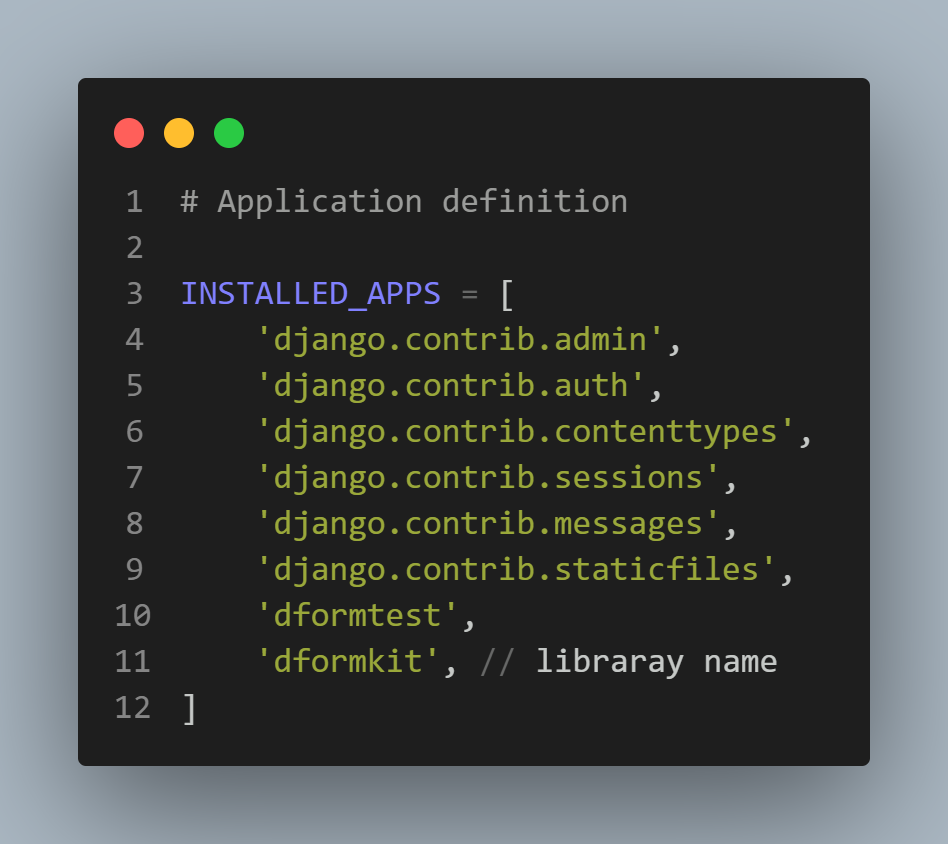
'dformkit'toINSTALLED_APPSin your Django project'ssettings.pyfile:INSTALLED_APPS = [ ..., 'dformkit', ]
- image showing the addition of
'dformkit'toINSTALLED_APPSinsettings.py.
- image showing the addition of
📈 Upgrade
Stay in the loop with the latest features on GitHub! To upgrade your DFormKit tool, simply run:
pip install --upgrade dformkit
Then you’re all set to keep generating dynamic forms from your Terminal! 🥳
🦸 Quick Start
Getting started with DFormKit is a piece of cake! Just use the following command style:
python manage.py dformkit myapp Person
Note:
- Replace
myappwith your Django app name. - Replace
Personwith your model name.
If you don’t specify additional options, it’ll generate a dynamic form for the model and save it in forms.py. Easy-peasy!
👨💻 Usage
Arguments
| Argument | Description |
|---|---|
app |
The name of your Django app. This argument is [Required]. |
model |
The name of your Django model. This argument is [Required]. |
Options
| Option | Description |
|---|---|
-page or --p |
Generate an HTML template for the form. |
-view or --v |
Add a view function to views.py and a URL pattern to urls.py. |
--pv or --vp |
Combine all options: generate the form, template, view, and URL pattern. |
Examples
1. Generate a Form Only
python manage.py dformkit myapp Person
- What it does: Generates a dynamic form for the
Personmodel in themyappapplication. - Output: The form is saved in
forms.py.
2. Generate a Form and Template
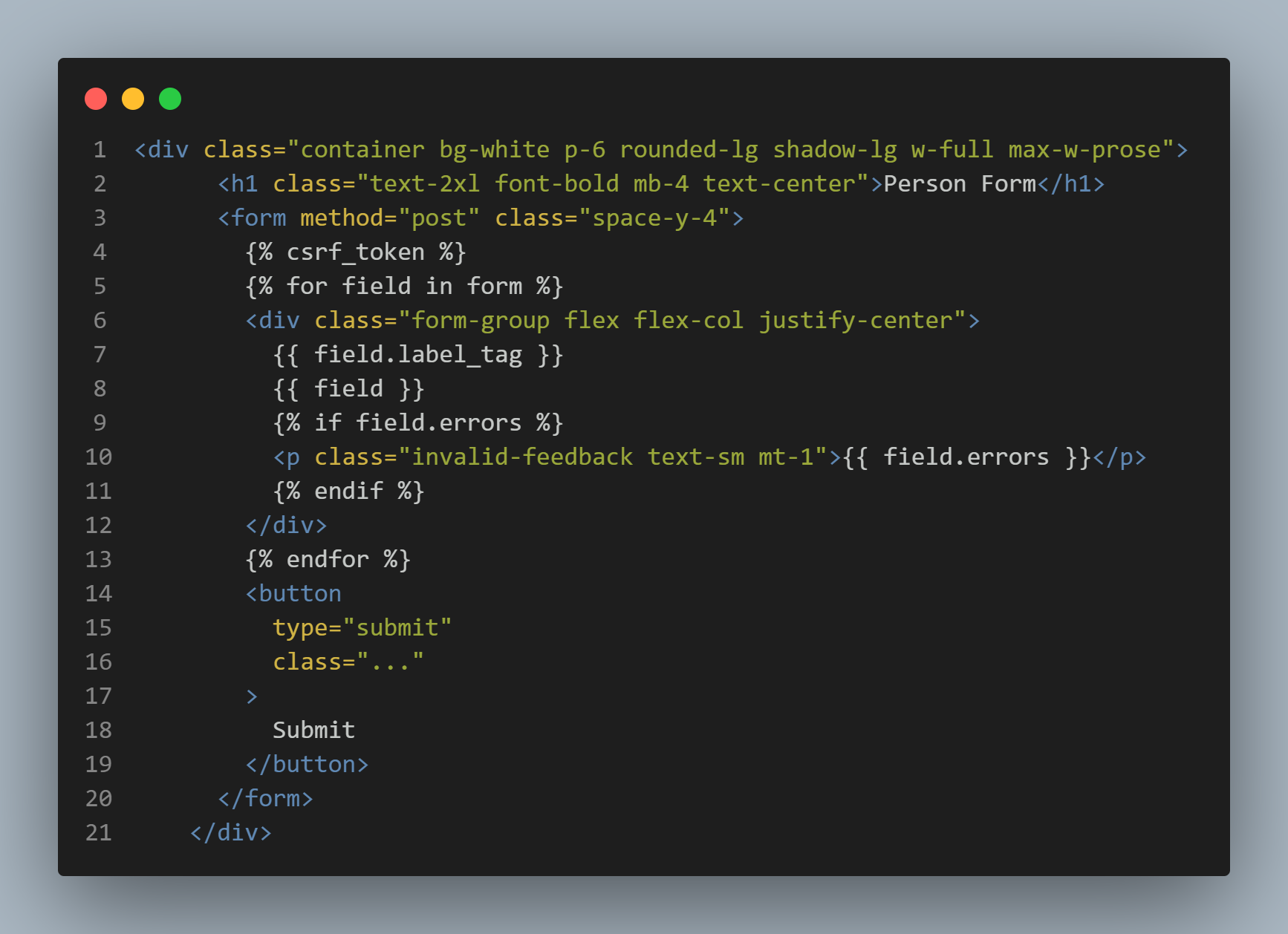
python manage.py dformkit myapp Person -page
or
python manage.py dformkit myapp Person --p
-
What it does: Generates the form and an HTML template for it.
-
Output: The form is saved in
forms.py, and the template is saved in thetemplatesfolder. -
This is the code generated with this command in templates/[formname]_form.html
3. Generate a Form, View, and URL Pattern
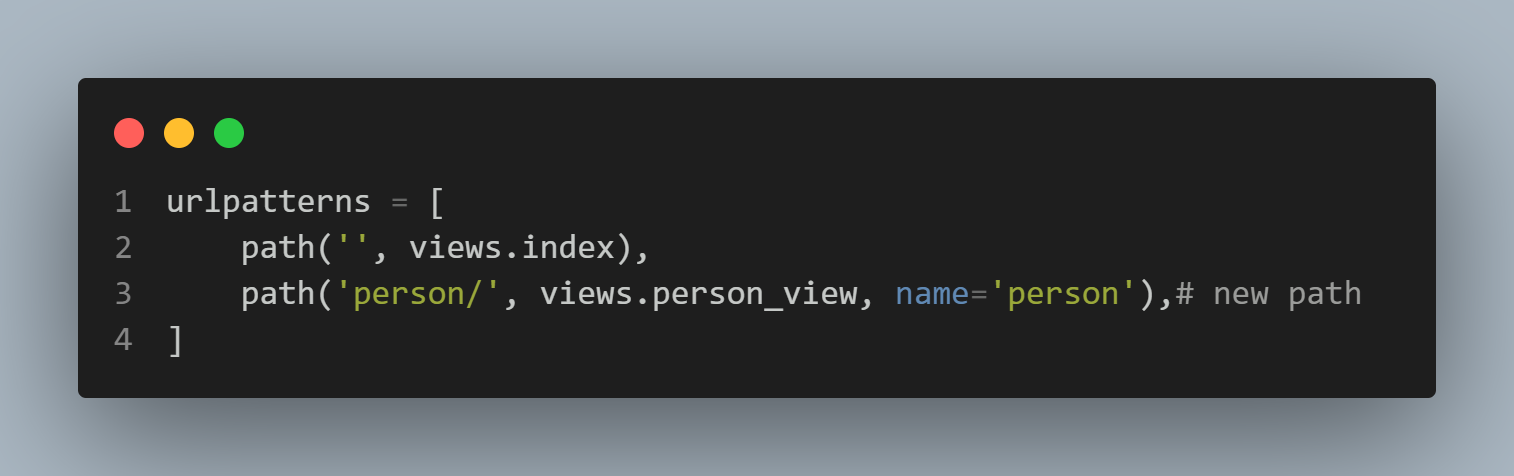
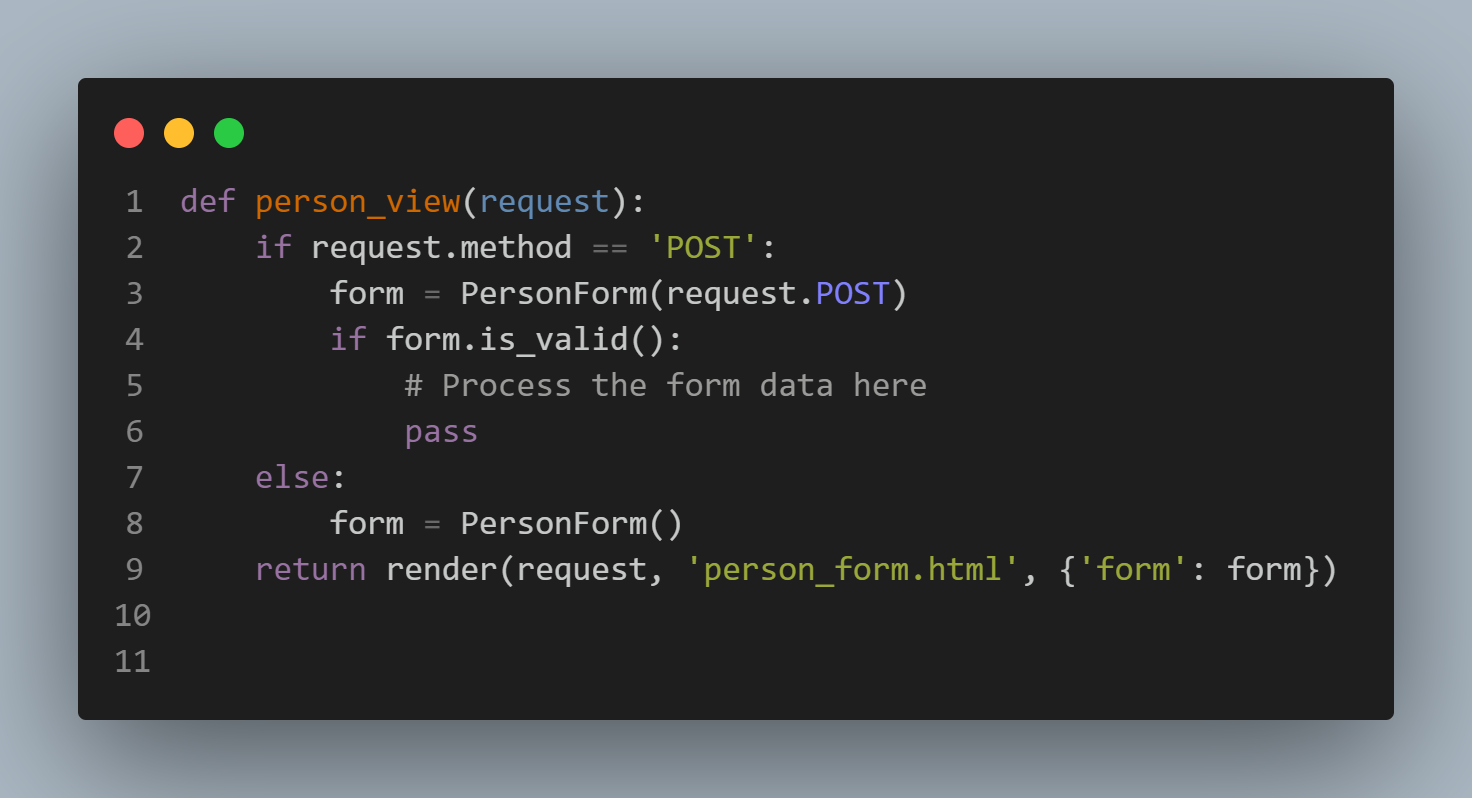
python manage.py dformkit myapp Person -view
or
python manage.py dformkit myapp Person --v
- What it does: Generates the form, adds a view function to
views.py, and adds a URL pattern tourls.py. - Output: The form, view, and URL pattern are created.
4. Combine All Options
python manage.py dformkit myapp Person --pv
or
python manage.py dformkit myapp Person --vp
-
What it does: Combines all the above steps into one command.
-
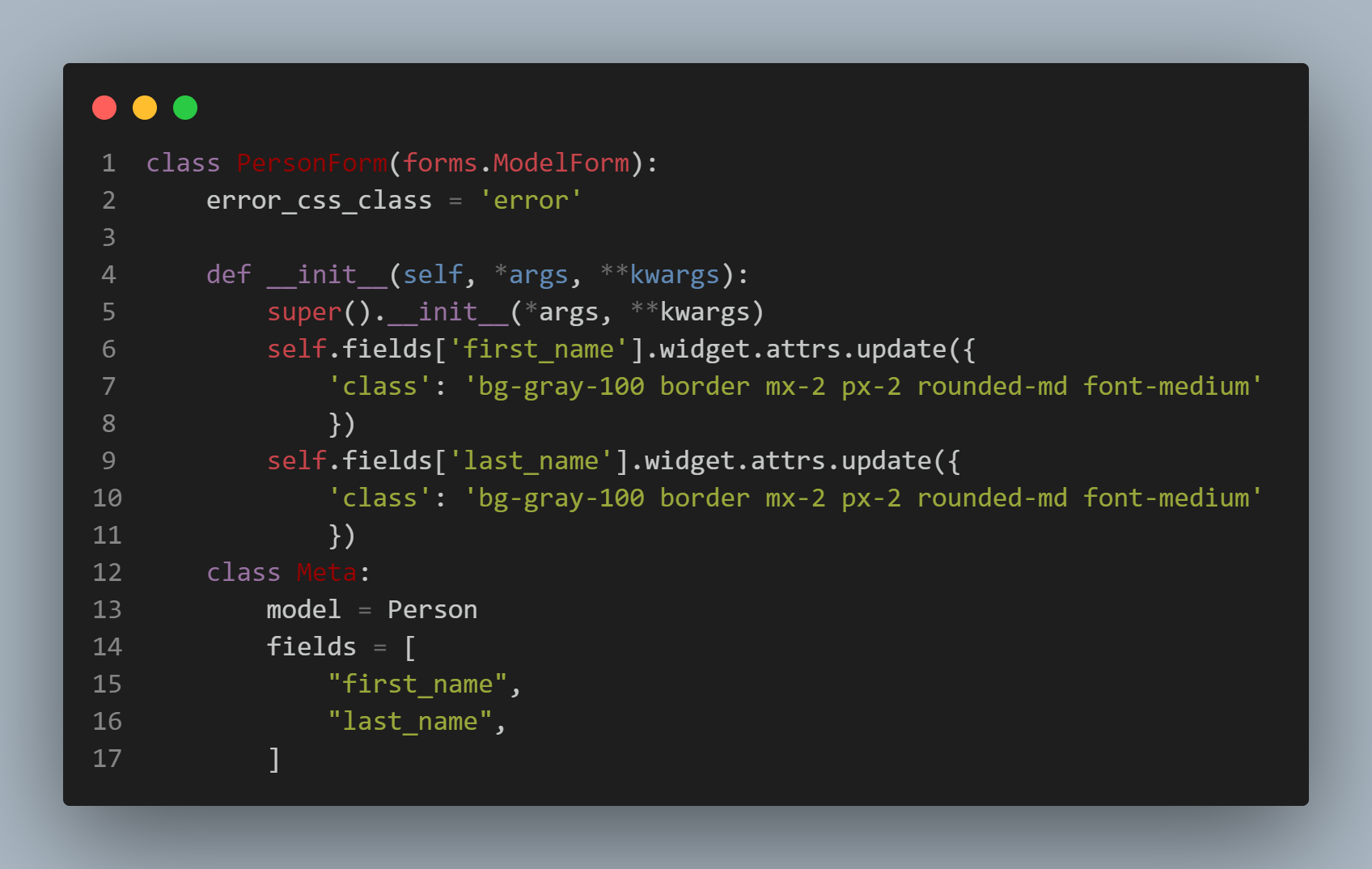
Output: The form, template, view, and URL pattern are generated.
-
this is the new form code in forms.py when use this command
🧰 Additional Features
Using Named Arguments
You can use named arguments for more flexibility. For example:
python manage.py dformkit -app=myapp -model=Person -view
or
python manage.py dformkit -app=myapp -model=Person --pv
- What it does: Works the same as positional arguments but provides a more explicit way to specify the app and model.
Overwriting Existing Forms
If the form already exists in forms.py, the library will warn you before overwriting it. You can choose to proceed or skip.
Customizing Templates
The generated templates are fully customizable. You can integrate styling frameworks like Tailwind CSS or Bootstrap by modifying the generated HTML files.
Testing the Library
You can run unit tests using pytest:
pytest
Contributing
We welcome contributions! Follow these steps:
- Fork the repository.
- Create a new branch for your feature or fix.
- Write tests if applicable.
- Submit a Pull Request with details about your changes.
❓ Frequently Asked Questions (FAQ)
1. What happens if the form already exists in forms.py?
- If the form already exists, the library will warn you before overwriting it. You can choose to proceed or skip.
2. Can I customize the generated templates?
- Yes, the generated templates are fully customizable. You can integrate styling frameworks like Tailwind CSS or Bootstrap.
3. How do I add validation to the form?
- Validation is automatically handled based on the constraints defined in your Django model (e.g.,
max_length,null,blank, etc.).
🚀 Conclusion
DFormKit simplifies the process of generating forms, templates, views, and URL patterns in Django. By following the steps above, you can quickly set up dynamic forms for your models and streamline your development workflow.
📜 License
This project is licensed under the MIT License.
1 maintainer

Metadata
1 maintainer
Release files for dformkit 0.1.2
For a detailed explanation of source distributions (sdists) and built distributions (wheels), please see the package formats documentation.
Source distribution (sdist)
| File | Size | Uploaded | Provenance | |
|---|---|---|---|---|
| dformkit-0.1.2.tar.gz | 15.1 kB | Without provenance | Details |
Built distribution (wheel)
| File | Interpreter | ABI | Platform | Reset |
|---|---|---|---|---|
| dformkit-0.1.2-py3-none-any.whl | Python 3 | none | any | Details |
Total release size: 29.2 kB
Release files / dformkit-0.1.2.tar.gz
| Download URL | dformkit-0.1.2.tar.gz |
|---|---|
| Size | 15.1 kB |
| Tags | Source |
|
SHA-256 checksum How to use checksums |
5dfc172feb64b1686f7fd0893345f6261557c1e7afa028e2a58b83e8942aaf2c
|
|
BLAKE2b-256 checksum How to use checksums |
363bc974668f4138bff10fc58aecb13dc081fac09f0f1aacccf271db607201bf
|
| Upload date | |
|
Uploaded using Trusted Publishing? What is trusted publishing? |
No |
| Uploaded via |
twine/6.0.1 CPython/3.12.0
|
Release files / dformkit-0.1.2-py3-none-any.whl
| Download URL | dformkit-0.1.2-py3-none-any.whl |
|---|---|
| Size | 14.2 kB |
| Tags | Python 3 |
|
SHA-256 checksum How to use checksums |
0ef8f00d1ebbc43404476a3df7f1b53c7ed31481bc131fef38bccd81127f3db6
|
|
BLAKE2b-256 checksum How to use checksums |
01069fa902fcb5d7164b8b380f4d44e2e07faf48a2abdb00f6ebc68c46fe89e0
|
| Upload date | |
|
Uploaded using Trusted Publishing? What is trusted publishing? |
No |
| Uploaded via |
twine/6.0.1 CPython/3.12.0
|
Security for dformkit 0.1.2
Provenance
Provenance describes where a file came from. On PyPI, provenance is shared via attestations, which provide a verifiable record of the build or publishing details. View details, limitations and caveats.
No provenance found
None of the files in this release were uploaded with provenance metadata.
A note on package security
PyPI is a repository for distributing packages, not a service for auditing them. While third-party security researchers and our staff do their best to detect and remove malicious packages, PyPI cannot guarantee the quality, security or suitability of any given package.














