
Usage
DGet! is a command line tool for calculating molecule deuteration. To see a full list of CLI options, run the help:
$ dget --help
Basic Usage
To use DGet! pass a molecular formula, mass spectra text file and optionally the adduct formed:
$ dget C12HD8N <path-to-ms-file.csv> --adduct "[M-H]-"
This will print the deuteration of the base molecule %Deuteration and the predicted deuteration of every possible deuteration state from D0 (no deuterium) to Dn (full deuterium):
Formula          : C12HD8N
Adduct           : [M-H]-
M/Z              : 175.1237
Adduct M/Z       : 174.1164
Deuteration      : 93.73 %

Deuteration Ratio Spectra
D0               :  0.07 %
D1               :  0.19 %
D2               :  0.20 %
D3               :  0.26 %
D4               :  0.39 %
D5               :  1.41 %
D6               :  6.05 %
D7               : 27.80 %
D8               : 63.62 %
Plotting
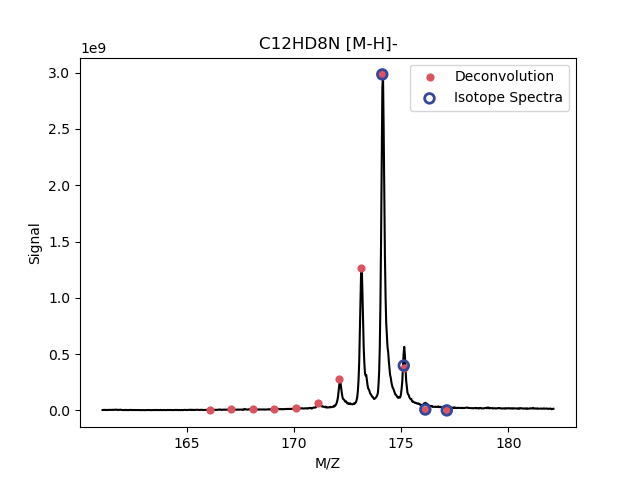
To visualise the deuteration and mass spectrum pass --plot:
$ dget C12HD8N <path-to-ms-file.csv> --adduct "[M-H]-" --plot
This will show the de-convolved deuteration spectra in red and the predicted adduct spectra in blue. These spectra are scaled to fit the mass data so absolute heights will not be indicative of good fit.
Plotting depends on matplotlib.
GUI
A Qt based GUI is also available and can be started using:
$ dget-gui
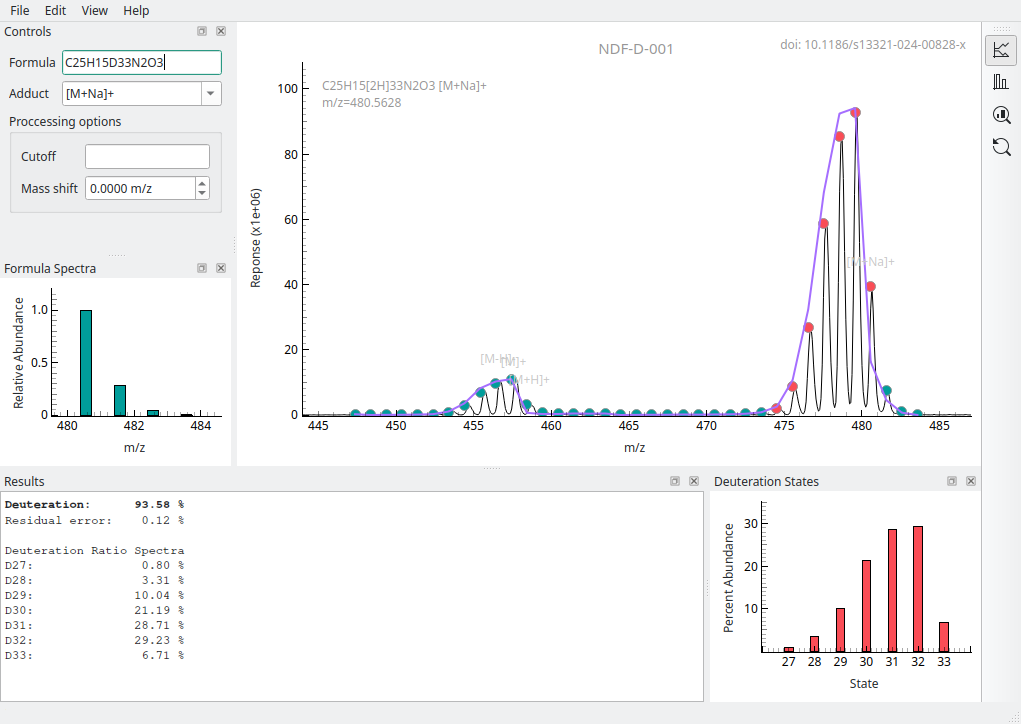
Windows executables are available for each release on the DGet! GitHub https://github.com/djdt/dget/releases.
Basic usage on the GUI can be found in the Documentation.
Web App
A web application of DGet! is available at https://dget.app.
Details on its usage can be found on the Help page.
Installation
DGet! is available on PyPI and can be installed via pip:
$ pip install dget
To install the GUI:
$ pip install dget[gui]
To install DGet! from source first clone the repository:
$ git clone https://github.com/djdt/dget
Then install using pip:
$ cd dget
$ pip install .
Requirements
matplotlib (optional, for plotting)
PySide6 (optional, for GUI)
pyqtgraph (optional, for GUI)
Documentation
Documentation is available at https://dget.readthedocs.io.
Citation
When using DGet! in your research please cite:
1 maintainer

Metadata
1 maintainer
Release files for DGet 1.0.2
For a detailed explanation of source distributions (sdists) and built distributions (wheels), please see the package formats documentation.
Source distribution (sdist)
| File | Size | Uploaded | |
|---|---|---|---|
| dget-1.0.2.tar.gz | 62.8 kB | Details |
Built distribution (wheel)
| File | Interpreter | ABI | Platform | Reset |
|---|---|---|---|---|
| dget-1.0.2-py3-none-any.whl | Python 3 | none | any | Details |
Total release size: 128.0 kB
Release files / dget-1.0.2.tar.gz
| Download URL | dget-1.0.2.tar.gz |
|---|---|
| Size | 62.8 kB |
| Tags | Source |
|
SHA-256 checksum How to use checksums |
9d1633bb608424b1ed3f8b9e077e5f68068cfafb9bfbf859c5e79118fef46427
|
|
BLAKE2b-256 checksum How to use checksums |
fba92eb5b5842a8c8932c5726197dc0d174a5e3d366c2bcdeceb744f6b665dec
|
| Upload date | |
|
Uploaded using Trusted Publishing? What is trusted publishing? |
Yes |
| Uploaded via |
uv/0.9.0
|
Release files / dget-1.0.2-py3-none-any.whl
| Download URL | dget-1.0.2-py3-none-any.whl |
|---|---|
| Size | 65.2 kB |
| Tags | Python 3 |
|
SHA-256 checksum How to use checksums |
01fe2f687da691ed82547312a9659e0cb78ef00e241d4a9f46ea58b4398d3d72
|
|
BLAKE2b-256 checksum How to use checksums |
f106f7d1ff45b411c93bd06c7bc31b6db56afd692004134de38f39d9f3e7f4cb
|
| Upload date | |
|
Uploaded using Trusted Publishing? What is trusted publishing? |
Yes |
| Uploaded via |
uv/0.9.0
|














