
DiaModality - The Modality Diagram
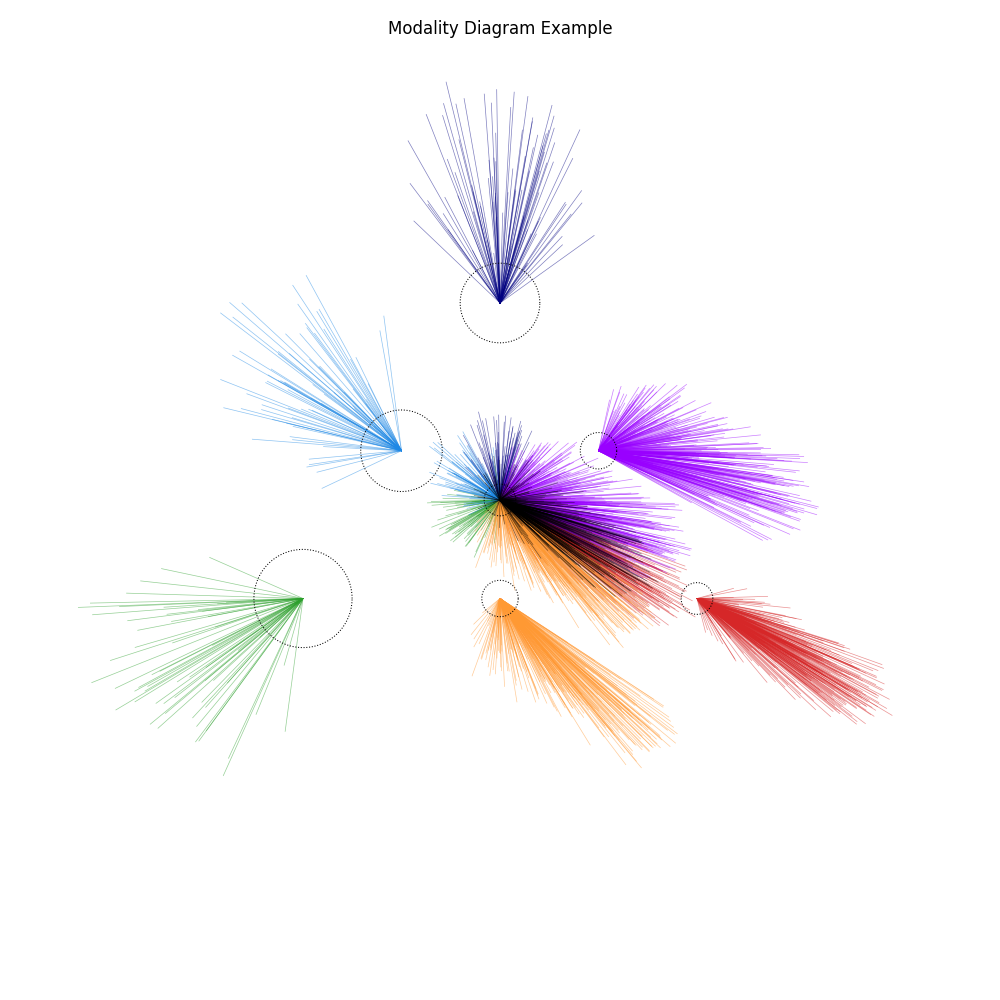
Simple tool to plot vector modality diagram




To install package run the command:
pip install diamodality
Example use case:
See the /demo directory on Git repo or
create and run the following two files:
(file names don't matter)
generate_sample_data.py:
import csv
import random
import os

num_rows = 1500
output_file = 'modality_data.csv'

# locate working directory
script_dir = os.path.dirname(os.path.realpath(__file__))
file_path = os.path.join(script_dir, output_file)

# Open a new CSV file to write the data
with open(file_path, mode='w', newline='') as file:
    writer = csv.writer(file)

    # Generate the data
    signal_treshold = 1.5
    for _ in range(num_rows):

        # generate data columns:
        col1 = random.uniform(0, 2.7)
        col2 = random.uniform(0, 3.3)
        col3 = random.uniform(0, 7.3)

        # generate binarization columns:
        col4 = 1 if col1 > signal_treshold else ''
        col5 = 1 if col2 > signal_treshold else ''
        col6 = 1 if col3 > signal_treshold else ''

        writer.writerow([col1, col2, col3, col4, col5, col6])
plot_sample_data.py:
import DiaModality.ModalityPlot as plt
import scsv as csv
import os

# input files:
files = ['modality_data.csv']

# Get full path
script_dir = os.path.dirname(os.path.realpath(__file__))

for file in files:

    # Get full path of input files
    file_path = os.path.join(script_dir, file)

    # Parse data from csv file
    new_csv = csv.OpenFile(file_path)
    data, binarization = new_csv.GetRows(3, 3)

    # Make figure:
    plot = plt.ModalityPlot(
        data,
        binarization,
        modalities=['Set 1', 'Set 2', 'Set 3'],
        angles=[210, 90, 330],
        labels=False,
        scalecircle=0.5,           # Scale circle radius
        scalecircle_linestyle=':',
        scalecircle_linewidth=0.75,
        marker='',                 # vector endpoints marker
        linestyle='-',
        linewidth=0.5,
        alpha=0.5,
        same_scale=False,          # Draw all the subplots in the same scale
        full_center=True,          # Draw all vectors in the central subplot,
                                   # else draw trimodal vectors only
        whole_sum=True,            # Calculate all three modality vectors despite binarization
        figsize=(10, 10),
        dpi=100,
        title='Modality Diagram Example',
        colors=(
            'tab:green',   # Set 1 color
            'navy',        # Set 2 color
            'tab:red',     # Set 3 color
            '#1E88E5',     # Sets 1 & 2 intersection color
            '#FF9933',     # Sets 1 & 3 intersection color
            '#9900FF',     # Sets 2 & 3 intersection color
            'black',       # All sets   intersection color
        ),
    )

    plot.save(file_path, type='png', transparent=False)
    plot.show()
Source page: https://github.com/konung-yaropolk/DiaModality
1 maintainer

Metadata
1 maintainer
Release files for DiaModality 0.2.8
For a detailed explanation of source distributions (sdists) and built distributions (wheels), please see the package formats documentation.
Source distribution (sdist)
| File | Size | Uploaded | Provenance | Actions |
|---|---|---|---|---|
| diamodality-0.2.8.tar.gz | 11.2 kB | With provenance | Details for diamodality-0.2.8.tar.gz |
Built distribution (wheel)
| File | Interpreter | ABI | Platform | Actions Reset |
|---|---|---|---|---|
| diamodality-0.2.8-py3-none-any.whl | Python 3 | none | any | Details for diamodality-0.2.8-py3-none-any.whl |
Total release size: 19.2 kB
Release files / diamodality-0.2.8.tar.gz
| Download URL | diamodality-0.2.8.tar.gz |
|---|---|
| Size | 11.2 kB |
| Tags | Source |
|
SHA-256 checksum How to use checksums |
cbd396d7ef677fdd2e064e69db3d9dac308ebe48756675bf5056adb44f80aaea
|
|
BLAKE2b-256 checksum How to use checksums |
14e813c1ffe6bacc6b8181117b83d6f19c0220d8d2fe76a4f8967848c4c314c2
|
| Upload date | |
|
Uploaded using Trusted Publishing? What is trusted publishing? |
Yes |
| Uploaded via |
twine/6.1.0 CPython/3.13.12
|
Provenance
Provenance describes where a file came from. On PyPI, provenance is shared via attestations, which provide a verifiable record of the build or publishing details. View details, limitations and caveats.


PyPI Publish Attestation
PyPI verified that this artifact, at this checksum, originated from the publisher listed below.
Signed by GitHub Actions, verified by PyPI on May 21, 2026.
Transparency logRelease files / diamodality-0.2.8-py3-none-any.whl
| Download URL | diamodality-0.2.8-py3-none-any.whl |
|---|---|
| Size | 7.9 kB |
| Tags | Python 3 |
|
SHA-256 checksum How to use checksums |
093e3a18355993ba37b6e7752ac5e4cbdd1ac2254f3615e55e02a8f268148b2c
|
|
BLAKE2b-256 checksum How to use checksums |
b50a785527173dc0611ac0ae2ff0b74bd77d1e43eeb6123a7536b7fe188bc5c3
|
| Upload date | |
|
Uploaded using Trusted Publishing? What is trusted publishing? |
Yes |
| Uploaded via |
twine/6.1.0 CPython/3.13.12
|
Provenance
Provenance describes where a file came from. On PyPI, provenance is shared via attestations, which provide a verifiable record of the build or publishing details. View details, limitations and caveats.
PyPI Publish Attestation
PyPI verified that this artifact, at this checksum, originated from the publisher listed below.
Signed by GitHub Actions, verified by PyPI on May 21, 2026.
Transparency logSecurity for DiaModality 0.2.8
Provenance
Provenance describes where a file came from. On PyPI, provenance is shared via attestations, which provide a verifiable record of the build or publishing details. View details, limitations and caveats.
Full provenance
Both files in this release have been uploaded with provenance metadata.
Attestation for diamodality-0.2.8.tar.gz
PyPI Publish Attestation
PyPI verified that this artifact, at this checksum, originated from the publisher listed below.
Signed by GitHub Actions, verified by PyPI on May 21, 2026.
Transparency logA note on package security
PyPI is a repository for distributing packages, not a service for auditing them. While third-party security researchers and our staff do their best to detect and remove malicious packages, PyPI cannot guarantee the quality, security or suitability of any given package.
To learn more about protecting yourself from malicious actors, visit our package security documentation.














