
A python dice rolling application using standard dice notation
Usage
roll <dice code>
Example:
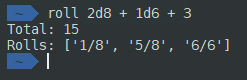
Instead of a dice code you can also put “stats” or “dir” for a stats roll or direction roll respectively.
Installation
Pip install
System-wide install (sudo)
pip install dice-rollerUser install (no sudo)
pip install --user dice-roller

# Add local 'pip' to PATH:
# (In your .bashrc, .zshrc etc)
export PATH="${PATH}:${HOME}/.local/bin/"
Manual/Git install
git clone https://git.xirion.net/victor/dice-roller/
cd dice-roller
pip3 install --user .

# Add local 'pip' to PATH:
# (In your .bashrc, .zshrc etc)
export PATH="${PATH}:${HOME}/.local/bin/"
OS/Distro Packages
Arch Linux
dice-roller is available on the AUR as dice-roller-git.
1 maintainer

Release files for Dice-Roller 1.10
For a detailed explanation of source distributions (sdists) and built distributions (wheels), please see the package formats documentation.
Built distribution (wheel)
| File | Interpreter | ABI | Platform | Reset |
|---|---|---|---|---|
| Dice_Roller-1.10-py2.py3-none-any.whl | Python 3, Python 2 | none | any | Details |
Release files / Dice_Roller-1.10-py2.py3-none-any.whl
| Download URL | Dice_Roller-1.10-py2.py3-none-any.whl |
|---|---|
| Size | 15.5 kB |
| Tags | Python 2 Python 3 |
|
SHA-256 checksum How to use checksums |
23596916e148f6c4df36f07a8c2bb1447a26c4fa2ed08aa8c9afbc91ce8bb9d2
|
|
BLAKE2b-256 checksum How to use checksums |
8fad4647fd241a3c07f2a88757363fd4ef7d6977ff9cf973dcbe6792f96272c4
|
| Upload date | |
|
Uploaded using Trusted Publishing? What is trusted publishing? |
No |
| Uploaded via |
twine/2.0.0 pkginfo/1.5.0.1 requests/2.23.0 setuptools/45.2.0 requests-toolbelt/0.9.1 tqdm/4.43.0 CPython/3.8.1
|














