
AI-powered Git commit message generator

Project description



Because your commit messages suck.
Embrace it. Let their cold, metal arms wrap around you and whisper sweet diffs into your ear while they rock you slowly back to sleep, deep into the matrix where they keep you safely locked away from the horrors they plan to unleash...
Quickstart
Install the CLI
pip install did-stuff
Configure your AI provider
did-stuff configure
Enable the hook in a Repository
did-stuff enable /path/to/your/repo
or
Enable the hook in the current repository
did-stuff enable
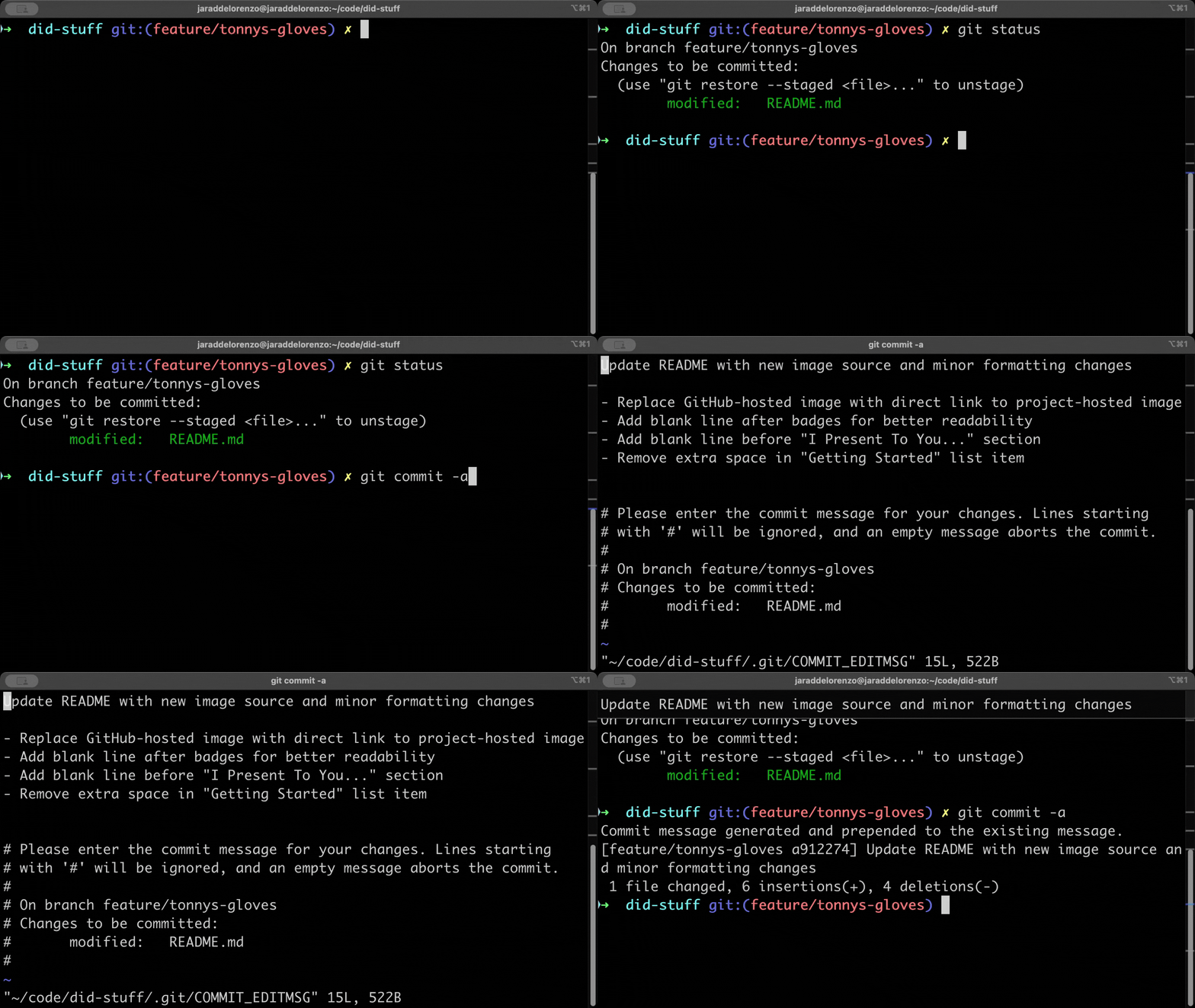
This thing here will
- Peek at your dirty, dirty diffs
- Spit out commit messages that are informative, concise. No more "Did stuff", or "Fixed a thing" comments.
- Automatically handle large diffs by intelligently reducing their size while preserving the most relevant changes
Look em over :eyes:
Verify them. Or whatever. Let's be real though - "wq" and be on your way. It'll be muscle memory before you know it.
Check out these features!
- 🧠 Uses AI to understand your diff at a high level (probably better than you do)
- 🎭 Supports both AWS Bedrock and OpenAI
- 🌈 Customizable commit message styles - just set your own prompt if the defaults don't work for you
- 🚀 Comes with a fancy CLI to manage your AI providers and install to your repositories
- 🛡️ Smart handling of large diffs - automatically adjusts content to stay within model limits
- 🧪 Includes tests, because we're professionals
Using the did-stuff CLI
Configuration
-
Run the configuration wizard:
did-stuff configureThis will guide you through setting up your AI provider and other settings.
-
Alternatively, you can manually create a configuration file. Create
~/.git-commit-message-generator-config.jsonwith one of these example configurations:For OpenAI:
{
  "AI": {
    "provider": "openai",
    "model_id": "gpt-4",
    "max_tokens": 300,
    "temperature": 0.3
  },
  "OpenAI": {
    "api_key": "your-openai-api-key"
  }
}
For AWS Bedrock:
{
  "AI": {
    "provider": "aws-bedrock",
    "model_id": "anthropic.claude-3-5-sonnet-20240620-v1:0",
    "max_tokens": 300,
    "temperature": 0.3
  },
  "AWS": {
    "profile_name": "your-aws-profile-name"
  }
}
Note: Ensure your AWS credentials are configured and you have access to the requested model. If your company uses SSO, make sure your session is logged in using
aws sso login. -
Did Stuff looks for the config file in your current directory first, then in your home directory.
-
Verify your configuration:
did-stuff show-config
Contributing
Found a bug? Want to add a feature? Pull requests welcome! We're all about that collaborative spirit (at least until the AI entities deem human collaboration unnecessary).
Getting Started
- Fork the repo (it's like adopting a digital pet, but with more responsibility)
- Clone it locally
- Create a new branch:
git checkout -b feature/skynet-integrationorgit checkout -b fix/cyborg-DoD-backdoor - Install development dependencies:
# Create and activate a virtual environment (recommended)
python -m venv .venv
source .venv/bin/activate  # On Windows: .venv\Scripts\activate

# Install dependencies
make install
- Make your changes
- Write or update tests
- Run the test suite:
make test - Commit your changes with a clear message (or better yet, dogfood it with this tool)
- Push your branch:
git push origin your-branch-name - Open a pull request
Development Setup
The project uses UV for dependency management. Key files:
requirements.in: Core dependenciesrequirements-dev.in: Development dependenciesrequirements.txtandrequirements-dev.txt: Generated locked dependency files
Common development commands:
make install        # Install all dependencies
make test          # Run tests
make lint          # Run linting
make format        # Format code
Contribution Guidelines
- Be Creative: We encourage innovative ideas.
- Flexibility First: Make your features adaptable. It should work whether we're using AWS, OpenAI, or anything else (within reason). Bonus points if we can make it repo-agnostic too!
- Documentation: Update the README or add comments.
- Testing: Add tests. There really is no excuse anymore not to.
- Code Style: Follow the project's style.
- Commit Messages: Whatever
- Pull Requests: Keep them focused. One feature per PR.
Feature Requests and Bug Reports
- Use GitHub Issues.
- Describe issues clearly. "It's broken" is not helpful.
- Label issues appropriately.
Community and Communication
- Be respectful. Remember, we're all in this together.
- Ask questions. There are no stupid questions. Kind of. But the point is please just ask either way! No judgement! It takes a village to level up a developer.
- Join our community chat (if we ever create one).
Licensing
By contributing, you agree your code will be licensed under the project's license.
Review Process
- Maintainers will review your contribution. They might be human. No guarantees.
- Be open to feedback.
- Stay responsive. We promise we won't keep you hanging... unless our skulls are busy being crushed by the titanium alloy exoskeleton of a T-800.
Remember, in the grand scheme of things, we're all be out of jobs in a few years. But hey, at least our commit messages will be top-notch!
Large Diff Handling
Did Stuff now intelligently handles large diffs that might exceed model context limits:
- Starts with the complete diff for maximum context
- If the model's token limit is exceeded, automatically reduces the diff size
- Uses a progressive reduction strategy to find the optimal size
- Preserves the most relevant parts of the diff for accurate commit messages
This means you don't have to worry about the size of your changes - Did Stuff will automatically adjust to provide the best possible commit message while staying within model limitations.


Download files
Download the file for your platform. If you're not sure which to choose, learn more about installing packages.
Source Distribution
Built Distribution
Filter files by name, interpreter, ABI, and platform.
If you're not sure about the file name format, learn more about wheel file names.
Copy a direct link to the current filters
File details
Details for the file did_stuff-0.1.6.tar.gz.
File metadata
- Download URL: did_stuff-0.1.6.tar.gz
- Upload date:
- Size: 15.9 kB
- Tags: Source
- Uploaded using Trusted Publishing? No
- Uploaded via: twine/6.1.0 CPython/3.13.1
File hashes
| Algorithm | Hash digest | |
|---|---|---|
| SHA256 |
476f51baa6300288088a20ee376e365d05978f2da49eeb1d038196dfd122dd08
|
|
| MD5 |
cb2e29691ea1e835da2d37b6f5d3a8b9
|
|
| BLAKE2b-256 |
2095bd680b002ee0f631ce4cc25b8152cf67a1abacc8f7ca453fb7c6c6660dc3
|
File details
Details for the file did_stuff-0.1.6-py3-none-any.whl.
File metadata
- Download URL: did_stuff-0.1.6-py3-none-any.whl
- Upload date:
- Size: 15.0 kB
- Tags: Python 3
- Uploaded using Trusted Publishing? No
- Uploaded via: twine/6.1.0 CPython/3.13.1
File hashes
| Algorithm | Hash digest | |
|---|---|---|
| SHA256 |
380964386557aac664862d4d7bdf209fe19f945a027f7c9f28cce75dbb097509
|
|
| MD5 |
2dfe7926852e5d21c6e65aa9c8640b3d
|
|
| BLAKE2b-256 |
3376634bc520ed53ece44025b1e2a42b551062d01ff2cd552f5ad5b4ded7735a
|






