
Compare text and show the difference with color.
Install
pip install diffcolor
Useage
show the help
python -m diffcolor
After that, diffcolor will read data from STDIN.
For more help, you can use the "-h" option.
So, the following test command
echo "Hello World\nHello Worll" | python -m diffcolor
It will output the following, the last "l" is different:
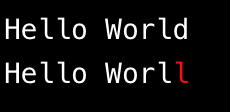
By default, diffcolor compare each character in each frame of the data. You can use the "-s" parameter to specify the delimiter, such as the space. This "-s" parameter can be used multiple times. For example, the following command will compare the data frame using the space.
echo "Hello World\nHello Worll" | python -m diffcolor -s " "
It will output the following, the last word "Worll" is different:
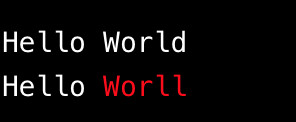
By default, it splits data frames using line breaks(\n). But sometimes, we need a front end and a frame end to segment. We can use the "-b" parameter to specify the frame header and the "-e" parameter to specify the frame footer.
For example, the following command will splits the data frame begin with "[" and end with "]\n".
echo "[Hello World,\nI am Tom]\nThis is not a frame.\n[Hello Worll,\nI am Tim]" | python -m diffcolor -b="[" -e="]\n" -s=" "
It will output the following, the color of "This is not a frame." is gray, because it is not a frame:
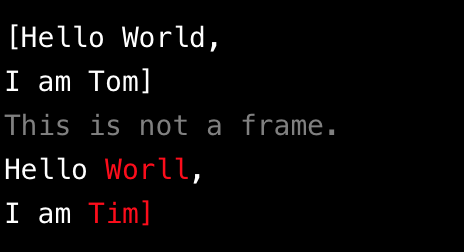
We can use the "-i" option to ignore the none frame data.
echo "[Hello World,\nI am Tom]\nThis is not a frame.\n[Hello Worll,\nI am Tim]" | python -m diffcolor -b="[" -e="]\n" -s=" " -i
It will output the following:
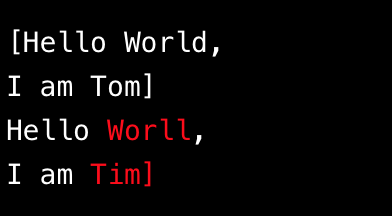
We can use the "-f" option to handled output appended data as the file grows. This option is like "tail -f", often used to handle growing log files.
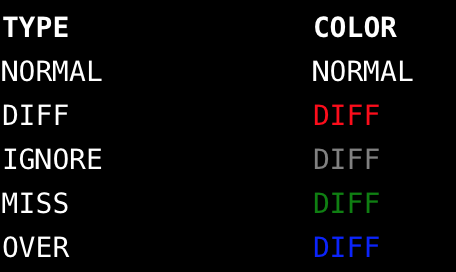
The colors define you can use "-v" option to show.
python -m diffcolor -v
Click to view more information!
CHANGES
0.0.1
- first version
1 maintainer

Metadata
1 maintainer
Release files for diffcolor 0.0.3
For a detailed explanation of source distributions (sdists) and built distributions (wheels), please see the package formats documentation.
Source distribution (sdist)
| File | Size | Uploaded | |
|---|---|---|---|
| diffcolor-0.0.3.tar.gz | 4.7 kB | Details |
Release files / diffcolor-0.0.3.tar.gz
| Download URL | diffcolor-0.0.3.tar.gz |
|---|---|
| Size | 4.7 kB |
| Tags | Source |
|
SHA-256 checksum How to use checksums |
be3d1e0e43976c924b441f7fca39f0bbef43278f89e3766271338513d040b537
|
|
BLAKE2b-256 checksum How to use checksums |
9d195c9e088b17100655948e4852a7c1810007fceecd6408901b89d417fa2f64
|
| Upload date | |
|
Uploaded using Trusted Publishing? What is trusted publishing? |
No |
| Uploaded via |
twine/1.15.0 pkginfo/1.8.2 requests/2.27.1 setuptools/44.1.1 requests-toolbelt/0.9.1 tqdm/4.64.0 CPython/2.7.16
|














