
diffReport
Python Package to report the differences between two files
Installation
Run the following to install:
pip install diffReport
Dependencies
The package dependencies are:
- Pandas
- PDFMiner
- FuzzyWuzzy
Python-Levenshtein is an optional library that can greatly improve the performance of the tool. Native python sequence matcher can perform the tasks as well, but including Python-Levenshtein can increase the sequence matching speeds by 10x to 30x
The package is set up to automatically install the dependencies during installation.
Usage
from diffReport import diffReport

html = diffReport("file_path_a","file_path_b")
To Specify a particular output folder for the generated HTML output, you may specify the path in 'path_file_output' argument to the function, which is optional. By default the output is created on the working directory
html = diffReport("file_path_a","file_path_b",path_file_output = 'Output/')
To get a return as a Dataframe instead of HTML from the function, you may set 'html_return' to false. By default it is always set to True.
df = diffReport("file_path_a","file_path_b",html_return = False)
There are various Ratios available to be displayed on the Partial Ratio column of the output, which can be specified in the 'partial_ratio' argument. By default it is set to "tokenSortRatio".
html_1 = diffReport("file_path_a","file_path_b",partial_ratio = "tokenSortRatio")
html_2 = diffReport("file_path_a","file_path_b",partial_ratio = "qRatio")
html_3 = diffReport("file_path_a","file_path_b",partial_ratio = "wRatio")
html_4 = diffReport("file_path_a","file_path_b",partial_ratio = "partialRatio")
html_5 = diffReport("file_path_a","file_path_b",partial_ratio = "tokenSetRatio")
html_6 = diffReport("file_path_a","file_path_b",partial_ratio = "partialTokenSortRatio")
Sample output
Modules
diffReport
    diffReport(path_file_a, path_file_b, path_file_output='', html_return=True, partial_ratio='tokenSortRatio')
            :param path_file_a: Path for the File A to be compared.
            :param path_file_b: Path for the File B to be compared.
            :param path_file_output: Path of the directory where the output HTML file needs to be saved. (Default: 'Output/')
            :param html_return: Boolean to select if the function returns HTML of the report. (True by default)
            :param partial_ratio: Partial Ratio Type, Accepted Values are ("Ratio", "qRatio", "wRatio", "ratio_2", "tokenSetRatio", "tokenSortRatio", "partialTokenSortRatio", "default")
            :param exlude_analytics: List of character or sub-strings to exclude from the pdf during analysis.
            :return: HTML for the report if html_return is set to True.  If set to false, it will return the DataFrame.
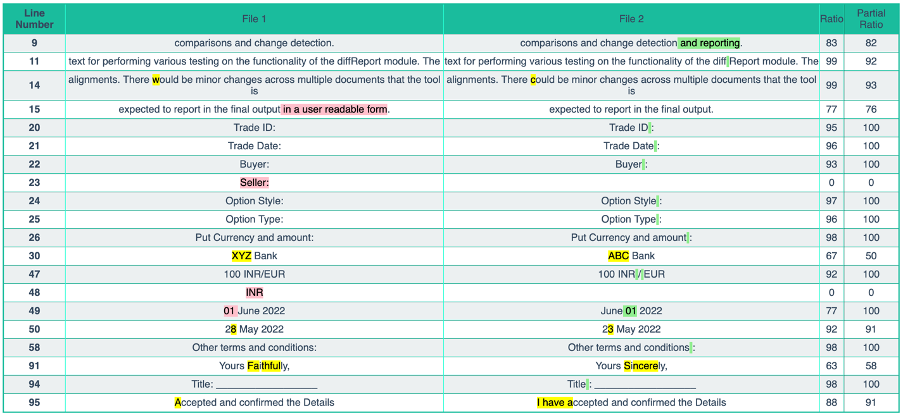
Function takes two PDF file paths as input, and generates a difference report with the lines that are different in the two files, and also highlighting the differences in an HTML table with colors to represent content that was Added, Removed or changed.
Any text that is present in File_a but not File_b is marked in Red.

Any text that is present in File_b but not File_a is marked in Green.

Any text that is neither present in string_a but nor string_b is marked in Yellow.

html_output
The 'html_output' function accepts the Data frame as an argument to iterate through the rows and returns an HTML table
    html_output(df, path_file_output)
        :param df: Data Frame to be displayed as an HTM Table
        :param path_file_output: Path of the directory where the output HTML file needs to be saved. (Default: 'Output/')
        :return: Returns the HTML for the table generated.
Example:
# Import pandas library
import pandas as pd

# initialize list of lists
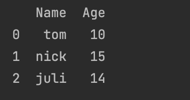
data = [['tom', 10], ['nick', 15], ['juli', 14]]

# Create the pandas DataFrame
df = pd.DataFrame(data, columns=['Name', 'Age'])

# print dataframe.
print(df)
html_output(df)
Returns:
<html>
<head>
<style>
body{font:1.2em normal Arial,sans-serif;color:#34495E;}replace {background-color: yellow;color: black;}insert {background-color: lightgreen;color: black;}delete {background-color: pink;color: black;}h1{text-align:center;text-transform:uppercase;letter-spacing:-2px;font-size:2.5em;margin:20px 0;}.container{width:90%;margin:auto;}table{border-collapse:collapse;width:100%;}.blue{border:2px solid #1ABC9C;}.blue thead{background:#1ABC9C;}thead{color:white;}th,td{text-align:center;padding:5px 0;}tbody tr:nth-child(even){background:#ECF0F1;}tbody tr:hover{background:#BDC3C7;color:#FFFFFF;}.fixed{top:0;position:fixed;width:auto;display:none;border:none;}.scrollMore{margin-top:600px;}.up{cursor:pointer;}
</style></head><body><table class="blue" border = 1>
<tbody>
	<tr style = "background-color : #1ABC9C">
		<th>Line Number</th>
		<td>File 1</td>
		<td>File 2</td>
		<td>Column 3</td>
	</tr>
	<tr>
		<th>0</th>
		<td>tom</td>
		<td>10</td>
	</tr>
	<tr>
		<th>1</th>
		<td>nick</td>
		<td>15</td>
	</tr>
	<tr>
		<th>2</th>
		<td>juli</td>
		<td>14</td>
	</tr>
</tbody>
</table>
</body>
</html>
markUp
FUNCTIONS
    markUpDifferences(string_a, string_b)
        :param string_a: String one to compare
        :param string_b: String two to compare :return: String A, String B after
marking both strings with , and tags by comparing the differences between the two strings.
Any text that is present in string_a but not string_b is marked with a markup tag.
markUpDifferences("Hello World !","Hello !")
returns >> "Hello <delete>World </delete>!"
Any text that is present in string_b but not string_a is marked with a markup tag.
markUpDifferences("Hello !","Hello World !")
returns >> "Hello <insert>World </insert>!"
Any text that is neither present in string_a but nor string_b is marked with a markup tag.
markUpDifferences("Brown Fox","Brown Box")
returns >> "Brown <replace>F</replace>ox"
mark_green(string)
    :param string: String to be marked
    :return: returns a String with markup tags
Function appends markup tags to the input strings as prefix and suffix to return a marked string.
mark_red(string)
    :param string: String to be marked
    :return: returns a String with markup tags
Function appends markup tags to the input strings as prefix and suffix to return a marked string.
mark_yellow(string)
    :param string: String to be marked
    :return: returns a String with markup tags
Function appends markup tags to the input strings as prefix and suffix to return a marked string.
fuzzyCompare
FUNCTIONS
Ratio
ratio(t1, t2, ratio_type='default')

tokenSetRatio(t1, t2)
    :param t1: Text string 1
    :param t2: Text String 2
    :return: Returns the Token Set Ratio score between the two given text
The Ratio option calculates the absolute Levenshtein distance between the two strings provided to the function. It returns a percentage value. A Levenshtein distance of 90% implies that String B has a 90% similarity to String B. It is a direct string to string comparison.
Partial Ratio
partialRatio(t1, t2)
    :param t1: Text string 1
    :param t2: Text String 2
    :return: Returns the Partial Ratio score etween the two given text
Function to calculate the ratio of the most similar substring as a number between 0 and 100. The Partial Ratio allows substring matching. It takes the shorter string and matching it with all possible substrings of the same length. It gives a match if the first string is present as a sub string within second string.
Token Sort Ratio
tokenSortRatio(t1, t2)
    :param t1: Text string 1
    :param t2: Text String 2
    :return: Returns the Token Sort Ratio score between the two given text
The Token Sort Ratio allows tokenizing of strings, ignore case and punctuations. It sorts both the strings and then performs a simple ratio on them.
Token Set Ratio
partialTokenSortRatio(t1, t2)
    :param t1: Text string 1
    :param t2: Text String 2
    :return: Returns the Partial Token Sort Ratio score between the two given text
The Token Set Ratio is similar to the Token Sort Ratio except that it takes out common token away before calculating the ratio.
Other Ratios
 qRatio(t1, t2)
    :param t1: Text string 1
    :param t2: Text String 2
    :return: Returns the Q Ratio score between the two given text


wRatio(t1, t2)
    :param t1: Text string 1
    :param t2: Text String 2
    :return: Returns the W Ratio score between the two given text
pdfParser
FUNCTIONS
pdfparser(path)
Function that takes a path of a PDF file as input and extracts the text within the file as a string
1 maintainer

Metadata
1 maintainer
Release files for diffReport 0.1.4
For a detailed explanation of source distributions (sdists) and built distributions (wheels), please see the package formats documentation.
Source distribution (sdist)
| File | Size | Uploaded | Provenance | Actions |
|---|---|---|---|---|
| diffReport-0.1.4.tar.gz | 401.4 kB | Without provenance | Details for diffReport-0.1.4.tar.gz |
Built distribution (wheel)
| File | Interpreter | ABI | Platform | Actions Reset |
|---|---|---|---|---|
| diffReport-0.1.4-py3-none-any.whl | Python 3 | none | any | Details for diffReport-0.1.4-py3-none-any.whl |
Total release size: 422.7 kB
Release files / diffReport-0.1.4.tar.gz
| Download URL | diffReport-0.1.4.tar.gz |
|---|---|
| Size | 401.4 kB |
| Tags | Source |
|
SHA-256 checksum How to use checksums |
43d9812eaeb6a3a078b249986674778365bbe09caec8e528c617e1a5fc739e3d
|
|
BLAKE2b-256 checksum How to use checksums |
fca4c7ea9393c9435095f17da1e865d93258f947478ba53205c7811bb8a14593
|
| Upload date | |
|
Uploaded using Trusted Publishing? What is trusted publishing? |
No |
| Uploaded via |
twine/4.0.1 CPython/3.9.1
|
Release files / diffReport-0.1.4-py3-none-any.whl
| Download URL | diffReport-0.1.4-py3-none-any.whl |
|---|---|
| Size | 21.3 kB |
| Tags | Python 3 |
|
SHA-256 checksum How to use checksums |
967d6c6bc0477e7349317c07bd9dcd92b68dc6910b8b08a21740e5de2b1e68b0
|
|
BLAKE2b-256 checksum How to use checksums |
56c3d59ea38c055c1554ecb5508fa87082ae18f0ce5b035fcef472703a083d22
|
| Upload date | |
|
Uploaded using Trusted Publishing? What is trusted publishing? |
No |
| Uploaded via |
twine/4.0.1 CPython/3.9.1
|
Security for diffReport 0.1.4
Provenance
Provenance describes where a file came from. On PyPI, provenance is shared via attestations, which provide a verifiable record of the build or publishing details. View details, limitations and caveats.
No provenance found
None of the files in this release were uploaded with provenance metadata.
A note on package security
PyPI is a repository for distributing packages, not a service for auditing them. While third-party security researchers and our staff do their best to detect and remove malicious packages, PyPI cannot guarantee the quality, security or suitability of any given package.
To learn more about protecting yourself from malicious actors, visit our package security documentation.














