
DijsktraAlgorithm
Dijkstra's algorithm is an algorithm for finding the shortest paths between nodes in a graph. It was conceived by computer scientist Edsger W. Dijkstra in 1956 and published three years later. Here, I used his method in python to find the shortest path and also the distance.
Installing
Run the following code to install on your terminal:
pip install DijkstraAlgo
Feature
After importing the module, use DijkstraAlgorithm() class. Then call the other methods whatever you want to use. Here the instances are given below:
'''First Import our module'''
import DijkstraAlgo as da
'''Initializing the Class Attributes'''
x = da.DijkstraAlgorithm()

'''Now pass the arguments through the following method'''
x.dijkstraWithPath(graph, source, destination)  #Here, this graph is about the distance between each nodes.

'''Lets define more methods'''
shortest_path = x.path()    # The path between the source node and the destination node.
distance = x.distance()     # The distance of the shortest path what is already determined by x.path() earlier.
Tutorial
In this part, you will see the procedure of implementing this package.
For 2 Dimensional surface :
Nodes are following the figure. You can also try your own.
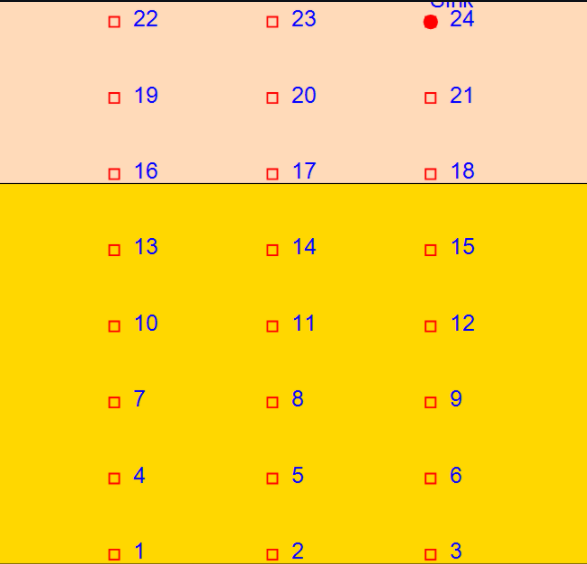
Here, the distances between two nodes are 0.8 and 1.13 in linear and diagonal way, respectively. The nodes are adjacent here.
# storing the distance between nodes in graph method as array.

graph = [
        [0, .8, 0, .8, 1.13, 0, 0, 0, 0, 0, 0, 0, 0, 0, 0, 0, 0, 0, 0, 0, 0, 0, 0, 0], #1
        [.8, 0, .8, 1.13, .8, 1.13, 0, 0, 0, 0, 0, 0, 0, 0, 0, 0, 0, 0, 0, 0, 0, 0, 0, 0], #2
        [0, .8, 0, 0, 1.13, .8, 0, 0, 0, 0, 0, 0, 0, 0, 0, 0, 0, 0, 0, 0, 0, 0, 0, 0], #3
        [.8, 1.13, 0, 0, .8, 0, .8, 1.13, 0, 0, 0, 0, 0, 0, 0, 0, 0, 0, 0, 0, 0, 0, 0, 0], #4
        [1.13, .8, 1.13, .8, 0, .8, 1.13, .8, 1.13, 0, 0, 0, 0, 0, 0, 0, 0, 0, 0, 0, 0, 0, 0, 0], #5
        [0, 1.13, .8, 0, .8, 0, 0, 1.13, .8, 0, 0, 0, 0, 0, 0, 0, 0, 0, 0, 0, 0, 0, 0, 0], #6
        [0, 0, 0, .8, 1.13, 0, 0, .8, 0, .8, 1.13, 0, 0, 0, 0, 0, 0, 0, 0, 0, 0, 0, 0, 0], #7
        [0, 0, 0, 1.13, .8, 1.13, .8, 0, .8, 1.13, .8, 1.13, 0, 0, 0, 0, 0, 0, 0, 0, 0, 0, 0, 0], #8
        [0, 0, 0, 0, 1.13, .8, 0, .8, 0, 0, 1.13, .8, 0, 0, 0, 0, 0, 0, 0, 0, 0, 0, 0, 0],#9
        [0, 0, 0, 0, 0, 0, .8, 1.13, 0, 0, .8, 0, .8, 1.13, 0, 0, 0, 0, 0, 0, 0, 0, 0, 0], #10
        [0, 0, 0, 0, 0, 0, 1.13, .8, 1.13, .8, 0, .8, 1.13, .8, 1.13, 0, 0, 0, 0, 0, 0, 0, 0, 0], #11
        [0, 0, 0, 0, 0, 0, 0, 1.13, .8, 0, .8, 0, 0, 1.13, .8, 0, 0, 0, 0, 0, 0, 0, 0, 0], #12
        [0, 0, 0, 0, 0, 0, 0, 0, 0, .8, 1.13, 0, 0, .8, 0, .8, 1.13, 0, 0, 0, 0, 0, 0, 0], #13
        [0, 0, 0, 0, 0, 0, 0, 0, 0, 1.13, .8, 1.13, .8, 0, .8, 1.13, .8, 1.13, 0, 0, 0, 0, 0, 0], #14
        [0, 0, 0, 0, 0, 0, 0, 0, 0, 0, 1.13, .8, 0, .8, 0, 0, 1.13, .8, 0, 0, 0, 0, 0, 0], #15
        [0, 0, 0, 0, 0, 0, 0, 0, 0, 0, 0, 0, .8, 1.13, 0, 0, .8, 0, .8, 1.13, 0, 0, 0, 0], #16
        [0, 0, 0, 0, 0, 0, 0, 0, 0, 0, 0, 0, 1.13, .8, 1.13, .8, 0, .8, 1.13, .8, 1.13, 0, 0, 0], #17
        [0, 0, 0, 0, 0, 0, 0, 0, 0, 0, 0, 0, 0, 1.13, .8, 0, .8, 0, 0, 1.13, .8, 0, 0, 0], #18
        [0, 0, 0, 0, 0, 0, 0, 0, 0, 0, 0, 0, 0, 0, 0, .8, 1.13, 0, 0, .8, 0, .8, 1.13, 0], #19
        [0, 0, 0, 0, 0, 0, 0, 0, 0, 0, 0, 0, 0, 0, 0, 1.13, .8, 1.13, .8, 0, .8, 1.13, .8, 1.13], #20
        [0, 0, 0, 0, 0, 0, 0, 0, 0, 0, 0, 0, 0, 0, 0, 0, 1.13, .8, 0, .8, 0, 0, 1.13, .8], #21
        [0, 0, 0, 0, 0, 0, 0, 0, 0, 0, 0, 0, 0, 0, 0, 0, 0, 0, .8, 1.13, 0, 0, .8, 0], #22
        [0, 0, 0, 0, 0, 0, 0, 0, 0, 0, 0, 0, 0, 0, 0, 0, 0, 0, 1.13, .8, 1.13, .8, 0, .8], #23
        [0, 0, 0, 0, 0, 0, 0, 0, 0, 0, 0, 0, 0, 0, 0, 0, 0, 0, 0, 1.13, .8, 0, .8, 0] #24
        ]
Now, let's implement our package on this graph array. You will input the source node and the destination node on console. Here, the source node is the starting node of this model. You can choose any node as source node and destination node. For instance, if you choose the same node for both source and destination node, the distance between the nodes will show you zero.
'''Importing our package'''

import DijkstraAlgo as da

def main():
    x = da.DijkstraAlgorithm()
    source = int(input("\nEnter the source: "))             # Get the input of the source value
    destination = int(input("Enter the destination: "))     # Get the input of the destination value
    x.dijkstraWithPath(graph, source, destination)

    shortest_path = x.path()
    distance = x.distance()

    print("\nThe shortest route: ")
    print(*shortest_path)   #It will print the path
    print("The shortest distance is {:.3f}".format(*distance))         #It will print the distance


if __name__ == '__main__':
    main()
You can also try this algorithm on 3 Dimensional model.
For 3 Dimensional model, you can visit Dijkstra Shortest Path Algorithm
License
GNU General Public License v2 or later (GPLv2+)
Happy Coding!
1 maintainer

Metadata
1 maintainer
Release files for DijkstraAlgo 0.0.7
For a detailed explanation of source distributions (sdists) and built distributions (wheels), please see the package formats documentation.
Source distribution (sdist)
| File | Size | Uploaded | |
|---|---|---|---|
| DijkstraAlgo-0.0.7.tar.gz | 4.1 kB | Details |
Built distribution (wheel)
| File | Interpreter | ABI | Platform | Reset |
|---|---|---|---|---|
| DijkstraAlgo-0.0.7-py3-none-any.whl | Python 3 | none | any | Details |
Total release size: 20.6 kB
Release files / DijkstraAlgo-0.0.7.tar.gz
| Download URL | DijkstraAlgo-0.0.7.tar.gz |
|---|---|
| Size | 4.1 kB |
| Tags | Source |
|
SHA-256 checksum How to use checksums |
c07d128d7d062d21ef4610838e29ae113bb5942f3c5593316c121ce2f016c935
|
|
BLAKE2b-256 checksum How to use checksums |
c27e9ac62c36593726da8b8d22ab476cad94f7b57a855b0657025c3464341c79
|
| Upload date | |
|
Uploaded using Trusted Publishing? What is trusted publishing? |
No |
| Uploaded via |
twine/3.3.0 pkginfo/1.7.0 requests/2.25.0 setuptools/49.2.1 requests-toolbelt/0.9.1 tqdm/4.56.2 CPython/3.8.6
|
Release files / DijkstraAlgo-0.0.7-py3-none-any.whl
| Download URL | DijkstraAlgo-0.0.7-py3-none-any.whl |
|---|---|
| Size | 16.4 kB |
| Tags | Python 3 |
|
SHA-256 checksum How to use checksums |
4ad79ff5b7a5e82c2d9930ad23380c8ed6ffd52afc53f6ae0bc8d1070ac631f8
|
|
BLAKE2b-256 checksum How to use checksums |
9ccc5876d27ae0e7de212c471f460e3ae9cb4edd0df4a8c1f46caf1fdb495f34
|
| Upload date | |
|
Uploaded using Trusted Publishing? What is trusted publishing? |
No |
| Uploaded via |
twine/3.3.0 pkginfo/1.7.0 requests/2.25.0 setuptools/49.2.1 requests-toolbelt/0.9.1 tqdm/4.56.2 CPython/3.8.6
|














